Looking a bit dark. Does your glass have thickness?
Test
Test
Posts
-
RE: Unability to activate my license
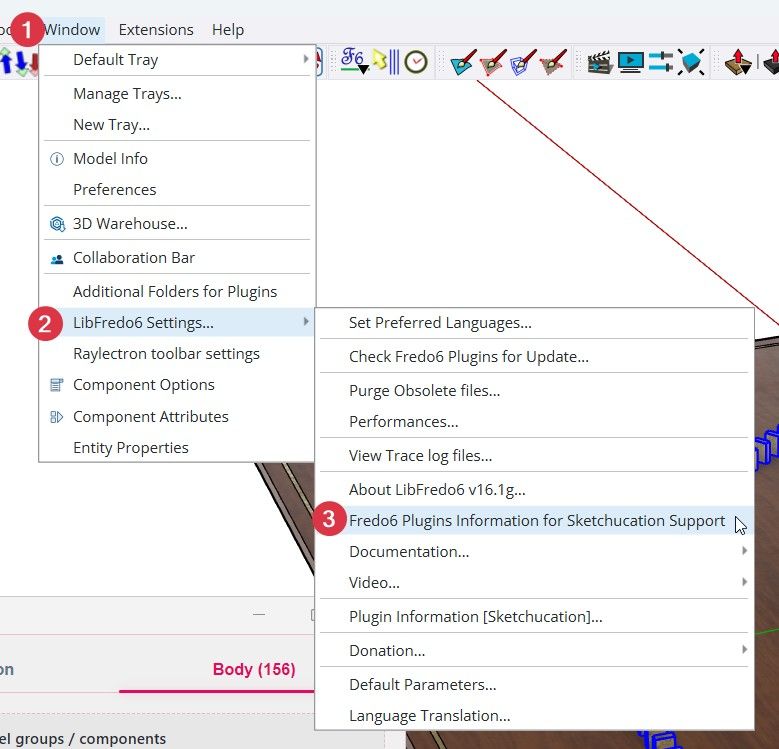
Please run the Window > Libfredo Settings > Fredo6 Plugins Information for Sketchucation Support menu command in SketchUp and copy/paste the output into your reply.
-
RE: Scene animation with Animator
@ntxdave said in Scene animation with Animator:
Can you give me a clue as to why I cannot delete some of the unwanted/unneeded clip names.
Would you consider that if you have unused animation elements in your model that this is animation data saved into the file?
The clue:

Could it be that marking unused animation data that is saved into the file for purging needs to be saved?
Could the save icon go from disabled to enabled after you have told Animator to trash it?
Also if you do mark unused elements to be purged by clicking the Maintenance of Data button and Save Changes and then Exit the tool using the Exit Tool button are you prompted that there are changes that have not been saved?
The clue:

-
RE: Scene animation with Animator
@ntxdave said in Scene animation with Animator:
For some reason, the animation stops after the 3rd clip (right). I have not been able to figure out why.
That's a bug. I discovered that today playing with your file. Fredo is aware and will post a fix with a new Libfredo.
-
RE: Scene animation with Animator
@ntxdave said in Scene animation with Animator:
How do you create a nice smooth transition
If it is movement between Camera A position and Camera B position you can see how that is done in the file I shared further up.
If the element in your timeline is stretched or fills the duration between A and B then the transition has no space to occur.
So lets say you capture camera position at 0.0 and make it last 1 sec and then capture at 1.0 for another 1sec. You are essentially telling Animator keep that captured view held from 0.0 to 1.0 then switch to the next view at 1.0 etc.
What should happen is you capture at 0.0 and then set the duration you want that held for. Then space for the Fadeout before your next captured view.
In that 'space' the Fadeout will execute.

-
RE: Scene animation with Animator
@ntxdave said in Scene animation with Animator:
I cannot get a smooth transition from one of the views to another

That is because the Scene is Static. Hover the buttons to see the tooltips.
Use the first icon

Click the Scene tab and then Capture View. Repeat for each Scene.
-
RE: Scene animation with Animator
Try reverse engineer this:
I didn't look at your file but check that to see if there are scenes in my file. If not then figure out how the camera moves without using scenes.
-
RE: Scene animation with Animator
@ntxdave said in Scene animation with Animator:
Still wondering about some video editing software
Go research it. But if you keep biting off more and more things to learn you'll get nowhere.
What's the rush? Take things at a sensible pace and enjoy the journey. Make the best animation in SketchUp you can then fuss over the rest when that part is sorted.
-
RE: Scene animation with Animator
Great, just keep plugging away. There is no better way to learn other than just brute force.
Failing is part of winning.
