For all of you who have been anxiously awaiting the change of mod.entities to mod.active_entities, your wait is over and Version 1.2.1 is for you.
Oops, your profile's looking a bit empty! To help us tailor your experience, please fill in key details like your SketchUp version, skill level, operating system, and more. Update and save your info on your profile page today!
⚠️ Important | Libfredo 15.8b introduces important bugfixes for Fredo's Extensions Update
 Offline
Posts
-
RE: [plugin] Rotated Box [updated 30-Mar-2014]
-
RE: [plugin] Rotated Box [updated 30-Mar-2014]
@jorge2011 said:
does not work, create the geometry inside a group. Or create a group inside another group
The change the.pjt made will only add the current box to a group if you have the group open for edit it does not open the group automatically. It should have no effect on whether or not the current box is created as a group or not. That will still depend on grouping being On or Off.
-
RE: Plugin Request / Tweak Request - Protrude
@haynesc said:
Hi all
I was wondering if there is an update for protrude or another tool that is similar to do the following Process
Selected all ...
Extrude randomly using the following heights:
Min : [User specified height) 8
Max : [User specified height) 24@ 8,12,16,20
So instead of random heights between 8 & 24, the heights will be of only values 8,12,16,20 or 24
Thanks Chris
Give attached plugin a try. I think it will do what you want.
-
RE: [plugin] Rotated Box [updated 30-Mar-2014]
OK, any other users think this is problem or desired feature?
-
RE: [plugin] Rotated Box [updated 30-Mar-2014]
the.pjt since you are not "a total mindless and stupid person", code it yourself. When this all started, you only wanted a "box in 3 click", now you want me to customize this just for you. Sorry but I'm done with this plugin. I have done all that I ever intend to do.
-
RE: [plugin] Rotated Box [updated 30-Mar-2014]
@the.pjt said:
when we work in a group of group , the box that this plugin makes goes to the model ( upper level in outliner )
OUTLINER VIEW
model ( the box goes here )
.........group 1
..............group 2
....................group 3 ( we want a box here )You may want the box to be part of an existing group but who else will. You can add any box to an existing group by selecting and cutting it then open for edit the group you want to add it to and do a "Paste in Place".
-
RE: [Plugin] Rotated Circle/Cylinder
Version 1.2 has been posted. The axes of the group is aligned with the defined direction.
-
RE: [Plugin] Gradientator v1.21
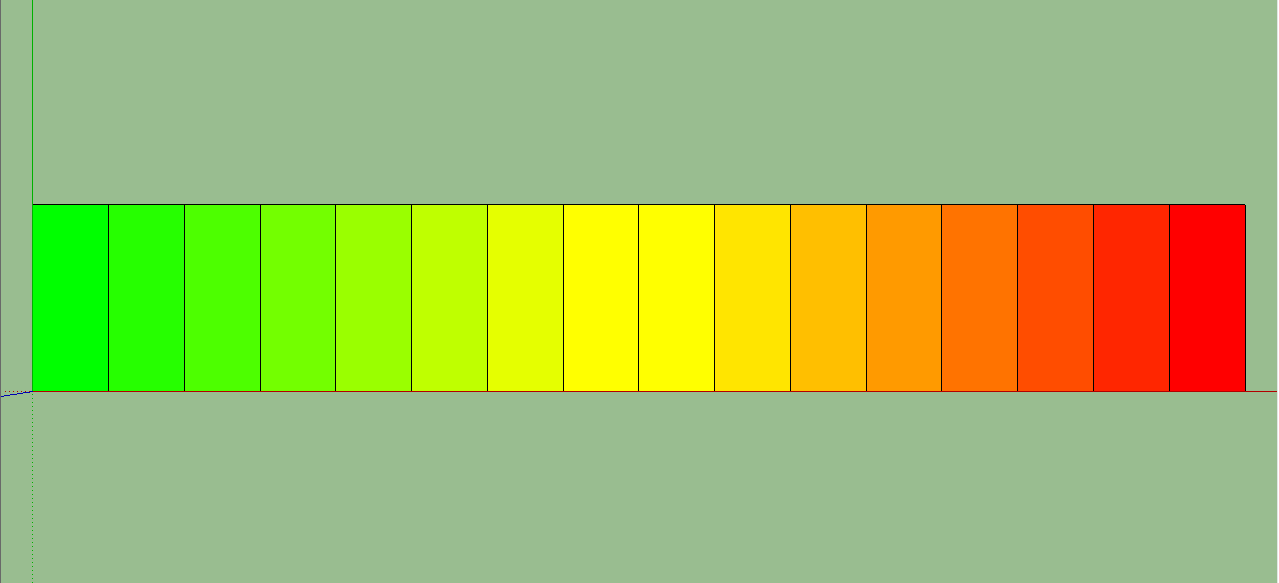
Using face.bounds.center failed in the sort but using ORIGIN.distance(face.bounds.center) did
faces=selection.select{|f| f.is_a?(Sketchup;;Face)}
stack = {}
faces.each{|face| stack[face]=ORIGIN.distance(face.bounds.center)}
sorted = stack.sort { |a,b| a[1] <=> b[1] }.map { |n| n[0] }
redness=0.0;greenness=255.0;blueness=0.0;colorincrement=(510/faces.length.to_f);
sorted.each{|f|
   f.material = [redness.round,greenness.round,blueness.round];
 redness += colorincrement
 if redness >= 255.0
  redness = 255.0
  greenness -= colorincrement
  if greenness <= 0.0
   greenness = 0.0
  end
 end
}
-
RE: [Plugin] Rotated Circle/Cylinder
Version 1.1 has been posted. Double clicking on a face defines the direction as perpendicular to the face.
-
RE: [plugin] Rotated Box [updated 30-Mar-2014]
Version 1.2 has been posted. It aligns the axes to the box if grouping.
-
RE: [plugin] Rotated Box [updated 30-Mar-2014]
I agree so when you get into edit mode, right click on the group and choose Align Axes.
-
RE: [plugin] Rotated Box [updated 30-Mar-2014]
TIG, thanks for the info. I guess my next question is what is the advantage or need to do this?
-
[Plugin] Rotated Circle/Cylinder
As requested. Rotated Circle/Cylinder allows you to define the center of the circle or cylinder, the axis that it is oriented on or along, and the radius of the circle or cylinder. All in three clicks.
Version 1.1 Double clicking on a face defines the direction as perpendicular to the face. Use Ctrl key on PC's to toggle grouping on and off. On MAC's, use the Alt key.
Version 1.2 The groups axes are aligned to the direction defined.
Version 1.3 Made 2014 compliant.
Please get the latest version from the PluginStore
http://sketchucation.com/pluginstore?pln=Rotated_Circle_Cylinder -
RE: [plugin] Rotated Box [updated 30-Mar-2014]
No way to define the axes of a group that I'm aware of.
You can temporarily align the axes to the group when in group edit mode. -
RE: [plugin] Rotated Box [updated 30-Mar-2014]
Rotated box has been updated to allow the option turning grouping on and off.
-
RE: Help Needed - Using Ruby to Project a Vertical Face.
This code snippit seems to work with vertical faces or any other angle.
mod = Sketchup.active_model ent = mod.entities sel = mod.selection face=sel.first norm=face.normal axis=norm.axes[0];rp=nil ang=norm.angle_between Z_AXIS pts=face.outer_loop.vertices.collect{|v| v.position} mp=face.bounds.min;md=1e6; last=pts.length-1 0.upto(last) do |i| dis=mp.distance(pts[i]) (md=dis;rp=pts[i]) if dis<md end tr=Geom;;Transformation.rotation(rp,axis,-ang) pts.each{|p| p.transform! tr}#rotate points to horizontal tr=Geom;;Transformation.translation([0,0,-rp.z]) pts.each{|p| p.transform! tr}#move points to xy plane at 0 z face=ent.add_face(pts)#create the projected copy face.reverse! if face.normal.z < 0.0 # turn it face up -
RE: Help Needed - Using Ruby to Project a Vertical Face.
are you wanting to lay the selected face itself down on the xy plane or make a copy "projected" on the the xy plane.
-
RE: [plugin] Rotated Box [updated 30-Mar-2014]
I don't know exactly why either. You might post this question on the developers forum and get an answer but basically it has to do with the way Sketchup displays things on the screen. There is a certain field of view and if you get to close to an object it disappears. Zooming out usually makes it reappear.
-
RE: [plugin] Rotated Box [updated 30-Mar-2014]
@gilles said:
The best for my needs should be
first point center second point axis third point radius.Defining a axis other than standard red, green, or blue can be difficult without something to inference to. So, unless you are not interested in defining an arbitrary axis, I guess it would work
-
RE: [plugin] Rotated Box [updated 30-Mar-2014]
@jorge2011 said:
thank you very much, excellent plugin.
just a query, you can use the "Ctrl" key to switch between geometry and geometry grouped ungrouped?thank you very much
Do you mean toggle the grouping of the box on and off with the "Ctrl" key?