Oops, your profile's looking a bit empty! To help us tailor your experience, please fill in key details like your SketchUp version, skill level, operating system, and more. Update and save your info on your profile page today!
Sketchucation Tools 5.0.7 | Licensing improvements and bug fixes Learn More
P
Offline
Posts
-
RE: [Plugin] ExtrudeTools - Full Set
@tig said:
However, if you pick a 'sweeping rail' as the first profile, then the two 'end' curves as the rails, and the other 'sweeping rail' as the melding profile, then it works...
Yes, the result is also logic, but not the one i wanted.
@tig said:
Another solution is to rotate the 4 curves [temporarily] by say 1 degree, then it works as I think you had hoped - no 'twisting' etc...
I can live with it.

Thanks for the 'research' and the explanation.
-
RE: [Plugin] RichSection V0.5.8 UPDATED march 2015
@takesh h said:
I tried it with a solid group, still no result.
There is an error reported in Ruby panel. It goes;"Error: #<TypeError: reference to deleted DrawingElement>...
BTW I updated RichSection to the latest version.Thanks for the errordump. I will look this evening ....
If you have Sketchucation tools .... Can you try running the plugin alone, after switching off other plugins (+ restart SU)?
Let me know if that makes the difference ..... -
RE: [Plugin] ExtrudeTools - Full Set
I use your excellent Extrude-tool in another thread
(http://sketchucation.com/forums/viewtopic.php?f=323%26amp;t=55072)) )I'm afraid that I have to report a small bug.
With the Extrude-by-rails (I didn't test the others).
I have almost always an unexpected result if the [highlight=#ffff00:367zdzqn]profile turns exactly 180°[/highlight:367zdzqn] around Z (didn' test for the other axes). It could be a 'division by (almost) zero' (tangent).

I also used Jim's drawhelix14 plugin
helix-extrude-bug.skp -
RE: [Plugin] RichSection V0.5.8 UPDATED march 2015
quote="ladcwei"]Here is my model,wish you could solve all problems...
This model is made by Max,then it is transformed by 3DS format to SK,big software produce big models
 [/quote]
Hi ladcwei,
Big sofware, big problems... .... after conversion to SKP.
The problem is not the complexity. Even with a small part or the Max model, no intersection will be generated. It could be that adjacent faces dont share the same edge. Some faces have superposed edges.There are lot of coplanar faces subdivided without any reason. I tried to clean-up (plugins, by hand...).... no change,,,,
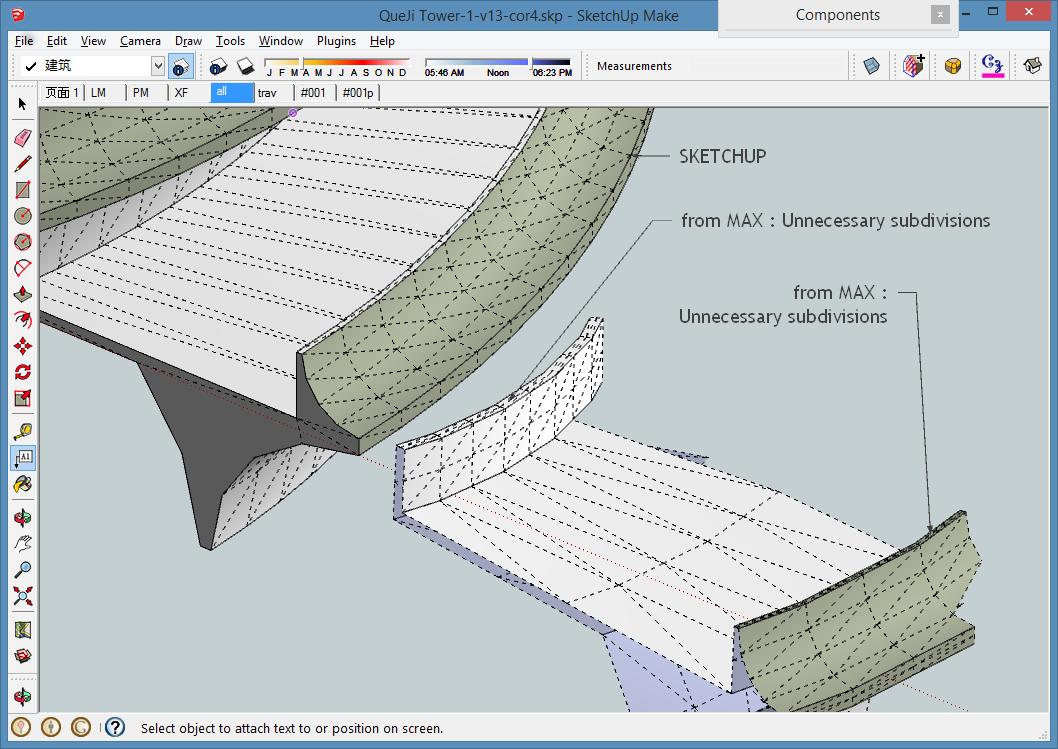
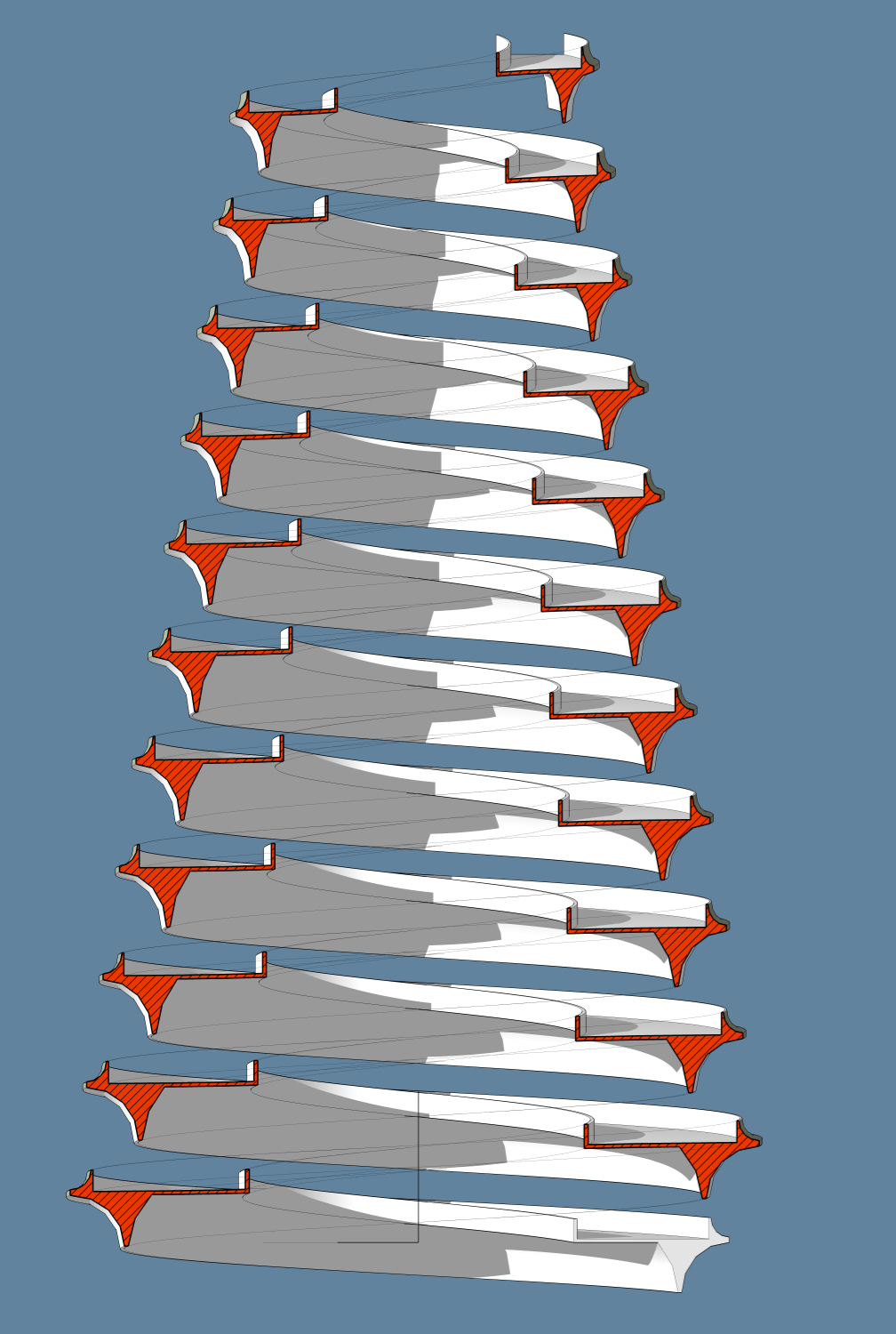
I’ve built in SU a model with the same complexity (not as beautiful as yours),
I used two excellent plugins : drawhelix14 from JIM and Extrusion-tools from TIG,
The section shown below (without projection) is generated in 3 seconds (For_ladcwei-02.png)
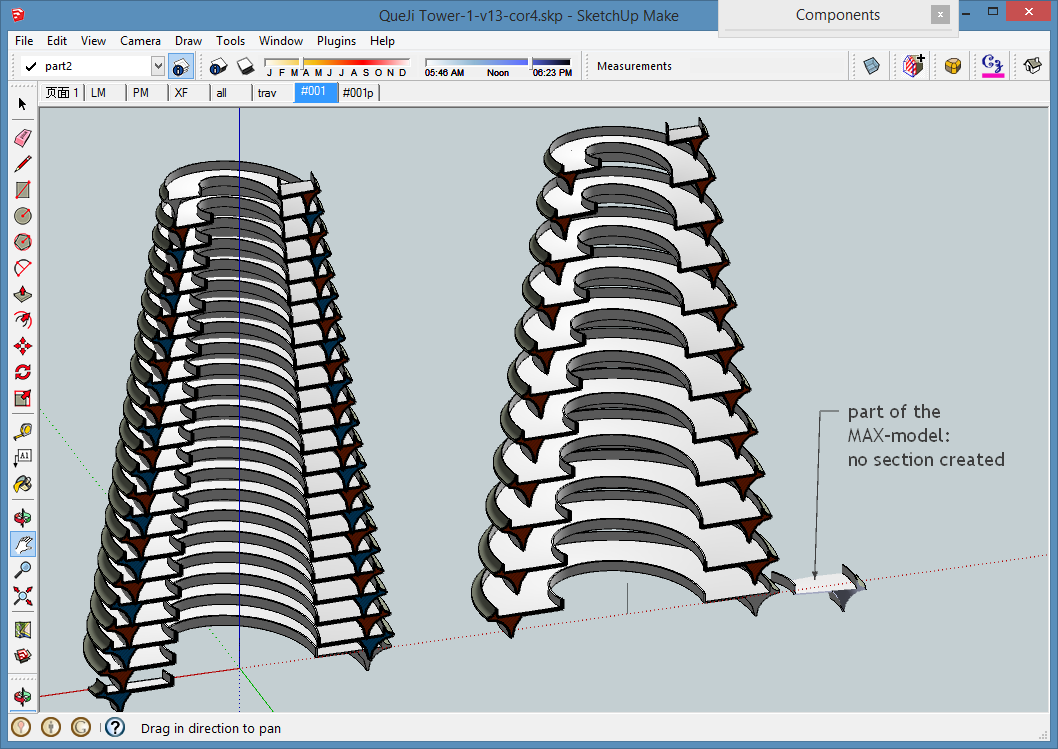
This image with projection, but les faces, was generated in 3,8 seconds, (For_ladcwei-03r.png)
PS : I only could read the first skp file the second is corrupted (tried to download 3 times...)

My SKP-file
QueJi Tower SKP SU2013 -
RE: [Plugin] RichSection V0.5.8 UPDATED march 2015
@ladcwei said:
Yes,it's a temple ...... However,in some complex models,the plugin could give section lines but never fill the hole,I don't know is there some problem has not been solved? It seems to work right.
Hi ladcwei
 Could it be that your complex model is in the same context as the sectionplan.
To produce a RichSection, the model must be in a group (or component) or composed by (groups or components). If the RichSection-sectionplan is within a group, there will be only RichSection-faces produced for the nested groups or components. Is that the problem ? If not, could you send me a model (private I necessary) ?Placing a RichSection-sectionplan within a group or component is still experimental. You will have to update it manually if you move the sectionplan.
Once again : Magic model.
How did you made the helix ? -
RE: [Plugin] RichSection V0.5.8 UPDATED march 2015
@micione said:
No. I just tried to open it as a file .Zip
But you have SU2013. Why not using the installer ? Do you need it for older SU versions ? The same files (as RBZ and ZIP) are also on the first post.
-
RE: [Plugin] RichSection V0.5.8 UPDATED march 2015
@micione :
I installed yesterday on SU8 and SU2013 from the pluginstore (sketchucation Tools), and didn't change anything since. What happend. Did you used the plugin installer? -
RE: [Plugin] RichSection V0.5.8 UPDATED march 2015
About the Bug that isn't one : There was a blanc space in the beginning of your “ #Insulation” material. If you use the right name “#Insulation” and recalculate the scene, you will see your material.
Q :Would you consider adding a feature that would find loops in sections corresponding to groups inside other groups? : RS calculates group by group. Groups nor nested groups can interfere with each other. But I see other solutions to achieve the same visual effect. Thanks for this idea.
I will work on it but it will take time. Actually I don't have much time. I started this plugin in march 2012. 
Right now this feature and the fact that a lot of layers, materials and scenes are created that I don't need: I will work on it. But les layers, scenes … will give restrictions or strange behavior. I
still have the 231 previous versions of this RS plugin, but I can already imagine the posts if they were published.Try it out and show me the result ....

-
RE: [Plugin] RichSection V0.5.8 UPDATED march 2015
Your screenshot is very complete :
I see that you have 0 groups and 0 component-instances.
RS generates only sectionplans of grouped elements or components (as explained in the first post)
The sectionplan can't be within de same context (= within the group or a component).OK
 Was that the solution
 -
RE: [Plugin] RichSection V0.5.8 UPDATED march 2015
@JQL
I will take some time this evening to look at your file.
About the number of files and scenes: At this moment I need at least a scene and a style with the sectionplan active and visible, and without the camera applied. They are activated before changing parameters and (re)calculation. But the purpose is to use the result directly in Layout. To use it, the camera must be applied by and the sectionplan should be made invisible. Therefore I need a second scene. there is no way to hide a scene(?) I could load and save one scene on disk, but that will slow down, give a lot off crashes, and will give problems with the Undo-action.I will continue this evening....
-
RE: [Plugin] SketchUcation Tools
@R
 B
B
Thanks, I could upload the last version to the pluginstore.
I tested the download over the pluginstore : fast, easy, works perfekt....
(here i can give you more than one 'thumb-up')After updating, I got a message that parts of the code ... needs at least SU8M2.
I can't remember the exact words.Normally, my plugin should be OK for SU7 and later. (Not tested)
I used switches (if Sketchup.version_number > 8XX....; else ....)
to adapt routines to the different SU-versions -
RE: [Plugin] RichSection V0.5.8 UPDATED march 2015
RichSection is now in the 'SketchUcation Plugin Store' browser...
-
RE: [Plugin] SketchUcation Tools
My plugin has been uploaded by the SketchUcation-TEAM to de SKF-pluginstore as "Plugin_Richsection_20131117-2000_.rbz.skp"
Does this mean that I wil have do use the same name (with a date in it !!)..... -
RE: [Plugin] RichSection V0.5.8 UPDATED march 2015
@Rich
thanks,
that wil be for Tomorrow.....
(I'm now on my tablet)
I need to be on a PC to save it..... -
RE: [Plugin] RichSection V0.5.8 UPDATED march 2015
@tig said:
http://sketchucation.com/forums/viewforum.php?f=382
First sticky: http://sketchucation.com/forums/viewtopic.php?p=475671#p475671About the Converter tool: You are not authorised to download this attachment. (after login)

-
RE: [Plugin] RichSection V0.5.8 UPDATED march 2015
@arcad-uk said:
Had a play tonight. Just some thoughts: 1 2 3....
- Extending Sketchup with Ruby is not as
"driving a car without a steering wheel"
but some controls are missing
The SU ruby API has no (direct) method to create, activate, hide or show a sectionplan. some control is possible using a Scene or a Style. [highlight=#ffff00:2itt6uzf]Thus, I NEED THOSE TWO SCENES AND STYLES[/highlight:2itt6uzf], to save my settings, to switch things on/off... .
Many methods to control a 'scene' or a 'style' are missing. A workaround to create a style with the sectionplane activated is to load a style from a file, (a file created before with visibility and active sectionplan as needed) and update it with the active style-settings. What complicates the whole thing is that some methods (like loading a style from a file) can't be in the undo DB. Roughly, my plugin is 30% core code, 30% input & data management and 30% workaround.
2 see 1
3. The shortest workaround is that YOU save YOUR default material (white, red, hached or not), and select it as default in the RS-settings. You can also (at your ouwn risk) eliminate or replace the bitmaps in plugins/PiGa_RichSection/resources/mat. They are loaded at the creation of the first RS. But the plugin needs at least a #default.png (bitmaps applied with dim. 30x30cm). I plan to replace the bitmaps by a .skm library, but you keep me busy with ....
4. I have tons of ring and bels to install, but first I have to upload a working version to the plugin store. - Extending Sketchup with Ruby is not as
-
RE: [Plugin] RichSection V0.5.8 UPDATED march 2015
@Rich
Thanks for the quick reply.
TIG gave me alreardy a very complete explanation on the Sketchucation-tools-page,
But I will need to find some time to work it out.... .
Where can I find the Authors' Guide. -
RE: [Plugin] SketchUcation Tools
@TIG
Thanks for this very complete explanation.
I will need to find some time to work it out....