sketchucation logo sketchucation
    • Login
    1. Home
    2. peebo22
    3. Posts
    Oops, your profile's looking a bit empty! To help us tailor your experience, please fill in key details like your SketchUp version, skill level, operating system, and more. Update and save your info on your profile page today!
    ⚠️ Important | Libfredo 15.6b introduces important bugfixes for Fredo's Extensions Update
    P
    Offline
    • Profile
    • Following 0
    • Followers 0
    • Topics 14
    • Posts 38
    • Groups 1

    Posts

    Recent Best Controversial
    • RE: Best way to create forest?

      Sometimes I render (I use Artlantis), but in this case I try quickly to create forest area in sketchup scene. It seems that the best way is to use component spray to multiply faceme-trees.

      Is there some way to create "forest-like" object with sandbox tools from the ground and color it, so it would look like forest?

      Where could i find good backdrop textures...?

      posted in Newbie Forum
      P
      peebo22
    • RE: Best way to create forest?

      So....huh?

      posted in Newbie Forum
      P
      peebo22
    • Best way to create forest?

      What is the best way to create forest in sketchup without huge slowdown with edges?
      I often use component spray plugin, but usually face-me trees slows down when there's too many.

      posted in Newbie Forum sketchup
      P
      peebo22
    • RE: Import DWG to Sketchup, coordinates and closing edges

      ThomThoms edge tools works for small edges! Great plugin!

      posted in Newbie Forum
      P
      peebo22
    • RE: Import DWG to Sketchup, coordinates and closing edges

      So basically proper way is to use cad edges as a reference?
      Mitcorb can you find the next video, how to continue the drawing, very interesting.

      ThomThoms edge tools looks very useful! πŸ˜„

      What about the align problem, got any solution?

      posted in Newbie Forum
      P
      peebo22
    • Import DWG to Sketchup, coordinates and closing edges

      Hi again everybody!

      It's nice to look things from the forum, a great help!

      My question is, is there a proper way to align dwg layers in sketchup?
      I mean if I choose preserve coordinate system when I import DWG, sketchup messes edges completely.

      DWG files are in coordinate system and I would be so nice that they would align.
      For example if I want to import roads or house edges to the terrain mesh, I always have to draw/use reference lines.

      Also when I import sketchup file type from Microstation V8 2008, the skp file is messed when importing to SU.

      How you guys align edges?

      My other question is, how you close curves/lines so you can make faces? It's hard to do this in sketchup because usually the edges are small. Do you close them in CAD software, make somekind of polyline and then import them?
      Is there a plugin which closes the lines? I've used weld and stray line plugins, but they don't help me.

      posted in Newbie Forum sketchup
      P
      peebo22
    • RE: Working with terrain (triangles)

      That would be painful.. 😞

      posted in Newbie Forum
      P
      peebo22
    • RE: Working with terrain (triangles)

      Anyone got a clue from the skp file?

      posted in Newbie Forum
      P
      peebo22
    • RE: Working with terrain (triangles)

      I mean Pilous link....if this is the tutorial working with terrain.
      The instant road link works just fine.

      Someone should write a good english tutorial how to work with triangulated terrain in sketchup. I really don't have clue, how to get the roads from the terrain. These roads are also in the real world, so I don't have to make new ones.

      I've included a untouched SKP file which shows the situation. So, I want to make smooth terrain and the roads to it. You see they are there, but how can I "extract" them? And there's also other edgets, houses etc...

      What is the first thing to do?

      http://db.tt/FC7u5Hh5

      @unknownuser said:

      here a [url=http://sketchucation.com/forums/download/file.php?id=85550:pc3zuuyx]PDF tutorial[/url:pc3zuuyx] about that by Daredevil
      (sorry in French but with images and you can put the text in the [url=http://translate.google.fr/?hl=fr&tab=wT:pc3zuuyx]Google translator[/url:pc3zuuyx] πŸ˜‰

      posted in Newbie Forum
      P
      peebo22
    • RE: Working with terrain (triangles)

      I mean the PDF files. πŸ˜‰

      @krisidious said:

      favicon

      (www.valiarchitects.com)

      posted in Newbie Forum
      P
      peebo22
    • RE: Working with terrain (triangles)

      Nope, I can't access...

      http://i48.tinypic.com/2090m04.jpg

      @krisidious said:

      If you go to that link and scroll down there are a bunch of pdf's to teach you how to use it.

      posted in Newbie Forum
      P
      peebo22
    • RE: Working with terrain (triangles)

      Thanks, but it says that I'm not authorized to download this file...?

      Yeah, I have the instant road plugin, but I don't know how to use it with this. Any advices?

      @unknownuser said:

      here a PDF tutorial about that by Daredevil
      (sorry in French but with images and you can put the text in the Google translator πŸ˜‰

      posted in Newbie Forum
      P
      peebo22
    • Working with terrain (triangles)

      Hello!

      I need some advice with working with terrain.
      So, I have this triangulated terrain and I want to bring the roads to it, but how can I do it properly? The data is from Trimble Tekla GIS.
      It works with flat ground, but not with this.

      I usually bring separate dwg/dxf and I try to make surface from edges and drape them to the terrain.

      What is the proper way?

      Here is a picture of the work and I've put an arrow which shows the road on the terrain.

      http://i47.tinypic.com/30x956s.jpg

      posted in Newbie Forum sketchup
      P
      peebo22
    • RE: Can't get a face =(

      Got it! I checked that all rectangles were inside the road (hidden geometry) the ground and found the edges which went below (dashed lines). Draw them again with 2 edges and vola!

      So what I learned is that the rectangles must be inside the drawn objects, if even one goes over, the face doesn't work.
      It would be nice that there could be plugin which tells this.

      Thanks everybody!


      Got it!

      posted in Newbie Forum
      P
      peebo22
    • RE: Can't get a face =(

      Yippikayyeee!

      I fixed the road, it was the dashed line! I made 2 lines that don't go under the terrain.

      Now if I can fix the ground between the roads.

      posted in Newbie Forum
      P
      peebo22
    • RE: Can't get a face =(

      Ok, model is over 50 mb, so unfortenately I can't.
      I noticed when I turned the hidden terrain geometry on some of the triangles doesn't stay inside the road. Could this be the problem? The edge in that place goes little bit under the terrain (it's dashed), cause terrain is little lower in that spot.

      The faces are on layer 0 and the road edges are in other layer.

      posted in Newbie Forum
      P
      peebo22
    • RE: Can't get a face =(

      Okay thank you guys!

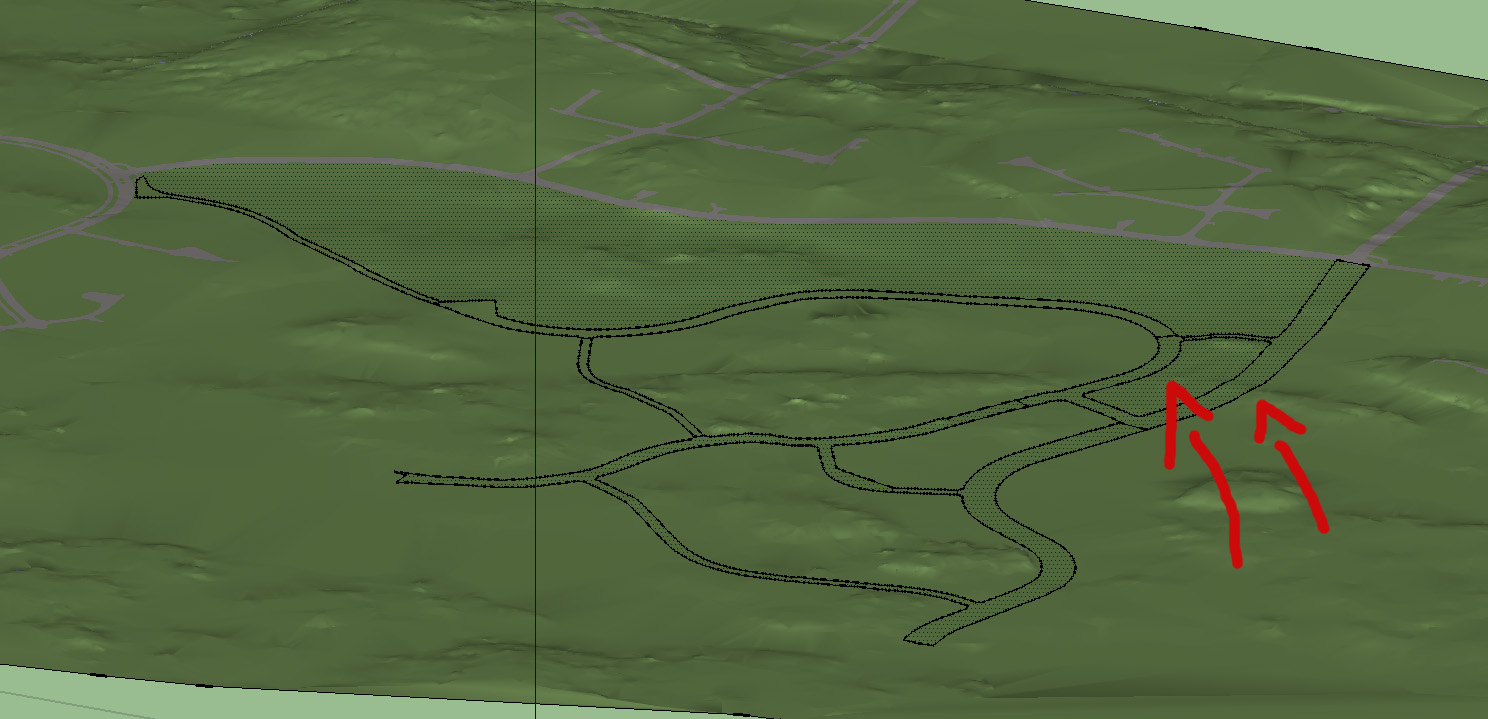
      Here's the main problem...as you can see in the picture.

      I've marked with the arrows those faces/objects that I want to be closed. The roads and the ground between them.
      I just can't get it to work.

      I have draped the road lines from CAD drawing to ground and drawn few lines in there, so most of the roads and grounds are ok. But not those which I have marked with red arrow. The face covers them both, but I want them separated.

      As you can see those black spots on the roads are endpoints..

      Can you also explain what coplanar means? Is it that the edges are not on the same level or something like that?

      I hope you understand my writings... πŸ˜„


      The problem

      posted in Newbie Forum
      P
      peebo22
    • Can't get a face =(

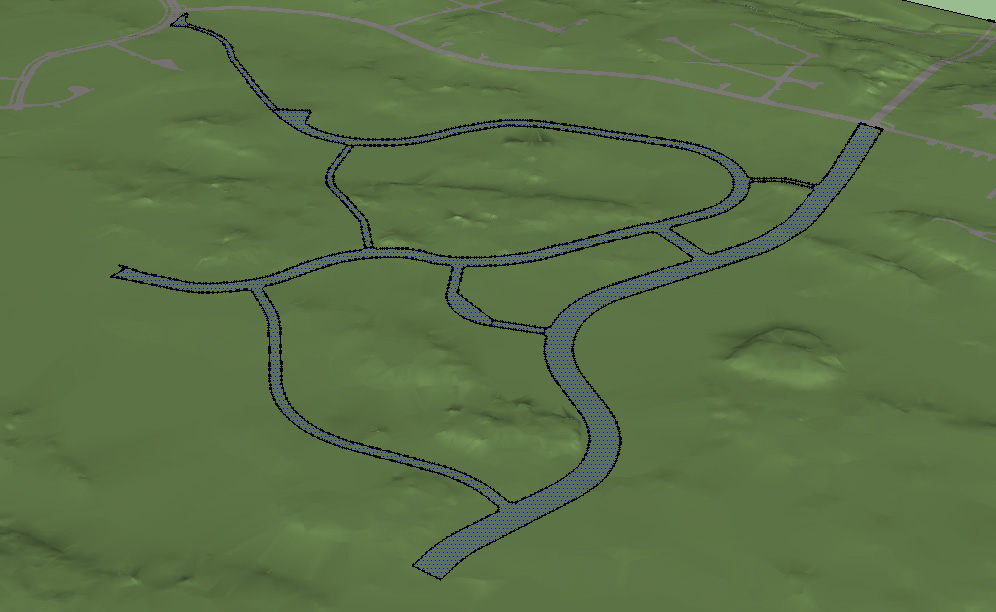
      Can somebody help me, how the heck I can make a face from these edges. I've tried plugins, such as weld, make faces etc.
      Nothing helps. I've tried to draw edges again, no help.

      What is the problem????????

      Thanks in advance!


      This is the SKP

      posted in Newbie Forum sketchup
      P
      peebo22
    • 1 / 1