sketchucation logo sketchucation
    • Login
    1. Home
    2. pav_3j
    3. Posts
    Oops, your profile's looking a bit empty! To help us tailor your experience, please fill in key details like your SketchUp version, skill level, operating system, and more. Update and save your info on your profile page today!
    πŸ”Œ Easy Offset | Offset selected faces in SketchUp in positive and negative offsets. Download
    P
    Offline
    • Profile
    • Following 0
    • Followers 0
    • Topics 29
    • Posts 646
    • Groups 1

    Posts

    Recent Best Controversial
    • RE: Pc to mac

      @unknownuser said:

      I transfer/share skp's from Pc to Mac and vice versa quite a bit. I don't really recall ever having any significant problems.

      yeah me too, apart from sketchup running really slowly on my mac, but that's just because it's rubbish.

      pav

      posted in SketchUp Discussions
      P
      pav_3j
    • RE: Displacement + vray

      @remus said:

      Displacement is using a map (like a bump map) to physically alter the geometry of the mesh.

      i'm guessing this is rather CPU intensive then, if it's diesplacing the maps then is it dramatically increasing the polycount?

      hmm, i really wan to give this a go.

      biebel, didn't you have a similar thread about this? could you link it as i can't find it.
      thank you!

      pav

      posted in Gallery
      P
      pav_3j
    • RE: Displacement + vray

      very impressive!!

      so what render engines support this displacement mapping then? i want to tinker!

      pav

      posted in Gallery
      P
      pav_3j
    • RE: Ideas in CAD

      @remus said:

      Pav, do you have a computer? id say its a fairly standard peice of equipment these days. Not so much with swanky interfaces (tablets, tablet PCs etc.) but give it 10 years or so, im sure there will be some new interface device we could have never lived without.

      i agree with you on computers being a standard piece of equipment, but like you say the "swanky interfaces" not so much (at this current moment in time). let's not forget though that these swanky interfaces, pretty much still rely on sketching techniques, graphics tablets, tablet PCs, are still fundamentally based on the good old pen and paper.

      who knows, maybe there will be some kind of "computer paper" (there probably already is) but this is still essentially a development on sketching.

      prehistoric man had cave walls and natural pigments, the egyptians had papyrus and ink, modern man a sketchbook and a pencil.
      i'm not saying that we wont be drawing on tablet pc's in the furure, i'm almost certain we will be, but the question was about whether we would be designing in CAD, and as far as i am concerned this is just an evolution in sketching, not a change in the way ideas are put down.

      pav

      posted in Corner Bar
      P
      pav_3j
    • RE: Instancing in indigo

      2900 rubiks cubes,

      original model is 3.9mb

      rendertime: 17m 37s (then i got bored and had to get on with some work)

      pav

      http://i329.photobucket.com/albums/l400/pav_3j/im1216299039.png

      posted in Gallery
      P
      pav_3j
    • RE: Ideas in CAD

      @remus said:

      Of course its here to stay, theres no arguing that. Whta im trying to work out/discuss is wether UIs and software will ever reach the point where they are a viable alternative. (thats actualyl pretty different from what i wrote in the OP, but it raises pretty similar issues.)

      hmm,

      laptop computer: Β£1000
      mouse: Β£10
      skecthup pro: $495

      drawing on the back of an old letter using a pencil you found on a colleagues desk: priceless.

      there are some techniques in design you can buy, for everything else there's sketching.

      he he

      pav

      posted in Corner Bar
      P
      pav_3j
    • RE: Ideas in CAD

      lets face it remus, pen an paper is here to stay.
      and i find it hard to believe that you don't think the same way πŸ˜‰ he he

      pav

      posted in Corner Bar
      P
      pav_3j
    • RE: Instancing in indigo

      yeah i had the same message when trying a resume. might just start to from the beginnning.

      i must say that i am getting more impressed with the speed of indigo, especially with the instancing. i've not been as hot with my render practices recently, but now i have kerkythea, and indigo to mess about with i'm defo going to be hitting it up.
      i had been using the latest version of artlantis, but as simple as it is to use (and as expensive as it was) i'm finding the functionality and variables in a league below these two free renderers.

      oh well, guess i'll save for v-ray so i can compare that too.

      pav

      posted in Gallery
      P
      pav_3j
    • RE: Ideas in CAD

      the best of both worlds?

      pav

      posted in Corner Bar
      P
      pav_3j
    • RE: Ideas in CAD

      well (maybe this is a personal thing) i find that i can design better on paper than on a piece of software. i use the software to display my ideas more accurately afterwards, but initial ideas are always always always sketched (or a quick sketch model).
      i find that if i use software to design, then i sometimes slip into designing what i know i can achieve with that piece of software, and not designing what is in my imagination.
      there is no medium i can think of which is as free as pen an paper. the only boundaries are your imagination and obv. the size of the paper!

      also when i'm talking to a client (during any stage of the design process) it's always infinitely easier to do a quick sketch for them to convery my ideas than to get the computer fired up. i find that they relate to it better as well.

      like i said though, this is just my opinion.

      i'd like to hear what others have to say on the matter, maybe i am totally wrong. (i don't think i am though! he he)

      pav

      posted in Corner Bar
      P
      pav_3j
    • RE: Ideas in CAD

      i hope not, i just got shares in papermate. he he

      nothing is more fluid, and as rapid as a sketch. if anything i'd say that sometimes CAD restricts visualisation. there are no boundries with pen and paper.

      good question though.

      pav

      posted in Corner Bar
      P
      pav_3j
    • RE: Instancing in indigo

      hey there plot,

      got into work this morning and my computer had crashed over night and thus the render was not completed to a standard i would have hoped.

      here's what i have though, think it rendered for about an hour.

      going to try again today.

      loving this instancing!

      pav

      http://i329.photobucket.com/albums/l400/pav_3j/im1216221187.png

      posted in Gallery
      P
      pav_3j
    • RE: Instancing in indigo

      @plot-paris said:

      a beautyful collection of springs. somehow they really seem to tell a story.

      simply extend the ground plane beyond the screen borders and leave a high-res version of the image cook for some hours and we will have a real beautyful "still life", soon to be found in the tade... πŸ˜„

      that's really an impressive example of what is possibe with the combination of several rubies...

      thank you plot, though really all the hard work was performed by those people who code these wonderful rubys, i just point and click.

      oh just so you know, i have a high res, render (with the extended ground plane) cooking as we speak, going to let it run over night and i'll post it up tomorrow.

      thanks again

      pav

      posted in Gallery
      P
      pav_3j
    • RE: Instancing in indigo

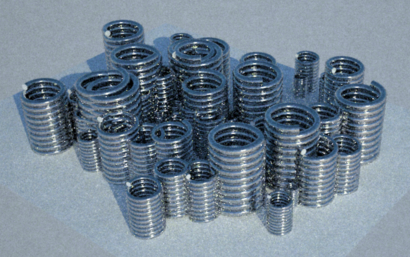
      okay, finally gave it a go, VERY VERY impressed i must say.

      used the drawhelix.rb, tube_along_a_path.rb, component_spray.rb and indigo renderer.

      each one of these springs has nearly 3000 faces (sorry i didn't check the file size.) yet using all these rubys, and the instancing technique, i was able to produce the image below on my crappy work computer.

      only left it to render for 10m 54s, with no settings changed (other than the spring material.)

      I'm grinning from ear to ear!

      Pav

      im1216216084.png

      posted in Gallery
      P
      pav_3j
    • RE: [Plugin] Terrain Reshaper

      wow, thank you very much didier!

      and thank you plot-paris, wherever you may be!

      pav

      posted in Plugins
      P
      pav_3j
    • RE: [Plugin] HouseBuilder metric 1.2

      wow, thank you very much! this is awesome

      pav

      posted in Plugins
      P
      pav_3j
    • RE: Instancing in indigo

      @plot-paris said:

      thanks for the idea, Whaat. I messed arround with tree proxies and was soon at 10 000 instances. took an awfully long time to export πŸ˜‰

      I pushed the use of proxies a bit further and wanted to find out, if nested proxies are possible (proxies within proxies)

      http://img211.imageshack.us/img211/4056/nesteddummiesvi8.jpg

      well, obviously they are - what a wonderful tool! so you can create immensly detailed and complicated models and still be able to work fluently in SU? Great!

      I then created some simple buildings (based on the same component), assembled these to building blocks and created a nice city area.
      unfortunately my pc (Core2Duo @ 3.0 Ghz, 2 Gb Ram) can't cope with it anymore.

      indigo, as well as the skindigo exporter seem to break down, if it gets too complicated (I wouldn't have expected differently). πŸ˜„
      now I would very much like to know, if the possible complexity depends on the power of the machine or on indigo itself.
      I did a short test of a reduced city model (1/20 of it's original size). still took a long time to export...

      http://img337.imageshack.us/img337/9413/citynestedproxiesai6.jpg

      it would be great if one of you guys with the incredibly powerful monster computers (like Coen) had a try. thus we knew, if it solely depends on the machine - and I have to save a lot of money to buy a new one πŸ˜‰

      here is the file (the whole city with 1920 buildings is only 200 kb):
      [attachment=0:1mn8qr50]<!-- ia0 -->city.skp<!-- ia0 -->[/attachment:1mn8qr50]

      thanks,

      Jakob

      this is exceptional, any chance you could do a quick tut on this, inc. how you get it to instance in indigo, as i'm having mega trouble doing it, and also with finding out how to do it!

      loving your work

      pav

      posted in Gallery
      P
      pav_3j
    • RE: Ha

      oh dear.

      pav

      posted in Corner Bar
      P
      pav_3j
    • RE: [Plugin] Random Select

      tasty

      thank you

      pav

      posted in Plugins
      P
      pav_3j
    • 1 / 1