sketchucation logo sketchucation
    • Login
    1. Home
    2. Panga
    3. Posts
    Oops, your profile's looking a bit empty! To help us tailor your experience, please fill in key details like your SketchUp version, skill level, operating system, and more. Update and save your info on your profile page today!
    ⚠️ Important | Libfredo 15.6b introduces important bugfixes for Fredo's Extensions Update
    P
    Offline
    • Profile
    • Following 0
    • Followers 0
    • Topics 22
    • Posts 363
    • Groups 1

    Posts

    Recent Best Controversial
    • RE: Google Sketchup Pro 7 is out

      After reading all posts here, and the updated "What's new" page, even if some good work is done in this release...i just feel disapointed...for all the reasons that the community already spoke about (hi-poly, shadows...)

      I'm afraid that Google is considering sketchup more than an add-on for google earth than a real independant and powerfull software. For me, all the updates are just to get the modelling a little easier, but are not real new features...this is just my feeling.

      Hope this will evolve in the future.

      posted in SketchUp Discussions
      P
      Panga
    • RE: Chair request

      Hy,

      Your chair seems interesting, have you any other pictures that can help to make it, like front face or side face ?

      posted in SketchUp Discussions
      P
      Panga
    • RE: Animation Walkthru....What to use?

      For a better render of walkthrough animation, don't forget Kerkythea, it's free, really simple to set up a walkthrough from sketchup scenes. For me the best way to achieve a good animation.

      favicon

      (www.kerkythea.net)

      Bye.

      posted in SketchUp Discussions
      P
      Panga
    • RE: [Plugin] Front Face - 1.2

      Thanks for this script...saved time'll be well used !!

      posted in Plugins
      P
      Panga
    • RE: Pan and Orbit are FREAKING OUT!

      Yes, plot-aris seems to be right ! After many experiences on this fact during my works, the zoom is completely dependant on where is the cursor !

      When you're too far from your model and you point on a empty space with the cursor, the zoom is too slow...point on a part of your model and is getting faster.
      When you're closer to your model, if you point on a empty space with the cursor, the zoom goes too fast and the "camera" goes behind your object...still pointing on your model and the zoom will be slower until the camera goes behind it !

      But that's right, it's a little boring sometimes when you're working on small parts of a big model, or in wireframe mode !!

      posted in SketchUp Discussions
      P
      Panga
    • RE: Bad habits Annonymous

      Hi, I'm Panga. I confess that I tried others famous 3D software in order to replace sketchup...but I always came back on SU I promess !!Definitly the better 3D modeler for lazy and impatient people like me...I also confess that I create layers to organize my model...but stop to use them after ten minutes... πŸ˜’

      posted in SketchUp Discussions
      P
      Panga
    • RE: Trace Tool?

      Just for information, Inkscape integrates a nice tool to vectorize bitmaps. Based on Protrace, and better than many other softs, and it is...free !! πŸ˜‰

      posted in SketchUp Discussions
      P
      Panga
    • RE: Regular terrain

      Very nice approach for simplify a terrain mesh !!

      Thanks for sharing it. πŸ˜‰

      posted in SketchUp Discussions
      P
      Panga
    • RE: Terrain Clipping Issues from Imported Contours

      Thanks for sharing this rabbit, I'm gonna give a look at it !!

      posted in SketchUp Discussions
      P
      Panga
    • RE: Help please! Stamp Tool causes crash!

      Hi Hoangduong,

      I'm frequently confronted to this problem when I use the stamp tool.
      For me, it happens when i have other objects near the surface I want to stamp and when my model become too large.

      To avoid this, there's a few solutions :

      1. Try to put all others objects in a turned off layer
      2. Take your surface and your building print out of your model, and do the stamp in a new file, and then copy it in your model (not always possible...)
      3. If you have an old version of Sketchup 5, save your file in the SU 5 format, do it under SU 5, and reopen it with SU6. It never crash on sketchup 5 for me.

      Hope it helps you.

      posted in SketchUp Discussions
      P
      Panga
    • RE: Some visual Issues with my graphics

      Hi,

      It happens to me sometimes...I think it's because the sketchup's camera is too close to your model. Try to change ortho/perspective view of camera, maybe that'll help.

      posted in SketchUp Discussions
      P
      Panga
    • RE: Terrain Clipping Issues from Imported Contours

      Hi thetown,

      Yes definitely, when sketchup shows to many limits, rhino can be the solution. I already use it for some works, but never tried to import a terrain made with rhino in sketchup. If you give it a try, tell me about your results.

      posted in SketchUp Discussions
      P
      Panga
    • RE: How to make a terrain from contours and points

      Thanks for the info, I think I already found int the past that plugin, but I completely forgot it !! πŸ˜‰

      posted in SketchUp Discussions
      P
      Panga
    • RE: How to make a terrain from contours and points

      Hi Mozzie and Gaieus,

      First, points_cloud_triangulation.rb is only taking points for triangulation, and it ignores completely the path of level lines during the triangulation...too much work after to correct the errors.

      If you organise well your file before importing in skecthup, it's not more work using my procedure. I work with autocad files, and all my points are instances of the same block. Sketchup automatically converts each block in a component, so in sketchup I have instances of the same component.
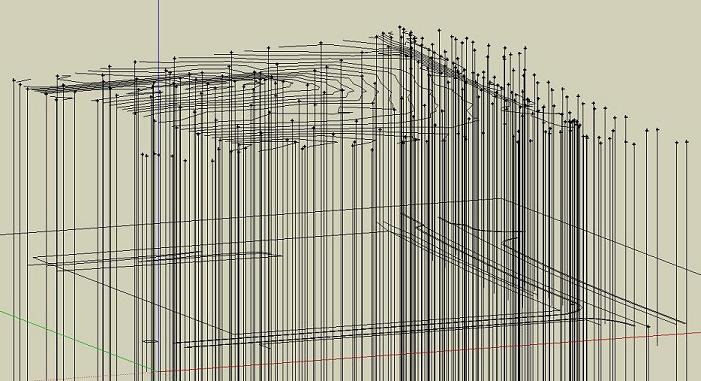
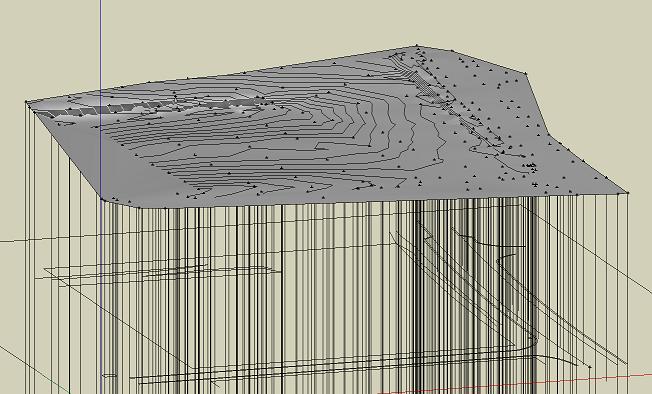
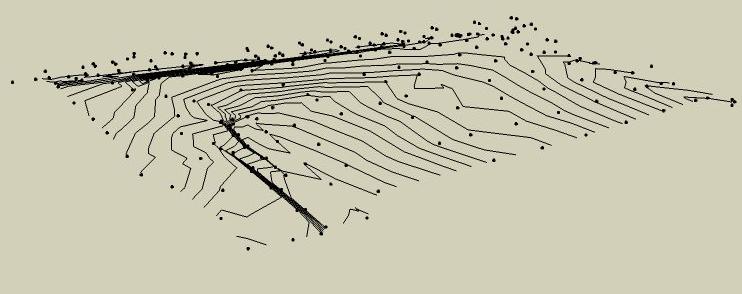
      I just have to edit one of them, to draw a line on the z axis, and i'ts done !! Then I explod all the components, select all my contours lines and my new "vertical lines", and use the sandbox.

      screen2.JPG

      screen3.JPG

      posted in SketchUp Discussions
      P
      Panga
    • RE: How to make a terrain from contours and points

      Hi people,

      I found a solution, so here it is :

      Because the sandbox do not recognize points, we have to use lines, this is a problem. As you said Chris, replace the points by small lines could help but it also will make my model too complex...But there's another problem boring problem with the sandbox : sometimes it ignores some lines, or line vertex because they're too close or...too far ! And here is the solution.

      I made long lines from my points in the Z axis, and when I use the sandbox, it picks the top of each line (which is my original point), and it ignores the other extremity of the line, too far below !!

      So sometines one defect can be useful to avoid another one !!

      Hope that'll be useful for everyone.

      See u.

      posted in SketchUp Discussions
      P
      Panga
    • RE: Terrain Clipping Issues from Imported Contours

      I gave a look at your file. The first thing, is that you have to clean a little your contour lines before use the sandbox. I saw some of your lines are above others and the sandbox dot not like this. When you have such lines, you're obliged to correct them after, or make them separately.

      The only way to have a clean model from close contours lines, or superposed ones, is to make your model piece by piece like I described before. I made a example in the file below. It can be long, but as far as i know, this is the only way.

      Bye.

      contours_show.skp

      posted in SketchUp Discussions
      P
      Panga
    • RE: How to make a terrain from contours and points

      Hi Chris,

      My points are "guide points". And yes, I thought about replacing my points by small lines...but my model will be too complex after that...

      I join my skp file and a screenshot, in order you can check it if you want.

      Thanks.

      relief.skp
      screen.jpg

      posted in SketchUp Discussions
      P
      Panga
    • RE: How to make a terrain from contours and points

      Ok Remus,

      This script is fine, but not useful for me because I already have contours and points. And the only thing is to find a way that the sandbox or any other script picks all of them to make the terrain, but thanks anyway.

      Any other ideas ?

      posted in SketchUp Discussions
      P
      Panga
    • RE: How to make a terrain from contours and points

      I'm gonna try right know.

      Thanks.

      posted in SketchUp Discussions
      P
      Panga
    • RE: Terrain Clipping Issues from Imported Contours

      Hi,

      I'm confronted to the same issue regularly...it seems that the sandbox accuracy is not at his best when contour lines are too close !

      The only way to avoid this, is to make your terrain piece by piece,especially where you have contour lines very close. You isolate the two contours line, use the sandbox, edit the created terrain and clean the surface to keep only the part between the two contours lines.
      And then you can join all parts. It is not so long to do, and this way your are sure that your model is ok.

      Or you can correct these errors individually.

      That's all i know πŸ˜‰

      posted in SketchUp Discussions
      P
      Panga
    • 1
    • 2
    • 15
    • 16
    • 17
    • 18
    • 19
    • 18 / 19