sketchucation logo sketchucation
    • Login
    1. Home
    2. nutchief
    Oops, your profile's looking a bit empty! To help us tailor your experience, please fill in key details like your SketchUp version, skill level, operating system, and more. Update and save your info on your profile page today!
    🚨 Skimp | 25% Off until March 30 Buy Now
    N
    Offline
    • Profile
    • Following 0
    • Followers 0
    • Topics 1
    • Posts 3
    • Groups 2

    nutchief

    @nutchief

    Newcomers
    2
    Reputation
    1
    Profile views
    3
    Posts
    0
    Followers
    0
    Following
    Joined
    Last Online
    SketchUp version 2025
    Operating System Windows
    Knowledge of SketchUp Advanced
    What do you use Sketchup for? landscape architecture

    nutchief Unfollow Follow
    Newcomers registered-users

    Best posts made by nutchief

    • NnC SurfGen Pro - Procedural Terrain & Contours (Seeking Feedback)

      Hi everyone,

      First time posting here! I’m a civil engineer and I’ve always found manual terrain modeling in SketchUp to be a major bottleneck for site planning and preliminary infrastructure layouts. The native sandbox tools are great, but I needed something faster and strictly parametric.

      To solve this in my own workflow, I decided to dive into Ruby and code my own solution: NnC SurfGen Pro.

      Here is a quick look at the logic I currently have programmed:

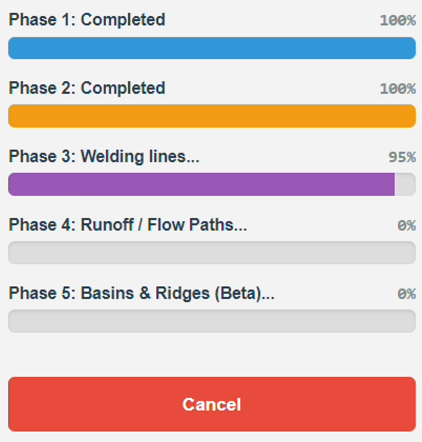
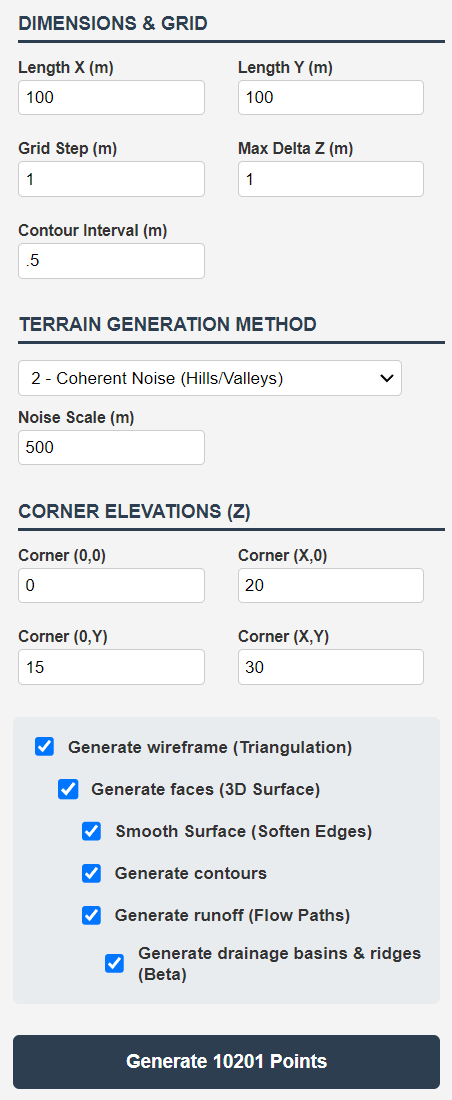
      Procedural Mesh Generation: The core script generates terrain meshes from scratch using mathematical noise filters (Raw Noise, Moving Average, and Coherent Noise). It allows full control over the grid step and Z-elevation limits.

      Parametric Contours: I wrote an algorithm that slices the mesh and extracts perfectly welded contour lines at any exact Z-interval defined by the user.

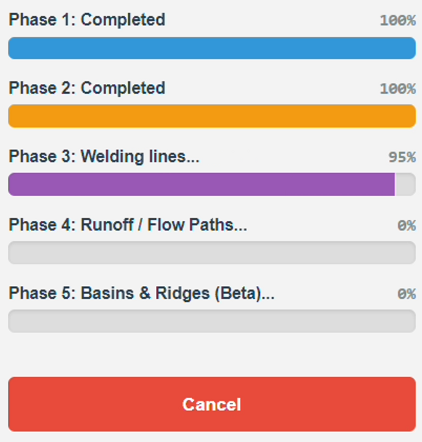
      Hydrological Runoff (Beta): A feature that reads the slope of each generated face and maps water flow vectors directly onto the geometry to simulate natural drainage catchments.

      I uploaded a quick YouTube Short showing the procedural generation examples:

      Since I'm relatively new to sharing extensions with the public, I would absolutely love to hear some technical feedback from the veteran Ruby developers and power users in this community.

      What do you think of this approach? Are there any specific features, optimization tricks, or contour tools you usually miss when dealing with topography in SketchUp? Any suggestions to improve the script would be greatly appreciated.

      Looking forward to your thoughts. Cheers!
      posted in Extensions & Applications Discussions
      N
      nutchief
    • RE: NnC SurfGen Pro - Procedural Terrain & Contours (Seeking Feedback)

      @Rich-O-Brien

      NnC.png

      Process.png

      Thanks for the warm welcome and the feedback!

      You are absolutely right. Those extensions by TIG, Thomthom, and the Raylectron tools are fantastic and essentially cover all these bases. They are classics for a reason.

      My main motivation for writing NnC SurfGen Pro wasn't to reinvent the wheel, but rather to create something entirely standalone, extremely easy to learn, and focused purely on speed for rapid conceptual work.

      As a civil engineer, there are many times when I open SketchUp and just need a quick, realistic terrain to start testing a layout or doing a preliminary study, without having to import external heightmaps or navigate complex toolbars. I wanted a "plug-and-play" tool: you open a simple UI, click a button, and instantly get a surface and its contours ready to work on.

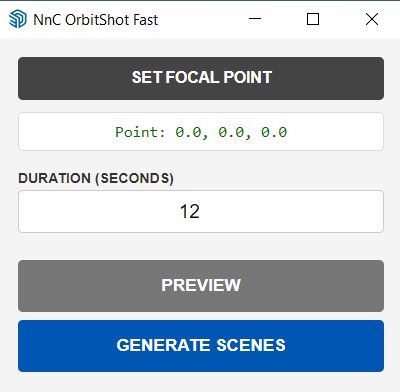
      Also, I've programmed a small additional workflow feature: the birds-eye-view animation you see in the video is generated entirely within the extension. I wrote an automation tool called NnC OrbitShot Fast, which allows me to set the focal point and duration of the movement. It then creates the necessary scenes, allowing me to use SketchUp's native animation feature to generate that smooth orbiting effect in a single step.

      It is built exactly for those moments when you need quick context to start a job fast and friction-free.

      Since you know the plugin landscape so well, do you think there is still an appetite in the community for this kind of "quick-start / all-in-one" approach?

      Thanks again for taking the time to take a look!

      NnC OrbitShot Fast_GUI.png

      posted in Extensions & Applications Discussions
      N
      nutchief

    Latest posts made by nutchief

    • RE: NnC SurfGen Pro - Procedural Terrain & Contours (Seeking Feedback)

      @Rich-O-Brien

      NnC.png

      Process.png

      Thanks for the warm welcome and the feedback!

      You are absolutely right. Those extensions by TIG, Thomthom, and the Raylectron tools are fantastic and essentially cover all these bases. They are classics for a reason.

      My main motivation for writing NnC SurfGen Pro wasn't to reinvent the wheel, but rather to create something entirely standalone, extremely easy to learn, and focused purely on speed for rapid conceptual work.

      As a civil engineer, there are many times when I open SketchUp and just need a quick, realistic terrain to start testing a layout or doing a preliminary study, without having to import external heightmaps or navigate complex toolbars. I wanted a "plug-and-play" tool: you open a simple UI, click a button, and instantly get a surface and its contours ready to work on.

      Also, I've programmed a small additional workflow feature: the birds-eye-view animation you see in the video is generated entirely within the extension. I wrote an automation tool called NnC OrbitShot Fast, which allows me to set the focal point and duration of the movement. It then creates the necessary scenes, allowing me to use SketchUp's native animation feature to generate that smooth orbiting effect in a single step.

      It is built exactly for those moments when you need quick context to start a job fast and friction-free.

      Since you know the plugin landscape so well, do you think there is still an appetite in the community for this kind of "quick-start / all-in-one" approach?

      Thanks again for taking the time to take a look!

      NnC OrbitShot Fast_GUI.png

      posted in Extensions & Applications Discussions
      N
      nutchief
    • RE: NnC SurfGen Pro - Procedural Terrain & Contours (Seeking Feedback)

      Process.png

      posted in Extensions & Applications Discussions
      N
      nutchief
    • NnC SurfGen Pro - Procedural Terrain & Contours (Seeking Feedback)

      Hi everyone,

      First time posting here! I’m a civil engineer and I’ve always found manual terrain modeling in SketchUp to be a major bottleneck for site planning and preliminary infrastructure layouts. The native sandbox tools are great, but I needed something faster and strictly parametric.

      To solve this in my own workflow, I decided to dive into Ruby and code my own solution: NnC SurfGen Pro.

      Here is a quick look at the logic I currently have programmed:

      Procedural Mesh Generation: The core script generates terrain meshes from scratch using mathematical noise filters (Raw Noise, Moving Average, and Coherent Noise). It allows full control over the grid step and Z-elevation limits.

      Parametric Contours: I wrote an algorithm that slices the mesh and extracts perfectly welded contour lines at any exact Z-interval defined by the user.

      Hydrological Runoff (Beta): A feature that reads the slope of each generated face and maps water flow vectors directly onto the geometry to simulate natural drainage catchments.

      I uploaded a quick YouTube Short showing the procedural generation examples:

      Since I'm relatively new to sharing extensions with the public, I would absolutely love to hear some technical feedback from the veteran Ruby developers and power users in this community.

      What do you think of this approach? Are there any specific features, optimization tricks, or contour tools you usually miss when dealing with topography in SketchUp? Any suggestions to improve the script would be greatly appreciated.

      Looking forward to your thoughts. Cheers!
      posted in Extensions & Applications Discussions
      N
      nutchief