wow, I had no idea animation from sketchup could be so intense!!!!!!!! I never even finished reading it. I had a client who wants to show a casket being put into a mosoleum animated.
thanks anyway for your efffort.
skip
poster-Skip
wow, I had no idea animation from sketchup could be so intense!!!!!!!! I never even finished reading it. I had a client who wants to show a casket being put into a mosoleum animated.
thanks anyway for your efffort.
skip
poster-Skip
Very creative! Will have to try this out.
poster-brichins
I've seen the animation trick before, but I was impressed with the way you did this. Thanks for sharing!
poster-brichins
Gaieus,
Did you change your avatar just because I was teasing you about it? Heck, I didn't think I had so much influence over you.
By the way, speaking of 10 Angstrom units, and returning for a moment to the subject of unit conversions, check this out:

-Gully
@gaieus said:
Probably just some whiskers (stubble) Gully.
I see. Maybe you could find a picture where your face is more than 10 Angstrom units across so these questions would not arise.
-Gully
Well, since Gidon asked, I may just consider it.
Of course, if I acquiesced every time Gaieus got after me about something, I'd be constantly doing all manner of bizarre things. By the way Gaieus, I've been meaning to ask you: regarding your most recent avatar, um, what's that brown thing on your face?
-Gully
Well, Mike, I think my problem here was not so much one of lacking the right tools to make a tutorial, but rather of conflicting objectives. I mean, as far as screen shots are concerned, there is a very nice screen capture utility in Paint Shop Pro, and another even more flexible and sophisticated one in CorelDraw (which even captures menus and custom cursors), although I usually prefer the one in PSP because it allows to me bring a capture directly into an environment where I can crop it, resample it, annotate it, and otherwise enhance it. I have created a number of tutorials on the GG site using images made in this way and assembled on a commented web page using Dreamweaver, which is such massive overkill in terms of high-octane tools for a fairly simple application that it's something like using a Howitzer to do the job of a pea shooter.
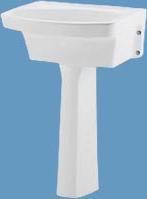
The problem in the case of the sink was one of scope. A particular utility sink was far too specific a subject for a tutorial (although I was very glad to help you with it, Edson, and please feel free to pose more such requests), and "curvy thingy" far too general. A tutorial should present one or two basic principles distilled down to their essentials, so they can be adapted and applied to a variety of particular applications. Our mentor Jean Lemire, of course, is a master at this.
Perhaps I will go back to the sink and try reducing it down to a few basic geometric elements, without getting hung up on specific features and proportions, which is what I allowed to derail me. As to whether a scene-based .skp or a series of screen shots is more appropriate, I think, depends on whether it is the geometry itself or non-persistent display elements that are more important to the subject of the tutorial.
-Gully
Great job Gully,
and darn close!
ezk
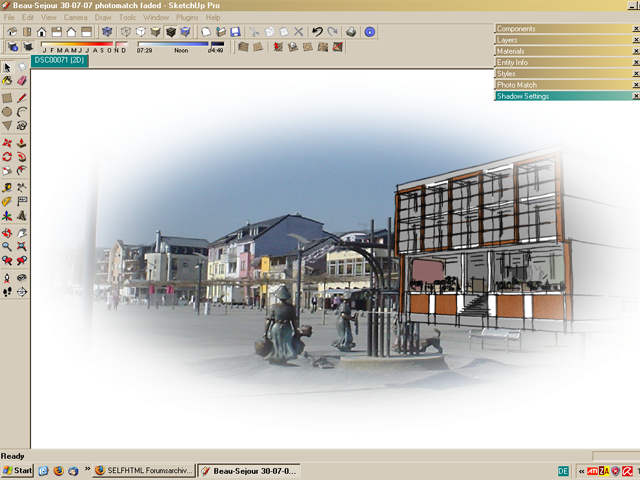
I actually played with the Style-Edit-Option and figured out an easy way of fadeing out a scene directly in sketchup. It's probably not the best of creativity, but maybe someone's out there, who finds it helpful.
What you need is a program like photoshop, that saves pictures with transparency and gives the possibility to fade.
First, start a new file in Photoshop, lets say in 1024 X 860 pixels.
Then fill the background with any color, in this case black.
Add a new "layer" (i think it's layer, i use a german version, there's called "Ebene"), which is usually white.
Use the circle-selection tool to select a circle in the size of the spot, which should be transparent at last.
After, use "change selection" (german: Auswahl verändern) in the "selection" menue. The lowest option there should be something like "smooth edge" (german: Kante glätten).
Use it with e.g. 50 pixels.
Then press delete.
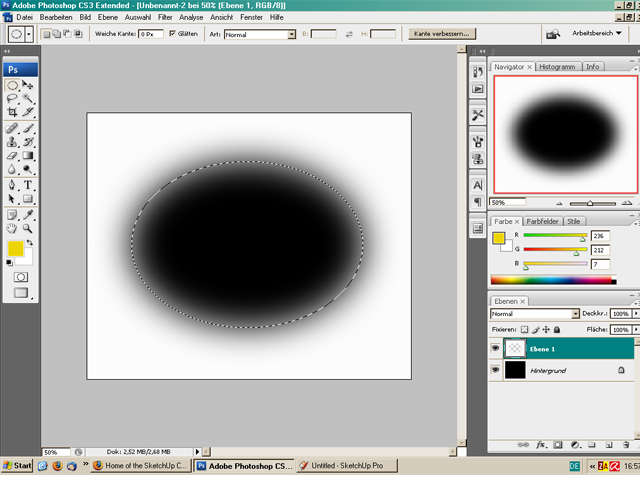
Now you see the black background fading into white edge.
Delete the layer with the background. There is only a white circle fading into transparency left.
Save this file as e.g. a *.png (with option "interlaced turned on).
Now revert back to Sketchup and open the styles menue. Choose the style you want to combine with this white circle.
Then click on "edit" (in styles menue) and go to watermarks. Open your *.png file and follow these steps: Add watermark (plus), overlay (next>>), (next>>), positioned in the screen(finish).
Here you go, enjoy!
Hope this was useful, greetings diameter
poster-diameter
Well Edson, I'm very glad the model serves your purpose.
You know, I actually did start out to make it a step-by-step tutorial, but I kept changing my mind about how to go about it or realizing I had forgotten to do something in an earlier step. So after going back and reworking the previous steps a few times, I said, "Screw this, I'll be lucky to get one copy of this thing right, much less a half dozen," whereupon I just worked on a single instance of the model, abandoning the idea of capturing a neat progression of stages in progress.
I'd like to say there was some special trick method, but really it was a combination of pretty much the whole tool kit. Starting with a rectangular block (and leaving the pedestal for last), I scaled the bottom surface down to impart the taper. The angle of the taper is one of the things I kept going back and fiddling with. Then I intersected a pair of perpendicular planes with a fillet radius between them with the block to divide the upper from the lower part of the basin and scaled the lower part down to recess it from the upper part in the front and on the sides. Did I mention that I worked most of it as a symmetrical half?
The fillet radius all around between the upper and lower parts was of course done with the Follow Me tool, with quite a bit of fiddling and hand-stitching to make up for some of its deficiencies. Naturally I ran into the inevitable defect in the surface of the spherical radius produced by running a fillet radius around a curve and had to stitch that up.
I Push/Pulled the basin down into the block, scaled the bottom to taper it, and used Follow Me again around the bottom. The grooves on the top front and the soap depressions are self-cutting components.
I knew (or guessed) that the pedestal was U-shaped in section instead of rectangular, since I just happen to have a pedestal sink in my spare bathroom whose pedestal looks just like that. I drew a half circular face on the ground plane, scaled it unidirectionally into a parabolic shape, and Push/Pulled it to about two-thirds of its height. Then I P/P'd several short segments using the Ctrl key and scaled them to achieve the waist.
Without turning this into a novel, that's pretty much it. I left out various scaling and push/pulling and so forth, but I'm sure you get the idea.
Maybe next time I try to make a step-wise tutorial, I'll get my $hit together enough so I don't have to end up explaining in words what would be more effectively demonstrated.
-Gully
Edson,
This is probably pretty close, although I cheated on the front a bit--the transition from an inside corner to a radius, especially going around a curve, is too time consuming. Also, I wasn't terribly finicky about all the dimensions.
Anyway, we can discuss the method if you wish.
-Gully
The model:
http://sketchup.google.com/3dwarehouse/details?mid=285a4b1b5a6788d3992b81423e36d93d
Images:


(Gully Foyle)
Edson,
this would be my approach:
Trace only as much as you have to. Make use of tangent arcs. The pedestal is a simple intersect. Here we note already we don't have enough info. A pedestal has no sharp corners. The outside of the 'bowl' is a simple follow me. The profile is shown in the section. The inside requires some guess work. Is it a round bowl or square and rounded? What are the elavations? Is the 'washboard' level or sloped? A picture would help. All together it would make a good tutorial.
Before my next post I'll read about Kdjanz' site.
ezk
Forgot to mention that this would be the time to scale it to proper dims and and check the minor dims also
(ezk)
Edson,
I know you didn't give up, you just postponed. May I recommend you check http://www.us.kohler.com/tech/cadsymbol/cadsymbol.jsp
and see how it's done more than 800 times (dwg,dfx).
Import a file and fix it.
Reduce the file size (components!,combine polygons, simplify)
Change a minor design feature. Get bolder and bolder.
And you are on your way!
ezk
Hehe - I can see why all of those examples are bad… now we just need some examples that are good or innovative 
poster-Ampa
No matter how long I looked at a baseball, I could not figure this curve. But I had a fine tailor's tape and measured the longitudes at intervals. Luckily I had to measure less than 1/8 th of the ball.
a mathematical approach:
http://www.darenscotwilson.com/spec/bbseam/bbseam.html
a good aproximation: http://www.cadcourse.com/winston/Baseball.html
ezk

http://www.sketchucation.com/forums/scf/sas/Tutorials/ezk/my%20baseball%20seam%20curve.skp
(ezk)
Well Mike, I was the oldest out of 35 people but I say age is just a state of mind and some of the youngsters struggled a lot more than me.
Gaieus; it wasn't my legs that hurt but where I met the saddle!!
(we also raised £37K for cancer charities).
Gerry
(anothereye)
Thanks for asking Eric,
The most recent picture of me: I'd just cycled from San Sebastian To Barcelona: 470 miles/755 Kilometres in 6 days. It was a great week.
Gerry
(anothereye)
No problem. It was text only at first. I made the pdf in, you guessed, LayOut.
Gerry
(anothereye)
I posted this a few months ago on the SU forums so here it is again:
Whilst it's written for beginners; I got some good feedback from a few old hands who learnt something from it.
preview of tutorial...
"MY SKETCHUP BASICS"
by Gerry Platt, London, England:
"Whether or not you've ever used
SketchUp before; follow this little
tutorial and you will learn a few
things that will make a big difference
to your modelling in the future. It
combines tips from other users along
with a trick or 2 that I've discovered
myself. I use this method every time.
Before I discovered it I got myself in
a mess from time to time, now I
don't. Once you understand the
reasoning behind this method you
can adapt it to your own needs.
I'm only familiar with the SU pro Mac
version but, to the best of my
knowledge, this tutorial is universal
(please let me know if it is not)."
(anothereye)
very nice work. thank you for the inspiration
Marc