sketchucation logo sketchucation
    • Login
    1. Home
    2. N1LESH
    3. Posts
    Oops, your profile's looking a bit empty! To help us tailor your experience, please fill in key details like your SketchUp version, skill level, operating system, and more. Update and save your info on your profile page today!
    Sketchucation Tools 5.0.7 | Licensing improvements and bug fixes Learn More
    N
    Offline
    • Profile
    • Following 0
    • Followers 0
    • Topics 4
    • Posts 7
    • Groups 2

    Posts

    Recent Best Controversial
    • nEVEn – Looking for Beta Testers & Feedback

      Hello everyone,

      I'm Nilesh, an architect and SketchUp extension developer.

      I recently released nEVEn, a SketchUp model diagnostics and performance tool focused on identifying heavy geometry, large textures, viewport bottlenecks, and general model health issues.

      I'm looking for 5–10 active SketchUp users willing to test it on real projects and share feedback.

      Any feedback, suggestions, bug reports, or real-world usage insights are welcome.

      Website: n1leshtools.com

      Thanks,

      Nilesh

      posted in SketchUcation Community Forums extensions plugins architecture
      N
      N1LESH
    • [RELEASE] nEVEn v4.34 — Completely Offline SketchUp Intelligence Protocol & Stability Suite

      Hi everyone,

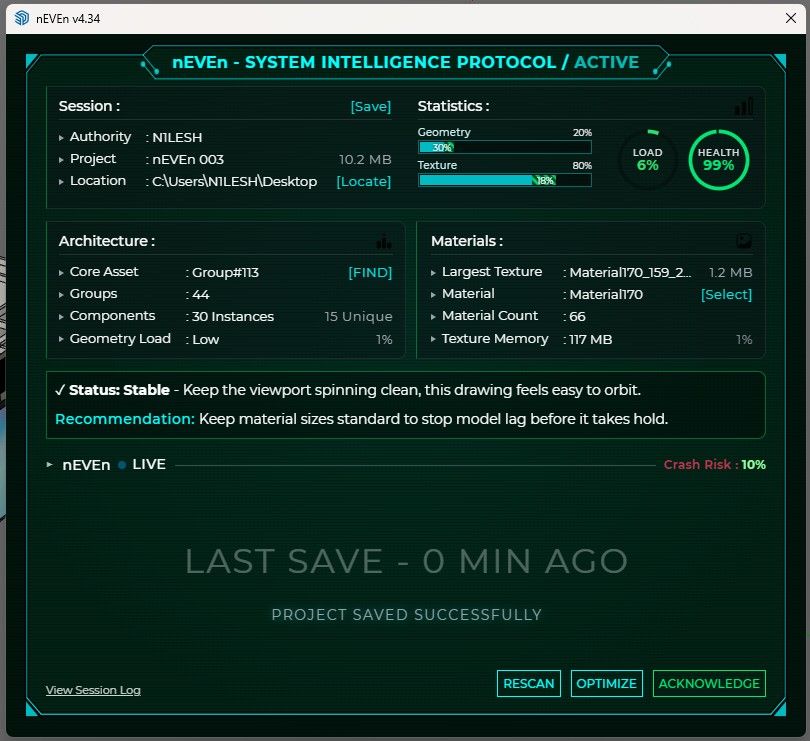
      nEVEn (v4.34) is officially live. It acts as a 100% offline diagnostic layer right inside your model to prevent viewport freezes and crash anomalies before deadlines.

      ui_critical_state.png ui_find_targets.png ui_optimize.png ui_rescan.png ui_stable_state.png

      Quick Specs:
      • Hardware-Aware Limits: Tracks your model’s memory strain based on your actual system specs.
      • Tactical Status Alerts: Simple Stable, Caution, and Critical status overlays keep you ahead of crashes.
      • Absolute Privacy: No forced cloud connections, zero background tracking data.

      Trial & Purchase:
      A fully functional 14-day free trial triggers automatically on your first run. No account registration or keys required.

      • Official Link: www.n1leshtools.com
      • Early Access: $20 (Lifetime node license via Gumroad, Lemon Squeezy, or Razorpay).

      Let me know your feedback or edge-case bugs right here.

      Best regards,
      N1LESH

      posted in Extensions & Applications Discussions
      N
      N1LESH
    • RE: nEVEn - FIND TARGETS | Locate Heavy Objects & Textures in SketchUp

      @Rich-O-Brien
      Thanks, Appreciate the heads-up.👍

      I’m currently polishing nEVEn before the Extension Warehouse release. More screenshots and workflow demos coming soon.

      posted in Plugins
      N
      N1LESH
    • nEVEn - FIND TARGETS | Locate Heavy Objects & Textures in SketchUp

      Find why your SketchUp model is slow or crash-prone.

      nEVEn - FIND TARGETS
      Built for architects, interior designers, and heavy SketchUp workflows.

      This demo shows how nEVEn locates heavy model assets inside a real SketchUp file:
      318MB project → reduced to 180MB after cleanup.

      Features shown in this video:
      — FIND TARGETS
      — heavy texture detection
      — heavy object detection
      — key impact area review
      — model health scan
      — session logging
      — manual cleanup workflow
      — purge + re-scan
      — save system
      — automatic monitoring

      Running on SketchUp 2026.
      Coming soon on Extension Warehouse.

      Feedback welcome.
      Contact: [Redacted]

      — N1LESH

      posted in Plugins
      N
      N1LESH
    • RE: nEVEn — System Intelligence Protocol for SketchUp | Coming Soon

      @Rich-O-Brien Hi Rich — noted. I’m putting proper documentation together, will share it at launch.

      For now, each parameter already has a tooltip inside the UI explaining what it represents.

      — N1LESH

      posted in Extensions & Applications Discussions
      N
      N1LESH
    • RE: nEVEn — System Intelligence Protocol for SketchUp | Coming Soon

      Hi panixia — good questions.

      These % are not fixed numbers. nEVEn reads your system RAM and sets limits based on that, so everything is relative to your machine.

      Geometry Load → model complexity (entities, nesting, instances)
      Texture % → how much of safe texture budget is used
      Crash Risk → combined signal from geometry + textures
      Health → overall stability score

      So 100% means you’re hitting your system’s safe limit, not a universal value.

      Also, each metric has a tooltip in the UI explaining what it represents.

      Will share proper documentation at launch.

      — N1LESH

      posted in Extensions & Applications Discussions
      N
      N1LESH
    • nEVEn — System Intelligence Protocol for SketchUp | Coming Soon

      Hi everyone,

      I've been developing a new SketchUp plugin called nEVEn —
      System Intelligence Protocol.

      It monitors your model health while you work — geometry load,
      texture memory, crash risk, and gives you actionable
      recommendations per session.

      Designed for architects and interior designers working
      with large, complex SketchUp models.

      Features :
      — automatic model health monitoring
      — crash risk detection
      — texture optimization
      — session logging
      — find targets
      — purge and save workflow
      — geometry cleanup
      — & more...

      This video shows a live texture optimization session
      on a real project — 183mb reduced to 10mb.

      YouTube : https://youtu.be/RjmF1os6b80
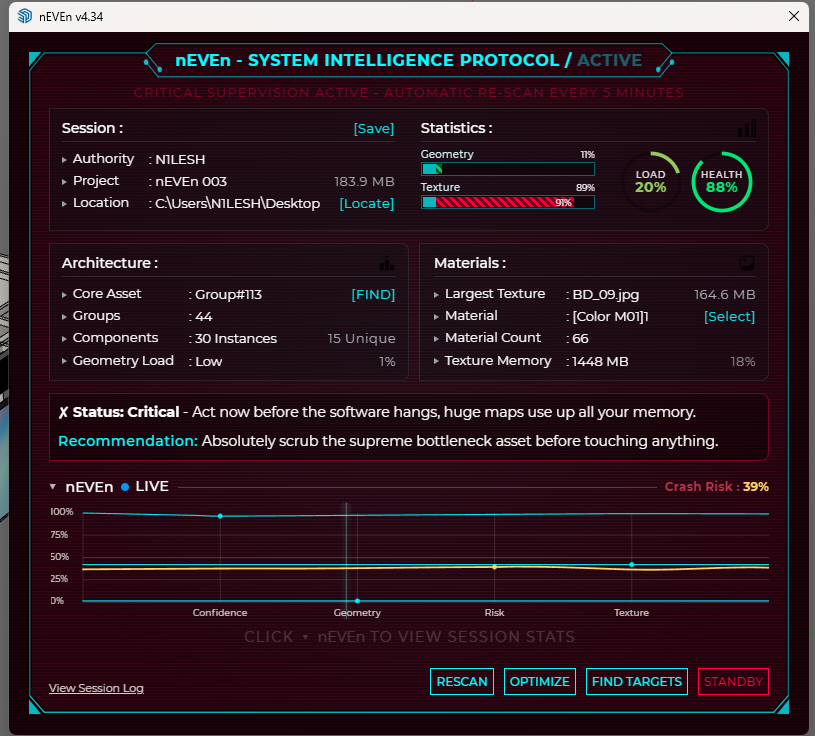
      Screenshot 2026-05-02 105206.png ae6244f1-86f6-42a6-b178-02056b0371d8-image.jpeg

      Running on SketchUp 2025. Coming soon on
      Extension Warehouse.

      Feedback welcome.
      Contact : Arnilesh@outlook.com

      — N1LESH

      posted in Extensions & Applications Discussions
      N
      N1LESH
    • 1 / 1