Hi everyone,
We’ve all been there: you import a complex DWG or work on a large-scale project, and suddenly your file size explodes. Often, this is caused by hundreds of identical geometries existing as unique groups rather than instances of a single component.
To solve this, I’m excited to share MBOS DEDUP2.

What is DEDUP2?
DEDUP2 is a specialized optimization tool that scans your model (or a specific selection) for "geometrical fingerprints." It identifies identical or highly similar geometries—even those buried deep within nested groups—and replaces them with instances of a single component definition.
Key Features:
Recursive Deep Scan: It doesn't just look at the top level; it digs through nested hierarchies to find duplicates.
Geometrical Profiling: The plugin analyzes faces, edges, and proportions to identify matches, regardless of the object's name.
Hierarchy Preservation: Your model structure remains intact—only the efficiency is improved.
"Safe Replace" Logic: Use the "Replace " button to swap objects where the match is 100% certain, minimizing risk.
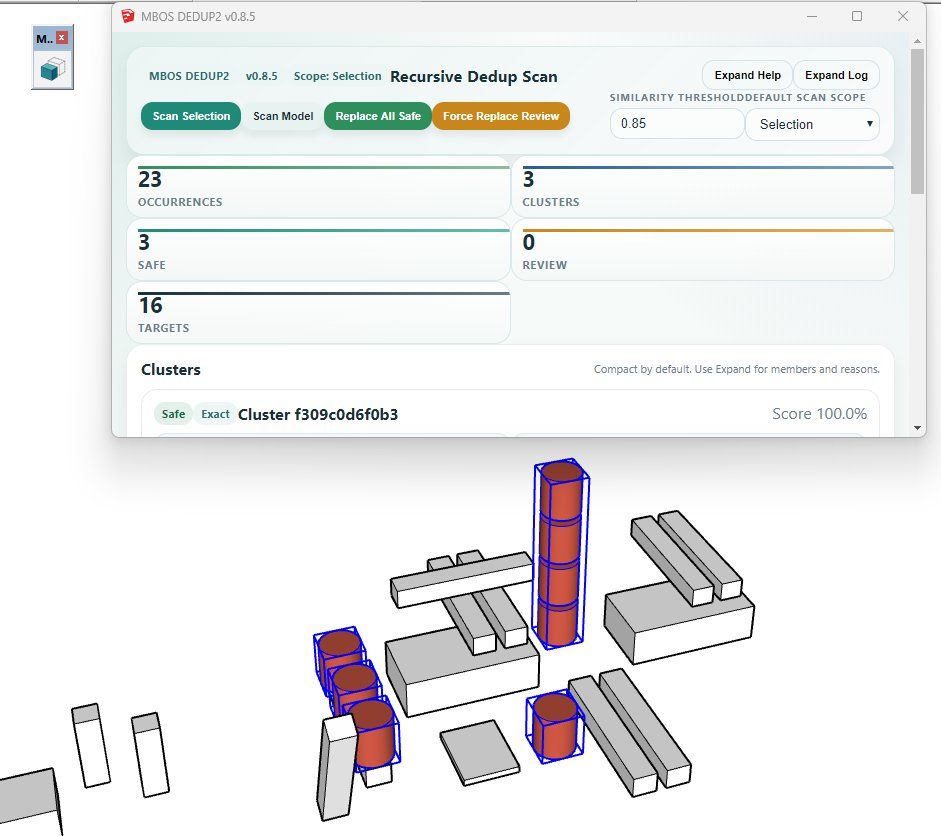
Modern UI: A clean HTML5 dialog window with a real-time execution log.
Native Feel: Includes a dedicated toolbar for a seamless workflow.
Quick Start Guide:
Select & Scan: Select the "problem area" or the whole model and hit Scan Selection.
Review: Check the dialog window to see how many duplicates and "geometrical fingerprints" were found.
Optimize: Click Replace Safe to let the plugin work its magic and watch your file size shrink.
Technical Details:
Version: 0.8.5
Compatibility: SketchUp 2019+
I’d love to hear your feedback, bug reports, or feature requests! You can find the .rbz file attached below.
Happy optimizing!
DOWNLOAD:
MBOS_DEDUP2_v0.8.5.rbz