[PLUGIN] MBOS DEDUP2 v0.8.5 – Optimize your models by deduplicating geometry!
-
Hi everyone,
We’ve all been there: you import a complex DWG or work on a large-scale project, and suddenly your file size explodes. Often, this is caused by hundreds of identical geometries existing as unique groups rather than instances of a single component.To solve this, I’m excited to share MBOS DEDUP2.

What is DEDUP2?
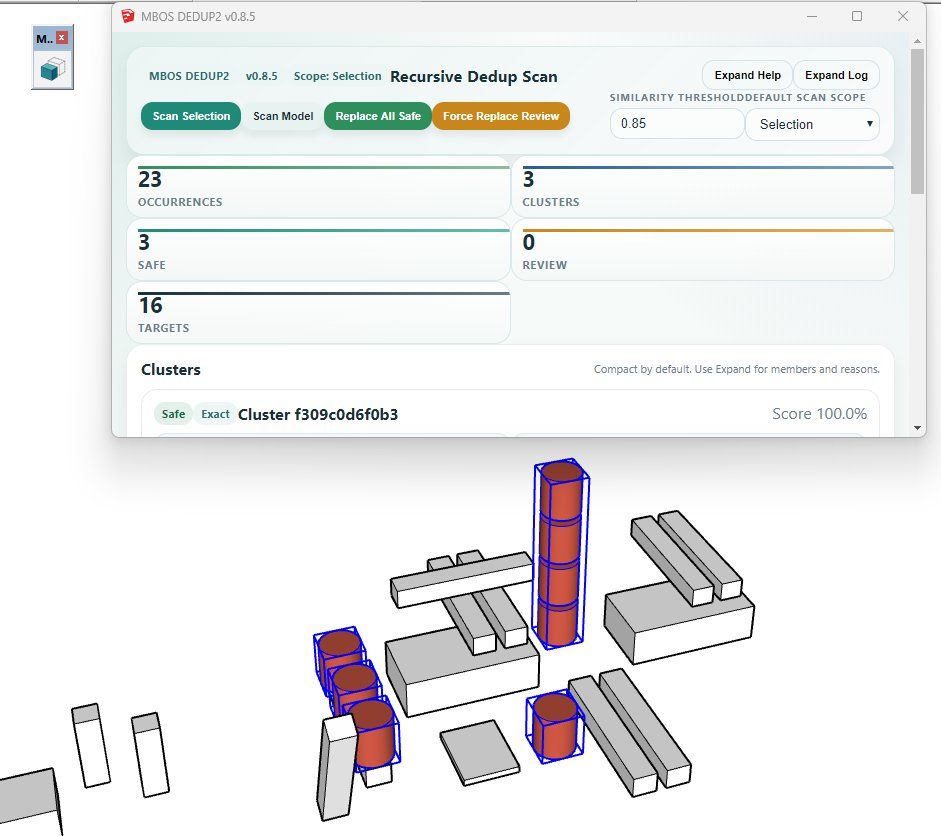
DEDUP2 is a specialized optimization tool that scans your model (or a specific selection) for "geometrical fingerprints." It identifies identical or highly similar geometries—even those buried deep within nested groups—and replaces them with instances of a single component definition.Key Features:
Recursive Deep Scan: It doesn't just look at the top level; it digs through nested hierarchies to find duplicates.Geometrical Profiling: The plugin analyzes faces, edges, and proportions to identify matches, regardless of the object's name.
Hierarchy Preservation: Your model structure remains intact—only the efficiency is improved.
"Safe Replace" Logic: Use the "Replace " button to swap objects where the match is 100% certain, minimizing risk.
Modern UI: A clean HTML5 dialog window with a real-time execution log.
Native Feel: Includes a dedicated toolbar for a seamless workflow.
Quick Start Guide:
Select & Scan: Select the "problem area" or the whole model and hit Scan Selection.Review: Check the dialog window to see how many duplicates and "geometrical fingerprints" were found.
Optimize: Click Replace Safe to let the plugin work its magic and watch your file size shrink.
Technical Details:
Version: 0.8.5Compatibility: SketchUp 2019+
I’d love to hear your feedback, bug reports, or feature requests! You can find the .rbz file attached below.
Happy optimizing!
DOWNLOAD:
MBOS_DEDUP2_v0.8.5.rbz

Hello! It looks like you're interested in this conversation, but you don't have an account yet.
Getting fed up of having to scroll through the same posts each visit? When you register for an account, you'll always come back to exactly where you were before, and choose to be notified of new replies (either via email, or push notification). You'll also be able to save bookmarks and upvote posts to show your appreciation to other community members.
With your input, this post could be even better 💗
Register Login


Advertisement