sweet... awesome shot too...
Oops, your profile's looking a bit empty! To help us tailor your experience, please fill in key details like your SketchUp version, skill level, operating system, and more. Update and save your info on your profile page today!
🚨 Skimp | 25% Off until March 30 Buy Now
 Offline
Posts
-
RE: [Tutorial] Smooth Animations from Sketchup - WIP
fantastic Paul... thanks.
-
RE: How to animate a sliding door
Rock N ROll Ain't Noise Polution...
I've seen this before, thanks for bringing it over... this is just what we're looking for...
-
RE: [Tutorial > Modeling] Saving time by reusing completed works
I used to work for a professional or commercial millwork company, and we did the same thing, we had certain details that we would reuse over and over...
can't wait to see what you've come up with....
Edson, Nickw just started this a few days ago, so maybe we can get him to upload some of these gems.
-
[Tutorial > Modeling] Saving time by reusing completed works
when building models, there are certain tasks that are repeated and repeated, especially in building models of houses. we make components of some of these things to save time, things like windows and doors, furniture and cabinets. but often there are other things that we use repeatedly that could also be components. such as rafter-tails, gabled ends, and even ridge saddle... at each pitch a different roof becomes a valuable time saver if reused. so here is a little tip on how to build some alternative component libraries. you can use this method on lots of different areas of buildings.
- make a small box in your model... say 5'x5'x5'...
- now make it a group.
- now move it to each corner of your roof, and envelope the entire corner of the roof, the rafter tail, the soffit, the facia...
- next, use the cut command to cut the box out of the model.
- next open your "roof" group or component.
- now, use the Edit>Paste in Place command. this will put the box back in the model exactly where you cut it from.
- now, select all of the corner of the roof, the box the roofing the soffit all of it.
- next, right click and select intersect all selected.
- now select all the corner again, and right click, select create component.
- next, right click again on the new component, select saveas... navigate to your component library inside of the Sketchup folder. then navigate to the Roof area in Construction. and save this corner roof as "Gable_End_Pitch_8_12_w_Wrap" or whatever you want...
now you'll have this little corner in your roof component library, and if you do this on each corner, every time you make a roof, soon you'll have a little library of awesome roof corners, which can be then inserted and entire roofs extended from them.
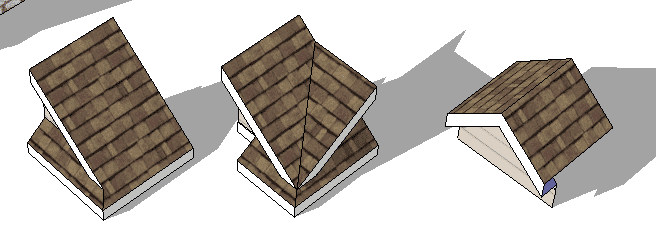
here is an example from NickW,with some sweet little roof details.
-
RE: [Tutorial] Import custom images as permanent new materials
Excellent... thanks soo much for the contribution.
-
RE: [Tutorial] Selfmade Faded Style, White Background
I think this is a Scene Tut.
-
RE: [Tutorial] Selfmade Faded Style, White Background
thank you... very nice.
-
RE: [Tutorial > Modeling] Wanted: tuts on curvy thingies
remember how we discussed using the sandbox? this is a perfect example of a time to use that to make your corners or sides...
-
RE: [Tutorial > Modeling] Wanted: tuts on curvy thingies
edson,
imagine you are a sculptor... start with a block and chamfer and follow along a path, and intersect with model... until you have achieved the shape you want...
hope this helps until a tut is added...
-
RE: Poor Tree Placement
Susan looks like she's pondering something interesting in her new pic...
-
RE: [Tutorial > Modeling] Baseball Seam Curve
very impressive sir... not much in sketchup I can't or won't do... that is one of them...
-
RE: [Tutorial > Modeling] My SU basics
nice lil Tut there... would you mind if I posted some of the text here in the forum, so that people using our search function might find it later on down the road?
-
RE: Exporting to ACAD...lost lines
the only fix I have found is exporting in AutoCAD R14 mode
-
RE: [Tutorial > Modeling] dome with pendents and latern
that is soooo sweet Gai... love it...
-
RE: Send a message to Google: Hire CraigD now!
Craig has requested no more E-mails to Google Corporate... so I'm going to lock this thread so that everyone comes to this end.
I'm sure I speak for the whole forum in saying that we're behind you 100%. and we'll be anxiously awaiting word on a decision. good luck.
and again...
PLEASE NO MORE E-MAILS TO GSU CORPORATE
Krisidious
-
RE: Send a message to Google: Hire CraigD now!
done...
"I'm with you boys"
as said in
"Oh brother where art thou"
Krisidious
-
RE: Sketchy Materials
Styles are few and far between... hopefully someone will post some new ones soon