Hi guys
Ive been enjoying the forum for a while as a new sketchup user and found solutions to many of my problems. Though I couldn't find anything about this:
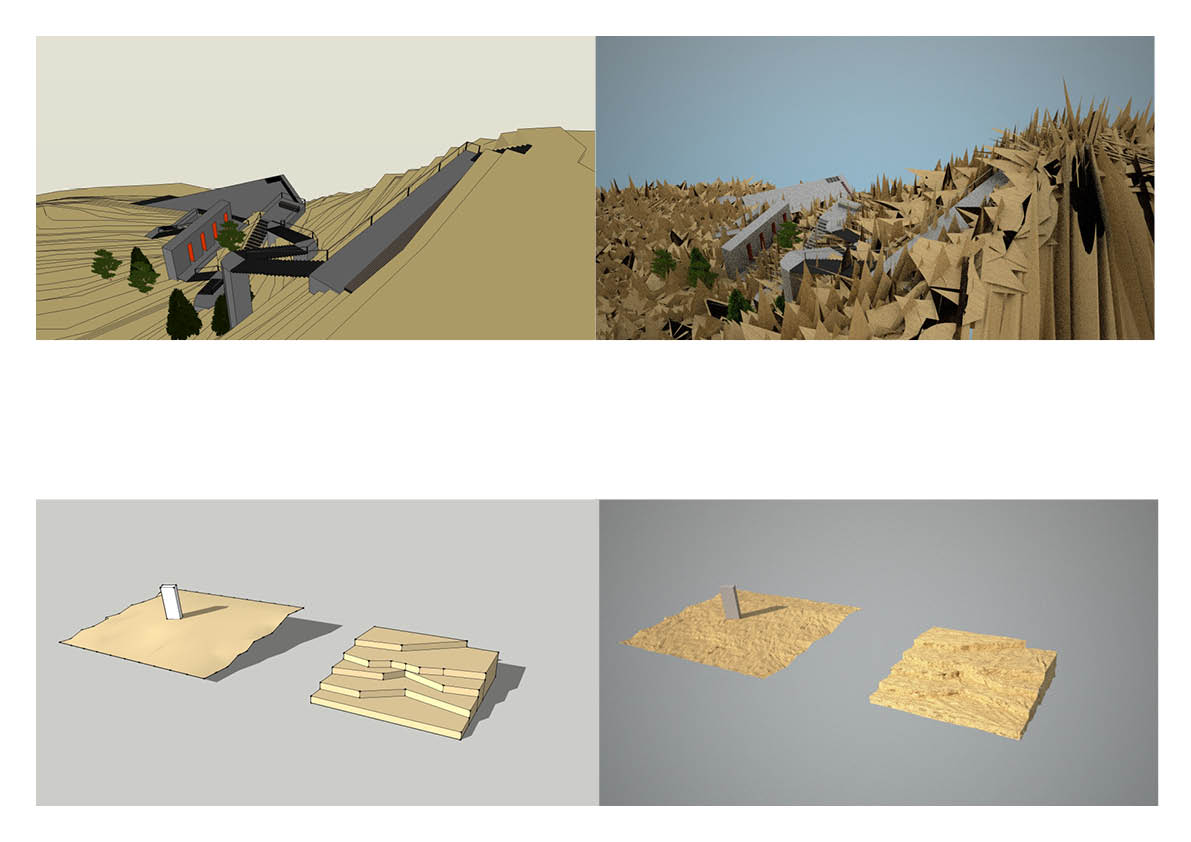
Ive created a landscape by importing lines from a .ai file with the "contour hight lines" (sorry I don't know what its called in english) of a small island, created surfaces between the lines and then used the push/pull tool to drag each "ledge" up in 50cm intervals.
Used the paint bucket (1clicking the group) to cover it in a color and assigned a .mxm sand texture to it with maxwell. Though when I export and render, it gets, uhm... a bit messy. I kinda like the abstract look of it, but it doesn't really show my landscape as it is 
Using the sandbox "from contours" tool was quite disappointing since it all gets so sharp.
Heres the sketchup+render pictures
(i tried to make a small landscape in a separate file and that works just fine)
Any ideas what it might be and how to clean it up? Also any tip on making a smoothe landscape for renderings or is sketchup just not meant for that?
Thx !
the 1. year arch student....