
sketchucation logo sketchucation
    • Login
    1. Home
    2. JClements
    3. Posts
    Oops, your profile's looking a bit empty! To help us tailor your experience, please fill in key details like your SketchUp version, skill level, operating system, and more. Update and save your info on your profile page today!
    πŸ”Œ Smart Spline | Fluid way to handle splines for furniture design and complex structures. Download
    Offline
    • Profile
    • Following 0
    • Followers 0
    • Topics 196
    • Posts 918
    • Groups 1

    Posts

    Recent Best Controversial
    • RE: REQUEST: Color Front Faces in Group or Component

      How do you propose to determine the 'material' to be used for the [selected front-faces?]
      I think the simplest way is for the user to be required to pre-select the color they want to use by choosing a color in the Materials windows.

      Then run the script.

      A. The script would use the color chosen by the user and create new color by copying it and adding a custom suffix or prefix to the name so it could later be identified to assist in reverting all surfaces with that color, if desired, back to the default front face color.

      B. I would be happy to manually turn on monochrome style before running the script to assure the front faces are oriented properly, but I suppose if you want to build that in as feature when the script is run that would be up to you.

      C. Perhaps the Paint Bucket cursor would appear and the user could paint the selection
      or the script would just automatically apply the color to the pre-selection

      Is this tool used on a selection of components/groups, or more globally on all such 'containers ?
      The user would have to do a pre-selection of geometry (if there was nothing selected a message would occur to notify the user to make a selection and run the script again). The script would disregard components/sub-components found in a pre-selection. If inside an entity which contains subgroups, then a pre-selection of objects would still be required and pertain only to that pre-selection and its subgroups.

      D. Hopefully, the user could use Ctrl-Z to undo the changes immediately after the script has run.

      What about badly modeled geometry with textured back-faces etc ?
      They would not be considered. Note: Trimble Connect currently can not render texture or patterns with transparency either.

      As far as the logic for nested components goes I see why it would be very tricky.
      I'm thinking that I could get by with only the un-painted front faces within nested groups being affected. I not sure, now that I have read your posting, that we want to include the faces of nested components as it could have unexpected results. Perhaps that is something that could wait for later on and add in if really needed.

      For reverting the painted front faces back to the default front face color, could a script then search recursively for any geometry with the custom color name (mentioned above in Step "A.") and replace them with the default front face color? The user could then manually purge the custom color.

      posted in Plugins
      JClementsJ
      JClements
    • REQUEST: Color Front Faces in Group or Component

      I am working with a client who would like to manage our modeling project using Trimble Connnect (TC).
      We have done some testing and it seems TC will only display colored-Front Faces (FFs). The color MUST be painted DIRECTLY onto a FF, groups or components with a color applied to them will not display that color when the model is published to TC.

      ? Could someone develop an extension that would automatically paint any FF which have the default color?
      It would be able to drill into subgroups/subcomponents and paint the FFs including smoothed-FFs.?

      Note: I tried the Repaint Face script (by Clark Bremmer) but it can not paint all the facets of a smoothed surface at once.
      ? Also, if possible, have a way to extract a FF color from within groups/components without editing (opening) them, remove the color from those FFs, and use the extracted color as the active color for the Paint Bucket tool. The reason for this is that the coloring or rendering requirements of a model could change as the project project evolves. I don't want to drill into the subgroups/subcomponents and manually remove and repaint each FF of a specific color; I would rather be able to just repaint the parent group/component. This could be a separate script or an option of the painting script, whatever be the easiest to develop/maintain.

      posted in Plugins
      JClementsJ
      JClements
    • RE: [Plugin] Add Height from Datum

      Thanks, TIG.
      I guess my age status/memory was playing tricks on me. :}

      Also, what works is assign a shortcut key to "Make Selected Text Dynamic" and the Text tool.
      Draw a label. When finished and the Text tool is still active, pass (and keep) the cursor over the leader to select it and then use the shortcut for "Make Selected Text Dynamic".

      .... I don't suppose a script could do something similar, could it? Add Datum would start the Text Tool and also an observer of some kind which looks at Text tool activity. When the user completes the label, it is selected and the "Make Selected Text Dynamic" is applied.

      posted in Plugins
      JClementsJ
      JClements
    • RE: [Plugin] Add Height from Datum

      Hi TIG:

      When using SU2018 there seems to be a glitch. The starting point of the leader for the elevation label is no longer "sticky" (if the surface or end-point to which leader is pointing is pushpulled or moved, the leader doesn't move with it).

      However, when "Make Selected Text Dynamic" is applied to a regular leader text, the leader of the converted text IS "sticky".

      Regards, John

      posted in Plugins
      JClementsJ
      JClements
    • Todd Burch (of Smustard) ???

      Has anyone heard from Todd Burch within the last few days ???

      If I remember correctly, he lives in Katy, Texas which is in the flood zone.

      posted in Plugins
      JClementsJ
      JClements
    • RE: Wish list for Sketchup 2018

      Give the ability to enter Latitude and Longitude coordinates using the same formats found in Google Earth.

      posted in SketchUp Feature Requests
      JClementsJ
      JClements
    • RE: Wish list for Sketchup 2018

      Since many Toolbar titles are too long to be displayed in their Titlebar, allow a right-click on the Titlebar to display the full title besides the cursor.

      posted in SketchUp Feature Requests
      JClementsJ
      JClements
    • RE: [Plugin] FredoTools - v4.5c - 24 Jun 24

      Divide Edges (DE) is a nice new addition to your toolset. Thank you!

      Perhaps a version of DE could be adapted to produce dashed lines? When selected only an ODD number of segments would be available, then every-other-segment after the first segment would be deleted or hidden (not sure which would be the best to go). Maybe it could be "parametric" in the sense that the user could restore the original at later time and apply and different number of segments.

      posted in Plugins
      JClementsJ
      JClements
    • RE: [Plugin] Curve Maker v1.2.2 - 7 March 2011

      Try the attached. Hopefully it contains all the required files.


      ctsMaker.zip

      posted in Plugins
      JClementsJ
      JClements
    • RE: Wish list for Sketchup 2018

      LAYER MANAGER
      The Layer Manager organizes geometry for user convenience which it does well. However, SU is being used for a variety of different purposes by so many people/disciplines.

      I feel Layer Manager redesign needs to be a primary target of SU 2018. It could alleviate a lot of frustration for many users and facilitate modeling efficiency.

      My contention is that it needs to be far more flexible/configurable, with hooks in the API that will allow developers to do their thing.

      So, trash the UI.
      Use the Spreadsheet paradigm. The current fields/columns would would remain the same (and perhaps unconfigurable ?) so that templates and models from previous versions would remain in tact.

      The UI would be user modifiable. New Columns could be added which could be assigned properties which could be sorted alphabetically, numerically, etc., for instance: a project phase assignment and I suspect many other useful category designations needed for different disciplines.

      Column order would be changed by merely dragging column headings with the mouse. They could be assigned a background color. Perhaps styles could be assigned to columns which could be toggled on or off for specific layer(s).

      Layers could have sublayers ( a sublayer "level" would be assigned as a "child" column with the ability to control the indentation of each child column by allowing the user to drag the sublayer column borders sideways).

      Layers could be put into groups (for 4-d construction phasing, progressive disclosures, project phasing, assigning the background color of layers in the Layer Manager. Layer Groups could be used to override certain properties of the layers contained within them. Layer Groups (and layers) could be manually reordered by dragging the layer vertically

      Layers could be locked.

      There would be a SOLO MODE for layers. When toggled on to Solo Mode, all other layers would be temporarily hidden. This would facilitate editing of complex models and quickly verifying that geometry has been assigned to the proper layer.

      I guess you could consider this suggestion to be a Data and Geometry Management system with a Layer Manager contained within in it.

      posted in SketchUp Feature Requests
      JClementsJ
      JClements
    • RE: [Plugin] Add Height from Datum

      TIG, first of all, thank you!

      Three suggestions for an update:

      1- Would it be possible to add to the submenu, an option to specify a new (or existing) layer the leader text would automatically be assigned too?

      After using the plugin, a lot for all these years, I find that the text can get in the way at times but is still is required. So being able to turn it off for certain scenes via the Layer Manager is the answer ... but I often forget to change layers before using the plugin.

      2- Ability to add prefix-text to a leader's text with descriptors such as "TOS" (top of slab) or "Pipe Invert" . That text would remain even if attached to geometry that is moved but could later be edited manually by the user.

      3- Instead of creating the leader with a mouse-click, have it created via click-and-drag. With the current version, many times I have to adjust the leader's position with the text tool immediately after placing it with the mouse-click.

      posted in Plugins
      JClementsJ
      JClements
    • REQUEST: SketchUcation Plugins and Extension Managers

      Could there be a print-list and/or copy-list-to-file function in their UI's?

      posted in Plugins
      JClementsJ
      JClements
    • Getting Rid of Duplicate or Similar Colors in Model ?

      I did a search for "color" via the SketchUcation Extension Store but did not find anything that related to my problem

      When I examined the colors in my model, there a some colors/textures that appear to be duplicates (with different names) or are very similar or obviously not needed. I'd like to be able to replace those with just one color.

      Is there a way to search for and select surfaces by color?

      Better yet, first have a means to output the number of usages of each of the model colors then, based upon that search, replace those colors that have a low usage.

      posted in Plugins
      JClementsJ
      JClements
    • RE: [Comment] Holiday Cheer!

      And a big thanks to SketchUcation for all they do!

      posted in Plugins
      JClementsJ
      JClements
    • New Mac Book Pro graphics?

      I believe that Intel graphics has been an issue in the past for SketchUp.
      Does anyone have any info whether this would still be an issue with the new MacBook Pro?

      posted in Hardware
      JClementsJ
      JClements
    • RE: Looking for good graphics program

      Also check out Affinity Designer. $39.99
      https://affinity.serif.com/en-us/designer/

      MAC and Windows versions.

      posted in Corner Bar
      JClementsJ
      JClements
    • Question for Whaat regarding Place Maker

      Hi Dale:

      Pretty impressive "preview" video. Thanks for publishing it.
      YouTube Video:
      https://www.youtube.com/watch?v=Pa_bZE4ljbQ%26amp;feature=em-uploademail

      Some questions:
      1- If, for example, you were to open the Manhattan Model at a later date and needed to expand the site area, will the plugin be able to "remember" the original area's boundaries and other settings so that the added areas would be seemless with the original?

      2- How would the data be imported relative to the SU model's origin? Can you determine the where model's original would be from inside the "grab" UI?

      3- Since you are able to control/sync the camera in Street View could there be a way to use your algorithm to determine the height of buildings in Street View? For example, go to a residential area in Street View and click on base of a house and then the ridge of roof.

      posted in Plugins
      JClementsJ
      JClements
    • RE: Looking for good graphics program

      Might want to checkout Xara. http://Www.Xara.com. I gave up on Corel.
      It has a good core of basic drawing tools which, when combined, can produce cool results. The tools are interactive (Corel attempted to copy most of Xara's interactive tools with v7 but couldn't replicate Xara's ease of use and speed). Can do a multitude of things. There are different products from the less expensive to the full blown Pro Designer.

      Originally developed in the UK for Acorn computer in 1981, by Charles Moir ( https://en.wikipedia.org/wiki/Xara ) one of the very first vector graphics apps, no MAC version. I started using it on my 386 PC's and haven't stopped since.

      Lots of movie-tutorials on their website and at Gary Pristers' XaraXone
      http://site.xaraxone.com/gary-w-priester/

      What some artist's have produced with it: http://www.xara.com/us/gallery/

      Some examples of Xara illustrations of stuff I did a long time ago (not necessarily "high-end" πŸ˜‰ ) but does show it can be an all in one app.
      https://goo.gl/photos/4EvjmEd2RhWoiP1s5

      posted in Corner Bar
      JClementsJ
      JClements
    • RE: REQ: A Hybrid of Make Faces

      @SDmitch
      Excellent. Thank you!

      posted in Plugins
      JClementsJ
      JClements
    • REQ: A Hybrid of Make Faces

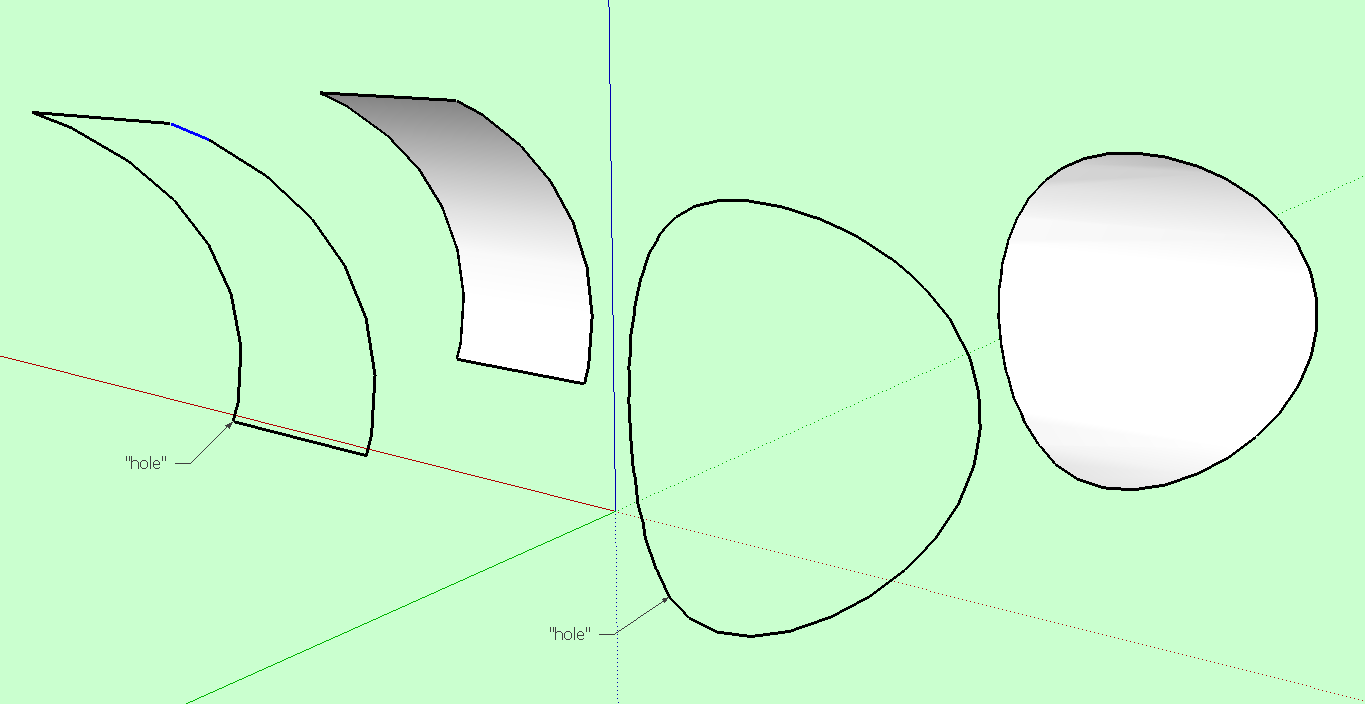
      Often I create holes from intersections of cylinders, for example the intersection of two pipes. Sometimes the surfaces of the intersection are deleted. See attached examples.

      If, later on, I need to restore the "hole" it can be time consuming.

      I was wondering about a hybrid Make Faces such that colinear and coplaner edges in a selection are used to regenerate faces. Perhaps with an options to smooth or group the result?


      Make Faces from colinear and coplanar edges.PNG


      Make Faces from colinear and coplanar edges.skp

      posted in Plugins
      JClementsJ
      JClements
    • 1 / 1