sketchucation logo sketchucation
    • Login
    1. Home
    2. hpnisse
    3. Posts
    Oops, your profile's looking a bit empty! To help us tailor your experience, please fill in key details like your SketchUp version, skill level, operating system, and more. Update and save your info on your profile page today!
    FredoBend | Powerful new bending tool for SketchUp Download
    H
    Offline
    • Profile
    • Following 0
    • Followers 0
    • Topics 7
    • Posts 101
    • Groups 1

    Posts

    Recent Best Controversial
    • RE: Camera help

      Hello again!

      I had done a .skp file now that simulates this really good, I think. So if you cant run the simulation (track/follow) correct, then I don't know what it is. ❓
      It's a very basic model, with two box with name on, Track and Follow. Right below the names there is letters, that is how to move the box right/left. (WASD keys are used)

      Here is the file:
      TrackFollowTest.skp

      /hpnisse

      posted in SketchyPhysics
      H
      hpnisse
    • RE: Camera help

      Hello!
      The text Camera track NAME should be in the Scene Description.

      And if you want both Track and Follow in the same scene, you need to type in.
      Camera track NAME. Camera follow NAME
      in the Scene Description. (you can have diffrent name on track and follow objects)

      I've tested it right now cause I didn't remember, but I got it to work.

      Hope you get it to work to.

      /hpnisse

      posted in SketchyPhysics
      H
      hpnisse
    • RE: Pre-release SP 3.2 (test of midi support)

      Hello!
      I installed the SP3.2, it works really good.
      And the "Piano-JukeBox7" is awesome, its not slow in frame-rate.
      I had seen the Animusic Movies before and think thats great done.

      The piano works great, and I add a little stuff to it, when it press the key you the key "lights up" red.
      Cause when I see at the cool simulation its a little bit hard to see which key thats playing.
      It's done with a simple on/un-touch that you use, and works great. πŸ˜„

      Fun that you fixed the bug
      Fixed bug where solids would drop into floor first time you run..
      It was a bit boring, but now it works great that to.
      /hpnisse

      posted in SketchyPhysics
      H
      hpnisse
    • RE: SketchyPhysics3.1

      Hey!
      Thanks for fast answer, is it possible to "getTorque/velocity" to know if something is moving in any direction.
      And get the speed of an object, if I will do a speed/RPM -meter?
      /hpnisse

      posted in SketchyPhysics
      H
      hpnisse
    • RE: SketchyPhysics3.1

      Hello CPhilips! (or someone else).
      How can I use Velocity & Torque in sketchyphysics 3.1?
      Is it something with, get the speed of a physics joint (hinge/motor for example)?
      Some examples or something will be appreciate.
      Its from this website that you named in this post I find it, but no instructions how to use them.
      http://code.google.com/p/sketchyphysics/wiki/ScriptFunctions

      /hpnisse

      posted in SketchyPhysics
      H
      hpnisse
    • RE: Grouping object and hinge makes new group fall over

      Use JointConnectTool, same that you used before.
      Click on the floor and press "CTRL" (Control)[Left], then press the hinge.
      Or you can start with the hinge (Ctrl-click) and then the floor, dosn't matter.

      /hpnisse

      posted in SketchyPhysics
      H
      hpnisse
    • RE: Camera help

      Okay! Sorry πŸ˜„

      If you want it to follow a object, then

      1. Add a scene.
      2. Open Scene Manager
      3. Add camera follow NAME (NAME is the name of the object you want to follow).
        (If you want to TRACKa object just write camera track NAME insted.)

      If you don't know how to name objects:

      1. Select a group/component.
      2. RightClick on that.
      3. Click: Entity Info
      4. There you have a box that is called Name:.
      5. Just type in anything.

      Hope this is what you searching for.

      /hpnisse

      posted in SketchyPhysics
      H
      hpnisse
    • RE: Camera help

      Hey!
      If you dowload SketchyPhysics 3.1 http://sketchyphysics.googlecode.com/files/SetupSketchyPhysics3.1-Sep27.exe that CPhillips released a few days ago at this forum, http://forums.sketchucation.com/viewtopic.php?f=61&t=31262&start=0.

      Then you can use this script in an objects script-field:

      
      ontick{
         camera.set(camera.eye,transformation.origin,[0,0,1])
      }


      This will follow the object that you need.
      /hpnisse (script is from CPhilips, that created SketchyPhysics 3.1)

      posted in SketchyPhysics
      H
      hpnisse
    • RE: Windows 7, Sketchup 8 and SP 3 issues

      No, it was the same thing with SU7, so I think that probably is the computers fault.

      posted in SketchyPhysics
      H
      hpnisse
    • RE: Windows 7, Sketchup 8 and SP 3 issues

      I've got the simulation to work with:
      Sketchup 8
      SketchyPhysics 3 (last version I think)

      And it runs on a computer with this:
      Processor: Intel Pentium 4 - 3.2GHz
      RAM: 2.5GB
      OS: Windows 7 Ultimate 32-bit (86-bit)

      So the simulation is slow but it works fine. (only slow in big physics models, if the .skp file is over 1MB)
      And I had no other (heavy) plugin like Twilight or somthing like that.
      /hpnisse

      posted in SketchyPhysics
      H
      hpnisse
    • RE: Slider Problem

      Hehe, thank you.
      Have a nice day you too, just fun to help.
      There pretty nice weather in Sweden to. πŸ˜„

      posted in SketchyPhysics
      H
      hpnisse
    • RE: Slider Problem

      Hello again, first, Yes I have a real name: Tim. πŸ˜„

      I've downloaded your model and do stuffs that I think you want it to be.
      The "Sliding" stuffs had tooo many groups, you don't need that, so just one "Big" group with all small Groups inside. I don't know if the physics simulation can't handle to many groups.

      And then I changed the groups that are around the cylinders to "Convexhull", and the cylinder was not in the right direction, so the cylinders where the big problem in your model.

      I upload the fixed model, and just say if there is'nt right.
      RE_Slider_Problem_02.skp

      /Hpnisse (Tim)

      posted in SketchyPhysics
      H
      hpnisse
    • RE: Slider Problem

      I've downloaded the model, and after some time I figured it out.
      The sliders had "Max" values that stop the sliders to "slide" on to the cylinders.
      I deleted them and it works great. (and if you want to stop the slider at the end of cylinders, just put in a negative value in the "Min" box.)

      /hpnisse

      posted in SketchyPhysics
      H
      hpnisse
    • RE: Cylinder sides and dimensions

      Question 1: When you press the Circle Tool there is a number in "Measurement" (that named "Sides" when cylinder tool is selected) box. That is the number of sides the circle will have. Just press how many sides the cylinder should have, before start making the circle.

      Question 2: When you start make a circle you the box that named "Sides" before will have the name "Radius", just press in the radius you want. Press Enter. Then use "Push Pull" tool and press on the cirle, and then press how high you want the cylinder.
      (then you can make a group)

      The other questions is out of my business, cause I don't use "Proper Animation".

      /hpnisse

      posted in SketchyPhysics
      H
      hpnisse
    • RE: SketchyPhysics 3x June 27 version.

      I can use the "@var" and "@@var" insted of "getVar..." and "setVar...", but I can't use the "onTouch{????}" funcion in the "Scripted" field.

      But the "@var" is pretty good, its shorter than "getVar". πŸ˜„

      /hpnisse

      posted in SketchyPhysics
      H
      hpnisse
    • RE: Simulating cables?

      Hello.
      I made a model of what I think you wanted.

      simple linear drive.skp

      Is it about what you searched?
      /hpnisse

      posted in SketchyPhysics
      H
      hpnisse
    • RE: Timing gear slipping?

      Hey.
      The ratio is on the first joint, if you press "JCT" (Joint Connector Tool) and press on the motor, and then a hinge. The motor will get the "Ratio" box.

      hinge motor ratio.skp

      I've created a file with examples. If the motor have the ratio and you write "2.0", then the motor will go twice as fast than the hinge.
      The example have four diffrent "motor to hinge" and "hinge to motor" gears.

      /hpnisse

      posted in SketchyPhysics
      H
      hpnisse
    • RE: Timing gear slipping?

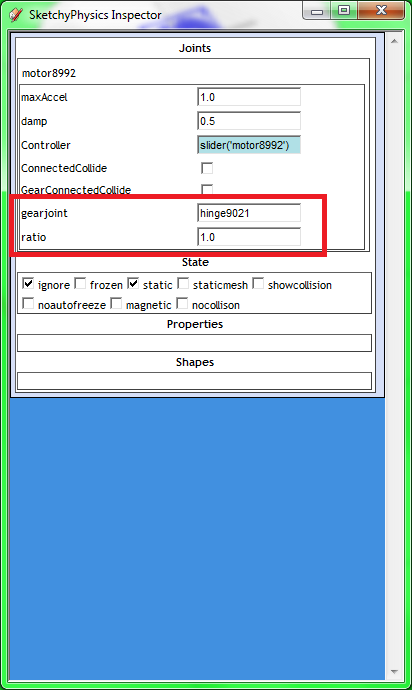
      Select one of the two joints that you have "gear" between, then open "UI" (skechyphysics inspector)
      In one of those joint there are a box named "ratio".
      ratio.png

      /hpnisse

      posted in SketchyPhysics
      H
      hpnisse
    • RE: Is it possible to make a Linked Chain

      @unknownuser said:

      ...Once you've made a single link once for the type of chain you need, you're done. Copy/paste at will.

      And if you do the first part to a component, and then copy it, so will it be much easier to change the style of the chain later.
      /hpnisse

      posted in SketchyPhysics
      H
      hpnisse
    • RE: Is it possible to make a Linked Chain

      I think that is the only way if you need to create holes with SketchyPhysics, cause there is nothing what I have found that can handle "concavo" objects, skechyphysics can only handle "convex". I've read that somewhere, I don't know where.
      /hpnisse

      posted in SketchyPhysics
      H
      hpnisse
    • 1 / 1