sketchucation logo sketchucation
    • Login
    1. Home
    2. hpnisse
    3. Posts
    Oops, your profile's looking a bit empty! To help us tailor your experience, please fill in key details like your SketchUp version, skill level, operating system, and more. Update and save your info on your profile page today!
    FredoBend | Powerful new bending tool for SketchUp Download
    H
    Offline
    • Profile
    • Following 0
    • Followers 0
    • Topics 7
    • Posts 101
    • Groups 1

    Posts

    Recent Best Controversial
    • RE: Scale in Sketchy Physics

      You can try to scale the physics components in there own file.

      find your ...Plugin\SketchyPhysics3\Joints... folder and go in to every "joint".skp and try to scale it down, try with one first and see if it really works correct when you start physics simulation.

      I don't know if this works but you can always try.

      /hpnisse

      posted in SketchyPhysics
      H
      hpnisse
    • RE: Sketchyphysics 3RC1 Sound

      Hey!
      You have to put your own .wav file in:
      ...Program Files\Google\Google SketchUp 7\Plugins\SketchyPhysics3\Sounds
      or if you have installed GoogleSketchup in other directinary.

      Then just use - playsound("filename.wav") - in your script.

      simple example:
      when you press "W" the sound woodSound1.wav that come with the installation of SP3.

      
      if key("W")==1
        playsound("woodSound1.wav")
      end


      Hope this help!

      posted in SketchyPhysics
      H
      hpnisse
    • RE: Sketchy Physics joint help

      Hey!
      They are just hidden, so press "View" and then "Hidden Geometry". Then you will see all joints and stuffs.

      Edit:
      But I think is pretty hard to steer cause there is no diffrential att the rear wheels.

      posted in SketchyPhysics
      H
      hpnisse
    • RE: Delete object with script?

      Hello again!

      I have seen the "$curEvalGroup" before, but I did't understand everything. I have test everything I come up with.

      Can Wacov (or someone else) explain the "group handler", it sounds so simple when you say it.

      @unknownuser said:

      you just get the group handler and use '.erase!'
      /Wacov

      And when I test a few examples and combinations with ".erase!" the simulation will freeze, the only that works is to stop the simulation.

      So a little more careful explanation would be helpful.

      /hpnisse

      posted in SketchyPhysics
      H
      hpnisse
    • RE: Sketchyphysics- Servo control with keyboard

      Hello!

      There is very simple to do that!

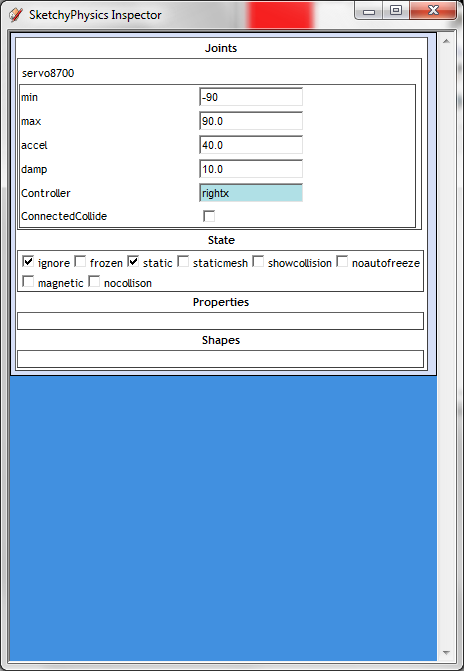
      Open the servo "UI" and insert " rightx " (no quotes) in the controller field.

      Namnlös.png

      If you want to control the speed (a motor) with up and down arrow, just write " righty " (no quotes).

      It's wery simple, and this page is wery helpfull http://sketchyphysics.wikia.com/wiki/Beginner.

      /hpnisse

      posted in SketchyPhysics
      H
      hpnisse
    • RE: [problem] slider moving from fast to slow

      Hey.
      There is a simple gear creater inside the Physics Engine.

      When you click with the "Joint Connector"-tool in one motor/hinge/slider/piston and hold Ctrl (control) -key and press a second motor/hinge/slider/piston these Joints connect to each other, a motor/hinge to a slider/piston would be a wormgear and motor/hinge to another motor/hinge would be a normaly gear.
      With this trick you don´t need that much geometry in the physics model that slow it down.

      I had attached a model with example of a motor to slider, in two ways. first, with physics geometry and a second with physics gear connecting that I explain earlier in this text:D

      Physics gears.skp

      hope this maybe would be some help.!

      /hpnisse

      posted in SketchyPhysics
      H
      hpnisse
    • RE: [problem] slider moving from fast to slow

      Hey!

      Try to set the "damp" at least doubble of "accel", and play around with diffrent numbers.
      Hope this would help a little.

      /hpnisse

      posted in SketchyPhysics
      H
      hpnisse
    • RE: Delete object with script?

      What is the "Group handler"? Im searching for help in
      http://code.google.com/intl/sv-SE/apis/sketchup/docs/ourdoc/group.html
      but I can't find anything that I understand.

      So a little more precise instruction would be great!
      The idea is to delete groups/components when they touched another group.

      /hpnisse

      posted in SketchyPhysics
      H
      hpnisse
    • RE: Delete object with script?

      The hide idea would not work that well, so a script to delete objects when ontouch will probably work better:P (I hope)
      But thanks for the idea.

      /hpnisse

      posted in SketchyPhysics
      H
      hpnisse
    • RE: Delete object with script?

      This should be done in the physics simulation, so if there is to much "pins" in the model at the same time the physics will run slowley.
      And when I hide the pins after they thrown down there will take up a lot of space.
      But I can test with hide the pins and ball when they fall down back of the lane, and see if the physics simulation will run slowley.
      The best thing would be to delete them cause there will be new pins emitted down on to the lane when a new "Round" will start.
      But if there is a script that delete everything that it touch, would I be pleased to know that.

      thanks TIG for the hide tip, I would try that.

      /hpnisse

      posted in SketchyPhysics
      H
      hpnisse
    • RE: Delete object with script?

      ok, thats okej, cause the objects that touch "Box B" should not appear again after the simulation, the model I working on is a scripted bowling alley.

      The pins are emitted down on to the lane, and when a ball pull the pins down and back off the lane it will be deleted. Thats is how I want it to be:P

      so is there a script that delete everything that it touch, so would I be pleased to now that. It would be awesome. (I think)

      Thanks,
      Sorry for bad english, its early in the morning here in Sweden right now.
      /hpnisse

      posted in SketchyPhysics
      H
      hpnisse
    • Delete object with script?

      Hello!
      As the title say, I wonder if there is some way to delete objects with a script or something?

      example: If "Box A" touched "Box B" the "Box A" will be deleted!

      An ontouch script that delete everything that it touch, not just specific objects.

      Hope someone can ask and understanding my english.

      Thanks!
      /hpnisse

      posted in SketchyPhysics
      H
      hpnisse
    • RE: Joint issues....

      Funny that you fix it by yourself 😛
      The best way to learn something on computer is to click on everything you see 😄

      /hpnisse

      posted in SketchyPhysics
      H
      hpnisse
    • RE: Joint issues....

      Good that I help you a little bit.
      But what do you mean by "more accurate" ??? maybe I could help you more`!

      posted in SketchyPhysics
      H
      hpnisse
    • RE: Joint issues....

      Hello.

      The biggest problem in the model is that it´s to small. When objects are to small the physics won´t work.
      But if you scale it up two or three times the physics will work, and the physics joints will work correct when you add them.

      I downloaded the model and change it, scale the vehicle up and add physics joints.
      The script o drive the vehicle is in the "main body".

      Robot Design.skp

      Hope this is what you ask about, sorry for my bad english.

      You drive with the arrow keys.

      posted in SketchyPhysics
      H
      hpnisse
    • RE: Simple bug?

      You need to do every side of the frame as a "Box" and then group it together.

      To set the state to "Box" rightclick on the Group --> SketchyPhysics --> Shape --> Box.

      simple_bug.skp

      That is your file but the frames to left is created by several "box"-groups.

      Hope you understand!

      posted in SketchyPhysics
      H
      hpnisse
    • RE: How to properly create a LONG chain/rope?

      Okey 😐

      Perhaps the file that never show upp in the answer before understand what I mean?

      ROPE.skp

      That you see its not so hard, and Iam not good at neither scripting or english:P.

      This is better than having physics joints in every link that take a lot of the computer:P

      posted in SketchyPhysics
      H
      hpnisse
    • RE: How to properly create a LONG chain/rope?

      Yes, there is a way to create a chain/rope (if you have SP3 with script field).

      in the model I have here there is two example, one with ball thats linked to each other direct, and one with a cylinder between each ball.

      [attachment=0:122zsqmx]<!-- ia0 -->ROPE.skp<!-- ia0 -->[/attachment:122zsqmx]

      @unknownuser said:

      The long ROPE:

      
      > ontouch{|t,s,p|
      >    connect(t,"ball") if frame==0
      > }
      > 
      

      -- This script is only connected everything it touch when you press play.

      @unknownuser said:

      The short ROPE.

      
      > ontouch{|toucher,s,p|
      >    if frame==0 #only at start
      >       case toucher.name 
      >          when "Rope"
      >             connect(toucher,"ball")
      >       end
      >    else #after first frame
      >       ontouch{} #turn off ontouch event.
      >    end
      > }
      > 
      

      -- This script connect everything that have the name "Rope" when the Play button is pressed.

      hope this help...
      /hpnisse
      posted in SketchyPhysics
      H
      hpnisse
    • RE: SketchyPhysics 3x June 27 version.

      Hello!
      When I try the "ontouch" in script-field event it will not work:S

      Ex. I have a "button" (box), and when I push that button it touch another box with the script (easy one, see below) the physics engine freeze and I need to restart the physics-simulator.

      Here is the simple code I use:

      
      ontouch{
         setVar("var1",1)
      }


      Why does the physics-simulator freeze?
      And will this script set the "var1" to "0" (zero) when I relase the button?

      Thank´s for help.
      /hpnisse

      posted in SketchyPhysics
      H
      hpnisse
    • RE: Combining sketchy physics joints

      Yes.
      Go in to the group with the box and motor, then right-click on the box --> SketchyPhysics --> State: ---> then ether "ignore" or "nocollision", it dosn't matter right now.

      And if you don't want to se the box after this ignore stage, just "hide" it under right-click-menu.

      /hpnisse

      PS. More info about ignore and nocollision state:

      Ignore: http://sketchyphysics.wikia.com/wiki/Ignore

      Nocollison: http://sketchyphysics.wikia.com/wiki/NoCollision

      posted in SketchyPhysics
      H
      hpnisse
    • 1
    • 2
    • 3
    • 4
    • 5
    • 6
    • 4 / 6