sketchucation logo sketchucation
    • Login
    1. Home
    2. gistman
    3. Posts
    Oops, your profile's looking a bit empty! To help us tailor your experience, please fill in key details like your SketchUp version, skill level, operating system, and more. Update and save your info on your profile page today!
    ⚠️ Important | Libfredo 15.6b introduces important bugfixes for Fredo's Extensions Update
    G
    Offline
    • Profile
    • Following 0
    • Followers 0
    • Topics 6
    • Posts 42
    • Groups 1

    Posts

    Recent Best Controversial
    • RE: The A show (post your Thea images)

      WOW WOW WOW...

      Majid- Really nice work. How do you feel about the ease of learning Thea now that you've seen it Kerky and Twilight?

      "Thea render, biased method is used and it has been rendered at about 2 hour on my crappy machine " That's quite a rendering for 2 hours...

      Solo- Haha, reading through your posts with the renderings seemed like a fantastic sales pitch...

      "Thea biased render 4mins 31s"

      "not forgetting the amazing solid exporter Tomasz created." <-- Which by the way is probably the most complex .rb ever written for SU Certainly the best thing literally since sliced bread, seriously. I dream of the say I can buy more than a few drinks... although at this point he's probably spent so much time developing the latest plugins he would probably prefer a little cash... Then a round of drinks!

      "9 minutes 7 seconds, original size 1718x527, no post work"

      " those buttons have strong kung-fu."

      SOLD- Although the check out process is a little funny? I'm also getting more and more suspicious / paranoid about internet security... I thought I had read somewhere that it was threw paypal, but it doesn't say that (from what I could see) while on the "Cart" page.

      I unfortunately have flubbed the whole process... I backed out of paypal when I realized I didn't add the SU2TH plugin - Woops.

      Anyone have thoughts on THEA being sold as a package? Like- If you have SU and MAC buy this one... If you use Windows and SU buy this one... I sometimes pretend to not be as smart as I really am in order to test the UI on websites and software... 😳 ( which really means I blew it)

      As far as I'm concerned, using the plug-ins is a must. I remember having to export an .obj from SU then load it to KT... Get the plug-in.

      Be careful and make sure you have both the Thea Render License and the appropriate plug-in...

      Hopefully I just didn't buy 14 copies...

      Thank you guys for posting these great images- I'm looking forward to see more from you guys and maybe show a little of my own work.

      It's been a good day- Hope everyone is doing well.

      Gistman- (aaron)

      posted in Gallery
      G
      gistman
    • RE: The A show (post your Thea images)

      Sorry to jack the thread-

      @timmy16744- have a look for at this: http://www.nzone.com/object/nzone_humanhead_home.html and, http://developer.nvidia.com/object/doc_characters.html#skin

      It's all about the sum-of-Guassians formulation of subsurface scattering within a multi-layered skin model... πŸ˜‰

      So Solo you seem sold on THEA? I just had a second and was amazed at your post... I'm going to a meeting and will be back later to check and read the entire thread... So far your images look ridiculously fantastical!

      posted in Gallery
      G
      gistman
    • RE: Drape crashes SU

      Anyone still having the same issue? I am almost certain that I have been in contact with SU way back when... Seems like I could reproduce the same effect over and over. I would copy out the 'plan' I'll call it and the terrain - Open a new SU file past it and it would do the same thing. Purging is alway good to help with speed and other issues but doesn't seem to be working with this issue. What's strange is that I've draped HUGE site maps on HUGE meshes- Like half a mile by half a mile on my Dell Inspiron 9800 Notebook...

      My current issue is one that I've had before, but it's with V 7.1.6860. I've had better luck in the past making both the mesh and the drap'ee, or 'plan' both into groups. I know this can't be true, but it seem like the more complex the mesh is the better it work. So I have my 'plan' It's clean, fixed lines and grouped. My mesh is simple and grouped as well. (I've tried it every possible combination of grouped and exploded). I go to drape- it gets to 40% and apparently locks up. I've checked the Task Manager and sometimes it's still using memory and the processor other times it's not. I've let it sit over night and nothing but the hour glass... Other times I get a bugsplat.

      I've also had an issue with the 'zorro' tool which is doing some of same processes I imagine... The one thing I can think of that I've done when this started was at some point last week, and I didn't know I had loaded it, I loaded WxSU which is "is a free, open source plugin for Google SketchUp that extends the SketchUp API with the capabilities of wxRuby." I'm not sure how I even loaded it... I opened SU and a ruby error said that it could not load wxSU.rb- I thought, I don't even know what that is, so I went and took it out of the plug-ins folder. No error but mysteriously I am now getting this old drape tool issue.

      I'm wondering if it's an issue with manipulating the mesh, like painting, or softening the mesh then trying to Drape on to it. I guess I need to do a little more testing...

      Thanks to anyone and everyone that makes this such a great place to find help -

      Machine specs:
      Windows XP Pro SP3, Intel Core2 Quad Q8200@2.3ghz, 3.2 gig ram, Nvida GeForce 8400 GS.

      Aaron

      posted in SketchUp Bug Reporting
      G
      gistman
    • RE: Some Sketchup Models & Materials

      Wow- Thank you so much for these. It's actually very difficult to find good wood textures which are larger than 200x200...

      posted in SketchUp Components
      G
      gistman
    • RE: Can anyone help me ??

      camionero266- If your issue was that you couldn't get your .skp thumbnails to show up, pleas look at the end of my last post. I got it to work, and it's not hard to fix it.

      301 Moved Permanently

      favicon

      (www.sketchucation.com)

      posted in SketchUp Discussions
      G
      gistman
    • RE: SketchUp Thumbnails not showing up?

      TaffGoch- THANK YOU... IT WORKED! You know I tried typing that- and copy pasting it etc etc and it still didn't work- You have to include everything between the arrows

      -->cd C:\Program Files\Google\Google SketchUp 6<--

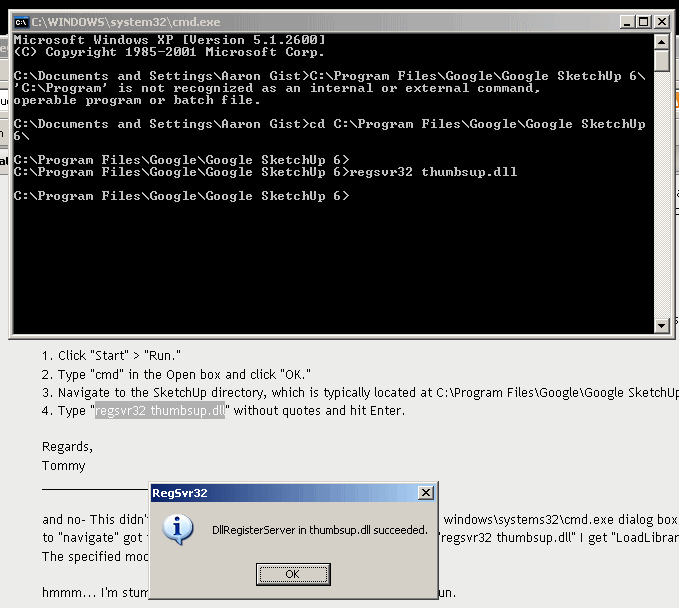
      ... and you can't 'ctrl v' either you have to right click and past at the control prompt... not sure what the "cd" part had to do with it but it worked- I NOW HAVE SU THUMBNAILS!

      Thank you again.

      (in the screen cap- I hit enter twice, that's why in at the prompt it's there two or three times- guess I got a little impatient)


      ScreenShot003.gif

      posted in SketchUp Discussions
      G
      gistman
    • RE: SketchUp Thumbnails not showing up?

      Oh man... Damn- You know, as I remember I ran CCleaner, well you know why I ran CCleaner?... Because I had just UNINSTALLED SU5! I was thinking to myself... self, you haven't used SU5 in a year or so, why don't you just go ahead and free up some of that disk space...

      Going to try the fix that was posted by the google tech guy on page two- I'll let you guys know if it works... I saw someone else had the same issue as me and posted just a bit ago.


      We've been investigating the issue and have been offered a fix that may help. Kindly refer to the following steps:

      1. Click "Start" > "Run."
      2. Type "cmd" in the Open box and click "OK."
      3. Navigate to the SketchUp directory, which is typically located at C:\Program Files\Google\Google SketchUp 6\
      4. Type "regsvr32 thumbsup.dll" without quotes and hit Enter.

      Regards,
      Tommy


      and no- This didn't work... When you go to th cmd, which opens the windows\systems32\cmd.exe dialog box... How are you supposed to "navigate" got the SketchUp directory from there? And typing in "regsvr32 thumbsup.dll" I get "LoadLibrary("thumbsup.dll") failed- The specified module could not be found."

      hmmm... I'm stumped and now I have to go measure a house- fun fun.

      posted in SketchUp Discussions
      G
      gistman
    • RE: Can anyone help me ??

      Uh oh- Looks like your having the same issue I am...

      Your link wasn't posted correctly--> http://img230.imageshack.us/img230/3008/dibujo111bf4.jpg

      Here is a link to my post with, I think is the same situation I am having... -->http://www.sketchucation.com/forums/scf/viewtopic.php?f=15&t=13097

      posted in SketchUp Discussions
      G
      gistman
    • RE: SketchUp Thumbnails not showing up?

      Hmmm... so there isn't a "SUicon.dll" for SketchUp? Hmmm... I tried to 'reinstall / repair' SketchUp only to have it lock up...

      About the last thing I want to do is install and have to run another application, just to fix something which shouldn't have 'broken' in the first place... grrr.

      I guess it's time to contact The Google SketchUp people. "I'm a SketchUp Pro User and Want to Contact Support (Requires License)" - One good thing about having SU 'pro'? We'll see.

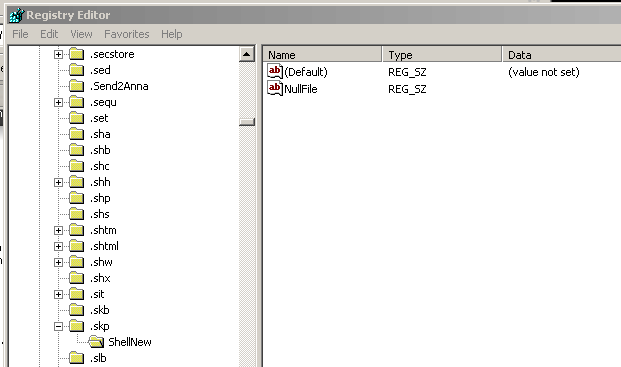
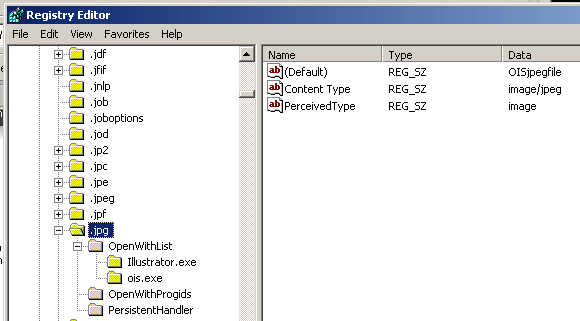
      EDIT- after doing a little research on google... I found this link--> http://support.microsoft.com/?scid=243401 but it's specifically for .jpg thumbnails- But when I looked at the .jpg reg. file, I noticed that it has information under the "Data" column (OISjpegfile,image/jpeg and image) where the .skp reg. file was left blank. hmmm... Gets kind of scary when you start modifying registry files, as I know just enough about computers to break them.

      Aa


      ScreenShot002.gif


      ScreenShot003.gif

      posted in SketchUp Discussions
      G
      gistman
    • RE: SketchUp Thumbnails not showing up?

      Ahh... good, there is a solution- But doesn't it just seen odd, they were there, then they weren't?!? I was thinking originally that running CCleaner may have had something to do with it... It's also strange that the thumbnails show up in the folder the .skp files are in (that just might me something else though). Also- I don't think my Photoshop files have ever shown a thumbnail.

      Oh- I just remembered this- Another thing that happened at the same time as my thumbnails disappearing was the addition of {view--> filmstrip) which I have never been a fan... I think there was a windows update around the same time as well... hmmmm...

      Worked for Photoshop! Funny it's not in there to begin with?

      Hmmm... How does it work for SU? There doesn't seem to be a Google\Google SketchUp 6 in the common files

      Thank you guys...

      Aaron

      posted in SketchUp Discussions
      G
      gistman
    • SketchUp Thumbnails not showing up?

      Hello people-

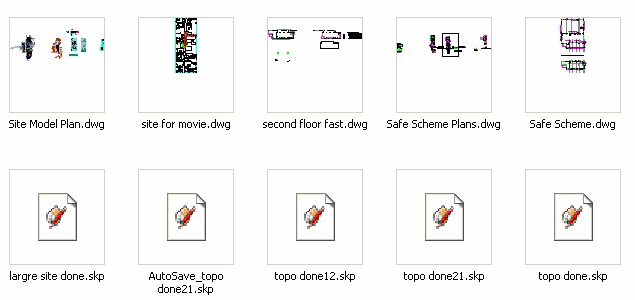
      Not sure how it happened and didn't really pay attention, thinking well maybe it will just fix it's self... But my SU thumbnails won't show up in any of the folders on my computer. Other thumbnails show up and I checked in SU to make sure the Thumbnails (make thumb at last save) was turned on. I'm stumped and it's turning into be a real pain in the neck, back etc etc...

      Anyone have any thoughts?

      Thank you in advance-

      Aaron


      ScreenShot001.gif

      posted in SketchUp Discussions sketchup
      G
      gistman
    • Ruby scripting repository hosting?

      Hello-

      My friend (computer nerd) has been encouraging me to learn ruby- He knows it and well lots of other code things as well. I have told him about SketchUp and all the things ruby can make it do... So, I noticed the other day there was a sticky warning people to cross-reference their scripting ventures before going on making them public. Also the reformatting of the Google group which I never could bring myself to visit... There might be a way to keep the ruby scripting more organized.

      Ok- here's the point- Does anyone know about http://github.com/plans ? Not that I really do, but after doing some research (having my computer nerd friend walk me through it 😳 )- it seems like this would be a fantastic way to develop,to share and keep track of script development and possibly promote SU to non-SU'ers. He (my computer nerd friend) uses it to develop code for work and well for fun.

      "What is it? Not only is Git the new hotness, it's a fast, efficient, distributed version control system ideal for the collaborative development of software. GitHub is the easiest (and prettiest) way to participate in that collaboration: fork projects, send pull requests, monitor development, all with ease. "

      The link I provided is the link to the "plans" which if you notice at the top, it's free... If you look around they have a repository and other sections...

      Sorry if I don't know enough about the site or ruby scripting to be fully accurate. I would like to thank anyone who has taken the time to develop and or write any ruby plug-ins and when I say "computer nerd" I mean that in the most endearing way.

      Maybe this can be asset to the way ruby scripts are written?

      Aaron

      posted in Developers' Forum
      G
      gistman
    • RE: Wood Siding method - materials

      urgen- Thank you- I am digging the end grain materials...

      posted in SketchUp Components
      G
      gistman
    • RE: Site plan help...

      I have done quite a bit of site work using SU- I can't stress enough, the cleaner your topos are coming from cad the easier any modeling will be in SU... I alway make sure they are polyline (pe -> multi line ->make polyline -> join) This will make things much easier for you once you bring your topos into SU. I also do "repair lines" (ruby script) this will join and fix all of your topo lines which may have not imported correctly.

      You also may need to extend some of your topolines beyond the site boundaries then after you make your surface, you can stamp the site boundary and erase the extras.

      Hope this helps a little.

      posted in SketchUp Discussions
      G
      gistman
    • RE: UV Tools Teaser ;)

      I Can't wait for this sweet action- Thank you!

      posted in Plugins
      G
      gistman
    • RE: 3d people

      Hello- lowpolygon3d is a good source. If you look around the site, you can download a sample of each of their types (2d and 3d).

      Here is another site I have used- http://www.got3d.com/. http://www.archvision.com/RPCPeople.cfm Is another company that seems to have very high quality models.

      I am pretty sure you can download samples from both of those sites as well.

      And as always... http://www.google.com/search?q=low+poly+people&ie=utf-8&oe=utf-8&aq=t&rls=org.mozilla:en-US:official&client=firefox-a
      Google is always a great place to start.

      Good luck and let us know what you find.

      Aaron

      posted in SketchUp Components
      G
      gistman
    • RE: Kerkythea Rendering

      Bytor- Thank you- Yes, the city light and how to show it can/is a big issue. Sometimes it ends up looking more like a daytime scene...

      Solo- Thank you- SketchUp + FormFonts makes it easy(ish) to add those kind of details which push your output to a more tangible level for clients.

      Gaieus- oops, I thought this was your doing... Well, thank you for administrating it!

      I have to say- I really don't know much about rendering, it really is Kerkythea... I have been using it for quite a while and one of things I hopefully was able to help with, was telling all of the physics nerds (I say that with love...) that unless an architect nob, like myself can use this easily, we won't use it. The interface of Kerkythea has really come a long way and combine the plug-in SU2K- Literally, you can export you .skp to KT and hit render and get something you would show a client.

      Thanks again for the warm welcome, I look forward to learn and share with everyone here...

      Aaron "gistman" Gist

      posted in Gallery
      G
      gistman
    • RE: Low poly folk ... edit

      Yes- after a little investigating... on your website, I saw you had a few renderings of manikins... 😳 and well- obviously you know a little about SU and a few other softwares... I haven't messed with Sketchy Physics at all- Maybe this is my calling.

      I guess size does matter after all (oh, bad bad joke...) It all seems to be tied into time- weather you need it fast in the beginning, just SU exporting, throwing some supper high-poly people, cars and trees doesn't really mean too much- Then you get to the final out put, what ever renderer your useing, combine lighting, texture maps, then it becomes an issue.

      My latest project is 29,696kb (.skp file), 300 lights, and I think around 175 different materials- when exported to Kerkythea the .xml file is 167,067kb nothing my little Inspiron 9300 can't handle... Although she does throw a fit now and again.

      By the way- I guess we are 'neighbors', I'm up in NW Arkansas...

      posted in SketchUp Components
      G
      gistman
    • RE: Low poly folk ... edit

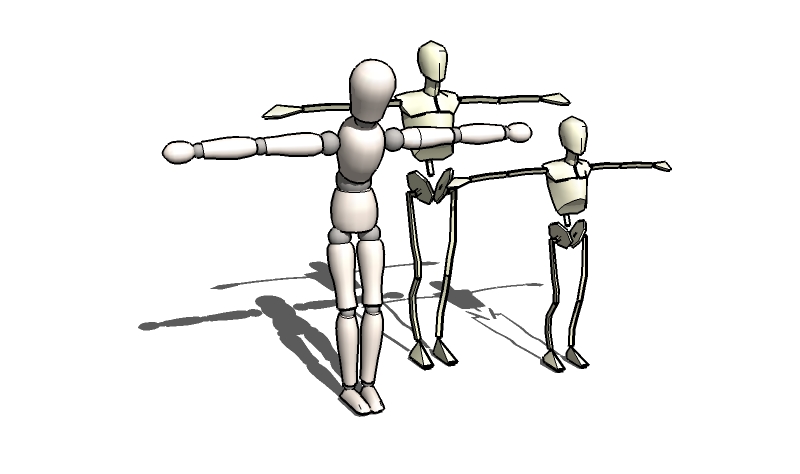
      Wow- these are really fantastic Solo. I have been trying to figure out a way to get lower-poly 3d figures for a while now- I just don't seem to be able to muster the patients it takes to do what you have done here... Truly an artist. I'm sure you have seen this/these?

      http://sketchup.google.com/3dwarehouse/details?mid=e7aa44ffbb4d9b926f14af769a57786a

      I followed the thread(s) about the copy right issues using Poser and Daz content until my eyes started crossing. Have you tried tracing an SU model of a manikin? Now that I think about it... seems like you could lock the joints with Sketchy Physics and move the little guy/gal around just like a real one? hmmm...

      Not really sure where I got these little guys- but I would be more than happy to share them.

      Keep you the great work.


      manikin, mannequin, mannikin, manakin or manneken...

      posted in SketchUp Components
      G
      gistman
    • 1 / 1