J'ai simplement oublié d'attacher l'icone

 Offline
J'ai simplement oublié d'attacher l'icone
@unknownuser said:
tu parles d'un "X" coloré? où c'est qu'il est celui-là
C'est un bouton dans la toolbar (verifie que cette toolbar est bien affichee).
@unknownuser said:
Les textures disparaissent complètement? C'est normal parce que le % est trop grand ou par ce que n'est pas géré par le script?
Petit probleme dans Ruby. Pas moyen d'avoir le path complet de la texture. Il y a un bug dans l'API.
@unknownuser said:
Ps Pas moyen d'avoir un % réglable?
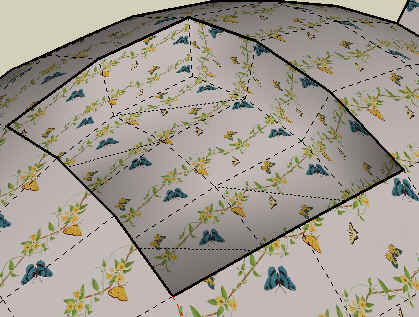
Ca c'est plus facile. J'avais choisi 0.25, mais il me semble que 0.35 est plus fidele a un Xray.
I quickly built a script to toggle Xray on a part of the model and posted it in the French section of the forum (at http://www.sketchucation.com/forums/scf/viewtopic.php?f=51&t=6589&st=0&sk=t&sd=a&start=30
As Todd says, it will double the number of materials, as you have to duplicate materials present on original faces with an alpha transparency set to 0.25. So "purge unused" should be done at some point. It may also take some time on large models.
The script works on a selection of groups, components or isolated faces, possibly nested.
It will Xray the selection. Then, if you do not select anything, it will work in Toggle mode (Xray / Normal / Xray / Normal, ...)
Claire,
On peut simuler le Xray par un petit script qui fonctionne comme suit:
Tu selectionnes la partie du modele que tu veux rendre en XRAY. Ce peut etre un ou plusieurs composants ou groupes, meme emboités ou des faces isolées.
Tu appelles la commande Xray selection(ou cliques sur le 'joli' icone en forme de X coloré). Cela transforme la selection en Xray
A partir de la, la commande marche en mode bascule si tu ne fais aucune selection (et a condition de ne pas effacer ou rajouter des faces dans la partie concernée du modele).
Le script est attaché.
Remarque: en Ruby, il faut creer des nouveaux materiels (en mode Xray). Donc n'oublie pas de faire un "purge usused" de temps en temps (tous les materiels creés se termine par "___XR". De meme, si tu as fait des positionnements fins de texture, tu ne les retrouveras pas (je peux se faire en Ruby toutefois, mais c'est un peu plus long).
Voila. Bon courage et dis moi si c'est utile.
Fredo
Here is a very first version of what I call Joint Push Pull, which is a compromise between the classic Sketchup push pull along individual face normals and the Vector Push pull whihc keeps faces contiguous. In other terms, how to extrude faces along their normal, but generate a contiguous shape.
I guess the pictures attached are self-explanatory on what the script tries to achieve.
The ZIP archive should be unzipped in the Plugins folder and create in the Plugins folder:
There is a full doc in PDF, but it is too large to upload on this site. So I put it on the Google forum at http://groups.google.com/group/Ruby-API/browse_thread/thread/6ae80c5c688083fb.
[url=http://www.sketchucation.com/forums/scf/viewtopic.php?f=57&t=4840:2tyretng]Link to the discussion[/url:2tyretng]

I guess the whole point is to understand whether there is a way to know 'in advance' the size of a text (based on string and font) so that it can be positioned accurately in the model at creation.
On my side I did not find a way to do that.
Thanks very much.
I know how to do it via Windows, but if we start programming in Windows SDK instead of Ruby, this is less fun, and more important, additional headaches for deployment.
One suggestion would be a few members of the sites, knowledgeable in system programming (Windows and Mac) group their efforts to build a utility libraries (dll) to complement the Ruby API of Sketchup (menu, events in tools, mouse, etc...). Unless the Sketchup SDK is more powerful!
I was wondering if there is a way to move programmatically the mouse pointer, within a Tool.
This may be useful when you have to open a dialog box and want to reposition the mouse pointer where it was before.
Thanks in advance for your help
It seems that at least you triangulate the faces, from what I could judge with the deer's kees (and the few faces that were not triangular in the original model).
This is a great tool, and judging from the video, the performance are more than "better"! (compared for instance to a simple shear of the model, that would take 40 seconds with a Ruby script). I imagine that you use a compiled version in C++).
I would encourage you to continue on this path, really!
If you need some help for the GUI, just post a description of what you need and I am sure we would find a way to contribute.
I have this one in preparation, for a composite model (i.e. any drawing elements, groups, etc... with texture transfer, etc...) and a curve in 3D space.
Actually, the main difficulty is about managing some topological cases where it is necessary to remove and cut faces that are squizzed in the curvature.
Looks like it does not find the cursor PNG file (cursorshear.png)
It must be in the Plugins directory
I thought I had put some code to check in any case, but apparently this does not work.
@unknownuser said:
Mais c'est bestial comme truc!
Ne serait-il point possible de répéter les dernières entrées paramétrables (celles-ci étant satisfaisantes d'une précédente action) sans passer par l'ouverture du Menu et l'appui de la touche "OK"?
Par un simple clic droit sur l'icône par exemple?
Mais c'est pour finasser sur l'ergonomie et booster la vitesse de modélisation
On doit gagner une seconde peut-être deux
Merci pour l'appreciation. J'espere que cela rendra quelques services.
Je me suis poser la question d'une execution 'rapide', mais on tombe rapidement dans l'indecidable car il y a pas mal de parametres. Sketchup ne permet pas de capturer un clic droit sur l'icone, et en creer un autre conduit a une proliferation des icones deja fort nombreux. En fait, je pense que quand on travaille sur un modele serieusement, on n'utilisera cette operation que rarement, et avec une preparation qui fait que quelques secondes de plus ou de moins ne changeront pas grand chose.
Azuby,
In theory, we could imagine that a user would not call a PDF at each Skecthup session, and if he does, after all, he could wait a little bit.
But your macro is fast enough that this fine too. When we have hundreds of PDF and HTML documenting scripts, we could revisit the problem 
All this proves that we have a damned good team of Ruby script programmers on this forum, as it took less than 24 hours to get 3 good versions after the idea just popped up.
This is a great idea and can be done with no major issue (the center of the circle is at the crossing of parallels of segments, at a distance equal to the specified radius). There are of course some tricky cases where the specified radius would be too big and would overlap more that 2 segments, but this can be adjusted.
Great script!
And works fine for me on v6
I gave me some inspiration about what you can do with Sketchup and Ruby, when I redesigned the Bezier curves from the @Last version.
Thanks again
Fredo
TIG,
There is an error, due to a missing closing brace '}' on line 22.
Otherwise, it seems to work, though I may prefer to have the menu / submenu version (one suggestion would be to build the submenus at first call, rather that systematically at load time).
Thanks a lot
Adam,
You are right, we can do much cooler things, but there is still the problem of compatibility with v5.
But I still don't understand the logic of the basic Sketchup Windows-based dialogs for dimensioning combo boxes!
Just to inform you that there is an small update to Bezierspline scripts, available at Crai Ruby Depot http://www.crai.archi.fr/rubylibrarydepot/ruby/fr_Newest_scripts.html
Nothing big, but some bug fixing in the area of inference, as well as the support of Portuguese translation, with a Quick reference card as well (many thanks to Edson).
Fredo
PS: I am still expecting some gentle souls more accomplished in the art of geometry than me to publish new curve extensions
Didier,
Very nice idea.
It seems to have problems with the subfolders of the Plugins directory however. For instance with the PDF of Bezierspline which are in subfolder BZ_DIR. I think it is because the file name contains a '.' (on top of the extension).
Also, do you understand why the combo boxes in Sketchup Dialogs are never properly sized? I came across this problem too.
Daniel,
You are an artist. Adopted, and will go in the final published version, if OK with you
Thanks again


