The information on MrHide is maintained on the Plugin Home Page of MrHide. This is also where you can download the RBZ file.

- LibFredo6: v14.3b or above
- Sketchup version: SU2017 and above
- Platform: Windows and Mac OSX
- Usage: Free
If you land on this page and are unfamiliar with how to install Sketchup Extensions such as LibFredo6 or how to register on Sketchucation, please watch this video or refer to the Plugin page of LibFredo6.

MrHide is a Toolbarproviding direct access to functions which have no dedicated icons in Sketchup or are embedded deeply in the UI.
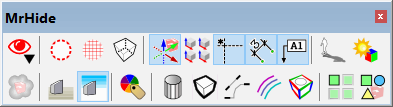
In the current version, the functions are related to showing / hiding visual elements in SketchUp, most of them being style and scene parameters
- hidden geometry, hidden objects, back edges
- axes, component axes, dimensions, guides, text labels
- shadow, sun shading, fog
- Ground, Sky
- dge visibility, Edge profiles, Edge endpoints, edge color by material, edge color by axis
- Colors by tag / layer
- Edit Component: show other instances and show rest of the model
There is also a Quick Launcher.
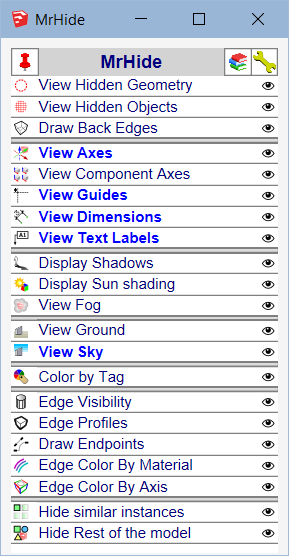
Based on an original idea by JClements, who also designed all the icons.

No documentation. Please check tooltips of the icons and in the Quick Launcher dialog