sketchucation logo sketchucation
    • Login
    1. Home
    2. djc87
    3. Posts
    Oops, your profile's looking a bit empty! To help us tailor your experience, please fill in key details like your SketchUp version, skill level, operating system, and more. Update and save your info on your profile page today!
    ⚠️ Important | Libfredo 15.8b introduces important bugfixes for Fredo's Extensions Update
    D
    Offline
    • Profile
    • Following 0
    • Followers 0
    • Topics 6
    • Posts 22
    • Groups 1

    Posts

    Recent Best Controversial
    • Follow Me Tool Issue

      I am having an issue with the Follow Me Tool (FM). I am trying to model a light bulb, but only a quarter of it as I will be adding to it and then copying and combining the 4 quarters.
      I have modeled the profile of the bulb and added the radius I want the bulb to follow.
      When running the FM, it does not provide a perfect quarter bulb. There is a notch in the center of the bulb, plus the tool seems to "lift up" the profile that was originally flat.

      I'm hoping I explained this well enough and hoping that the image below sheds light on my issue. Any feedback helps. Thank you.

      https://imgur.com/IkrVeOG

      posted in Newbie Forum sketchup
      D
      djc87
    • Editing Terrain Using Push/Pull for 3D Printing

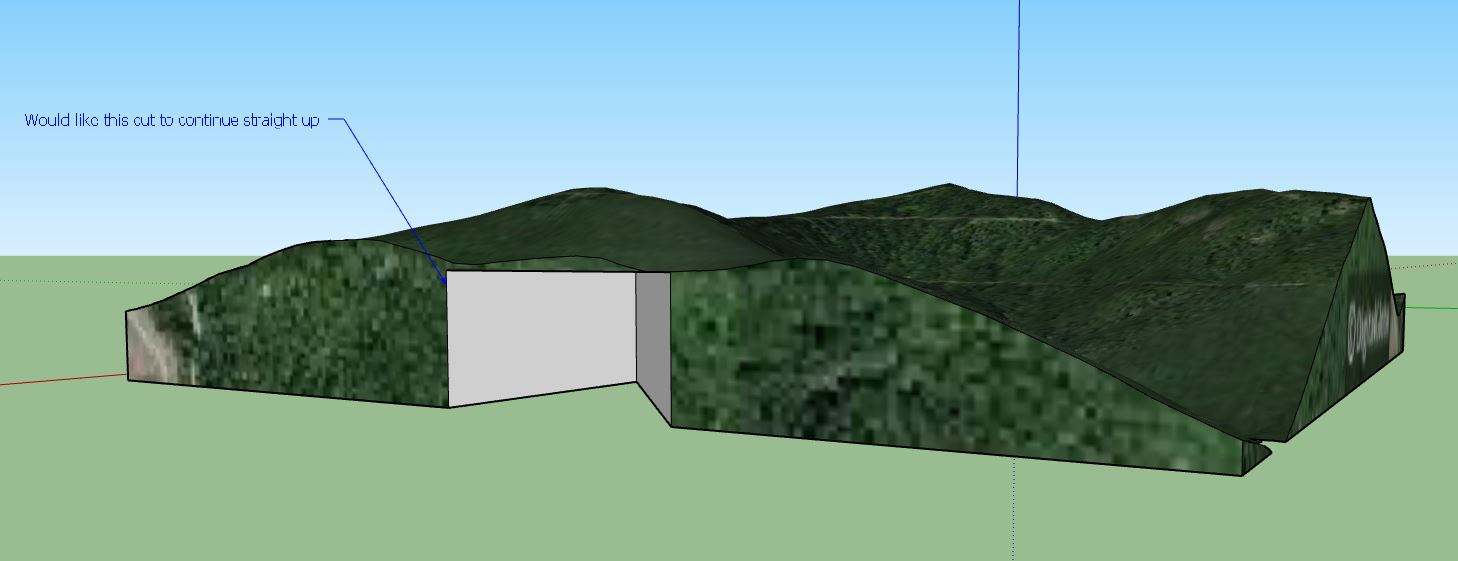
      I am working with Google Earth terrain in Sketchup Pro 2019 but I feel my question may be more basic in concept.
      I have imported topography from Google Earth, toggled the terrain and squared up the bottom and sides, to make a solid object. (squaring it up for 3d printing). I am trying to cut a shape (triangle) from the bottom face of the object and use the Push/Pull to remove this triangle shape all the way up and through the object while keeping the object solid.
      The issue is I run into the Offset limits and can’t remove this triangle shape all together. I have tried making my triangle cutout before toggling the terrain but the imported file does not allow that.
      Is there an easy way/(extension maybe?) to remove a particular piece from terrain?

      https://imgur.com/a/tyqUtaL

      Any feedback helps. Thank you in advance.
      [mod=:1yvrv32a]The linked image doesn't work.
      I've downloaded and added it again.
      TIG[/mod:1yvrv32a]
      ce0ZguT - Imgur.jpg

      posted in Google Earth sketchup
      D
      djc87
    • 1
    • 2
    • 2 / 2