Editing Terrain Using Push/Pull for 3D Printing
-
I am working with Google Earth terrain in Sketchup Pro 2019 but I feel my question may be more basic in concept.
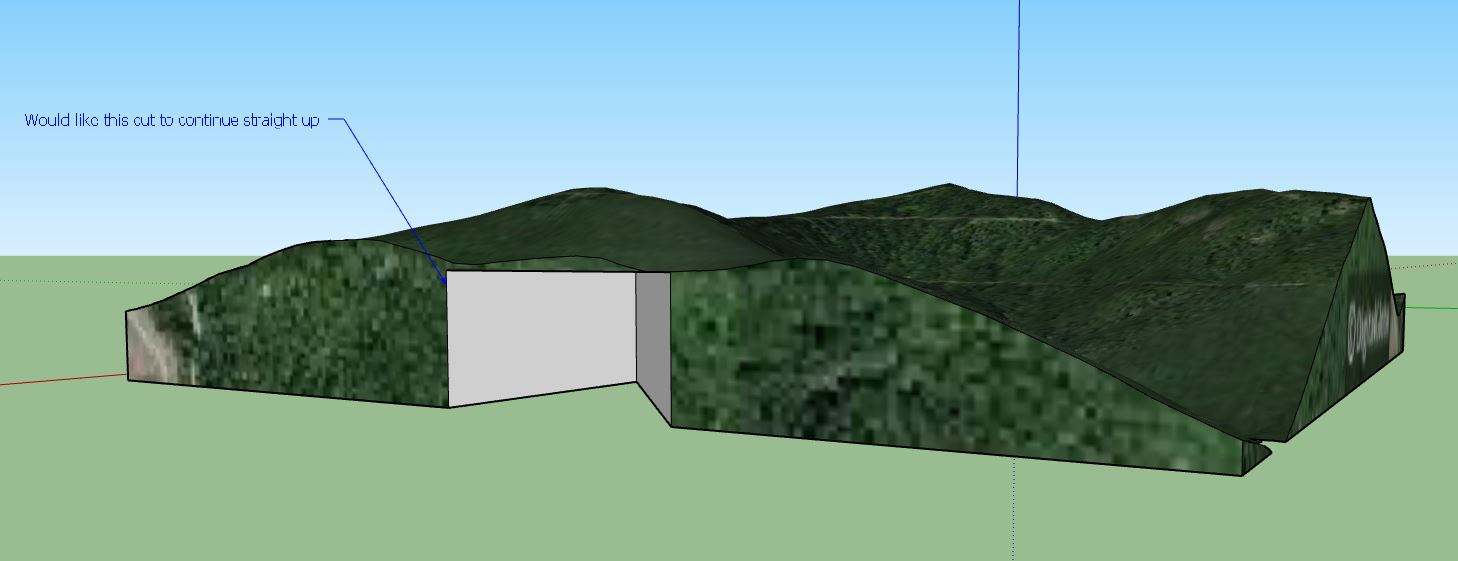
I have imported topography from Google Earth, toggled the terrain and squared up the bottom and sides, to make a solid object. (squaring it up for 3d printing). I am trying to cut a shape (triangle) from the bottom face of the object and use the Push/Pull to remove this triangle shape all the way up and through the object while keeping the object solid.
The issue is I run into the Offset limits and can’t remove this triangle shape all together. I have tried making my triangle cutout before toggling the terrain but the imported file does not allow that.
Is there an easy way/(extension maybe?) to remove a particular piece from terrain?Any feedback helps. Thank you in advance.
[mod=:1yvrv32a]The linked image doesn't work.
I've downloaded and added it again.
TIG[/mod:1yvrv32a]

Hello! It looks like you're interested in this conversation, but you don't have an account yet.
Getting fed up of having to scroll through the same posts each visit? When you register for an account, you'll always come back to exactly where you were before, and choose to be notified of new replies (either via email, or push notification). You'll also be able to save bookmarks and upvote posts to show your appreciation to other community members.
With your input, this post could be even better 💗
Register Login


Advertisement