sketchucation logo sketchucation
    • Login
    1. Home
    2. Dan Rathbun
    3. Posts
    Oops, your profile's looking a bit empty! To help us tailor your experience, please fill in key details like your SketchUp version, skill level, operating system, and more. Update and save your info on your profile page today!
    🚨 Skimp | 25% Off until March 30 Buy Now
    Offline
    • Profile
    • Following 0
    • Followers 1
    • Topics 92
    • Posts 4,904
    • Groups 2

    Posts

    Recent Best Controversial
    • RE: Closest face problem

      @hsmyers said:

      I'll be using the faces from the bounding box of each object.

      Bounding Boxes are virtual geometric "helper" objects that do not have faces.

      @hsmyers said:

      How do I reliably tell first selection from second? Currently it's the simple minded @sel[0] and @sel[1] as first and second where @sel results from Sketchup.active_model.entities.selection.

      You will need to implement a [%(#BF0000)[SelectionObserver]](http://www.sketchup.com/intl/en/developer/docs/ourdoc/selectionobserver) subclass.

      posted in Developers' Forum
      Dan RathbunD
      Dan Rathbun
    • RE: Attributes (auto updating)

      @thomthom said:

      @medeek said:

      Howevever, I can't seem to figure out how this attribute is automatically updating.

      I came across some code not too long ago that could explain this - but there is no documentation for this. SketchUp seem to apply transformations to Geom::Point3d and Geom::Vector3d object stored in attributes. This might be what you want some times - other times if you don't want it, store them as arrays.

      Which is basically what I said in the duplicate thread in the SketchUp forum, ...
      http://forums.sketchup.com/t/attributes-that-auto-update/27840

      ... which has gone beyond the original questions.

      posted in Developers' Forum
      Dan RathbunD
      Dan Rathbun
    • RE: Attributes (auto updating)

      Cross-posted:
      http://forums.sketchup.com/t/attributes-that-auto-update/27840

      (and gave answer there.)

      posted in Developers' Forum
      Dan RathbunD
      Dan Rathbun
    • RE: Getting entity information in onEraseEntity observer

      @smeyers said:

      I am trying to use the onEraseEntity observer, ...

      To be precise, this is a callback method name, of the Sketchup::EntityObserver class (and subclasses.)

      @smeyers said:

      ... which I have placed on the component, to look at the location of the entity being erased ...

      Okay then, it follows that at the time you've attached the observer, you should have a reference to the component instance, ... which means you can get a reference to the instance's transformation, and store it as an instance attribute of YOUR observer instance (assuming each component instance you attach a separate new observer instance to.)

      And then, also add an onChangeEntity callback method, that compares the current instance's transformation with the one that was stored in the observer, and if they are different, then the instance was moved, rotated, etc., so update the stored transformation in observer instance.

      THEN,... later when the onEraseEntity callback is fired, you'll have a copy of the deleted instance's transform stored right there in the observer instance (that is being called.)

      You do this by passing the component instance's transform into your observer subclass' new() constructor, which passes it into the new instance's initialize() method, (after the object has been created,) where you assign it to an instance variable.

       module Author;;SomePlugin
      
        class NiftyEntitySpy < Sketchup;;EntityObserver
      
          attr_accessor(;transform)
      
          def initialize(trans_arg)
            @transform = trans_arg
          end
      
          def onChangeEntity(obj)
            return unless obj.respond_to?(;transformation)
            if obj.transformation.to_a != @transform.to_a
              transform=(obj.transformation)
            end
          end
      
          def onEraseEntity(obj)
            # obj is invalid here !
            #
            # Use transform() method or @transform reference directly, BUT
            # beware of making model changes inside observer callbacks !!!
            #
          end
      
        end # class
      
        # Somewhere in the code, attach a new observer instance,
        # to each component instance to be watched;
        inst.add_observer( NiftyEntitySpy;;new(inst.transformation) )
      
      end

      
      
      posted in Developers' Forum
      Dan RathbunD
      Dan Rathbun
    • RE: Selection error?? with Ruby API

      No pattern. The various ways that the user can manipulate the selection set makes any order meaningless.

      Ie: single pick, single pick + CTRL, single pick + SHIFT, Window Right-to-Left pick, Window Right-to-Left pick + CTRL, Window Right-to-Left pick + SHIFT, Window Left-to-Right pick, Window Left-to-Right pick + CTRL, and Window Left-to-Right pick + SHIFT.

      Any of these, followed by any other number of them, in whatever order the user may use them, creates a selection set in which the pick order has no importance.

      That said, ...

      You question indicates you are perhaps trying to program a workflow that would better be implemented as a Ruby Tool, using a Sketchup::PickHelper.

      Another alternative might be a Sketchup::SelectionObserver subclass.

      posted in Developers' Forum
      Dan RathbunD
      Dan Rathbun
    • RE: Selection error?? with Ruby API

      You need to use a filtering method. The each method always returns the entire collection object, regardless of what you do in the iteration block.

      ents = Sketchup.active_model.active_entities
      sel  = Sketchup.active_model.selection
      
      a = ents.grep(Sketchup;;Group).find_all {|e|
        e.name.include?('aaa')
      }
      
      sel.add(a)
      

      (Fixed: " a = ents.grep" was: " a = entities.grep"

      Array and most array-like SketchUp API collections have Ruby's Enumerable library module mixed in. So you can use any of it's methods, like find() and find_all(), etc.

      posted in Developers' Forum
      Dan RathbunD
      Dan Rathbun
    • RE: Auto close UI.messagebox (Bug or feature?)

      On Windows, the native messagebox window objects can be set to autoclose, as the function has a timeout argument. But the SU API never leveraged this feature.

      Trying to use WScript shell object's messagebox interface from SketchUp Ruby to have auto-close message box windows is a failure. What happens is the windows are on top of the Z order, but non-modal. Ie the user can use the SketchUp interface whilst the messagebox remains open. This shouldn't really occur.

      Wrapping the code in a UI.start_timer just makes things weirder and weirder. I did get them to auto-close but, the amount of time they are open is pseudo-random (depending on what happens in the background.) IE, if I tell it to stay open 3 seconds, it will be open somewhere between 5..10 seconds.

      I gave up after a few days of wasted effort.

      posted in Developers' Forum
      Dan RathbunD
      Dan Rathbun
    • RE: Minimum dimension of a component

      My solution:

      def thickness(obj)
        ents =( obj.definition.entities rescue obj.entities )
        tran =( obj.transformation rescue IDENTITY )
        edges = ents.grep(Sketchup;;Edge).find_all {|e| 
          e.start.position == ORIGIN || e.end.position == ORIGIN
        }
        if edges.size < 3
          return 0.to_l # not a 3D object or edges array empty
        end
        shortest = edges.min_by {|e| e.length }
        shortest.start.position.transform(tran).distance(
          shortest.end.position.transform(tran)
        )
      end


      This should work with an argument that is a definition, group or component instance.

      If a ComponentDefinition is passed, the transform will be the IDENTITY transform, otherwise an instance or group will be it's transform (which also might be == IDENTITY.)

      Within the entities the local origin is == ORIGIN, so there is no need to create any temporary point object for comparison, just to select the 3 edges.

      Once we have the shortest (untransformed) edge, we apply the transformation to both it's vertex positions, to account for any rotation and scaling (either uniform or not.)

      Now, this assumes that the shortest definition edge is always to be considered the thickness, even in the instances.

      But what if someone does non-uniform scaling and makes one of the longer edges shorter than the one that is supposed to be the shortest ?

      I suppose, if you control the definitions, you could attach an attribute to the "thickness" edge, and find it by attribute.

      posted in Developers' Forum
      Dan RathbunD
      Dan Rathbun
    • RE: Storing Bounding Points

      The SketchUp team had created an example Parametric superclass that helps in saving original construction parameters, into a attribute dictionary attached to the group or component.

      The main problem with it is that it is not distributed stand-alone, and the several "team" extensions that use it have divergent versions. Ie, I think the "3D Shapes" extension did some revisions and fixes to it, but other extensions like the "Window Maker" extension still have the original.

      You can see the code and copy the latest Parametric class from:
      https://github.com/SketchUp/sketchup-shapes
      (It is released under the MIT License.)

      So your options are (1) to copy the Parametric class into your own extension sub-module, use it as is, or subclass it and make whatever changes you need for your extension's use.

      Or (2), require your users to download the Trimble Team's "3D Shapes" extension, and then use it as a superclass via qualification. (Users do not actually have to have it switched "on", just have the "su_shapes/parametric.rb" file available.) This way you can leverage any future fixes to the Parametric class, .. but future changes could also break your plugin.

      Either:

      (a) ... use as is without modification:

      
      require "su_shapes/parametric.rb"
      module MedeekDesign
        module TrussMaker
          Parametric = Class;;new(CommunityExtensions;;Shapes;;Parametric)
        end
      end


      (b) ... make local modifications for your extension. Be sure to understand the use of the Ruby keyword super if the superclass' methods need to be called within your method overrides:

      
      require "su_shapes/parametric.rb"
      module MedeekDesign
        module TrussMaker
          class Parametric < CommunityExtensions;;Shapes;;Parametric
            # override methods here
          end
        end
      end
      
      
      posted in Developers' Forum
      Dan RathbunD
      Dan Rathbun
    • RE: Send mail from Sketchup

      And to have an email form filled out, but not automatically sent:

      
      UI;;WebDialog;;new(
        "Email...",true,nil,200,100,300,200,false
      ).instance_eval {
      
        email = "mailto;//someone@example.com"<<
        "?subject=This%20is%20the%20subject"<<
        "&cc=someone_else@example.com"<<
        "&body=This%20is%20the%20body"
      
        set_html(
          "<!DOCTYPE html>\n<html>\n  <head>\n  </head>\n"<<
          "  <body>\n    <br/>"<<
          "    <a id='elink' href='#{email}'>Firing an email!</a>\n"<<
          "  </body>\n"<<
          "</html>"
        )
      
        show() {
          execute_script("elink.click();")
        }
      
      }


      http://en.wikipedia.org/wiki/Mailto

      But there must be a registered email client for the system.

      Ie, it does not work on my machine because I use browser based gmail, and never registered any email client application on this machine. (So for me two error messages popup stating there is no registered email client.)

      posted in Developers' Forum
      Dan RathbunD
      Dan Rathbun
    • RE: Top Level Component or Group

      And it really should look like this:

      if (obj.is_a?(Sketchup;;ComponentInstance) || obj.is_a?(Sketchup;;Group)) &&
      obj.parent.is_a?(Sketchup;;Model)
      
      
      posted in Developers' Forum
      Dan RathbunD
      Dan Rathbun
    • RE: [Code] Skew Transformation from axes

      @fredo6 said:

      "assuming they are normalized"

      Does normalizing first remove any variance that could throw off the comparison (with -1, 0 or 1) afterward ?

      Or would it be safer to use:
      vec1.perpendicular?(vec2)
      vec1.parallel?(vec2) && vec1.samedirection?(vec2)
      vec1.parallel?(vec2) && ! vec1.samedirection?(vec2)

      I also wonder about ThomThom's magic comparison.

      Is it the same on 64-bit SketchUp ?

      I mean why 10 decimal places ? Is it SketchUp's internal tolerance ?

      Ie, (0.001 x 0.001 x 0.001) ... which is 9 decimal places.

      posted in Developers' Forum
      Dan RathbunD
      Dan Rathbun
    • RE: [Code] Skew Transformation from axes

      @icehuli said:

      I have never known this operator " %" on vectors....., could you explain to me how it works....

      Geom::Vector3d#%()
      is an alias for the dot() method, ie:
      Geom::Vector3d#dot()

      @unknownuser said:

      (https://en.wikipedia.org/wiki/Dot_product)":dlvmfrbf]
      Geometrically, it is the product of the Euclidean magnitudes of the two vectors and the cosine of the angle between them. The name "dot product" is derived from the centered dot " · " that is often used to designate this operation; the alternative name "scalar product" emphasizes that the result is a scalar (rather than a vector).

      posted in Developers' Forum
      Dan RathbunD
      Dan Rathbun
    • RE: [Code] Material picker

      OK, I updated the previous example for system appearance. Wrapped the dialog in a fieldset border. Changed the cursor per Julia's suggestion.

      Also reset my own system, and made a new screenshot. (It now looks normal and not so dark.)

      http://sketchucation.com/forums/viewtopic.php?f=180%26amp;t=65078%26amp;p=597010#p597010

      posted in Developers' Forum
      Dan RathbunD
      Dan Rathbun
    • RE: [Code] Material picker

      I overhauled the CSS stylesheet in the WebDialog to mimic Windows UI.
      Added a meta tag in the head.
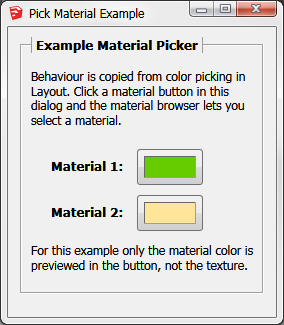
      Also a word "none" in the color swatch disappears after a material is chosen.

      *This image is a new screenshot made with default system colors.

      ene_PickMaterial_dialog_2.png

      [attachment=0:3svr0kkn]<!-- ia0 -->ene_pickmaterial_dialog_2.zip<!-- ia0 -->[/attachment:3svr0kkn]

      To use as a separate html file, change the code's
      dlg.set_html statement to:
      dlg.set_file("#{File.dirname(__FILE__)}/dialog.html")
      or, just paste it all over the inline HEREDOC.

      <!DOCTYPE HTML>
      <!DOCTYPE HTML>
      <html>
          <head>
              <meta charset="utf-8">
              <meta http-equiv="MSThemeCompatible" content="yes"/>
              <meta http-equiv="X-UA-Compatible" content="IE=edge"/>
              <title>TITLE</title>
              <script>
                  function pickMaterial(inputId) {
                      window.location= 'skp;pick_material@' + inputId;
                  }
                  function setPreview(inputId, colorString) {
                      var input = document.getElementById(inputId);
                      var span = input.getElementsByTagName('span')[0];
                      span.innerText = ""; /* delete word "none" */
                      span.style.backgroundColor = colorString;
                  }
              </script>
              <style>
                  html, body {
                      font-family; "Tahoma", "Segoe UI", Sans-Serif;
                      line-height; 100%;
                      font-size;   100%;
                      font; message-box;
                      margin;  0px;
                      border;  0px;
                      padding; 5px;
                      background-color; ButtonFace;
                      color; ButtonText;
                  }
                  div.dialog {
                      margin;  0px;
                      border;  0px;
                      padding; 0px;
                  }
                  fieldset {
                    font; Status-Bar;
                  }
                  fieldset legend {
                      font; Icon;
                      font-weight; bold;
                      padding-left;  4px;
                      padding-right; 4px;
                      border-top; none;
                      border-bottom; none;
                      border-left-style;  groove;
                      border-right-style; groove;
                      border-color; ButtonHighlight;
                      border-width; thin;
                  }
                  label {
                      font; Icon;
                      font-weight; bold;
                      display; inline-block;
                      border;  0px;
                      margin;  0px;
                      padding-left;  20px;
                      margin-top;    10px;
                      margin-bottom; 0px;
                  }
                  button {
                      font; Caption;
                      color; ButtonText;
                  }
                  button.pick_material {
                      width;   66px;
                      height;  36px;
                      margin;  0px;
                      margin-left; 10px;
                      padding-left;   6px;
                      padding-top;    6px;
                      padding-right;  8px;
                      padding-bottom; 8px;
                      vertical-align; middle;
                      cursor; default;
                  }
                  span.swatch {
                      font; small-caption;
                      display; inline-block;
                      margin;  0px;
                      padding; 0px;
                      border-style; inset;
                      border-width; 1px;
                      border-color; #D0D0D0;
                      width;  100%;
                      height; 100%;
                      background-color; #E0E0E0;
                      text-align; center;
                      vertical-align; middle;
                      color; #B0B0B0;
                      /* default cursor prevents text select cursor before  */
                      /* the first button press, when hovering over "none"  */
                      cursor; default;
                  }
              </style>
          </head>
          <body>
              <div class="dialog">
              <form>
                  <fieldset>
                      <legend> Example Material Picker </legend>
                      <p>
                      Behaviour is copied from color picking in Layout.
                      Click a material button in this dialog and the material browser lets you select a material.
                      </p>
                  <label>
                      Material 1;
                      <button type="button" id="material1" class="pick_material" onclick="pickMaterial(this.id)">
                          <span class="swatch">none</span>
                      </button>
                  </label>
                  <br />
                  <label>
                      Material 2;
                      <button type="button" id="material2" class="pick_material" onclick="pickMaterial(this.id)">
                          <span class="swatch">none</span>
                      </button>
                  </label>
                      <p>
                      For this example only the material color is previewed in the button, not the texture.
                      </p>
                  </fieldset>
              </form>
              </div><!-- dialog -->
          </body>
      </html>


      ene_pickmaterial_dialog.zip

      posted in Developers' Forum
      Dan RathbunD
      Dan Rathbun
    • RE: [Code] Material picker

      Ref: @@app_observer ||= nil

      We cannot use this pattern with class / module @@vars before they are defined.

      The interpreter expands this to:
      @@app_observer = @@app_observer || nil
      ...[snip]...

      nevermind, yes we can, ... it was fixed and I didn't notice. (I'm such a stick in the mud.)

      See Christina's comment below.


      Check out the pattern I posted here:
      http://sketchucation.com/forums/viewtopic.php?f=180%26amp;t=64981#p596158

      posted in Developers' Forum
      Dan RathbunD
      Dan Rathbun
    • RE: [Code] Material picker

      @eneroth3 said:

      The background color looks a little dark though.

      Don't mind that. That is just my manual dark system settings to save my eyes.
      I did not put any background color for the page into the CSS.

      @eneroth3 said:

      I usually use the values defined by the system. It has been deprecated in css3 specification but all browsers I've tried still supports it.

      Yes, I also.

      @eneroth3 said:

      Also a button should have the default cursor and not the pointer.

      Well change the CSS, then. As long as the text select doesn't appear when your over the word "none".

      @eneroth3 said:

      Regarding the pipe assignment a ||= b does not mean a = a || b. The later raises an error when used on for class variables while the former doesn't.

      Good article. But I do not think it works on old 1.8.0 Ruby that runs on old SketchUp 7. It gave me errors so I avoided using ||=. But I always wanted it fixed. Just never noticed when they fixed it.

      (That article mentions that it added another fix for constants in Ruby 1.9.)

      Hurray! I can go ahead and use it again, because I do not write for Ruby 1.8 anymore.

      I just read somewhere a few days ago that a ||= b expanded to a = a || b. I cannot remember where it was. I was reading the latest update to the "Pick-Axe" book. It has been updated and updated again and again since Ruby 1.6, so the old behavior might still be written in the book.

      posted in Developers' Forum
      Dan RathbunD
      Dan Rathbun
    • RE: [Code] Material picker

      if Sketchup.version >= "16"

      REVIEW: won't work for 1 or 3 digit mayor version numbers

      Use instead:
      if Sketchup.version.to_i >= 16

      The .to_i method will discard anything past the first decimal point.
      (It truncates, and does not round.)
      http://ruby-doc.org/core-2.0.0/String.html#method-i-to_i

      posted in Developers' Forum
      Dan RathbunD
      Dan Rathbun
    • RE: Auto close UI.messagebox (Bug or feature?)

      @dezmo said:

      Is that a known feature or bug?

      That is a definite bug. No programmer in their right mind would purposely set that up to work that way.

      posted in Developers' Forum
      Dan RathbunD
      Dan Rathbun
    • RE: [Plugin] Selection Toys

      @rombout said:

      Im using latest version 2.2.2

      No you're not. Latest (as of this reply) is 2.3.9.

      http://sketchucation.com/pluginstore?pln=tt_selection_toys
      or
      http://extensions.sketchup.com/en/content/selection-toys
      or
      https://github.com/thomthom/SelectionTools/releases

      posted in Plugins
      Dan RathbunD
      Dan Rathbun
    • 1 / 1