sketchucation logo sketchucation
    • Login
    1. Home
    2. Berserk
    3. Best
    Oops, your profile's looking a bit empty! To help us tailor your experience, please fill in key details like your SketchUp version, skill level, operating system, and more. Update and save your info on your profile page today!
    Urasik Extensions | Lots of new extensions to check out Learn More
    Offline
    • Profile
    • Following 0
    • Followers 0
    • Topics 5
    • Posts 20
    • Groups 2

    Posts

    Recent Best Controversial
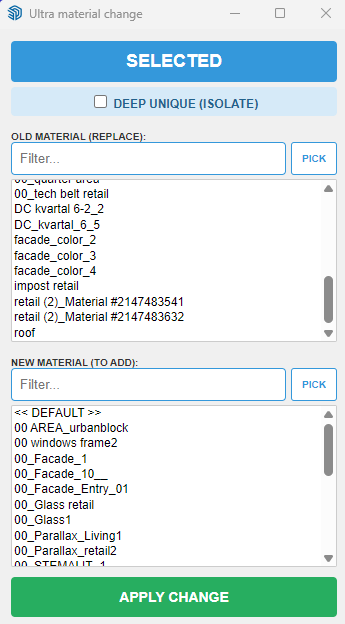
    • [Plugin] Extension Material Replacer

      Hi everybody!

      I am pleased to present my first Sketchup extension.
      This is an advanced synthesis of two already existing great plugins Global Material Changer and Material Tools, plus a few of my ideas.
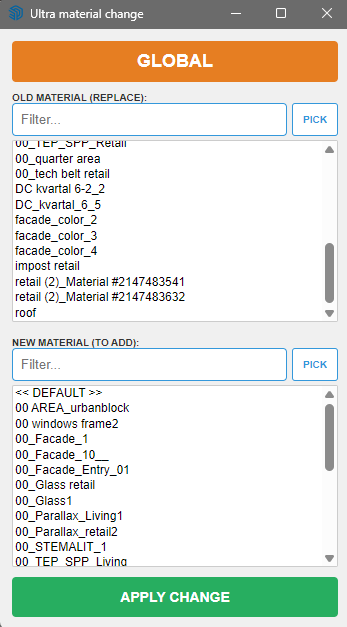
      Here are functions:
      1 - Filtering by lists of replacement and new material
      2 - The ability to select materials with a pipette
      3 - Work globally or only on selected objects
      4 - The ability to isolate the selected by making it unique. At the same time, the connection between the copies of the components inside the selection remains
      5 - Rubber web dialog
      6 - When selecting the "Unique" mode, the object isolation operation is displayed withe a progress bar

      Many thanks to authors of GMC and MT.

      My main activity is large architectural design, and thanks to AI I was able to create tools for work and just as a hobby.

      If errors or suggestions are found I will try to update ASAP

      The plugin was written for SU 2026 on Windows 10/ 11.

      Launches from the Extension menu - Ultra Material Change

      I'm ashamed, but I haven't figured out how to properly upload plugins here yet! Can someone please tell me?
      c8bb29ba-b87a-4431-9708-8897c3dba2e8-image.png
      e0bccf9d-f49c-4445-8902-c1c70daa0ef6-image.png

      ultra_mat_change.rbz

      posted in Developers' Forum
      BerserkB
      Berserk
    • RE: Urasik Vertex gap Inspector v04

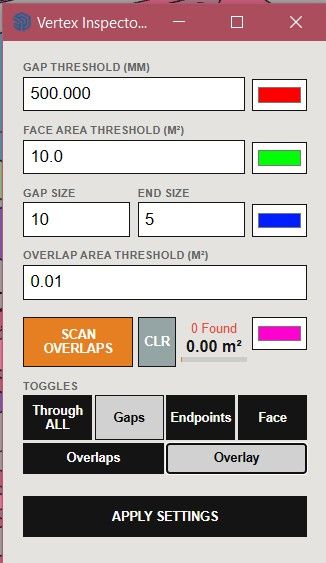
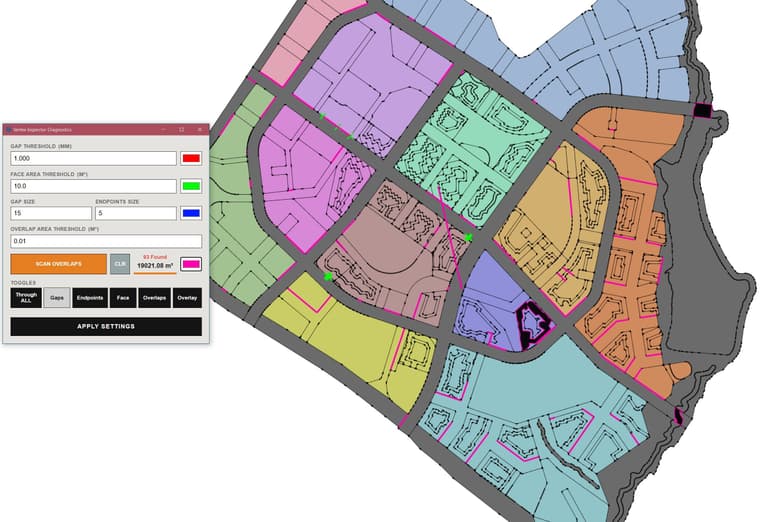
      Added an new feature - finding overlaps faces and an ability to find Gaps, Endpoints, small Faces through all model.
      I couldn't find an extra 2 hectares in the balance of the territory. I had an understanding that these were either bifurcations or multiple overlays of one zone on neighboring ones.
      So I've provided my Vertex Inspector with a cool overlay search option. In 20 minutes, he found my 2 hectares and showed me exactly where the overlays (pink and black highlights) were
      c3e90f57-b237-4a2b-8789-710512e88c02-image.jpeg

      Vertex Inspector v06.jpg

      Vertex Inspector v06.mp4

      Urasik Vertex Inspector v06.rbz

      posted in Plugins
      BerserkB
      Berserk
    • RE: [Plugin] Extension Material Replacer

      @Rich-O-Brien Thank you! I'm ashamed, but I haven't figured out how to put the plugin there yet! Can you tell me?

      posted in Developers' Forum
      BerserkB
      Berserk
    • Urasik Viewport +

      My extension to get fast captures in different projections and ability to visually cut model with a convenient mini-map. There can by any additional viewports windows you need.

      urasik_viewport.rbz
      Vertical section.mp4
      Horizontal section.mp4

      PURPOSE:
      Capture and render high-resolution viewports with history, custom resolutions, and clipping planes.

      HOW TO USE:

      1. Open the extension from the Extensions > Urasik > Viewport menu or the Viewport toolbar.
      2. Select the desired projection (Top, Bottom, Front, Back, Left, Right, ISO, or Current).
      3. Set the Gap percentage to adjust the framing of your selection.
      4. Clipping Plane:
        • Check "Clip" to activate a global clipping plane.
        • Use the slider or input field to adjust the clipping distance.
        • Click "Map" to see a top-down preview of the clipping plane and camera position.
      5. Click "Update" to capture a high-resolution snapshot of your selection.
      6. History:
        • Use the dropdown next to the Update button to access your capture history.
        • Click on any history item to reload that snapshot.

      FEATURES:

      • Units & Precision: All distance values (Gap, Clipping Distance) respect the units and precision settings defined in SketchUp's Model Info > Units.
      • Section Plane Integration: The "Clip" feature creates a temporary global Section Plane. Its visibility and behavior reflect your current SketchUp Section Plane settings.
      • High-resolution capture: Set your desired resolution (e.g., 1200px, 2400px, etc.).
      • Global Clipping: The clipping plane cuts through all geometry, including nested groups and components.
      • Dynamic Minimap: The Map preview automatically switches to a side view for Top/Bottom projections (with selected object isolation) and a top view for all other projections. For Top/Bottom views, the clipping slider scale is optimized to the object's height for more precise control.
      • World-space framing: Correctly frames selected objects even within nested contexts.

      RESULT:
      The extension will render a high-quality image of your selection and save it to your chosen directory.

      posted in Plugins
      BerserkB
      Berserk
    • Urasik Vertex gap Inspector v04

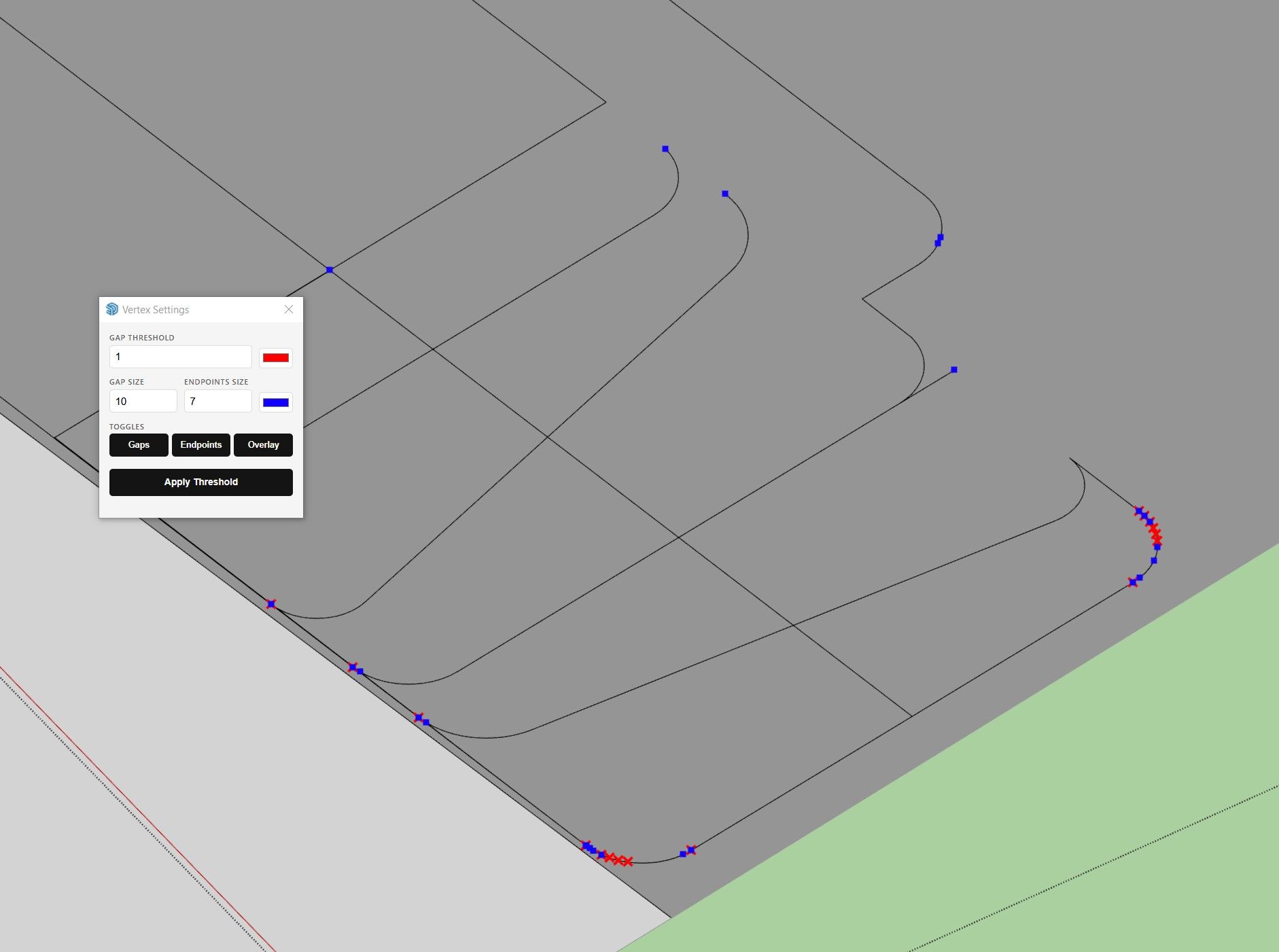
      Updated my Vertex Gap Inspector extension. Added more control and highlighting of the free ends of the edges. Greatly increased the speed - now the viewport does not slow down in heavy models

      VertexInspector.jpg

      Main functions:

      • Highlight gaps between vertexes depending on user set threshold
      • Highlight free ends of edges
      • User can set colors and size of highlighting, and gap threshold
      • On/off in Overlays Tray of in the settings dialog.

      urasik_vertex_gap_inspector v04.rbz

      link text

      All my extensions:
      link text

      posted in Plugins
      BerserkB
      Berserk
    • RE: Urasik Vertex gap Inspector v04

      Urasik Vertex Inspector v05.rbz

      Added an indication of small planes, such as elongated triangles, which may often not be highlighted when Gaps and Endpoints are enabled. You can set an area limit for them. Another step towards clean modeling and simplification of work.
      VertexGapInspector.mp4

      posted in Plugins
      BerserkB
      Berserk
    • RE: Urasik Vertex gap Inspector v04

      I have corrected the display of units of measurement and their conversion to other units that are set in the model settings.
      Urasik Vertex Inspector v05_01.rbz

      posted in Plugins
      BerserkB
      Berserk
    • 1 / 1