sketchucation logo sketchucation
    • Login
    1. Home
    2. avariant
    3. Posts
    Oops, your profile's looking a bit empty! To help us tailor your experience, please fill in key details like your SketchUp version, skill level, operating system, and more. Update and save your info on your profile page today!
    ⚠️ Important | Libfredo 15.6b introduces important bugfixes for Fredo's Extensions Update
    A
    Offline
    • Profile
    • Following 0
    • Followers 0
    • Topics 12
    • Posts 96
    • Groups 2

    Posts

    Recent Best Controversial
    • RE: [Plugin] Import OBJ with Materials v2.1 20131118

      Cool, thanks TIG. I've been using Jim's importer for a long time.

      One thing I've encountered with materials. You are assuming that the 'd' tag comes after the Kd tag, but it doesn't necessarily. It can show up anywhere in the list. The obj format doesn't require a specific order. So, if 'd' comes first, the plugin is crashing.

      posted in Plugins
      A
      avariant
    • RE: Refresh and stop inside a long routine

      I have not found any good solution for this kind of thing. If anyone can come up with an answer I'd love to hear it too. I've always had the impression this is just a limitation of Ruby, or at least it's incorporation in SU.

      posted in Developers' Forum
      A
      avariant
    • RE: New API doc - typos and questions

      @thomthom said:

      The example uses 7. Typo or undocumented feature?

      You can bit-wise OR the options together. 7 means 4 + 2 + 1, so normals, front UV, and back UV.

      posted in Developers' Forum
      A
      avariant
    • RE: New API doc - typos and questions

      PolygonMesh.uv_at

      Arguments;  
      index    The index for the texture coordinate.
      

      Doesn't include the second argument, which is true for front face coordinates, false for back face.

      PolygonMesh.uvs
      Doesn't include the required argument, true for front face coordinates, false for back face.

      posted in Developers' Forum
      A
      avariant
    • RE: [Plugin] QHull

      I honestly don't know the math, but A LOT of regular shapes, like cubes, planes, etc, don't generate valid voronoi results. They may still generate results from the other options, and will often work if you choose Selection (Sphere) or Selection (Box). I don't know why... math, right? πŸ˜‰

      posted in Plugins
      A
      avariant
    • RE: [Plugin] QHull

      If your points are all on the same plane, then you won't get any results.

      To ensure it works at all:
      1.Create new, empty scene.
      2. Plugins->Qhull->Convex->Medium
      3. A convex shape should be created. Select it.
      4. Plugins->Qhull->Voronoi->Selection(Free)
      5. A spiky shape should be created.

      If all that works, then the problems is your input data (ie model / points).

      posted in Plugins
      A
      avariant
    • RE: Inside-out transformation?

      I'm pretty sure the only way to effect an instance without effecting the definition is just the Transform. But that will just effect the instance as a whole. You can't reverse the faces (I don't think) without interacting with the actual geometry, thus changing the definition.

      posted in Developers' Forum
      A
      avariant
    • RE: [Plugin] QHull

      My pleasure. It was fun, and I've always been a fan of the 3D Voronoi shapes. πŸ˜„

      posted in Plugins
      A
      avariant
    • RE: [Plugin] QHull

      Fixed for using Construction Points.

      posted in Plugins
      A
      avariant
    • RE: [Plugin] QHull

      Add the actual plugin! (D'oh)

      EDIT: Updated to work for SU6
      EDIT 5/14/2009: Updated to work with ConstructionPoints


      QHull.zip

      posted in Plugins
      A
      avariant
    • RE: [Plugin] QHull

      OOOhhhhh.... oversight on my part!

      When examining the standard SU 'model', there usually aren't construction points. Everything is edges and faces. So, I just search for all the edges and use the starting vertex for each edge (to avoid duplicate points, I don't use the end). It never occurred to me to also search for construction points, but I can see how that would be useful!

      To see how the selection part works now, create a random convex shape. Then select the component, and do voronoi on selection. There you will see how it works. In the meantime, I'll update it to capture construction points also.

      As far as purpose.... well... it's artistic, right? πŸ˜†
      Actually, convex hull can have a legitimate purpose. If you have a complex model, do a convex hull selection on it, you'll get a sort of 'shrink wrap' shell of the entire model. I'm sure the others have legitimate purposes too. πŸ˜‰

      posted in Plugins
      A
      avariant
    • RE: [Plugin] QHull

      It should work now with V6.

      posted in Plugins
      A
      avariant
    • RE: [Plugin] QHull

      I haven't tested with V6... I suspect it's not compatible because of I'm using some SU7 flags on the start_operation command. I'll update that to do a version check.

      Anyway, as I wrote previously, you can either use one of the Small, Medium, etc commands to generate random shape, or select something and use the Selection entry.

      When using selection, it won't always generate a result. If the selection is all on a single plane, you won't get anything out.

      EDIT: I updated it to do a version check for SU7 vs SU6. Tested on SU6.

      posted in Plugins
      A
      avariant
    • RE: [Plugin] QHull

      Looks like someone did. Thanks! Sorry about that! 😳

      posted in Plugins
      A
      avariant
    • [Plugin] QHull

      I know there was a plugin produced for this a while back, but I wanted to make something that was fully integrated. So, hopefully no offense to the previous developers. I didn't build off anyone else's work, all from scratch.

      This plugin uses the Qhull libraries to produce voronoi, convex hull, delaunay, and half point shapes. Everything is managed by the plugin, so no need to produce data external to SU.

      In the plugins menu, under Qhull, there are 4 submenus:
      Voronoi - produces voronoi shapes, which tend to be rather spiky.
      Convex - produces solid, convex shapes that are a 'shell'
      Delaunay - produces 'mostly' solid (may have holes), convex shapes that contain a lot of internal structure
      Half - produces 'mostly' solid, convex shapes, not sure what else the generated data is supposed to represet... πŸ˜†

      Each submenu has items for:
      Small: uses 10 random points
      Medium: uses 50 random points
      Large: uses 100 random points
      Huge: uses 500 random points
      Selection: uses the vertices of the selected data

      Voronoi has some extra options that attempt to produce better visual results
      Selection (sphere) - adds an array of points in a sphere around the selection. Usually produces more 'knobby' results
      Selection (cube) - adds an array of points in a cube around the selection. Usually produces more of a 'star' result
      Selection (free) - doesn't add any extra data. Typically produces VERY spiky results.

      Qhull will not always generate valid data, especially from selection. The plugin will usually warn you if it doesn't produce valid data.
      Also, delaunay can produce A LOT of data, so be careful when using it from selection.
      Half point tends to produce physically very small shapes... I don't know why. I don't really know the math behind that one.

      I don't have much time to update these, so... sorry if I'm not able to make much in the way of improvements. I hope it's useful!

      The zip contains the rb and a qhull directory with the executables for Windows in it. Just extract to your plugins directory. Sorry, don't know what it will take to update for Mac.

      And, of course, QHull is copyright by the Geometry Center, qhull.org.
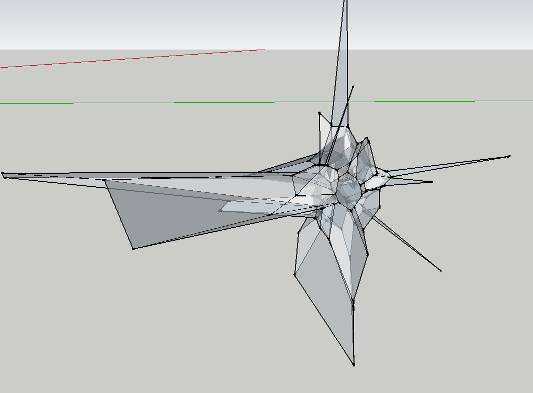

      voronoi.jpg


      delaunay and convex hull

      posted in Plugins
      A
      avariant
    • RE: New API doc - typos and questions

      BoundingBox.valid?

      text says

      status
          true if the bounding box is valid (not empty), false if it is not valid (empty)
      

      but the code example has it exactly the opposite:

       bbox = Sketchup.active_model.bounds
       status = bbox.valid?
       if (status)
         # If true, bounding box is empty.
       else
         # If false, bounding box contains entities.
       end
      
      posted in Developers' Forum
      A
      avariant
    • RE: New API doc - typos and questions

      From Image.explode:

      entitiesarray     an Array object of entities if successful
      

      which I interpret as the face and edges created in the explosion. However, the result from my testing always returns an empty array.

      posted in Developers' Forum
      A
      avariant
    • RE: InputPoint for Inference

      @TIG: Mirror3_1 doesn't appear to accept input from the VCB. That's what is causing the problem. Just doing it by mouse click is easy because all the clicks generate IP's. But having to generate pt2 programatically allows only the creation of a Point3d, because InputPoint has no method for setting it's 3D coordinate.

      posted in Developers' Forum
      A
      avariant
    • RE: InputPoint for Inference

      No, wait...I've confused myself. That still isn't what I mean.
      Getting the inference for the first segment, between IP1 and pt2 is easy, just as described above. And that's what I've been doing.
      But what about inferencing between pt2 and IP3? IP2, where the mouse was when the user entered in the VCB (the top of the line in image 1), may be on the right line for thefirst segment, but isn't on the right line at all for the second segment. If I try to inference lock with IP2 and IP3, that is not at all the same line as pt2 to IP3.

      As you can see below, pt2 to IP3 is not on the red axis, but IP2 to IP3 is. The inference lock is wrong for the line that I actually want, which is pt2 to IP3, not IP2 to IP3.

      So it goes back to the original intent, which is, how do I get an IP (InputPoint) at pt2 in order to get the correct inferencing for the second segment?

      http://img11.imageshack.us/img11/6985/ss1jvy.jpg

      http://img10.imageshack.us/img10/1434/ss2cfh.jpg

      posted in Developers' Forum
      A
      avariant
    • RE: InputPoint for Inference

      Ohhh.... I see. I can use the "on-the-fly" InputPoint to perform the inference, but I don't actually need to use it for positioning. Just inference. Since it's all along the same line, no difference! Thanks! 😳 πŸ˜„

      posted in Developers' Forum
      A
      avariant
    • 1
    • 2
    • 3
    • 4
    • 5
    • 3 / 5