sketchucation logo sketchucation
    • Login
    1. Home
    2. Alex37550
    Oops, your profile's looking a bit empty! To help us tailor your experience, please fill in key details like your SketchUp version, skill level, operating system, and more. Update and save your info on your profile page today!
    🔌 Smart Spline | Fluid way to handle splines for furniture design and complex structures. Download
    A
    Offline
    • Profile
    • Following 0
    • Followers 0
    • Topics 0
    • Posts 5
    • Groups 1

    Alex37550

    @Alex37550

    10
    Reputation
    1
    Profile views
    5
    Posts
    0
    Followers
    0
    Following
    Joined
    Last Online
    SketchUp version 2026
    Operating System Windows
    Knowledge of SketchUp Advanced

    Alex37550 Unfollow Follow
    registered-users

    Latest posts made by Alex37550

    • RE: [Plugin] FredoTools::SolidVolume - v1.4a - 10 Feb 20

      @fredo6 said:

      @alex37550 said:

      thanks for your reactivity !
      will you publish a reply when it will be downloadable?

      Alex

      Just republish, now that EWH certification seems to work again.
      Please advise if this fixes your problems.

      Fredo

      I have not seen your post.

      Thank you Fredo.
      I downloaded all new versions of you plug in and solid volumes works now.

      Alex

      posted in Plugins
      A
      Alex37550
    • RE: [Plugin] FredoTools::SolidVolume - v1.4a - 10 Feb 20

      thanks for your reactivity !
      will you publish a reply when it will be downloadable?

      Alex

      posted in Plugins
      A
      Alex37550
    • RE: [Plugin] FredoTools::SolidVolume - v1.4a - 10 Feb 20

      Hi Fredo

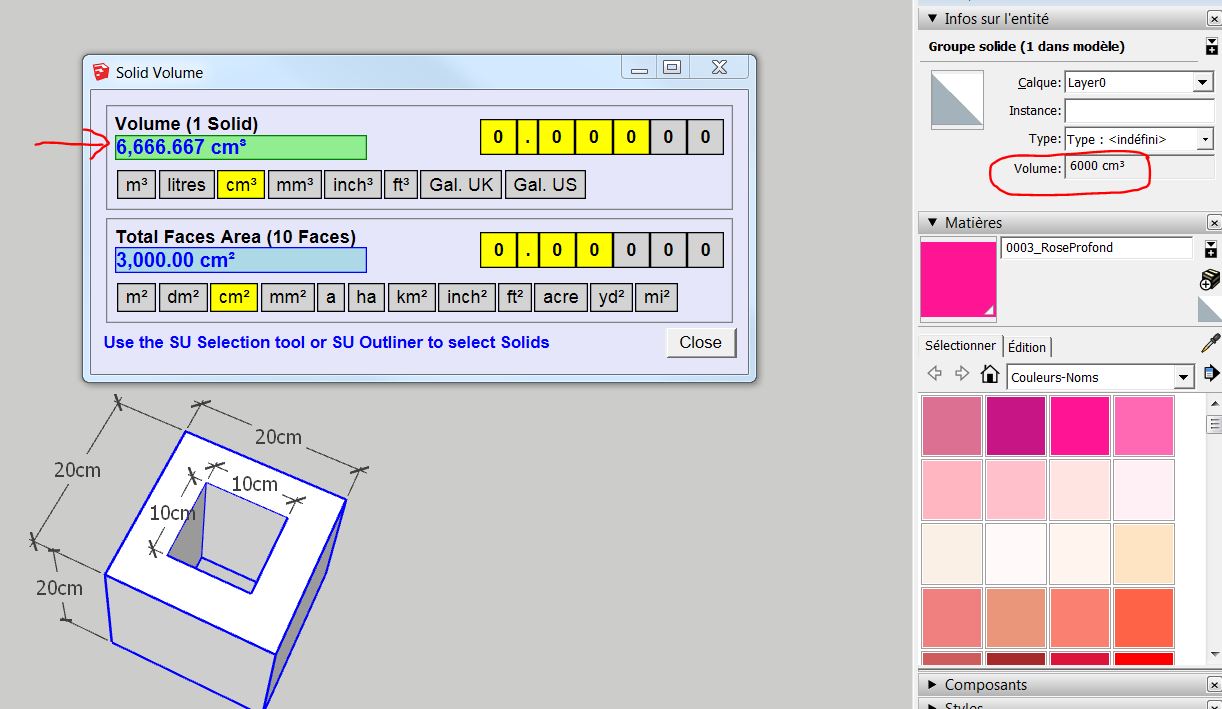
      I was so happy to find this plug in volumes, but it seems there is a problem with the volumes. i had a complex solid an found a volume that seemed very big. So i try with a small cube with an hole (20 cm for each side) and there is definitively a bug. see image

      I downloaded the latest versions of LibFredo, FredoTools (09 Jul 17) and that is the same

      anyway, thanks a lot Fredo for all your super plugins !

      have a good week !

      Alexandre

      bug solid volumes

      posted in Plugins
      A
      Alex37550
    • RE: [Plugin] Animator - v4.6a - 18 Dec 25

      @alex37550 said:

      problÚme d'image déformée sur une animation

      @fredo6 said:

      Je ne comprends pas bien le probleme. Est ce que les images servent simplement de fond.
      Dans tous les cas, Animator travaillant seulement sur des groupes et components, il est prudent de mettre les images dans un groupe.

      Fredo

      Bonjour,

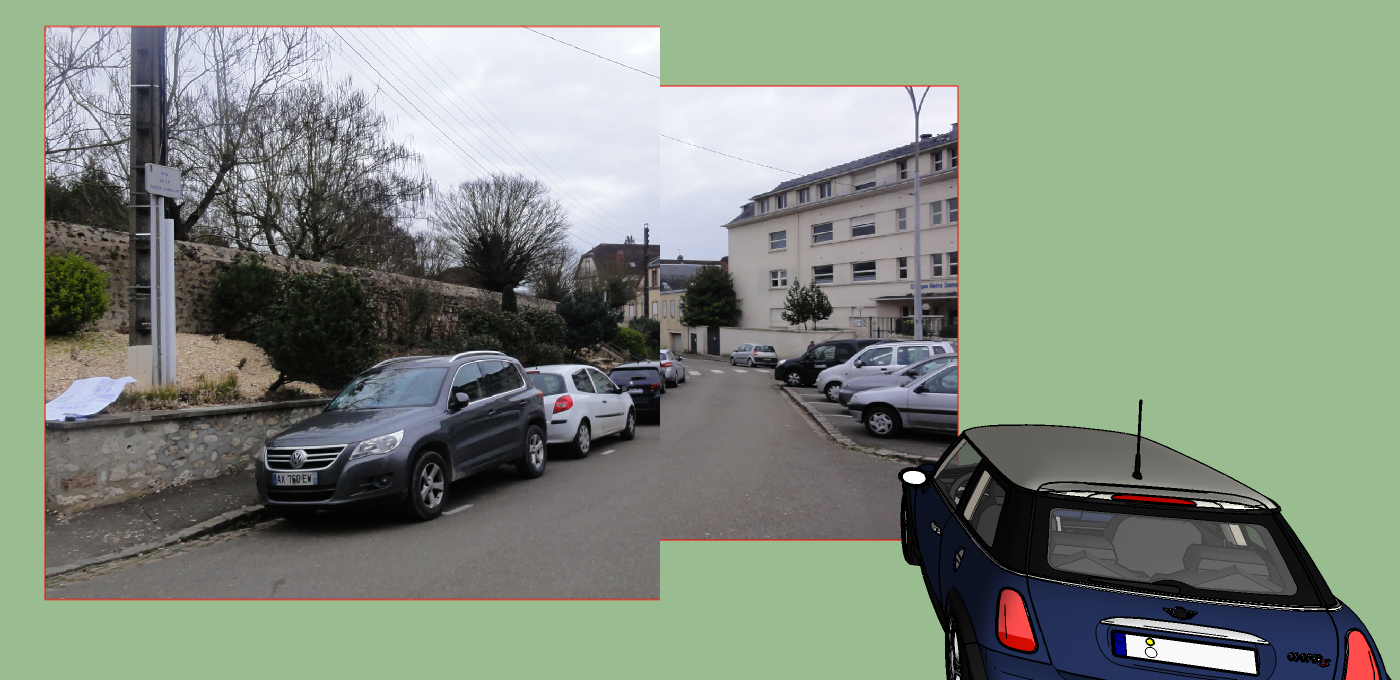
      J'utilise une image que j'ai importé pour l'adapter qui me sert donc de fond. (je ne fais donc pas bouger la caméra sinon elle ne serait plus visible, mais ce n'est pas grave.)
      L'image que j'ai jointe est ce que j'obtiens en aperçu avant de faire la vidéo. Si je fais le montage, la vidéo ressemble à cette image.
      Le problÚme est que ce "bug" n'est pas systématique, donc je ne sais pas dire dans quelle condition il se produit. On a réussi finalement à avoir une image non déformée, mais sans savoir ce qui a été efficace. On a essayé par exemple de déplacer les axes du dessin ou de la photo adaptée.

      Avez vous dĂ©jĂ  essayĂ© animator avec une photo adaptĂ©e? quand on utilise le zoom, c'est bizarre, la photo est figĂ©e mais on retrouve l'Ă©chelle, on rĂ©cupĂ©rant la position de dĂ©part sauvegardĂ©e. (Donc pas grave, mĂȘme si la 1Ăšre fois, on pense avoir perdu l'Ă©chelle par rapport Ă  la photo)

      Alexandre, fan des plug in de Fredo! Merci Fredo
      posted in Animator Beta
      A
      Alex37550
    • RE: [Plugin] Animator - v4.6a - 18 Dec 25

      Bonjour,

      j'ai dĂ©couvert en dĂ©but d'annĂ©e ce formidable Plugin Animator! Merci Fredo. 👍

      Je n'avais pas eu de souci sur mes 1Úres animations, mais là, j'ai travaillé à partir d'une photo adaptée et l'image adaptée est déformée (coupée en 2 avec des zooms différents apparemment).
      J'ai d'abord pensĂ© que je n'avais peut-ĂȘtre pas fait les mises Ă  jour.
      J'ai chargé Animator 1.5b
      j'avais déjà LibFredo 7.5b
      mais c'est pareil
      je joins une image extrait du Test image. la vidéo est pareille.
      j'ai fait un essai avec une autre photo, une nouvelle animation, un autre ordinateur, mĂȘme rĂ©sultat. et parfois ça revient comme il faut.

      Est ce un bug? quelqu'un a t il le mĂȘme problĂšme?

      Je profite de cette question pour savoir si on peut définir un chemin à suivre pour un mouvement (enchainement, ligne droite, courbe...), je n'ai pas vu si cela existait?

      Merci d'avance


      Fredo6_videoman_test_image0.png

      posted in Animator Beta
      A
      Alex37550