sketchucation logo sketchucation
    • Login
    1. Home
    2. AISmebel
    3. Posts
    Oops, your profile's looking a bit empty! To help us tailor your experience, please fill in key details like your SketchUp version, skill level, operating system, and more. Update and save your info on your profile page today!
    🚨 Skimp | 25% Off until March 30 Buy Now
    A
    Offline
    • Profile
    • Following 0
    • Followers 0
    • Topics 1
    • Posts 63
    • Groups 1

    Posts

    Recent Best Controversial
    • RE: [Plugin] LordOfTheToolbars - v2.9c - 20 Dec 24

      @fredo6 said:

      You seem to have 2 problems

      1. The Vignette Stripe does not display
      1. The custom toolbars are not showing at startup, but later on

      I don't have an explanation for that. I will probably need to send you a special version with traces to find out what is the problem.

      In the meantime, could you

      • Open the Ruby console
      • Close Sketchup with the Ruby console opened
      • restart Sketchup
      • Check if some errors appear in the Ruby console

      "Add help menu!"
      "create new"
      "created"
      #Sketchup::Menu:0x0000023c232015f0

      This inscription appeared a minute after the launch of SU. And after I opened the console on my own.
      Ruby console didn't open automatically!

      posted in Plugins
      A
      AISmebel
    • RE: [Plugin] LordOfTheToolbars - v2.9c - 20 Dec 24

      @fredo6 said:

      Could you display the Vignette Stripe? (go to menu Tools > Fredo6 Collection > LordOfTheToolbars > Toggle Visibility of the Vignette Stripe)

      Hello. The plugin itself works correctly. It just doesn't load icons.
      Yesterday I installed SketchUp 2022. I installed fresh LordOfTheToolbars for it. Problem still exists. So it's not in the plugin itself and not in SU. Maybe the problem is on my PC. Could this happen?

      posted in Plugins
      A
      AISmebel
    • RE: [Plugin] LordOfTheToolbars - v2.9c - 20 Dec 24

      @fredo6 said:

      If you do not see the Vignette Stripe at start up, it maybe be stuck off-screen (I guess you have multiple monitors).

      Could you go to the menu Tools > Fredo6 Collection > LordOfTheToolbars > Reset the Vignette Stripe position.

      I made a screen recording with another program.
      https://youtu.be/e6jSXIc9Dvo

      Reset the Vignette Stripe position did not help me 😞

      posted in Plugins
      A
      AISmebel
    • RE: [Plugin] LordOfTheToolbars - v2.9c - 20 Dec 24

      @fredo6 said:

      @aismebel said:

      With "LordOfTheToolbars" I'm having trouble loading the tabs I've created.
      These problems started after my SU crashed. Resetting the settings and reinstalling the plugin can not solve the problem (((
      Loading tabs starts only after clicking on any icon of the LordOfTheToolbars plugin.
      Very inconvenient (Icons constantly fly off from the places where I installed them (

      Could you first confirm which SU version you have (SU2018?).

      Then be more precise on the problem. And could you keep the Ruby console opened when dealing with LOTT, in case there are some error messages displayed.

      I would also recommend that you upgrade to LOTT V1.8a just published.

      https://youtu.be/EWKnFRXS1NE
      Now I use SU 2020. The plugin version is the latest and I update it regularly as soon as a new version appears.
      Reinstalling the plugin didn't help.

      posted in Plugins
      A
      AISmebel
    • RE: [Plugin] LordOfTheToolbars - v2.9c - 20 Dec 24

      Hey Freddo. First I want to thank you for your work, your extensions are very helpful.
      With "LordOfTheToolbars" I'm having trouble loading the tabs I've created.
      These problems started after my SU crashed. Resetting the settings and reinstalling the plugin can not solve the problem (((
      Loading tabs starts only after clicking on any icon of the LordOfTheToolbars plugin.
      Very inconvenient (Icons constantly fly off from the places where I installed them (
      https://youtu.be/EWKnFRXS1NE

      posted in Plugins
      A
      AISmebel
    • RE: [Plugin] Smooth Zoom 2.1.0 - 24 October 2021

      @anton_s said:

      @aismebel said:

      Dear Anton_S, I have been using your plugin for a very long time, it greatly facilitates daily work in SU.
      I personally express my point of view, but your plugin, up to version <2.0, was more convenient for me. Scrolling was smoother and easier to work with. Going back to the old version of Smooth Zoom again....

      I am curious if version 2 even works for you. Do you notice a difference with this plugin installed?

      Hi.
      Now I have version 1.3.0a installed with settings:
      Intenstity 0.8
      Transition Time 1.25
      Update FPS 60
      And it is very convenient for me to use. Smooth camera movement, which I can stop at any time, and this is very convenient)
      With these settings it sometimes slows down, but only when my SU model is filled with models with a lot of polygons.
      I installed version 2.0, the movement of the camera did not suit me, and I could not change the characteristics of the camera in the menu. I had to return the old version 1.3.0a.
      2.1 also did not suit me.
      Once again, this is just my opinion))) For some, version 2.1 is more suitable)))

      posted in Plugins
      A
      AISmebel
    • RE: [Plugin] Smooth Zoom 2.1.0 - 24 October 2021

      Dear Anton_S, I have been using your plugin for a very long time, it greatly facilitates daily work in SU.
      I personally express my point of view, but your plugin, up to version <2.0, was more convenient for me. Scrolling was smoother and easier to work with. Going back to the old version of Smooth Zoom again....

      posted in Plugins
      A
      AISmebel
    • RE: [Plugin] Smooth Zoom 2.1.0 - 24 October 2021

      Hello. Thank you very much for the useful plugin. It is very convenient.
      After the update, the option menu disappeared. Please return it to adjust the speed. Thank you very much! πŸ‘

      posted in Plugins
      A
      AISmebel
    • RE: [Plugin][$] JointPushPull Interactive - v4.9a - 02 Apr 25

      hi Fredo.
      I ran into such a problem, I cannot make a uniform indentation around the entire perimeter on a model with an irregular shape. I couldn't find any plugin that could do this.
      I have a big request to you to consider this improvement in the next versions of your excellent plugin. Thank you so much for your work!
      https://youtu.be/wCsli3Ps7xc

      posted in Plugins
      A
      AISmebel
    • RE: [Plugin] [$] S4u_Panel

      Hey. I recently bought the s4u-Panel plugin from you, I really like it. I use it very often. Thanks for such a wonderful plugin. I have a good suggestion for improving it: you need to enter several cells into which you can enter different thicknesses of the material, and which can be assigned to different hot keys !!! For example: To use material with a thickness of 3 mm, 10 mm, 15 mm, 16 mm, 19 mm. Each time, changing the thickness using the settings menu is very inconvenient.
      I hope you enjoy my idea. Sorry for my English, I use a translator πŸ˜„))

      posted in Plugins
      A
      AISmebel
    • RE: [Plugin] [$] S4u_Panel

      Dear developers, when users can see the updated version of the plugin on extensions.sketchup.com ???

      posted in Plugins
      A
      AISmebel
    • RE: [Plugin] [$] S4u_Panel

      Thank. I will wait.

      posted in Plugins
      A
      AISmebel
    • RE: [Plugin] [$] S4u_Panel

      Hey. I want to clarify with you if the plugin is being updated if I bought it on extensions.sketchup.com? The fact is that my version is v1.3, but v1.4.8 is listed on sketchucation.com.
      What do I need to do to upgrade to v1.4.8?
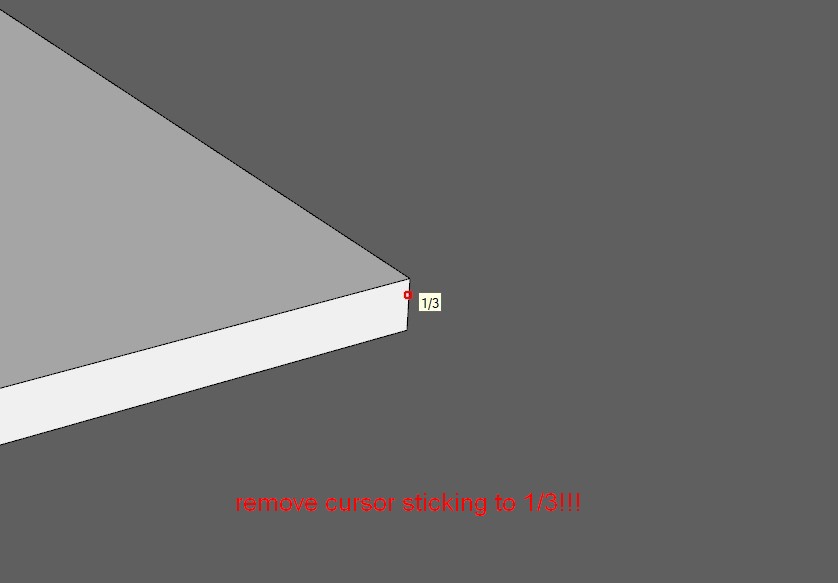
      I have one more question for you. Is it possible to remove the sticking of the cursor to 1/3? I do not need this function and it really bothers me.


      2020-05-13 135646.jpg

      posted in Plugins
      A
      AISmebel
    • RE: [Plugin][$] Curvizard - v2.5a - 01 Apr 24

      Fredo you are a magician !!! πŸ˜„))
      It was not me who caught the error, but rather she me;))
      I work in SketchUp and the slightest mistake in plugins makes my work uncomfortable. So thank you very much again!
      The second time I turned to you with a problem, and the second time we pleased me with its speed of solving it.
      P.S. The new version of LibFredo6_v10.3a fixed everything. So far, I do not see any errors.

      posted in Plugins
      A
      AISmebel
    • RE: [Plugin][$] Curvizard - v2.5a - 01 Apr 24

      Good afternoon. I have a problem with Curviloft and Curvizard plugins.
      Perhaps the problem arose after updating LibFredo6.
      Reinstalling the plugins did not help.
      Delivered an earlier version of LibFredo6, the problem is not fixed.
      Here is the link to the video: https://youtu.be/H06P-Fcx0Go

      posted in Plugins
      A
      AISmebel
    • RE: [Plugin][$] Curviloft 2.0a - 31 Mar 24 (Loft & Skinning)

      Good afternoon. I have a problem with Curviloft and Curvizard plugins.
      Perhaps the problem arose after updating LibFredo6.
      Reinstalling the plugins did not help.
      Delivered an earlier version of LibFredo6, the problem is not fixed.
      Here is the link to the video: https://youtu.be/H06P-Fcx0Go

      posted in Plugins
      A
      AISmebel
    • RE: [Plugin][$] Curvizard - v2.5a - 01 Apr 24

      @tig said:

      @AISmebel

      How is your Plugins folder within the ProgramData folder-path ?
      The user's Plugins folder in within that user's AppData/Roaming path...
      I hope you haven't made it manually ??

      Can you try this in the Ruby Console [copy+paste+enter]:
      Sketchup.find_support_file('Plugins')
      It should return something like:
      C:/Users/YOURUSERNAME/AppData/Roaming/SketchUp/SketchUp 2020/SketchUp/Plugins

      If you have not installed SketchUp properly sometimes folder permissions gets messed up...
      Close SketchUp/Layout, find the SketchUp installer exe file's icon [probably in Downloads]
      Select it, right-click > context-menu > "Run as administrator"
      When prompted choose 'Repair'

      This should sort out permissions and paths etc...

      Any other way of installing - e.g. double-clicking the exe file to simply 'Run' it is NOT the same thing and can result in weird errors...

      Hey.
      I use the SketchUcationTool plugin. It helps me quickly and easily expose my plugins. But I noticed that it works correctly when the plugins are located at the address:
      πŸ˜„ \ ProgramData \ SketchUp \ SketchUp 2018 \ SketchUp \ Plugins
      Fredo fixed the bug. Perhaps it was not the location of the plugin.

      posted in Plugins
      A
      AISmebel
    • RE: [Plugin][$] FredoScale - v3.6a - 01 Apr 24

      @fredo6 said:

      @aismebel said:

      Hello. Please tell me if you can use your plugins FredoScale and VisuHole so that the components do not lose contact with each other?

      Application to other component instances is something I can try to manage for VisuHole and FredoScale stretch is some situations.

      But be aware that this may not work, because, for instance, you could make a hole in 2 instances of the same component at different location.

      That's why I make the instances unique in the general case.

      Fredo

      For this, we need components! Work in one component should be displayed in others. Otherwise, I would use groups. And unique component, I can do it myself.
      You can add an icon that allows you to make the component unique or change it in all similar components.
      The plugin Bolt Maker (Final) does not break the connection between the components.

      posted in Plugins
      A
      AISmebel
    • RE: [Plugin][$] Curvizard - v2.5a - 01 Apr 24

      Fredo, thank you very much for your help, everything worked for me. I was very pleased that you were able to help me so quickly.
      Thank you for your plugins, they are very strong and very useful for many people.
      Β Take this opportunity to answer me another question =>

      http://sketchucation.com/forums/viewtopic.php?f=323&t=17948&p=657086#p657086

      Thanks.

      posted in Plugins
      A
      AISmebel
    • RE: [Plugin][$] FredoScale - v3.6a - 01 Apr 24

      Hello. Please tell me if you can use your plugins FredoScale and VisuHole so that the components do not lose contact with each other?
      I do not use these plugin functions because the connection between the components is broken. This is very inconvenient for me and for many users using this plugin.

      posted in Plugins
      A
      AISmebel
    • 1
    • 2
    • 3
    • 4
    • 3 / 4