sketchucation logo sketchucation
    • 登入
    Oops, your profile's looking a bit empty! To help us tailor your experience, please fill in key details like your SketchUp version, skill level, operating system, and more. Update and save your info on your profile page today!
    🔌 Smart Spline | Fluid way to handle splines for furniture design and complex structures. Download

    Quarter Sawn Oak texture

    已排程 已置頂 已鎖定 已移動 SketchUp Components, Materials & Styles
    sketchup
    31 貼文 11 Posters 9.3k 瀏覽 11 Watching
    正在載入更多貼文
    • 從舊到新
    • 從新到舊
    • 最多點贊
    回覆
    • 在新貼文中回覆
    登入後回覆
    此主題已被刪除。只有擁有主題管理權限的使用者可以查看。
    • Dave RD 離線
      Dave R
      最後由 編輯

      Here are three variations of a quarter sawn oak texture. Thanks to Modelhead for converting the lousy JPG I gave him into something very usable.
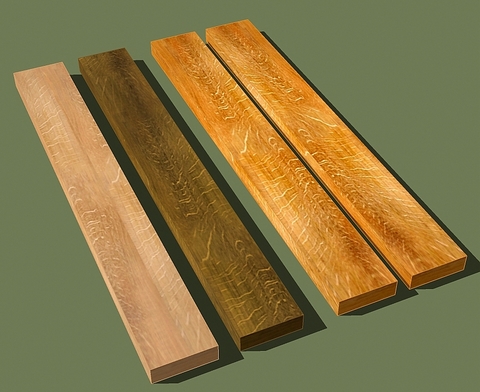
      Quarter Sawn Oak.jpg


      Quarter Sawn Oak.skp

      Etaoin Shrdlu

      %

      (THERE'S NO PLACE LIKE)

      G28 X0.0 Y0.0 Z0.0

      M30

      %

      1 條回覆 最後回覆 回覆 引用 0
      • boofredlayB 離線
        boofredlay
        最後由 編輯

        Nice. I can use these. 😄

        http://www.coroflot.com/boofredlay

        1 條回覆 最後回覆 回覆 引用 0
        • M 離線
          mike d
          最後由 編輯

          very nice thanks

          mike d

          The grass is always GREENER on the roof.

          1 條回覆 最後回覆 回覆 引用 0
          • A 離線
            alan wood
            最後由 編輯

            What beautiful grain. Thanks for that
            cheers
            Alan

            1 條回覆 最後回覆 回覆 引用 0
            • I 離線
              itisonlyi
              最後由 編輯

              Forgive my obvious ignorance. Being new to Sketchup, and even newer to this Forum, I am probably missing something incredibly obvious, but...

              How can I use this image as a texture, or material, in Sketchup?

              Thanks

              Steve

              1 條回覆 最後回覆 回覆 引用 0
              • R 離線
                remus
                最後由 編輯

                If you open up the model, go into the materials window (window->materials) and then select 'in model' from the drop down menu, you'll see a list of the textures in the model, you thn right click these and select 'save as' to save the material.

                http://remusrendering.wordpress.com/

                1 條回覆 最後回覆 回覆 引用 0
                • I 離線
                  itisonlyi
                  最後由 編輯

                  @remus said:

                  If you open up the model, go into the materials window (window->materials) and then select 'in model' from the drop down menu, you'll see a list of the textures in the model, you thn right click these and select 'save as' to save the material.

                  AaaaaH! I see.

                  And I see I can do that with imported jpg's that I use as textures as well.

                  Is there some easier way to save many Jpg's to textures? By the batch? I have a few dozen images I would like to do that with.

                  Many thanks (and such a swift response!)

                  Steve

                  1 條回覆 最後回覆 回覆 引用 0
                  • R 離線
                    remus
                    最後由 編輯

                    sorry, i cant help you with importing jpgs in batches, although i'd be interested to see if there is a method for doing this, ive got a lot of jpg textures just waiting to be used.

                    http://remusrendering.wordpress.com/

                    1 條回覆 最後回覆 回覆 引用 0
                    • I 離線
                      itisonlyi
                      最後由 編輯

                      Thanks for the response.

                      If I find something I will certainly post it here.

                      Steve

                      1 條回覆 最後回覆 回覆 引用 0
                      • K 離線
                        KennyL
                        最後由 編輯

                        Remus,

                        There's a Ruby script called massmaterialimporter.rb that will do what you want.
                        See http://www.crai.archi.fr/rubylibrarydepot/ruby/em_ren_page.htm.

                        Ken

                        Clothes make the man. Naked people have little or no influence in society.

                        1 條回覆 最後回覆 回覆 引用 0
                        • I 離線
                          itisonlyi
                          最後由 編輯

                          @kennyl said:

                          Remus,

                          There's a Ruby script called massmaterialimporter.rb that will do what you want.
                          See http://www.crai.archi.fr/rubylibrarydepot/ruby/em_ren_page.htm.

                          Thanks. I had found that a few minutes ago, but can't figure out how to make it work.

                          It prompts me to open a file, which it says will open the folder. I do so, and nothing further happens.

                          Any suggestions gratefully received.

                          Thanks

                          Steve

                          1 條回覆 最後回覆 回覆 引用 0
                          • K 離線
                            KennyL
                            最後由 編輯

                            Start the material importer, navigate to the directory containing your jpg images, click on any one of them and then click the Open button. After a bit, new materials will be added to your 'In Model' library.

                            Ken

                            Clothes make the man. Naked people have little or no influence in society.

                            1 條回覆 最後回覆 回覆 引用 0
                            • I 離線
                              itisonlyi
                              最後由 編輯

                              Yes, but they do not appear to be saved as skm files.

                              Each must be saved individually.

                              Or am I just being dense?

                              Steve

                              1 條回覆 最後回覆 回覆 引用 0
                              • K 離線
                                KennyL
                                最後由 編輯

                                You need to move each new material from the 'In Model' library to either an existing material library or to a new one. I suggest that you read up on the Material Browser in the SketchUp User's Guide which explains the whole process.

                                Ken

                                Clothes make the man. Naked people have little or no influence in society.

                                1 條回覆 最後回覆 回覆 引用 0
                                • I 離線
                                  itisonlyi
                                  最後由 編輯

                                  So you do have to handle each file individually.

                                  There is no way to "select all" and move/drag/copy to another folder/library.

                                  But I am way better off with this plugin than I was before. Thanks for it.

                                  Steve

                                  1 條回覆 最後回覆 回覆 引用 0
                                  • I 離線
                                    itisonlyi
                                    最後由 編輯

                                    I got this excellent advice in the Google Group Sketchup forum
                                    http://groups.google.com/group/sketchup/

                                    .

                                    @unknownuser said:

                                    ...there's a dropdown menu pick called Save Library As...

                                    That will save your entire In-Model Material Library as a named
                                    library, like Wood or Carpet and Textiles. The new library will
                                    correspond to a like-named folder under C:\Program Files\Google\Google
                                    SketchUp 6\Materials, and the folder will contain one .skm file for
                                    each texture.

                                    Hope others find it useful

                                    And thank you again for your help

                                    Steve

                                    1 條回覆 最後回覆 回覆 引用 0
                                    • R 離線
                                      remus
                                      最後由 編輯

                                      cheers, thats very useful, i was just going to do it by dragign all the materials into their respective folders 😛

                                      http://remusrendering.wordpress.com/

                                      1 條回覆 最後回覆 回覆 引用 0
                                      • O 離線
                                        oldworld124
                                        最後由 編輯

                                        I'm a Newbie here on Sketchup and Ruby Plugins.

                                        Could someone explain to me how to download this massmaterialimporter.rb Plugin? When I go into the Plugins library and click on this Plugin it comes up with script. Is there a way to download it normally or do I need to do it some other way. I would like to set up a materials library and do not know how.

                                        Thanks, John

                                        1 條回覆 最後回覆 回覆 引用 0
                                        • A 離線
                                          Aidus
                                          最後由 編輯

                                          Wow! Amazing textures! Thanks!

                                          CPU: Intel Core i7 Extreme Edition 965
                                          RAM: OCZ Gold DDR3 1600MHz 12Gb
                                          Video: Asus Radeon HD4870 X2 2Gb
                                          Mobo: Asus P6T Deluxe 1366 Intel X58

                                          1 條回覆 最後回覆 回覆 引用 0
                                          • GaieusG 離線
                                            Gaieus
                                            最後由 編輯

                                            @oldworld124 said:

                                            ...Could someone explain to me how to download this massmaterialimporter.rb Plugin...?

                                            Hi John,

                                            Yes, ruby files are simple text files (only difference is the *.rb extension vs. the *.txt extension). Web browsers and text editors therefore handle both the same way. Anyway, there are two easy ways to save them:

                                            1. Right click on the file and "Save as..." (or something like that in different browsers) into the Plugins folder. Make sure to give it the same name as it is written on the download page and add the .rb extension (in case it is not added automatically).

                                              NEVERgo to File > save page as... in your browser because it will add a whole bunch of html codes to the text file and it will get corrupted.
                                            2. When you have already clicked on it and the text is opened in your browser, select all (Ctrl A) > Copy (Ctrl C) and paste it (Ctrl V) into a plain text editor (like Notepad - NEVER a Word processor like MS Word or such!!!).
                                              Now save it (with the same naming rules as above) into your Plugins folder.

                                            Gai...

                                            1 條回覆 最後回覆 回覆 引用 0
                                            • 1
                                            • 2
                                            • 1 / 2
                                            • 第一個貼文
                                              最後的貼文
                                            Buy SketchPlus
                                            Buy SUbD
                                            Buy WrapR
                                            Buy eBook
                                            Buy Modelur
                                            Buy Vertex Tools
                                            Buy SketchCuisine
                                            Buy FormFonts

                                            Advertisement
