sketchucation logo sketchucation
    • Login
    Oops, your profile's looking a bit empty! To help us tailor your experience, please fill in key details like your SketchUp version, skill level, operating system, and more. Update and save your info on your profile page today!
    Mac User? | Join the Rayscaper Beta for Mac Learn More

    [Plugin] Cutting Windows script

    Scheduled Pinned Locked Moved Plugins
    27 Posts 13 Posters 42.0k Views 13 Watching
    Loading More Posts
    • Oldest to Newest
    • Newest to Oldest
    • Most Votes
    Reply
    • Reply as topic
    Log in to reply
    This topic has been deleted. Only users with topic management privileges can see it.
    • I
      ilay7k
      last edited by

      Thank you!

      @jenujacob said:

      didier,
      i loaded the .rb into the plugins folder... but however i do not get the right click option 'Window And Wall'...
      any thoughts?

      I have too...
      open component...define face and nothing in right-click action

      1 Reply Last reply
      Reply Quote 0
      • Didier BurD
        Didier Bur
        last edited by

        Hi,

        Below is the code of the controling function to wether display menu or not.
        So, if you're not satisfying all the uppercase comments, it is normal that you don't have the item in the context menu.
        Please let me know ๐Ÿ˜ณ

        
        def check_selection_floating_component
        sel = Sketchup.active_model.selection
        return false if sel.length != 1 #ONE ITEM SELECTED AT A TIME
        return false if sel[0].typename != "ComponentInstance" #MUST BE A COMPONENT INSTANCE
        f = sel[0].glued_to
        behavior = sel[0].definition.behavior.snapto
        if not f and behavior != 0 # IF COMPO IS NOT GLUED TO A FACE (FLOATING) AND IF COMPONENT CANNOT BE GLUED TO "NONE"
          return true #LET'S GO FOR THE MENU
          else 
          return false #DON'T DISPLAY ITEM IN CONTEXT MENU
        end 
        end


        DB

        1 Reply Last reply
        Reply Quote 0
        • jenujacobJ
          jenujacob
          last edited by

          SO BASICALLY..

          1. only one component has to be selected.... yes.
          2. must be a component instance... which means ????
          3. the component is not glued to a face... yes this is also satisfied..

          still nothin in the context menu.... or am i missing something from the code???? ๐Ÿ˜ณ
          ive never in my life even tried to read a code.. please forgive my ignorance!!! ๐Ÿ˜„ ๐Ÿ˜‰

          1 Reply Last reply
          Reply Quote 0
          • Didier BurD
            Didier Bur
            last edited by

            Hi Jenujacob,
            Please post the SKP so I can test what's happening. Maybe this has something to do with the model settings, 'cause you're doing everything right.

            DB

            1 Reply Last reply
            Reply Quote 0
            • jenujacobJ
              jenujacob
              last edited by

              well theres nothing special in this skp though... its just has a standard "window" component from the architecture library placed in empty space as told in the PDF tutorial u provided..
              Untitled.skp

              i am also attaching a jpg showing the plugin placement.. just in case...
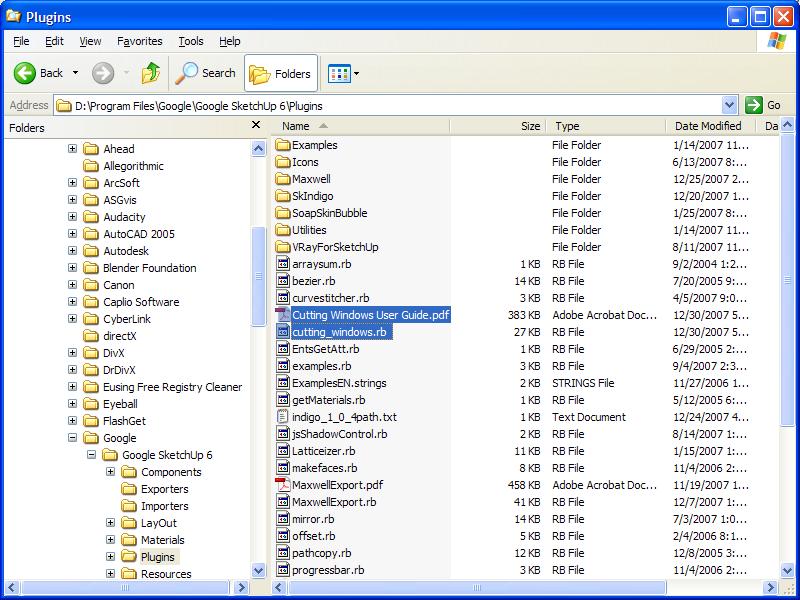
              untitled22.JPG

              1 Reply Last reply
              Reply Quote 0
              • I
                ilay7k
                last edited by

                Didier, thanks a'lot!
                It works! I just use componets from my collection and sketchup libraries(with glue allways)...so i play with glue function in comp-t's options(turn on any, sloped and ect...then back to none) and wall-cutting options appear in context-menu...slow response that component was unglued

                Ohhh....we can put comp-ts at wall and ect. then manupulate with detail cutting

                Thanks! Happy New Year!

                1 Reply Last reply
                Reply Quote 0
                • Didier BurD
                  Didier Bur
                  last edited by

                  Thanks ilay7k for tracking bugs...

                  Patched on 12.31.07 13:40 PM (GMT+2) โ—
                  Didn't work with components that had a behavior not to glue to anything.
                  Now works with every kind of component.
                  Happy new year !
                  ๐Ÿ˜†

                  DB

                  1 Reply Last reply
                  Reply Quote 0
                  • I
                    ilay7k
                    last edited by

                    @didier bur said:

                    Thanks ilay7k for tracking bugs...

                    Patched on 12.31.07 13:40 PM (GMT+2) โ—
                    Didn't work with components that had a behavior not to glue to anything.
                    Now works with every kind of component.
                    Happy new year !
                    ๐Ÿ˜†

                    It lives...works! ๐Ÿ˜ฒ ๐Ÿ˜„
                    Thanks!
                    future of 2008
                    +dynammic any!!

                    1 Reply Last reply
                    Reply Quote 0
                    • jenujacobJ
                      jenujacob
                      last edited by

                      this is awesome!!! thanks didier!!! ๐Ÿ˜„
                      happy new year!!!

                      1 Reply Last reply
                      Reply Quote 0
                      • kmeadK
                        kmead
                        last edited by

                        Didier:
                        Many thanks for what I hope becomes another great tool. I ran into the attached problem at startup of SU after installing your new ruby.

                        I am on a Mac, OSX 10.4.11 with a PPC chip. I will check on my Intel Mac tomorrow after I get back to work.

                        All the best.

                        Karl
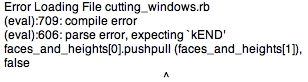

                        Picture 1.jpg

                        I created Dilbertville, sorry about that...

                        1 Reply Last reply
                        Reply Quote 0
                        • Didier BurD
                          Didier Bur
                          last edited by

                          Hi,

                          Kmead: I've PM'ed you an updated script. Tell me if it works.
                          Cheers,

                          DB

                          1 Reply Last reply
                          Reply Quote 0
                          • B
                            Ben Ritter
                            last edited by

                            Thank you for your generosity.

                            1 Reply Last reply
                            Reply Quote 0
                            • A
                              amadex
                              last edited by

                              @kmead said:

                              Didier:
                              Many thanks for what I hope becomes another great tool. I ran into the attached problem at startup of SU after installing your new ruby.

                              I am on a Mac, OSX 10.4.11 with a PPC chip. I will check on my Intel Mac tomorrow after I get back to work.

                              All the best.

                              Karl

                              Hi Didier, it happens the same with me... How can I solve this?

                              tkx

                              1 Reply Last reply
                              Reply Quote 0
                              • Didier BurD
                                Didier Bur
                                last edited by

                                @ Amadex: look at the top of this topic, I've released a Mac version.
                                Tell me if it's OK.

                                DB

                                1 Reply Last reply
                                Reply Quote 0
                                • G
                                  gerdwillemen
                                  last edited by

                                  Didier

                                  I also tried your "mac version. I also get an "error" report.
                                  Could you help ?

                                  See error report in attachment

                                  Thanks

                                  Gerd
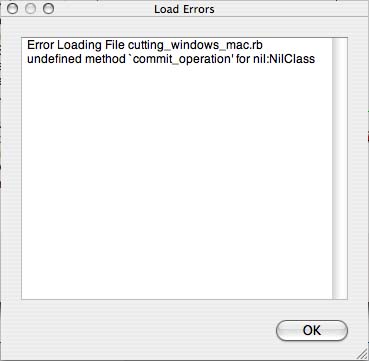

                                  error cutting report.jpg

                                  1 Reply Last reply
                                  Reply Quote 0
                                  • mariochaM
                                    mariocha
                                    last edited by

                                    Just to let you know that the Mac version works fine here.

                                    The whole thing is a 3 step process;

                                    1. define as cutting window
                                    2. put it on a wall
                                    3. right-click window and select "Cut wall from window" then parameters.
                                      Also works on several windows at a time.
                                      Many well deserved thanks to the author !

                                    %(#008000)[Mario C.
                                    Every rule has exceptions, but some.]

                                    1 Reply Last reply
                                    Reply Quote 0
                                    • P
                                      paddyclown
                                      last edited by

                                      Hi

                                      I tried to add this plugin to SUv8 Pro & got this message:
                                      Error Loading File cutting_windows.rb
                                      (eval):719: compile error
                                      (eval):610: syntax error, unexpected ',', expecting kEND
                                      faces_and_heights[0].pushpull (faces_and_heights[1]), false
                                      ^Error Loading File yaml.rb
                                      no such file to load -- date

                                      Does anyone have an idea what is going on ?
                                      Thanks in advance folks,

                                      1 Reply Last reply
                                      Reply Quote 0
                                      • TIGT
                                        TIG Moderator
                                        last edited by

                                        Perhaps it's time to look up my 'HolePunchTool' [ http://forums.sketchucation.com/viewtopic.php?p=271170#p271170 ] which does a similar job BUT has far more bells and whistles - and works relatively seamlessly and has had few error reports...

                                        TIG

                                        1 Reply Last reply
                                        Reply Quote 0
                                        • P
                                          paddyclown
                                          last edited by

                                          TIG, yes, thanks, actually I have been trying to use your tool, but sadly it doesn't work for some unknown reason... I followed the instructions which seem pretty clear & can't get it to work ๐Ÿ˜ž

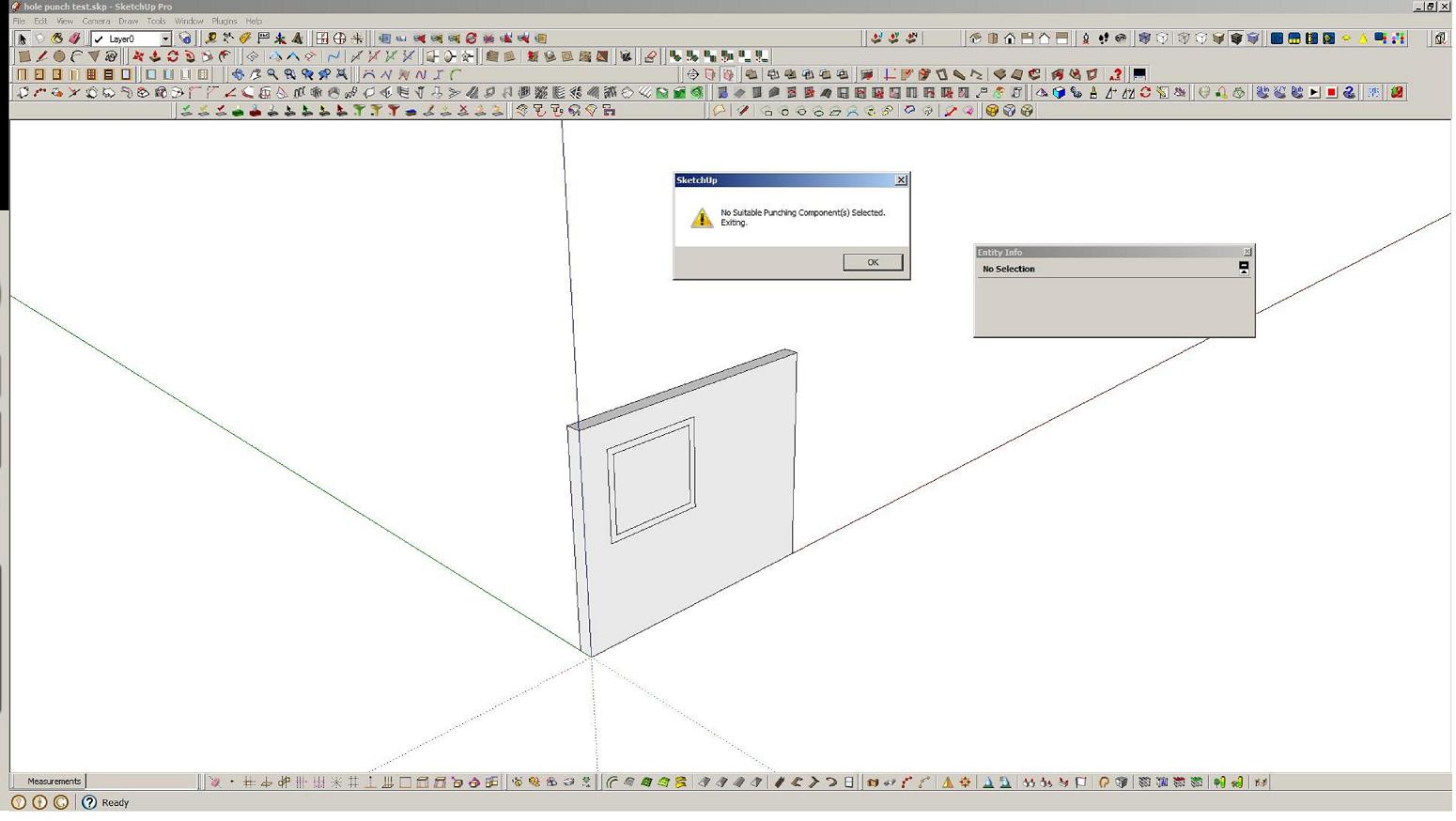
                                          I have made a component that glues to "any" & has cut opening checked but when i try & use it (ie it is in place on a face of a 'wall' & i r-click & choose punch ) I get this message 'no suitable punching component selected, exiting'... maybe i have just not understood the procedure


                                          file test

                                          1 Reply Last reply
                                          Reply Quote 0
                                          • P
                                            paddyclown
                                            last edited by

                                            ... sorry i pressed the submit button too fast...
                                            Thanks for any guidance..

                                            best


                                            screenshot

                                            1 Reply Last reply
                                            Reply Quote 0

                                            Hello! It looks like you're interested in this conversation, but you don't have an account yet.

                                            Getting fed up of having to scroll through the same posts each visit? When you register for an account, you'll always come back to exactly where you were before, and choose to be notified of new replies (either via email, or push notification). You'll also be able to save bookmarks and upvote posts to show your appreciation to other community members.

                                            With your input, this post could be even better ๐Ÿ’—

                                            Register Login
                                            • 1
                                            • 2
                                            • 1 / 2
                                            • First post
                                              Last post
                                            Buy SketchPlus
                                            Buy SUbD
                                            Buy WrapR
                                            Buy eBook
                                            Buy Modelur
                                            Buy Vertex Tools
                                            Buy SketchCuisine
                                            Buy FormFonts

                                            Advertisement