[Plugin] Volume Calculator2...
-
There are two versions of Volume - [v1] is slow but 'reliable' and the other [v2] is fast but 'sensitive' !
v1 will find the volume of a shape even it it has no 'lid' or holes in it - just as if it were filled up with a fluid till it spilled out - but it takes it's time on very high accuracy settings...
v2 needs a 'manifold' shape - make sure that the form is fully faced - there's my recentmanifold.rbto check this. Used on a suitable form v2 will quickly return the volume with as much accuracy as it can muster... if it has 'holes' or complex faces [internal etc] it can't return a volume.
To find the area of faces there's a new thread started recently that explains how best to do this...

-
hello......... it seems to be intressting, please how to get it?
-
thanks man... you're so great

-
Hi, just wanted to let the community know, I tried running Volume2.1, having had it run successfully in the past, and found that whilst the dialog loaded and the "clone volume" object was created, no volume text label was added to the drawing. Guessing that the problem might be a plug-in conflict, i disabled some of my more recent plugin additions (change filename from .rb to .rbXX) and re-ran Sketchup and Volume. The problem was Sketchy Physics plugin (V3 I think). Disable it and Volume 2.1 works as expected.
Don't know if anyone can shed any light on this or can suggest a solution for them both to co-exist?
Best wishes to all.
-
Thanks Bill
There is a know issue with some clashes with scripts and SketchyPhysics - see this http://forums.sketchucation.com/viewtopic.php?p=300105#p300105 BUT it's never been reported with Volume before ?
Perhaps it's a clash with theclass Geom;;Point3d def dot(v) self.x * v.x + self.y * v.y + self.z * v.z end endcode ?

I'll look into it........... -
No idea TIG, I'm not best-placed to comment on coding
It would be interesting to know whether anybody else has the same issue or whether it is a peculiarity of my system...
-
I am cleaning up all my plugins and testing as I install each one to make sure there are no conflicts and I keep getting an error when I do a validity check on simple cubes and spheres. Is this normal?
Using Sketchup 7.1 on OSX 10.6.5.
Thanks.
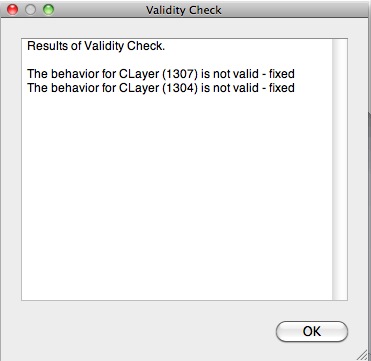
-
How do you know this is related to Volume?
Change your active layer to Layer0 beforehand and see what happens ?? -
Would it be possible to create a Volume by Surface option for this plugin? I often have to figure out volume calculations of things that below grade and hence not shown in the model. Say something like a concrete footer or slab. In the model I only usually show the surface. I thought it would be great if the plugin recognized if the selection was a single plane with no depth and would prompt the user to set a virtual depth before proceeding to the volume dialog. If it's not too much trouble.
-
Adam
Can't you just select all of the faces [using a filter] and then get the total area from Entity Info and then x that depth in " to get the volume in cu" [then x 0.000578703703703704 to make it cu' or x 0.000021433470507545 to make it in cuyds]...
This one-liner will return the volume of 1" depth of the selected flat faces in cuyds [other selected entities or non-flat faces are ignored].
You can change 'd=' to another depth as desired; change 'f=' [and the final 'puts()'] if you want say cu' etc...d=1;f=0.000021433470507545;v=0;Sketchup.active_model.selection.each{|e|v=v+(d*e.area)*f))if e.class==Sketchup;;Face and e.normal.z.abs>=0.999};puts(v+" cuyds")Just copy paste it into the Ruby Console, adjusting d= [and perhaps f= etc] as desired, then <enter>...
-
Thanks TIG. Would it involve changing the coding for each desired depth? For instance on a brick patio I often have to figure out three volume calculations. One for excavation depth and soil removed (10"), one for crushed gravel base (6") and one for bedding sand @ 1". Right now I do it by copying the surface shape into a different SU session and then making three copies of that and then extruding each to their desired depth. I then run the volume plugin on each group. I thought it would be easier with a prompt to set depth from the initial surface.
-
The result is cuyds [or cu' if you were to change the f= value] and it's based on a 1" depth - so you can simply multiply that volume by the actual depth in inches to get the actual volume ?
Otherwise paste the code and change the initiald=10;say if it's 10" and so on... see how the 10" version is simply 10x more volume than the 1" version etc...
To make it have dialogs etc is much more complex than a 'one-liner' like this...
-
Having slept on it you would probably want to find the volume of faces that slope too. This version does that - a fully 'vertical' face has 0x volume and a fully 'flat' face has 1x; while at 45 degrees it'll be 0.707x [1/sqrt(2)] of its flat cousin with the same surface area
v=0;b=Geom;;BoundingBox.new;m=Sketchup.active_model;s=m.selection;s.each{|e|(b.add(e.bounds);v=v+(e.area*e.normal.z.abs))if e.class==Sketchup;;Face};if v>0;t="Faces>Volume";r=inputbox(["Depth;","Units;"],['1"'.to_l,"cuyds"],["","cuyds|cu'|cu\"|m3|cm3|mm3"],t);if r;v=v*r[0];case r[1];when "cuyds";f=0.000021433470507545;when "cu'";f=0.000578703703703704;when "m3";f=0.000016387064;when "cm3";f=16.387064;when "mm3";f=16387.064;else;f=1.0;end;v=sprintf("%.6f ",(v*f));p=b.max;m.start_operation(t);m.active_entities.add_text((v+r[1]),p,[10,10,10]);m.commit_operation;else;p 'Canceled.';UI.beep;end;else;p 'No Faces!';UI.beep;endThis 'one-liner' version now asks for the depth and units, and then puts a piece of Text at the selected faces' max bounds.
To make it into a proper tool do this...
Make a file called 'VolumeFaces.rb' in the Plugins folder and add this coderequire 'sketchup.rb' module TIG def self.volumefaces() v=0;b=Geom;;BoundingBox.new;m=Sketchup.active_model;s=m.selection;s.each{|e|(b.add(e.bounds);v=v+(e.area*e.normal.z.abs))if e.class==Sketchup;;Face};if v>0;t="Faces>Volume";r=inputbox(["Depth;","Units;"],['1"'.to_l,"cuyds"],["","cuyds|cu'|cu\"|m3|cm3|mm3"],t);if r;v=v*r[0];case r[1];when "cuyds";f=0.000021433470507545;when "cu'";f=0.000578703703703704;when "m3";f=0.000016387064;when "cm3";f=16.387064;when "mm3";f=16387.064;else;f=1.0;end;v=sprintf("%.6f ",(v*f));p=b.max;m.start_operation(t);m.active_entities.add_text((v+r[1]),p,[10,10,10]);m.commit_operation;else;p 'Canceled.';UI.beep;end;else;p 'No Faces!';UI.beep;end end unless file_loaded?(File.basename(__FILE__)) UI.menu("Plugins").add_item("Volume from Faces..."){TIG.volumefaces()} end#menu file_loaded(File.basename(__FILE__)) endIt then appears in Plugins Menu under 'Volume from Faces...', select faces and run it, set the dialog options as desired etc...
-
Ah damned there is no right button on Mac?

But as writed in the header there is also a Menu on the top line
Because Menu volume is on contextuel menu on right clic button !
you must have also sketchup.rb in the folders Plugins!
Maybe it's for that you don't see that!works fine wtih the free one!

%(#FF4000)[Moderator note from thomthom:
I removed thesketchup.rbfile as it not be needed to distribute this. Each SketchUp version needs a specific version, otherwise odd bugs can appear. The file should also not be in the Plugins folder. (Might have been true many many versions ago, but for the last few it should be in the Tools folder.)] -
plz upload v1.8 bro TIG !!!
Thank u very much ! -
@duchuy2001 said:
plz upload v1.8 bro TIG !!!
Thank u very much !
If you go the the SCF Plugins Index page - menu linked above - and use your browser's find function [ctrl+F?] for 'volume' you'll find all of the volume tools listed in their own threads - v1.8 has its own thread...
Please learn to use the basic SCF forum and browser-page search/find tools it will be to your advantage... -
thnxxxxxxxxxxxxx

-
Tig, would it be possible to make plugin that calculates volume between two terrain surfaces.
Say you have existing ground surface in one group and planed ground surface in other, and you want to know how much you are excavating.
Or maybe there already are such plugin? -
The version 1 of the tool has a cut-and-fill example.
You need to do several steps...
You need to find whats removed AND what's added...Or make the two terrains into solids by adding a 'skirt' - I think sdmitch wrote a tool to do that...
Then intersect the two using solid-tools and the remainder is the volume... -
There's a new future-proofed update.
http://sketchucation.com/forums/viewtopic.php?p=16067#p16067






Advertisement