sketchucation logo sketchucation
    • 登入
    Oops, your profile's looking a bit empty! To help us tailor your experience, please fill in key details like your SketchUp version, skill level, operating system, and more. Update and save your info on your profile page today!
    🔌 Smart Spline | Fluid way to handle splines for furniture design and complex structures. Download

    [Plugin] Volume Calculator2...

    已排程 已置頂 已鎖定 已移動 Plugins
    64 貼文 23 Posters 85.2k 瀏覽 23 Watching
    正在載入更多貼文
    • 從舊到新
    • 從新到舊
    • 最多點贊
    回覆
    • 在新貼文中回覆
    登入後回覆
    此主題已被刪除。只有擁有主題管理權限的使用者可以查看。
    • TIGT 離線
      TIG Moderator
      最後由 TIG 編輯

      VolumeCalculator2.rb

      Rewritten with a much quicker volume calc method thanks to AdamB.

      Please try and feedback. It has most of the functions/options of v1.8 and also puts the text-tag on a separate layer...

      Note its new name - remove any earlier versions before running or you'll get two Volume items in the context-menu...PayPalButton
      This is v2.0 - the NEXT post contains v2.1

      TIG

      1 條回覆 最後回覆 回覆 引用 0
      • TIGT 離線
        TIG Moderator
        最後由 編輯

        Here's v2.2

        Nested Groups/Components within Groups now 'mined' and each calculated.
        Dialogs combined into one and only one dialog per selection set.
        Reversed faces in some volume-groups now properly colored.
        [Note that 'Red' faces show a problem too]
        Warning at end if any ambiguous forms.
        Get its RBZ from here http://sketchucation.com/resources/pluginstore?pln=VolumeCalculator2

        TIG

        1 條回覆 最後回覆 回覆 引用 0
        • P 離線
          pdpotter
          最後由 編輯

          How do I add the VolumeCalculator v2 script to SketchUp?

          1 條回覆 最後回覆 回覆 引用 0
          • P 離線
            pdpotter
            最後由 編輯

            Thanks, Pilou. There was no Plugins folder in my Google SketchUp 6 folder, so I created one and copied the VolumeCalculator2.rb file into it. I then created a component which has connected faces forming a solid which has a volume. When I right click on the component, I do not see a Volume option. I do not have a Plugins menu item, either.

            Perhaps it is because I am using the free version of SketchUp. Or perhaps because I am using a Mac (OS X 10.5.2).

            Any suggestions?

            1 條回覆 最後回覆 回覆 引用 0
            • P 離線
              pdpotter
              最後由 編輯

              I have a 2-button mouse (could have used Control-click for right-click otherwise), so that's not it. I think I should see an entry in the About Plugins menu, also, but I don't.

              1 條回覆 最後回覆 回覆 引用 0
              • P 離線
                pdpotter
                最後由 編輯

                Pilou (and others)

                I got it! On a Mac, you have to place the .rb file in the Library > Application Support > Google SketchUp 6 > SketchUp > Plugins folder. (This assumes that the SketchUp program exists in a folder called Google SketchUp 6 within the Applications folder.) Once I did that, the sub-menu included a Volume option. Thanks for your help, Pilou.

                1 條回覆 最後回覆 回覆 引用 0
                • G 離線
                  gurkesaft
                  最後由 編輯

                  Ug. I cannot get this thing to appear anywhere in sketchup 6. I tried to put it in the "Plugins" folder or the "plugins/utilities" folder but it just won't appear.

                  It's not the pro version. Do you need pro to use custom scripts? Sorry if I'm missing something stupid.

                  Thanks,
                  Jack

                  1 條回覆 最後回覆 回覆 引用 0
                  • G 離線
                    gurkesaft
                    最後由 編輯

                    Woa woa woa, never mind.

                    I knew I'd figure it out once I posted...

                    Sorry!

                    -Jack

                    1 條回覆 最後回覆 回覆 引用 0
                    • G 離線
                      gurkesaft
                      最後由 編輯

                      Hello again,

                      I'm having trouble with volume calculator, and I can reproduce the odd behavior:

                      Make a 1"x1" rectangle, push it 1" into a cube, draw a 0.25" circle in the middle and push it to the bottom of the cube to make a hole. Group it, and run volume calculator. It goes wonky! (I'm pretty sure it does this for all through-holes, but I wanted to be sure we're all doing it the same)

                      I'm using v2.1 and sketchup free 6. Any ideas?

                      Thanks!
                      Jack

                      1 條回覆 最後回覆 回覆 引用 0
                      • pilouP 離線
                        pilou
                        最後由 編輯

                        Simply add it inside the folder Plugins of (Google) Sketchup 😄
                        Instructions are in the header of the file: you can read it by a simple text editor (bloc note)

                        In this case just after a speedy use : you must create a goupe or a component before
                        Clic on this Group or Component and then "Volume" will appear on the "Right clic" 😉

                        Seems work like a charm 👍
                        This guy is this one 😄


                        Brice.jpg

                        Frenchy Pilou
                        Is beautiful that please without concept!
                        My Little site :)

                        1 條回覆 最後回覆 回覆 引用 0
                        • pilouP 離線
                          pilou
                          最後由 編輯

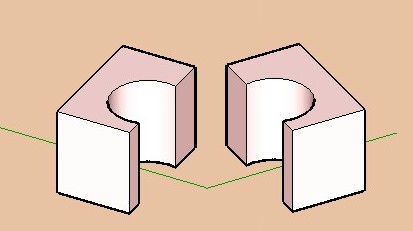
                          Seems that is the same for all volumes with holes 😐
                          A solution is to cut the volume in 2 parts and add the volumes results 😉
                          Now the calculator works! 😎


                          cube.jpg

                          Frenchy Pilou
                          Is beautiful that please without concept!
                          My Little site :)

                          1 條回覆 最後回覆 回覆 引用 0
                          • W 離線
                            watkins
                            最後由 編輯

                            Dear Gurkesaft,

                            Try TIG's version 1.8. It works fine with through holes

                            Regards,
                            Bob

                            1 條回覆 最後回覆 回覆 引用 0
                            • S 離線
                              svetik
                              最後由 編輯

                              This is sad- what does v2.1 exist for? 😢

                              1 條回覆 最後回覆 回覆 引用 0
                              • W 離線
                                watkins
                                最後由 編輯

                                Dear TIG,

                                Do you think you might have time to look at your latest, fast version of the volume calculator? I am still using V1.8 as V2.1 seems to fail when challenged with one of my models.

                                Kind regards,
                                Bob

                                1 條回覆 最後回覆 回覆 引用 0
                                • TIGT 離線
                                  TIG Moderator
                                  最後由 編輯

                                  V2 was a quicker alternative way of accurately calculating volumes. v2 does it by 'slicing'...

                                  Use v1 for more complex shapes (slow)
                                  or use v2 for simpler shapes (quicker)

                                  • see which suits you best...

                                  I currently don't have time to sort out v2 - if anyone else wants to tweak it, please feel free...

                                  .

                                  TIG

                                  1 條回覆 最後回覆 回覆 引用 0
                                  • W 離線
                                    watkins
                                    最後由 編輯

                                    Dear TIG,

                                    Okay, I will do that. Thanks for the response.

                                    Kind regards,
                                    Bob

                                    1 條回覆 最後回覆 回覆 引用 0
                                    • free agentF 離線
                                      free agent
                                      最後由 編輯

                                      is there any way to force a volume, i have a bottle design here and the client needs it to be 500ml and wants to know what the resulting dimensions would be.

                                      http:i167.photobucket.comalbumsu143FreeAgent84bug.gif

                                      1 條回覆 最後回覆 回覆 引用 0
                                      • AdamBA 離線
                                        AdamB
                                        最後由 編輯

                                        @unknownuser said:

                                        is there any way to force a volume, i have a bottle design here and the client needs it to be 500ml and wants to know what the resulting dimensions would be.

                                        If you know the current volume with the current dimensions, then you'll need to scale the current design by:

                                        3√(targetvolume / currentvolume)

                                        Adam

                                        Developer of LightUp Click for website

                                        1 條回覆 最後回覆 回覆 引用 0
                                        • free agentF 離線
                                          free agent
                                          最後由 編輯

                                          see a good reason to have payed attension in math class... i'll try

                                          http:i167.photobucket.comalbumsu143FreeAgent84bug.gif

                                          1 條回覆 最後回覆 回覆 引用 0
                                          • thomthomT 離線
                                            thomthom
                                            最後由 編輯

                                            @unknownuser said:

                                            see a good reason to have payed attension in math class... i'll try

                                            Did you ever say: "I'll naver have use of that!"..?

                                            Thomas Thomassen — SketchUp Monkey & Coding addict
                                            List of my plugins and link to the CookieWare fund

                                            1 條回覆 最後回覆 回覆 引用 0
                                            • 1
                                            • 2
                                            • 3
                                            • 4
                                            • 4 / 4
                                            • 第一個貼文
                                              最後的貼文
                                            Buy SketchPlus
                                            Buy SUbD
                                            Buy WrapR
                                            Buy eBook
                                            Buy Modelur
                                            Buy Vertex Tools
                                            Buy SketchCuisine
                                            Buy FormFonts

                                            Advertisement