[Plugin] Volume Calculator2...
-
BTW Thats "cube root" not "3 times squareroot"
Perhaps TIG could be persuaded to add a function to Volume Calc that does this since I can see it must be pretty common to be wanting to get to a target volume.
Now if three men take four days to dig.. nevermind..
Adam
-
Dear Adamm & TIG,
Could the volume calculator be updated so that the newer, faster script doesn't fall over with multiple internal volumes? I am currently using V1.8 as that seems to work well for complicated shapes, but it does take a long time when the precision goes up. Further, while easily calculated by hand (once one knows the volume), could an editable drop-down list of densities be added so that the script works out the mass as an option. Typical densities would be for concrete, steel, wood, water, sand etc.
Another option would be to assign materials properties to components (is this possible?), and then to get the script to work on an assembly (such as a wooden cabinet), treating each component separately (volume and mass) returning a table (spreadsheet) of volumes and masses with the total mass. This could be useful in assessing loading, lifting and shipping requirements. The calculations for C of G are very similar to those for volume (slicing the model), so that is yet another option, as is moments of inertia.
I'm sure you are both very busy, but I offer these few thoughts for consideration.
Regards,
Bob -
First off, "Volume Calculator" is TIG's baby not mine!
The analytic method for Volume calc (the fast one) will not give the right answer if you have "open geometry". You can find all open edges by running a script like this (doesn't recurse into groups/components):
def findleaks(ents = Sketchup.active_model.entities)

	for ent in ents
		next unless ent.kind_of? Sketchup;;Edge

		if ent.faces.length == 1
			Sketchup.active_model.selection.add ent
		end
	end
end
The problem is there isn't a real simple way of automatically closing those "leaks".
Adam
-
woohoo it worked thanx adamB
-
I'd better jump in here...
I made the early versions of Volume calculate by slicing the selected component or group into pieces and totting up the face-cut areas - like crude 'calculus'... It had levels of accuracy as it takes a while to slice and calculate a lot of faces. Often simple shapes return reasonably accurate volumes with few slices...
Adam suggested a 'clever' way of calculating the volume - it has the advantage of being very fast and accurate but is prone to falling over it the faces aren't complete etc...
That's why there are two versions out there.
I would like to fix the fast version much as you ask. It could also include density and CofG etc: however, I am very busy on other things - I will publish something as soon as I can... but no promises...
If anyone else would like to adopt my 'Volume' code and re-do it please feel free [I did something similar with Mirror.rb a while back - completely rewriting the method, but still gave Frank Wiesner the initial credit for having the original ideas up to 2.5 - now on 3.1 ?]...
. -
Dear TIG and Adam,
Thank you for taking my request/suggestions seriously.
Regards to you both.
Bob
-
Dear TIG,
Do you think you might find a moment to take a look at your volume calculator. As I wrote before, the 'faster' version falls over when applied to a shape with cavities. A faster, working version would be good as then one could use the higher precision without the time overhead.
Other improvements might include:
-
Mass calculation (volume x density), with a editable drop down menu of typical densities (glass, concrete, soil, sand, water, steel, plastic etc)
-
Centre of Gravity
-
Moments of inertia
Kind regards,
Bob -
-
Sorry to go OT, but I can't seem to get Sketchup 7.1.4871 to recognize the volume plugins. I've dropped them into the /Plugins folder with the rest of my plugins, all the rest of which work fine.
Any ideas?
Piyono
-
@unknownuser said:
Sorry to go OT, but I can't seem to get Sketchup 7.1.4871 to recognize the volume plugins. I've dropped them into the /Plugins folder with the rest of my plugins, all the rest of which work fine.
Any ideas?
Piyono
It's a right-click context-menu item only - available if you have a group or component-instance selected... There's no menu item - if that's your point ?

-
@tig said:
It's a right-click context-menu item only - available if you have a group or component-instance selected... There's no menu item - if that's your point ?
Ahh... I see.
I was selecting primitive volumes, not groups or components.Thanks!
-
TIG
Well I haven’t used the plugin “Volume” for sometime and not sure when this problem started to occur. Right now, VolumeCalucator2.1, 2 or 1.7 or 1.8, all the versions I have, the context menu stays grayed out. Not sure what I have added to make this plugin’s context menu not functional.
Just passing this on to you, don’t expect you to go back and figure out what is wrong. I have added and removed the required “#” symbols to add the “Volume” selection to the plugin menu and removed the grayed out selection from the context menu.
Most of my work involves working with designs that are located underwater. So if you ever do look at this program again, besides all the choices in volumes, it would be nice to have two more choices, buoyancy in saltwater or fresh water.
Again thanks so much for the original plugin.
Ken
-
TIG
Thanks for your quick reply.
Ken
-
Recent updates of SUp seem to have led to graying-out of context-menu items that only a restart and early try to use them fixes... The context-menu items can usually still be accessed via the end of the main Edit menu...
Something to do with how many clicks you do before it breaks - hopefully a future SUp update will fix this... -
Hello!
The first, Thanks!, the plugin is fantastic. I'm translating a lot of plugins for SU to spanish language, i have translated Volumen Caculator 2.1 to Spanish, i want to share with all SU's users.
Chao!Here is the Spanish version:
EDIT: Script Removed. SketchUcation forum policy does not permit people to post scripts they did not write. Please obtain permission from the author first, thanks!
-
Pedro
If you PM me your translated version I'll check it over and publish it here, if it's OK...
-
Thanks to Oxer who has translated my
Volume_v2.1tool into Spanish - so if you would like it to run in Spanish then remove the old version and put this new one*** into the Plugins folder [if you prefer it to be in ENglish then don't do anything !].
Unfortunately this tool is not [yet] 'debBelizered' so if there are any updates to the EN version then the ES translation might get out of step - however, the next update will probably be to get it 'deBabelizered' anyway, so not to worry...
***VolumeCalculator21-ES.rb -
Dear TIG,
I am having problems with the attached model. The volume calculator works fine on the blank casting (2 %), but falls over with the casting with the holes. I am using version 1.8 of VolumeCalculator.rb because (in the past), I found it worked best with internal voids.
Would it be possible to include a drop-down and editable list of densities, with the option to calculate total mass as well as volume. By editable I mean the possibility to add to the list of materials and densities.
Would it be possible to include an escape function (ESC key?) so that the calculation could be terminated if found to be taking too long?
Kind regards,
Bob
-
To do stuff with density/volume/weight use my very recent 'Center of Gravity Tool'...
I have got you 'holey form' to make a Volume... BUT I rotated it in 3D so it didn't take forever to work at 0.5%!
Having all of those holes in every 'slice' r_e_a_l_l_y slows things...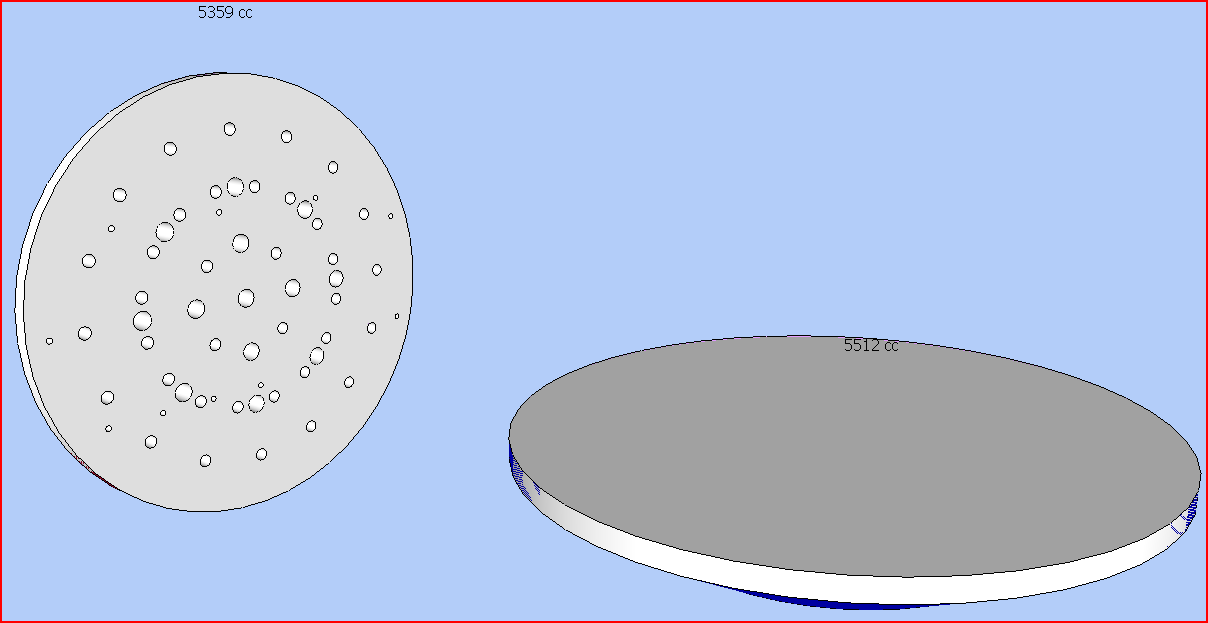
-
Dear TIG,
Many thanks for answering my query. I hadn't thought to change the Z direction before running the script. A very, very useful plugin. Thanks
Regards,
Bob -
Hey TIG,
Thx for this script.
I have a little question:
Let's say a group only contains one or multiple faces not forming a volume (so volume can not be calculated)
How do I build in a test that determines if the script should continue with the volume calculation (or just give the combined area of the faces)?
Maybe the test is already in the code, but i can't seem to figure it out completely.regards







Advertisement