sketchucation logo sketchucation
    • 登入
    Oops, your profile's looking a bit empty! To help us tailor your experience, please fill in key details like your SketchUp version, skill level, operating system, and more. Update and save your info on your profile page today!
    🔌 Smart Spline | Fluid way to handle splines for furniture design and complex structures. Download

    [Plugin] PipeAlongPath

    已排程 已置頂 已鎖定 已移動 Plugins
    122 貼文 58 Posters 144.9k 瀏覽 57 Watching
    正在載入更多貼文
    • 從舊到新
    • 從新到舊
    • 最多點贊
    回覆
    • 在新貼文中回覆
    登入後回覆
    此主題已被刪除。只有擁有主題管理權限的使用者可以查看。
    • TIGT 離線
      TIG Moderator
      最後由 編輯

      @dem said:

      Very useful plugin! I just wish for it to work at intersections)

      It's not so difficult to make the two pieces and then edit them in turn, intersecting with model so the cuts form and deleting the unneeded parts... Use View > Component Edit > Hide rest of model > ON, so you can better see what you are doing...

      TIG

      1 條回覆 最後回覆 回覆 引用 0
      • demD 離線
        dem
        最後由 編輯

        @tig said:

        @dem said:

        Very useful plugin! I just wish for it to work at intersections)

        It's not so difficult to make the two pieces and then edit them in turn, intersecting with model so the cuts form and deleting the unneeded parts... Use View > Component Edit > Hide rest of model > ON, so you can better see what you are doing...

        I know, but in this case, I prefer not to glue the groups to avoid of producing unnecessary polygons 😄
        It is good if them two, but sometimes you have to transform into pipes complex structures.

        1 條回覆 最後回覆 回覆 引用 0
        • SkyBlackS 離線
          SkyBlack
          最後由 編輯

          thx...bro

          1 條回覆 最後回覆 回覆 引用 0
          • L 離線
            lifefun
            最後由 編輯

            nice job thank you!

            1 條回覆 最後回覆 回覆 引用 0
            • R 離線
              RichardBronosky
              最後由 編輯

              @tig said:

              This ruby ('PipeAlongPath.rb') doesn't round corners, it makes a 'pipe' along a 'path' - although you could use it to add 'piping-trim' to shapes too... To round the corners of things use something like Fredo's 'Round Corners' script

              Fredo's Rounded Corners plugin is awesome. Thanks for the lead. I'm sure I'll get lots of great use out of it.

              For people looking to create pipes with rounded corners, I'll suggest this method of creating them:
              http://www.youtube.com/watch?v=UrdW_mN7Tt8

              You will, of course, be giving up all of the additional benefits of the PipeAlongPath.rb plugin if you use the "Follow Me" tool method from the video. But, that's the trade off. You have lots of options to choose from. You use what works best for your situation.

              I mean no disrespect to TIG by offering an alternative.

              1 條回覆 最後回覆 回覆 引用 0
              • TIGT 離線
                TIG Moderator
                最後由 編輯

                @RichardBronosky

                You should of course use and understand the native tools before considering the use of any 'plugin'.

                The linked video does show a somewhat simple use of FollowMe...

                One thing it fails to explain is that if you first preselect the path's edges/curves, then you activate FollowMe and then pick the desired profile-face, the whole extrusion is done in one go, without you having to drag the extrusion around the path... This is often the easier way.

                The other principle advantage of PipeAlongPath is that the face-profile is automatically made perpendicular to the first edge in the path, this can be awkward to create manually if the path doesn't start along an axial vector...

                TIG

                1 條回覆 最後回覆 回覆 引用 0
                • V 離線
                  vojo
                  最後由 編輯

                  So Tig, ever thought about extending your plugin to basically spoof thick lines?

                  • one more menu item: Pipe vs duct
                  • inner and outer diameters ==> width and height
                  • In your "getting to real work" section, use the menu item to determine
                    if creating a circular face or a rectangle
                  • etc

                  It would be a great way to make thick lines and not suffer from the aliasing issue on curves in the other plugin that seems focused on this kind of thing.

                  on top of spoofing thick lines, I guess, it could be a great way to make a serpentine wall easily (draw the line freehand or whatever, call your plugin and set width height, execute)

                  For thick line width = say 5mm Height = say 0.1mm
                  For wall width say 100mm height say 1000mm

                  1 條回覆 最後回覆 回覆 引用 0
                  • T 離線
                    tashaco
                    最後由 編輯

                    TIG - it's late at night and I have about a hundred little pipes to draw - each at a slightly different angle - before tomorrow morning, and have just stumbled across your plugin. I could cry I am so pathetically grateful, I thought I was going to be up all night doing it. Thanks so much!

                    1 條回覆 最後回覆 回覆 引用 0
                    • kingsiK 離線
                      kingsi
                      最後由 編輯

                      Great plugin. Many thanks

                      Noobtastic

                      1 條回覆 最後回覆 回覆 引用 0
                      • TIGT 離線
                        TIG Moderator
                        最後由 編輯

                        Version v1.9 now available in the PluginStore.
                        http://sketchucation.com/pluginstore?pln=PipeAlongPath
                        It has a trap for the occasional lockup if the path has a very slight skew and changes of direction, which SketchUp's FollowMe can't handle.
                        It now allows any units to be used in ne input [defaults to Model Units display]
                        It remembers the last used options across sessions and globally for all models.

                        TIG

                        1 條回覆 最後回覆 回覆 引用 0
                        • TIGT 離線
                          TIG Moderator
                          最後由 編輯

                          Version v2.0 now available in the PluginStore.
                          http://sketchucation.com/pluginstore?pln=PipeAlongPath
                          The lockup/skew trap is now improve and far less likely to appear.
                          The v2014 graphics glitch with some pipes not appearing smooth unless they were subsequently edited is resolved.
                          The name now better reflects if the pipe's internal diameter == 0.

                          TIG

                          1 條回覆 最後回覆 回覆 引用 0
                          • B 離線
                            Bethidralas
                            最後由 編輯

                            Hello there.

                            Is there any RAR file available for this plugin? I really don't know how to install sketchUcationTools.rbz

                            1 條回覆 最後回覆 回覆 引用 0
                            • massimoM 離線
                              massimo Moderator
                              最後由 編輯

                              I see that you have SU8. If you have the latest version of SU8 you must be able to install .rbz by clicking on window-->preferences-->extensions-->install extension.
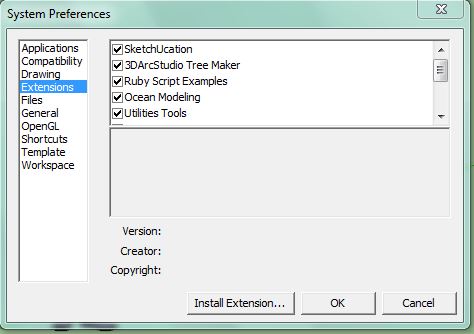
                              Cattura.JPG
                              If you want to install the plugin manually, just rename the .rbz as .zip and unzip it.

                              1 條回覆 最後回覆 回覆 引用 0
                              • B 離線
                                bwantedstar
                                最後由 編輯

                                why can't I find the download button?
                                where is it?

                                1 條回覆 最後回覆 回覆 引用 0
                                • massimoM 離線
                                  massimo Moderator
                                  最後由 編輯

                                  At the bottom of the very first post of this thread.

                                  Cattura.JPG

                                  1 條回覆 最後回覆 回覆 引用 0
                                  • B 離線
                                    bwantedstar
                                    最後由 編輯

                                    OH, I found it! Thank you very mush!!

                                    @massimo said:

                                    At the bottom of the very first post of this thread.
                                    [attachment=0:3tt49ous]<!-- ia0 -->Cattura.JPG<!-- ia0 -->[/attachment:3tt49ous]

                                    1 條回覆 最後回覆 回覆 引用 0
                                    • TIGT 離線
                                      TIG Moderator
                                      最後由 編輯

                                      Version v2.1 is now available in the PluginStore http://sketchucation.com/pluginstore?pln=PipeAlongPath It fixes some rare issues when edges in paths have a very slight skew in Z, it still warns if <~0.3 degrees etc which might Bugsplat, but traps for such slight differences which have previously caused a failure, but which would not have caused a Bugsplat...

                                      Please test and feedback...

                                      TIG

                                      1 條回覆 最後回覆 回覆 引用 0
                                      • TIGT 離線
                                        TIG Moderator
                                        最後由 編輯

                                        Version v2.2 is now available in the PluginStore http://sketchucation.com/pluginstore?pln=PipeAlongPath It addresses a glitch with the misplacement of node-cpoints [if that option was set], if the path was found to be slightly skewed, and the user chose 'No' in the additional dialog to process things anyway...
                                        Now the node-cpoints are correctly placed in every case...

                                        TIG

                                        1 條回覆 最後回覆 回覆 引用 0
                                        • GarethG 離線
                                          Gareth
                                          最後由 編輯

                                          thanks again Tig

                                          great work as always, and most genuinely appreciated

                                          1 條回覆 最後回覆 回覆 引用 0
                                          • B 離線
                                            bonk
                                            最後由 編輯

                                            I am very green;experience and envy ! Thanks to Tig and others who have gone before. Trying to create a square tube spiral to specs. Steep learning curve. Thanks


                                            1 條回覆 最後回覆 回覆 引用 0
                                            • 1
                                            • 2
                                            • 3
                                            • 4
                                            • 5
                                            • 6
                                            • 7
                                            • 5 / 7
                                            • 第一個貼文
                                              最後的貼文
                                            Buy SketchPlus
                                            Buy SUbD
                                            Buy WrapR
                                            Buy eBook
                                            Buy Modelur
                                            Buy Vertex Tools
                                            Buy SketchCuisine
                                            Buy FormFonts

                                            Advertisement