sketchucation logo sketchucation
    • 登入
    Oops, your profile's looking a bit empty! To help us tailor your experience, please fill in key details like your SketchUp version, skill level, operating system, and more. Update and save your info on your profile page today!
    🔌 Smart Spline | Fluid way to handle splines for furniture design and complex structures. Download

    [Plugin] Align 2d

    已排程 已置頂 已鎖定 已移動 Plugins
    21 貼文 8 Posters 30.1k 瀏覽 8 Watching
    正在載入更多貼文
    • 從舊到新
    • 從新到舊
    • 最多點贊
    回覆
    • 在新貼文中回覆
    登入後回覆
    此主題已被刪除。只有擁有主題管理權限的使用者可以查看。
    • Didier BurD 離線
      Didier Bur
      最後由 編輯

      Bug found: it happens when either the 2 points that define the alignment line or the origin of groups/components are not on the same plane.

      I'm considering to provide an additionnal option to align groups/components axis with the alignment line. Does it make sense or do you think this will be useful ?

      Regards,

      DB

      1 條回覆 最後回覆 回覆 引用 0
      • Didier BurD 離線
        Didier Bur
        最後由 編輯

        Here is an update with some fixes, thanks to TIG for pointing out.
        All alignments are now done regardless of altitudes of selected groups/components.
        It also checks for impossible alignments, for instance aligning vertically along a line which is parallel to Y axis is not allowed. 😉

        DB

        1 條回覆 最後回覆 回覆 引用 0
        • Didier BurD 離線
          Didier Bur
          最後由 編輯

          Coen,
          NO, I cannot upload a rb file 😢
          Here is the zip instead 😎


          align_2D.zip

          DB

          1 條回覆 最後回覆 回覆 引用 0
          • N 離線
            not registered yet
            最後由 編輯

            Hi, Didier and Thanks for the script again !
            Just an idea for improvment - an option, after aligning objects obove the line to place them with uniformly space between them, like we can do in PhotoShop. 😄

            [kaizer_soze]

            1 條回覆 最後回覆 回覆 引用 0
            • Didier BurD 離線
              Didier Bur
              最後由 編輯

              Hi TIG,
              I see that you're online now and I've got a small problem:

              Rotating groups/components work with this attached version EXCEPT with Y match, and I don' know why. Can you have a look at it ?
              Thanks in advance.


              align_2D.zip

              DB

              1 條回覆 最後回覆 回覆 引用 0
              • TIGT 離線
                TIG Moderator
                最後由 編輯

                Will look and get back to you a.s.a.p...

                Edit: After an hour I'm 'stumped' - I'll sleep on it and get back to you [on year]...

                TIG

                1 條回覆 最後回覆 回覆 引用 0
                • M 離線
                  marcelpatulacci
                  最後由 編輯

                  Hi Didier,

                  First, thank you for this plugin,
                  However, I have some problems to make it work.

                  For example, it doesn't work when i try to align windows on a facade. But if the facade is placed horizontally, then it works perfectly. Have you already heard about that?
                  Maybe i'm using it in a wrong way?
                  Can you help me please?

                  Thank you.

                  1 條回覆 最後回覆 回覆 引用 0
                  • TIGT 離線
                    TIG Moderator
                    最後由 編輯

                    Didier has agreed that I might update his Plugins.
                    The version in the PluginStore is now v2014/v2015 compatible.
                    http://sketchucation.com/pluginstore?pln=align_2D

                    TIG

                    1 條回覆 最後回覆 回覆 引用 0
                    • D 離線
                      dubreu
                      最後由 編輯

                      Bonjour,

                      J'ai installé ce pluging facilement.
                      Je n'arrive pas à m'en servir. Il me manque un élément de compréhension.
                      Je suis plutôt à l'aise avec Sketchup.

                      Je sélectionne plusieurs composants.
                      Je lance la fonction Align 2D avec le menu.

                      Je trace une droite; le menu apparait avec les différentes options. je valide et rien ne se passe.

                      En fait, je souhaiterais bien comprendre le principe d’alignement que je ne maitrise pas suffisamment.

                      J'ai cherché, mais il ne me semble pas qu'il existe de tutorial.

                      Pourrais-je avoir un peu d'aide ?

                      D'avance merci !!!

                      François

                      1 條回覆 最後回覆 回覆 引用 0
                      • Dave RD 離線
                        Dave R
                        最後由 編輯

                        @dubreu said:

                        Je trace une droite; le menu apparait avec les différentes options. je valide et rien ne se passe

                        Perhaps you could show us the components/groups you are trying to align. Probably you are choosing the wrong alignment setting at the top of the dialog box.

                        Etaoin Shrdlu

                        %

                        (THERE'S NO PLACE LIKE)

                        G28 X0.0 Y0.0 Z0.0

                        M30

                        %

                        1 條回覆 最後回覆 回覆 引用 0
                        • D 離線
                          dubreu
                          最後由 編輯

                          screen captureHi dave,

                          Thank you for your so quick answer !
                          I will try to explain it in english. Be indulgent ...

                          You will find enclosed a screen capture.

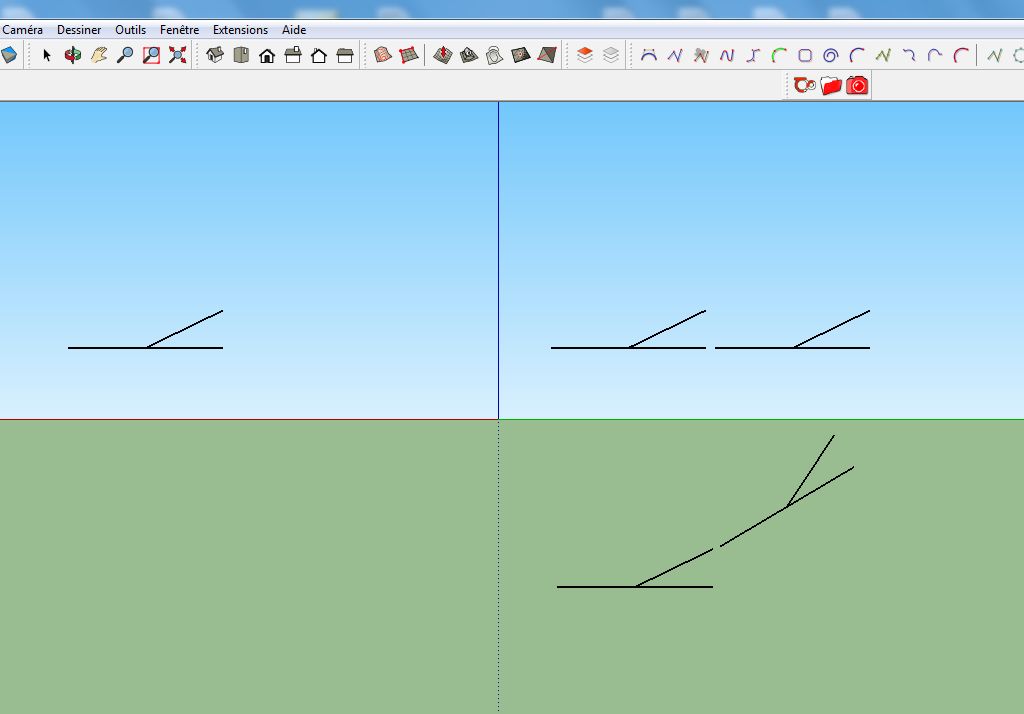
                          I'm currently working on a project with a schematic railway layout (2D) which will be included in a 3D project. That why i would wike to do all the job with only one tool, sketchup.

                          At the left of the screen, a component. It's a schematic railway turnout.

                          I would like to duplicate the component and align the new instance on the current schematic layout.

                          A the right of the screen(figure 1 above), i would like to align the 2 turnouts like that.
                          A the right of the screen (figure 2 under the previous one), i would like to align the 2 turnouts like that as well (More difficult ?).

                          Can it be done with the 2D Align Plugin ?

                          Best.
                          François

                          1 條回覆 最後回覆 回覆 引用 0
                          • pilouP 離線
                            pilou
                            最後由 編輯

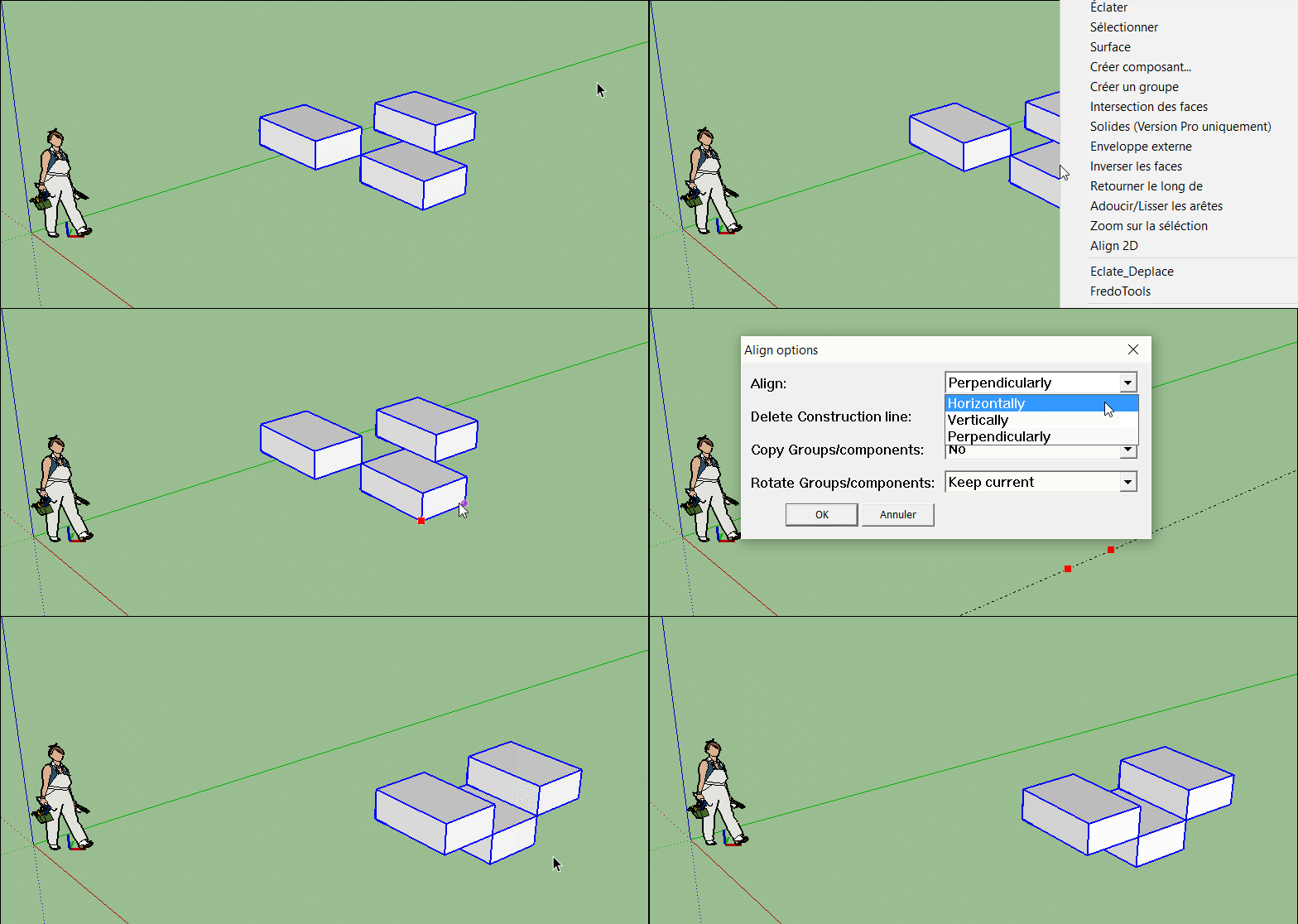
                            Aucun souci! On peut aussi essayer l'Align 3D!

                            Any Trouble!

                            (you can also try the Align 3D by Didier Bur also! )

                            Click image for animation of 2D Align! 🤓
                            GIF_align.gif

                            Frenchy Pilou
                            Is beautiful that please without concept!
                            My Little site :)

                            1 條回覆 最後回覆 回覆 引用 0
                            • D 離線
                              dubreu
                              最後由 編輯

                              Grands remerciements
                              c'est reparti !

                              François

                              1 條回覆 最後回覆 回覆 引用 0
                              • H 離線
                                hecham zw
                                最後由 編輯

                                please tell me how to hide or remove the axis that always been showing and annoying me by this plug in the area .. 😕

                                1 條回覆 最後回覆 回覆 引用 0
                                • Didier BurD 離線
                                  Didier Bur
                                  最後由 編輯

                                  Hi,

                                  I don't understand what is your problem. Please be more precise and post a screenshot.
                                  Regards,

                                  DB

                                  1 條回覆 最後回覆 回覆 引用 0
                                  • 1
                                  • 2
                                  • 1 / 2
                                  • 第一個貼文
                                    最後的貼文
                                  Buy SketchPlus
                                  Buy SUbD
                                  Buy WrapR
                                  Buy eBook
                                  Buy Modelur
                                  Buy Vertex Tools
                                  Buy SketchCuisine
                                  Buy FormFonts

                                  Advertisement