sketchucation logo sketchucation
    • 登入
    Oops, your profile's looking a bit empty! To help us tailor your experience, please fill in key details like your SketchUp version, skill level, operating system, and more. Update and save your info on your profile page today!
    🔌 Smart Spline | Fluid way to handle splines for furniture design and complex structures. Download

    [Plugin] MoveIt

    已排程 已置頂 已鎖定 已移動 Plugins
    53 貼文 28 Posters 47.3k 瀏覽 28 Watching
    正在載入更多貼文
    • 從舊到新
    • 從新到舊
    • 最多點贊
    回覆
    • 在新貼文中回覆
    登入後回覆
    此主題已被刪除。只有擁有主題管理權限的使用者可以查看。
    • S 離線
      Stu
      最後由 編輯

      Jim,

      A multiple copy option would be great ❗

      And thanks once again.....it's pretty obvious I like this one.

      😉

      Stu

      http://www.landesign.com.au

      1 條回覆 最後回覆 回覆 引用 0
      • J 離線
        Jim
        最後由 編輯

        Mover has a feature where it will move an object by an amount determined by the objects size if the DIST amount is zero or blank. It works since the plugin only supports moving one thing at a time. If I wanted to move multiple selected objects, this feature becomes less useful (if it was useful to begin with.)

        I wanted to know of anyone uses this feature, and if anyone would be unhappy if I removed it in favor of adding the ability to move multiple selected objects?

        Hi

        1 條回覆 最後回覆 回覆 引用 0
        • G 離線
          Gidon Yuval
          最後由 編輯

          @jim said:

          Mover has a feature where it will move an object by an amount determined by the objects size if the DIST amount is zero or blank.

          Jim, I know I was less than enthusiastic when I first saw the 'mover' but I have since come to use and appreciate it more and more. So first of all: Thank you. Secondly, regarding the above mentioned feature I find that to be very very helpful.
          Thanks again.

          If you don't know where you're going, you're never going to get there.

          1 條回覆 最後回覆 回覆 引用 0
          • Jean-FrancoJ 離線
            Jean-Franco
            最後由 編輯

            Jim, I just tried your tool and I like it. Thanks a lot. I would prefer to use multiple selection of groups and components. More convenient for me.

            Jean-Franco

            1 條回覆 最後回覆 回覆 引用 0
            • S 離線
              samtsham
              最後由 編輯

              Hi.
              Thank you for posting this great ruby.
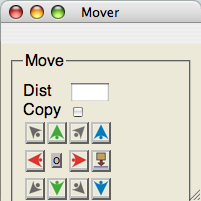
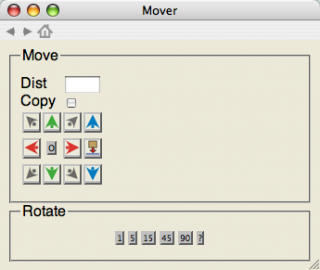
              I'm on a Mac, and I'd like to report some interface-niggles: First of all, the window-size appears to be off. Attached find the window as displayed, when the script is opened. When I resize it, in order to see the rotate-buttons, the horizontal size gets fixed at far too broad, see attachment two, and can't be reduced.

              As the window is so big, I can't put it to the side of the model-space, so I have to put it somewhere on top. As soon as I click anywhere in the model window, though, it gets the focus and covers the mover-window, which unfortunately doesn't float, at least not on a Mac.

              Third, any effect of the movement only becomes visible, if I click in the model window after I used mover. If I just click the buttons, nothing seems to happen. So visual feedback is rather muddled, I have to know exactly what I want to do, and only get confirmation, after I revert focus back to the model window.

              I don't know, if these issues are Mac-only, but I have a feeling, someone else would have already pointed them out, if they weren't.

              Thanks for sharing.
              SAM from Vienna.

              [samtsham]


              Bild%2013.png


              Bild%2014.png

              1 條回覆 最後回覆 回覆 引用 0
              • J 離線
                Jim
                最後由 編輯

                I was aware of some of those issues, but not all of them - thanks for bringing them up.

                Unfortunately, I do not own or have access to a Mac, which makes it difficult to create a cross-platform version - or even a separate Mac version. My understanding is that they are all Mac specific issues.

                Thanks for the comments and interest.

                Hi

                1 條回覆 最後回覆 回覆 引用 0
                • K 離線
                  kdjanz
                  最後由 編輯

                  Jim

                  Could you test it using Safari for Windows as the browser for the HTML? Would that give you a more accurate preview of what the Mac might be seeing?

                  Just asking a question out my deep Ruby ignorance.

                  Kelly

                  1 條回覆 最後回覆 回覆 引用 0
                  • J 離線
                    Jim
                    最後由 編輯

                    Kelly,

                    Safari may help remove some of the issues.

                    Last time I tried Safari (about a month ago,) it wouldn't run on my computer. I'm the guy still running Windows 2000 Pro on an AMD Athlon 1800 with 256 MB RAM. It barely meets the minimum requirements of the latest softwares. I'll try it again.

                    EDIT:

                    On second thought, it wouldn't help. You can't tell SketchUp to use one browser over another. I think it always uses Internet Explorer for WebDialogs. Unless someone knows something I don't...

                    @kdjanz said:

                    Jim

                    Could you test it using Safari for Windows as the browser for the HTML? Would that give you a more accurate preview of what the Mac might be seeing?

                    Just asking a question out my deep Ruby ignorance.

                    Kelly

                    Hi

                    1 條回覆 最後回覆 回覆 引用 0
                    • boofredlayB 離線
                      boofredlay
                      最後由 編輯

                      @jim said:

                      Mover has a feature where it will move an object by an amount determined by the objects size if the DIST amount is zero or blank. It works since the plugin only supports moving one thing at a time. If I wanted to move multiple selected objects, this feature becomes less useful (if it was useful to begin with.)

                      I wanted to know of anyone uses this feature, and if anyone would be unhappy if I removed it in favor of adding the ability to move multiple selected objects?

                      I find this to be usefull as GIdon, regarding the multiple copy will it be possible to copy in in x,y,z at the same time as in autocad, rows colums and levels? this would be very very usefull. Thank you for all your great work on this.

                      [Haggai]

                      http://www.coroflot.com/boofredlay

                      1 條回覆 最後回覆 回覆 引用 0
                      • N 離線
                        not registered yet
                        最後由 編輯

                        This is a great plugin that I have already used a number of times, and found to be very useful.

                        Would it be possible to further enhance the rotation tool so that one could specify an axis?

                        I am sometimes frustrated by SU when I need to rotate an object, which is in free-space, as the native rotation tool defaults to Z axis, unless there is a face to reference from. If I need to rotate a line, I have to draw a face, possibly pull it up to get a vertical face, and the lock the axis from that. Then after the rotation there is useless geometry to erase.

                        If Mover could fill this shortcoming in SU I would really appreciate it.

                        I know that Rotix.rb has this functionality in it already, but it would be nice to have an all-in-one tool.

                        Plus the Rotix.rb plugin always uses the center of the object as the rotation point, perhaps you could let us specify any point as the origin for rotation?

                        Thanks for considering these thoughts.

                        Ampa.

                        1 條回覆 最後回覆 回覆 引用 0
                        • A 離線
                          Antoino6911
                          最後由 編輯

                          Graet tool Jim,

                          Can it have a mirror comand?

                          1 條回覆 最後回覆 回覆 引用 0
                          • X 離線
                            xrok1
                            最後由 編輯

                            Mover2: http://sketchuptips.blogspot.com/2007/08/plugin-mover-2.html 😉

                            “There are three classes of people: those who see. Those who see when they are shown. Those who do not see.”

                            http://www.Twilightrender.com try it!

                            1 條回覆 最後回覆 回覆 引用 0
                            • D 離線
                              dedmin
                              最後由 編輯

                              Hi, Jim
                              I use this plugin every day - it is a big time saver for me. I have some suggestions - can we have an option to use components/groups axis instead of model axis. And since You have a simple shell plugin can we have a scaling function as an addition to move and rotate? Thanks.

                              1 條回覆 最後回覆 回覆 引用 0
                              • R 離線
                                rv1974
                                最後由 編輯

                                Hi Jim!
                                May I humbly request to add "scale department" to your 'mover 2'?
                                With uniform\non uniform\random\by axis\ lock the component insert point features it'd be a killer plugin.
                                Thanks in advance.

                                1 條回覆 最後回覆 回覆 引用 0
                                • R 離線
                                  rv1974
                                  最後由 編輯

                                  something like this:


                                  SKMBT_C36012082707510.jpg

                                  1 條回覆 最後回覆 回覆 引用 0
                                  • R 離線
                                    rv1974
                                    最後由 編輯

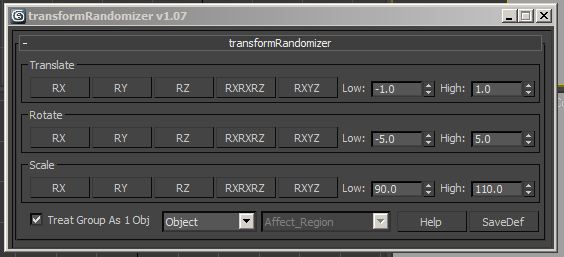
                                    Some 3ds max analog:


                                    kklkl.JPG

                                    1 條回覆 最後回覆 回覆 引用 0
                                    • J 離線
                                      Jim
                                      最後由 編輯

                                      @rv1974 said:

                                      something like this:

                                      Ah, that's what I need - pictures! Let me see what I can do. Thanks.

                                      Hi

                                      1 條回覆 最後回覆 回覆 引用 0
                                      • J 離線
                                        Jim
                                        最後由 編輯

                                        I renamed it MoveIt and it's in the SketchUcation store.

                                        Hi

                                        1 條回覆 最後回覆 回覆 引用 0
                                        • Bob JamesB 離線
                                          Bob James
                                          最後由 編輯

                                          Tried to download Mover2.
                                          http://sketchuptips.blogspot.com/2007/0%20...%20ver-2.html
                                          Got this error.

                                          Also no download arrow available for 'makeorthoviews' 😞


                                          mover2.JPG

                                          i7-4930K 3.4Ghz, 2x GTX780 6GB, 32GB DDR3-1600 ECC, OCZ Vertex 4 500GB, WD Black 3TB, 32TB NAS, 4x 27" Monitors, SpaceMouse Pro, X-keys XK-60

                                          1 條回覆 最後回覆 回覆 引用 0
                                          • Bob JamesB 離線
                                            Bob James
                                            最後由 編輯

                                            @jim said:

                                            I renamed it MoveIt and it's in the SketchUcation store.

                                            Whew!! I was worried there 😄
                                            Thanks for the quick reply.

                                            How about Makeorthoviews?

                                            i7-4930K 3.4Ghz, 2x GTX780 6GB, 32GB DDR3-1600 ECC, OCZ Vertex 4 500GB, WD Black 3TB, 32TB NAS, 4x 27" Monitors, SpaceMouse Pro, X-keys XK-60

                                            1 條回覆 最後回覆 回覆 引用 0
                                            • 1
                                            • 2
                                            • 3
                                            • 2 / 3
                                            • 第一個貼文
                                              最後的貼文
                                            Buy SketchPlus
                                            Buy SUbD
                                            Buy WrapR
                                            Buy eBook
                                            Buy Modelur
                                            Buy Vertex Tools
                                            Buy SketchCuisine
                                            Buy FormFonts

                                            Advertisement