sketchucation logo sketchucation
    • Login
    Oops, your profile's looking a bit empty! To help us tailor your experience, please fill in key details like your SketchUp version, skill level, operating system, and more. Update and save your info on your profile page today!
    Mac User? | Join the Rayscaper Beta for Mac Learn More

    [Plugin] Skin.rb

    Scheduled Pinned Locked Moved Plugins
    237 Posts 66 Posters 205.7k Views 66 Watching
    Loading More Posts
    • Oldest to Newest
    • Newest to Oldest
    • Most Votes
    Reply
    • Reply as topic
    Log in to reply
    This topic has been deleted. Only users with topic management privileges can see it.
    • M
      maxosmedia
      last edited by

      ===========
      Error Loading File skin.rb
      undefined method `[]' for nil:NilClass

      MacOSX 10.4 SU6.4.245

      1 Reply Last reply
      Reply Quote 0
      • kmeadK
        kmead
        last edited by

        @maxosmedia said:

        ===========
        Error Loading File skin.rb
        undefined method `[]' for nil:NilClass

        I am seeing the same error with the 2.4 version of the plugin under MacOSX 10.5.5

        I created Dilbertville, sorry about that...

        1 Reply Last reply
        Reply Quote 0
        • A
          architectboy
          last edited by

          Hmmm, it doesn't do that on my computer. Let's see if this fixes it.


          Version 2.5

          1 Reply Last reply
          Reply Quote 0
          • plot-parisP
            plot-paris
            last edited by

            weird. the plugin works for me, when I use the toolbar (buttons). but it doesn't react at all, if I try to launch the skin command from the tools-menu... its a pity, because I just assigned a shortcut for the old version. and now I can't use a keyboard shortcut anymore 😞

            1 Reply Last reply
            Reply Quote 0
            • F
              fakircho
              last edited by

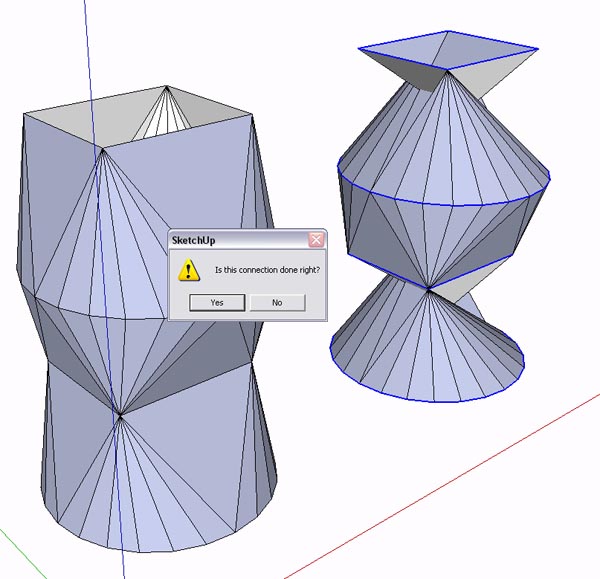
              Hi it is working for me fine. I am finding it a bit inconsistent when i give more than two
              profiles to "Skin". It usually gets it right at the end after asking "is the connection done right"? 😄
              but if i undo i notice that it does it in stages, two profiles at a time.
              That is ok but is it possible to have it do the whole "skin" as one operation if you have selected more than two profiles, instead of being asked to confirm each step? Please see attached. That would be great

              Skin.jpg

              1 Reply Last reply
              Reply Quote 0
              • O
                otb designworks
                last edited by

                @kmead said:

                @maxosmedia said:

                ===========
                Error Loading File skin.rb
                undefined method `[]' for nil:NilClass

                I am seeing the same error with the 2.4 version of the plugin under MacOSX 10.5.5

                I, too, am getting this error on start up. Mac 10.5.5, also.

                Cheers, Chuck

                OTB Designworks is on Youtube

                6 core nMP, 32 gig RAM, (2) D700 GPU's, dual monitors

                1 Reply Last reply
                Reply Quote 0
                • B
                  BTM
                  last edited by

                  Using the Skin rb., running SU7 on Mac OSX 10.5.5, The plugin works almost not at all. The only action working is the one that cleans up the unnecessary edges. It will only work from the toolbar too. Also, I don't know if it's supposed to be like this, but there are no icons in the skin toolbar.

                  1 Reply Last reply
                  Reply Quote 0
                  • olisheaO
                    olishea
                    last edited by

                    this is exactly the ruby ive been looking for. thank you so much. I've been wanting to 'skin' between faces for a long time.

                    oli

                    1 Reply Last reply
                    Reply Quote 0
                    • A
                      AcesHigh
                      last edited by

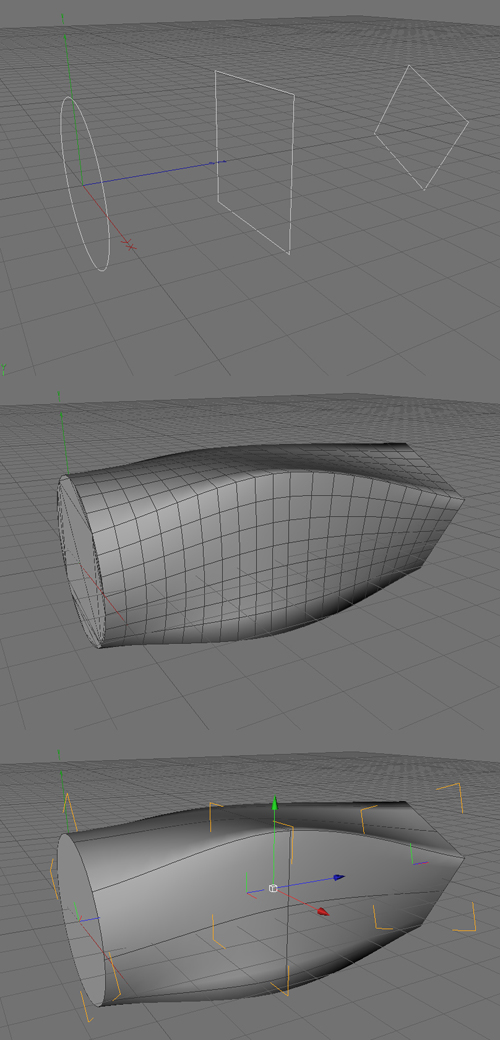
                      I think the problem with this plugin, in the way that it DOES NOT achieves the same result as true loft commands in other software, is that the Skin plugin SEEMS to try to achieve the transformation directly... from one shape to the other... maybe there is ONE partial step in the middle.

                      Analize visually the image below... watch as it seems there is a VERY GRADUAL MORPHING between one shape and the other. Its like if the LOFT command created some 10 intermediate profiles between each ORIGINAL profile. Then, after creating lots of intermediate profiles, it does "sking" the model.

                      When seeing the pictures of the SKIN plugin in this thread, I guess (but I cant be sure) that one ONE intermediate is create, half the way between the two original profiles.

                      I wonder if the author agrees with me, and if he thinks its POSSIBLE to better simulate a LOFT command, by making Sketchup draw a number of intermediate profiles, who morph in shape between the two original profiles (the number of intermediate profiles maybe could be selected in a dialog box?)

                      Easier said than done 😄

                      Loft_Script.jpg

                      1 Reply Last reply
                      Reply Quote 0
                      • A
                        AcesHigh
                        last edited by

                        hmmm... btw, the plugin is not working at all here at my PC... ive just downloaded 2.5... last time I used the plugin was a long time ago (many versions ago)...

                        1 Reply Last reply
                        Reply Quote 0
                        • F
                          fakircho
                          last edited by

                          Thank you AcesHigh, i have been moaning about this for years 😉

                          We need a proper Loft tool full stop. I did start a thread a while ago but nothing so far.
                          http://www.sketchucation.com/forums/scf/viewtopic.php?f=180&t=13272&p=98352&hilit=loft&sid=bcc844a9806886b037dad1618e96f9ad#p98352

                          I see you use C4D 😄

                          1 Reply Last reply
                          Reply Quote 0
                          • A
                            AcesHigh
                            last edited by

                            actually, I dont. I found that image on google 😄

                            1 Reply Last reply
                            Reply Quote 0
                            • F
                              fakircho
                              last edited by

                              Now that i look at it again i think i did that image in c4d ages ago to show what i want in Sketchup 😉

                              If i am not mistaken i posted it on the old forum ❓

                              1 Reply Last reply
                              Reply Quote 0
                              • A
                                AcesHigh
                                last edited by

                                lol... yes, I found it on a Sketchup forum where a guy was asking for a LOFT plugin... 😆 😆 😆

                                how funny that it was YOU, and then years later, you are still asking for the loft plugin, and I post YOUR image and you thought it was mine 😆 😆 😆 😆

                                1 Reply Last reply
                                Reply Quote 0
                                • F
                                  fakircho
                                  last edited by

                                  Nice one man 😄 that is funny 😆 😆 😆

                                  1 Reply Last reply
                                  Reply Quote 0
                                  • L
                                    lightburn
                                    last edited by

                                    umm, Where do I sign to join in your "petition" for a loft tool? 🎉 That would be a great addition to all the fine tools we have now. 😄

                                    1 Reply Last reply
                                    Reply Quote 0
                                    • A
                                      AcesHigh
                                      last edited by

                                      problem is that the Skin tool is not working in my Sketchup. I opened the Ruby console and NOTHING appears when I try to use the Skin command!

                                      1 Reply Last reply
                                      Reply Quote 0
                                      • MarianM
                                        Marian
                                        last edited by

                                        Try an older version of it, many of the newer ones don'y work for me either.

                                        http://marian87.deviantart.com/

                                        1 Reply Last reply
                                        Reply Quote 0
                                        • S
                                          sojourner
                                          last edited by

                                          I have tried several versions of this and get no results. 23, 24, and 25 seem to do nothing, ruby console is blank. versions earlier give:

                                          Error: #<NoMethodError: undefined method collect' for nil:NilClass> C:/Program Files/Google/Google SketchUp 7/Plugins/skin22.rb:166:in skin'

                                          I take it this is a SU 7 problem?

                                          1 Reply Last reply
                                          Reply Quote 0
                                          • MarianM
                                            Marian
                                            last edited by

                                            It works for me in su7 but dunno what version it is. if you used one of the earlier versions and didn't work probably some other plugin is interfer.


                                            http://marian87.deviantart.com/

                                            1 Reply Last reply
                                            Reply Quote 0

                                            Hello! It looks like you're interested in this conversation, but you don't have an account yet.

                                            Getting fed up of having to scroll through the same posts each visit? When you register for an account, you'll always come back to exactly where you were before, and choose to be notified of new replies (either via email, or push notification). You'll also be able to save bookmarks and upvote posts to show your appreciation to other community members.

                                            With your input, this post could be even better 💗

                                            Register Login
                                            • 1
                                            • 2
                                            • 8
                                            • 9
                                            • 10
                                            • 11
                                            • 12
                                            • 11 / 12
                                            • First post
                                              Last post
                                            Buy SketchPlus
                                            Buy SUbD
                                            Buy WrapR
                                            Buy eBook
                                            Buy Modelur
                                            Buy Vertex Tools
                                            Buy SketchCuisine
                                            Buy FormFonts

                                            Advertisement