sketchucation logo sketchucation
    • 登入
    Oops, your profile's looking a bit empty! To help us tailor your experience, please fill in key details like your SketchUp version, skill level, operating system, and more. Update and save your info on your profile page today!
    🔌 Easy Offset | Offset selected faces in SketchUp in positive and negative offsets. Download

    New script: Projection toolbar update

    已排程 已置頂 已鎖定 已移動 Plugins
    25 貼文 12 Posters 5.4k 瀏覽 12 Watching
    正在載入更多貼文
    • 從舊到新
    • 從新到舊
    • 最多點贊
    回覆
    • 在新貼文中回覆
    登入後回覆
    此主題已被刪除。只有擁有主題管理權限的使用者可以查看。
    • D 離線
      Dan
      最後由 編輯

      Thanks a lot, Didier!
      Very useful script, can't wait to install the update.

      Dan

      1 條回覆 最後回覆 回覆 引用 0
      • A 離線
        ARUNKUMAR
        最後由 編輯

        Thanks Didier!

        But I couldn't find contour/terrain related tool in that.

        Regards
        Arun Kumar

        1 條回覆 最後回覆 回覆 引用 0
        • W 離線
          watkins
          最後由 編輯

          Dear Didier,

          I should like to thank you for all your hard work. The revised scripts and tool-bar are excellent, and a real help to those who want to project geometry onto a sketch plane. I need to do this frequently when designing mechanical components.

          Thank you once again.

          Kind regards,
          Bob

          1 條回覆 最後回覆 回覆 引用 0
          • Didier BurD 離線
            Didier Bur
            最後由 編輯

            Hi arunkumar,

            Why should there be contour/terrain related stuff in such a toolbar ???
            Several tools are available at my site, in the architecture section: contourmaker, contour_lines, [CASF]Topo_18, and so on.
            My toolbar is limited to stricly geometric operations, no architectural stuff in there 😆 .
            Regards,

            DB

            1 條回覆 最後回覆 回覆 引用 0
            • G 離線
              gata
              最後由 編輯

              Thank you for this great toolbar (although I do miss the line2cyl though, it was very convenient to have a button for that feature. I saw the other post about working out the intersection issue).

              Being able to use the VCB and inference to control the Extrude selected lines along a vector tool is very elegant 😄 And the documentation is very good.

              I cannot get Project selected line perpendicular to plane to work. Only one edge is projected. I tried both selecting connected segments and welded segments.
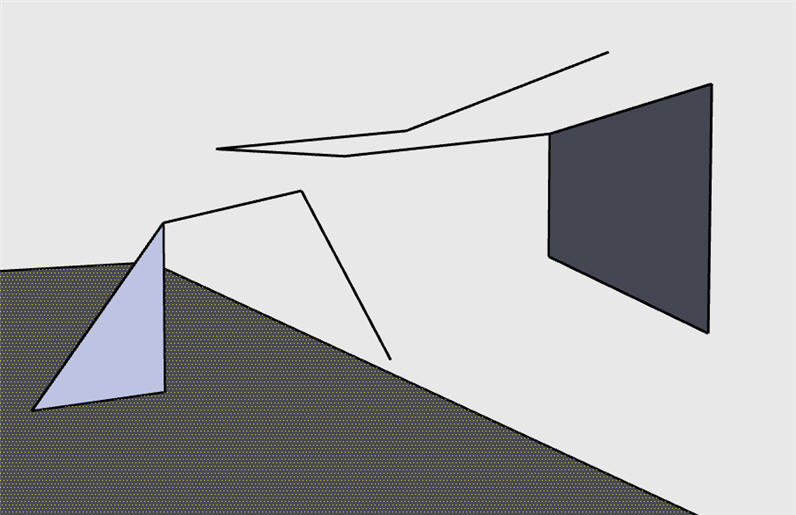

              project line issue.jpg

              1 條回覆 最後回覆 回覆 引用 0
              • Didier BurD 離線
                Didier Bur
                最後由 編輯

                Hi,
                What I see on the pic is that a face is selected. So what do you expect from a command which projects a line in this case ? You must select an edge to project an edge 😉

                DB

                1 條回覆 最後回覆 回覆 引用 0
                • G 離線
                  gata
                  最後由 編輯

                  I did select all lines and the face. Only one line would project.

                  The line on the left had three segments and the line on the right was welded. I also tried a circle entity, only selecting the outer edge lines to run the tool. In every case, only one segment would project.

                  I am running a new installation of SU6, XP Pro.

                  1 條回覆 最後回覆 回覆 引用 0
                  • Didier BurD 離線
                    Didier Bur
                    最後由 編輯

                    Hi,
                    Please post the SKP so I can help (I hope).
                    regards,

                    DB

                    1 條回覆 最後回覆 回覆 引用 0
                    • O 離線
                      otb designworks
                      最後由 編輯

                      When I click on the link in the first post, I am receiving a note that that topic does not exist.

                      Is there somewhere else I can download this update?

                      Thanks Didier, your projection tools are awesome!

                      Cheers, Chuck

                      OTB Designworks is on Youtube

                      6 core nMP, 32 gig RAM, (2) D700 GPU's, dual monitors

                      1 條回覆 最後回覆 回覆 引用 0
                      • Didier BurD 離線
                        Didier Bur
                        最後由 編輯

                        Probably a "board migration issue" 😲 ?
                        The link has been fixed. You can also download all latest versions of free scripts at my site 😄
                        Regards,

                        DB

                        1 條回覆 最後回覆 回覆 引用 0
                        • O 離線
                          otb designworks
                          最後由 編輯

                          Thank you, sir.

                          Works great now.

                          Cheers, Chuck

                          OTB Designworks is on Youtube

                          6 core nMP, 32 gig RAM, (2) D700 GPU's, dual monitors

                          1 條回覆 最後回覆 回覆 引用 0
                          • A 離線
                            a4chitect
                            最後由 編輯

                            didier great work! works perfectly and the user friendliness is sketchup-quality, please think about revising your lines2cyl script - it proves valuable when creating nets or simple structural grids.. thanks

                            1 條回覆 最後回覆 回覆 引用 0
                            • GaieusG 離線
                              Gaieus
                              最後由 編輯

                              @didier bur said:

                              Probably a "board migration issue" 😲 ?
                              The link has been fixed. You can also download all latest versions of free scripts at my site 😄
                              Regards,

                              😳
                              Sorry...

                              Gai...

                              1 條回覆 最後回覆 回覆 引用 0
                              • P 離線
                                pallamand
                                最後由 編輯

                                Hi:
                                Is there any required file to work with Projection?

                                I can't make it work !!!
                                I'm receiving from the ruby console:

                                Error: #<NameError: uninitialized constant AddCpointTool>
                                C:/Archivos de programa/Google/Google SketchUp 6/Plugins/projection_extension.rb:32
                                C:/Archivos de programa/Google/Google SketchUp 6/Plugins/projection_extension.rb:32:in `call'

                                when trying to place a construction point...

                                Thank you

                                Pablo

                                1 條回覆 最後回覆 回覆 引用 0
                                • Didier BurD 離線
                                  Didier Bur
                                  最後由 編輯

                                  @ Pallamand,
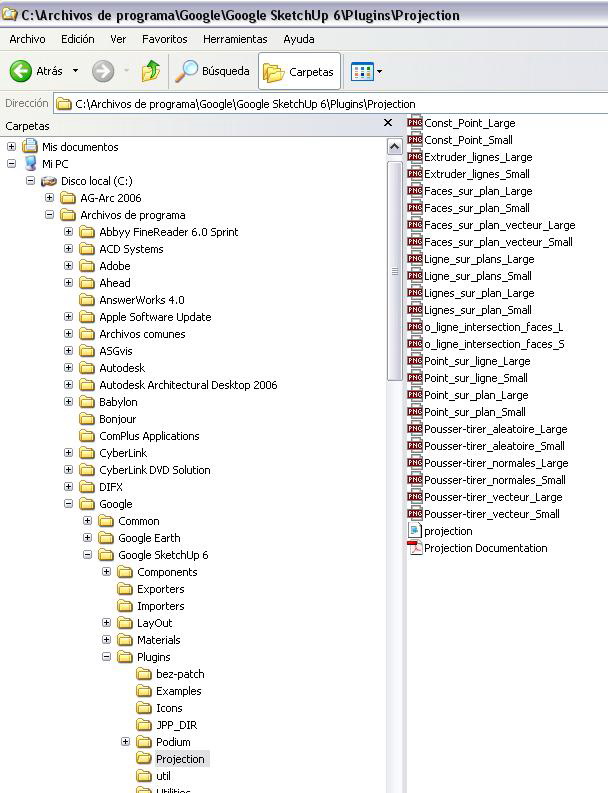
                                  This looks like an installation issue. Check for required subfolders an required files as well (see user guide). If everything is OK, tell me.

                                  DB

                                  1 條回覆 最後回覆 回覆 引用 0
                                  • P 離線
                                    pallamand
                                    最後由 編輯

                                    Hi Didier:

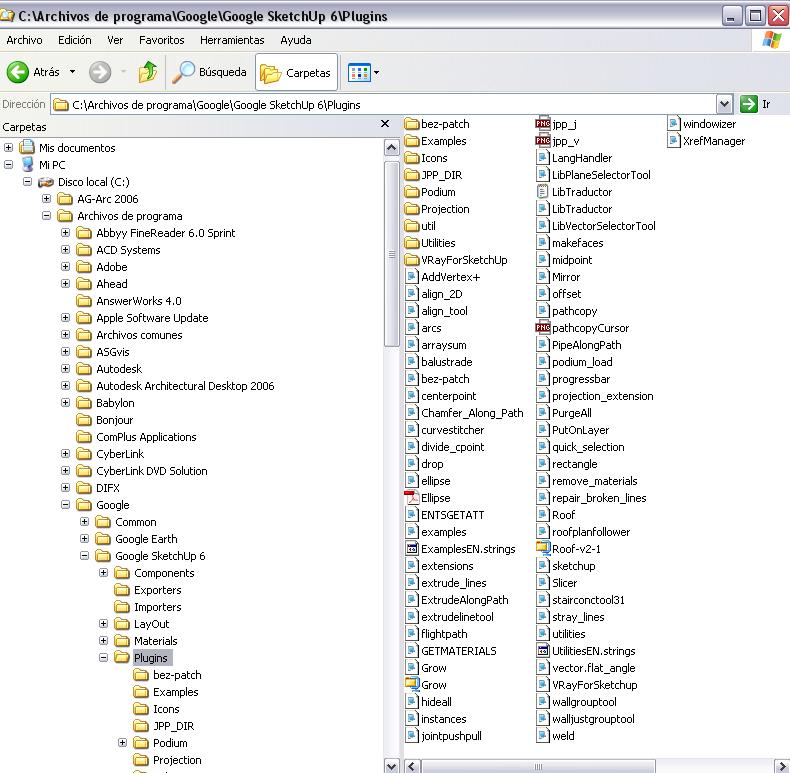
                                    Here are snaps of my directories...
                                    Thank you once again for your help

                                    Pablo


                                    Su dir.jpg


                                    Su dir 02.jpg

                                    1 條回覆 最後回覆 回覆 引用 0
                                    • Didier BurD 離線
                                      Didier Bur
                                      最後由 編輯

                                      Everything seems correct 😲

                                      Error; #<NameError; uninitialized constant AddCpointTool>
                                      

                                      means that the AddCpointTool class is unknown to SketchUp, and that the projection.rb file has not been loaded.

                                      Let's try something. Open the Ruby console, select a line in your model and click with the cursor in the white field at the bottom of the ruby console and type:

                                      Sketchup.active_model.select_tool ExtrudeLineTool.new (and hit Enter)

                                      This launches the "extrudeline" tool. If you get an error message, be sure the script is not loaded. If it works, this is another problem (that I can't figure out for now...)

                                      Hope this helps,

                                      DB

                                      1 條回覆 最後回覆 回覆 引用 0
                                      • P 離線
                                        pallamand
                                        最後由 編輯

                                        Hi:
                                        It seems it's working...

                                        BTW, did I tell you that I can't use the "construction point" neither?
                                        Thank you again for your help !!!!
                                        Pablo
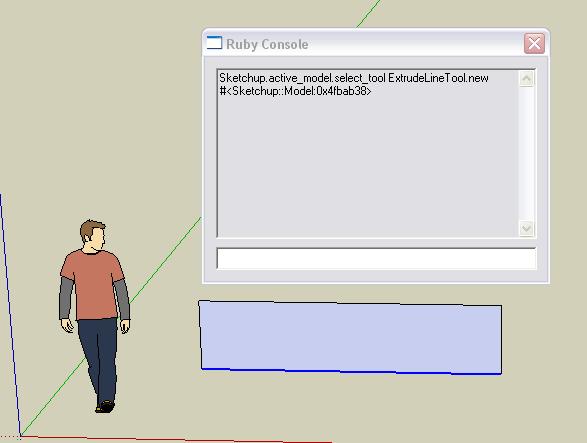

                                        Projection test 01.jpg

                                        1 條回覆 最後回覆 回覆 引用 0
                                        • simon le bonS 離線
                                          simon le bon
                                          最後由 編輯

                                          Dear Didier,

                                          Un très grand bravo et un merci de la même taille pour ce "Projection Pack". I keep it as a permanent basic tools pack of SU.( And i haven't yet tapped quarter of its possibilities.)

                                          One question:
                                          Construction point is a very handy tool i am using daily. How can we do to erase them after the drawing is finished???

                                          slb

                                          1 條回覆 最後回覆 回覆 引用 0
                                          • A 離線
                                            a4chitect
                                            最後由 編輯

                                            edit>delete guides

                                            1 條回覆 最後回覆 回覆 引用 0
                                            • 1
                                            • 2
                                            • 2 / 2
                                            • 第一個貼文
                                              最後的貼文
                                            Buy SketchPlus
                                            Buy SUbD
                                            Buy WrapR
                                            Buy eBook
                                            Buy Modelur
                                            Buy Vertex Tools
                                            Buy SketchCuisine
                                            Buy FormFonts

                                            Advertisement