sketchucation logo sketchucation
    • 登入
    Oops, your profile's looking a bit empty! To help us tailor your experience, please fill in key details like your SketchUp version, skill level, operating system, and more. Update and save your info on your profile page today!
    🔌 Smart Spline | Fluid way to handle splines for furniture design and complex structures. Download

    [Tutorial > Modeling] How a Pro Builds a House in SU pt 1

    已排程 已置頂 已鎖定 已移動 SketchUp Tutorials
    sketchup
    88 貼文 30 Posters 80.9k 瀏覽 30 Watching
    正在載入更多貼文
    • 從舊到新
    • 從新到舊
    • 最多點贊
    回覆
    • 在新貼文中回覆
    登入後回覆
    此主題已被刪除。只有擁有主題管理權限的使用者可以查看。
    • W 離線
      wildswan
      最後由 編輯

      I am a newbie just starting to use SketchUp. Following along with this tutorial I have also encountered the same problem as jvh with Step 6. I right click on my imported plan, then click on "use as material". However, when I do this, the plan is NOT greyed out. Then when I click on the paint bucket and get the materials window, my plan is not in it, so I can't select and drop it in my square. I have tried using both .tif and .jpeg images but it doesn't seem to make any difference which format I import the image in. Can someone please tell me what I am doing wrong?

      1 條回覆 最後回覆 回覆 引用 0
      • Chris FullmerC 離線
        Chris Fullmer
        最後由 編輯

        When you click on the image and choose "Use as Material", it should add the material to your "In Model" materials list. So make sure you are looking at the In Model materials, or it will not show up.

        Another option might be to just right click on the image and choose "Explode" and then activate the paintbucket tool, and hold alt and click on the image. That should select the material so you can then use the paint bucket tool to apply it to the other face.

        Does any of that help? By the way, welcome to the forum!

        Chris

        Lately you've been tan, suspicious for the winter.
        All my Plugins I've written

        1 條回覆 最後回覆 回覆 引用 0
        • R 離線
          Rose123
          最後由 編輯

          oops, appears i posted this in the wrong place ...n/m

          1 條回覆 最後回覆 回覆 引用 0
          • R 離線
            Rose123
            最後由 編輯

            Hi Gaieus,

            You said this: "Notice however that a face has two different sides; a white/beige one that is the front or outside of it and a bluish one that is the back face. Always make sure that the back face "faces" inside the "thickness" of the geometry and you can only see white faces everywhere in your model."

            I have noticed that outside or inside faces will take on different hues. For instance, here:

            Link Preview Image

            the top and sides are different shades, even though they're both outside faces.

            I assumed that was because SketchUp is replicating the effects of light; different planes are given different shades of the same color. Is my assumption correct?

            1 條回覆 最後回覆 回覆 引用 0
            • Rich O BrienR 離線
              Rich O Brien Moderator
              最後由 編輯

              See here to see the colour of front and back faces
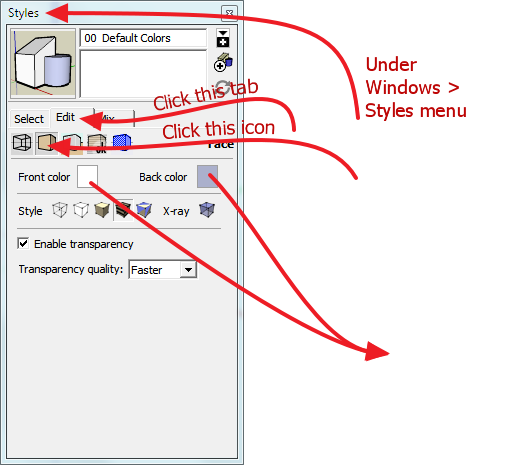
              Styles.png

              Download the free D'oh Book for SketchUp 📖

              1 條回覆 最後回覆 回覆 引用 0
              • Rich O BrienR 離線
                Rich O Brien Moderator
                最後由 編輯

                that's normal its just shading to give impression of illumination

                Download the free D'oh Book for SketchUp 📖

                1 條回覆 最後回覆 回覆 引用 0
                • GaieusG 離線
                  Gaieus
                  最後由 編輯

                  Well, that's just because of the shading I guess. Basically (if you have problems with face orientation), just set the two kinds of faces to something strikingly different. I think Dave uses some irritating magenta or what so that he cannot bear it too long and reverses back faces quickly.

                  Gai...

                  1 條回覆 最後回覆 回覆 引用 0
                  • R 離線
                    Rose123
                    最後由 編輯

                    Thanks, Rich. I've played with those settings, but even so, it still looks like the outside faces take on different hues by default, such as below.

                    Link Preview Image

                    To clarify; they're all "fronts" or "backs," but still take on slightly different hues.

                    1 條回覆 最後回覆 回覆 引用 0
                    • R 離線
                      Rose123
                      最後由 編輯

                      Re: [Tutorial > Modeling] How a Pro Builds a House in SU pt

                      Hi, very nice tutorial, but I have some questions I'm hoping someone can answer.

                      1. I've gotten to step 5, where I've scaled the imported drawing and erased the line. Why can't I just trace directly over this plan now? Is it because I won't be drawing on one plane?

                      2. About step 6: "right click on your plan image and choose "use as material" and apply the material to the rectangle." How, exactly, do I apply the material? I select/copy, but can't seem to paste it to the rectangle.

                      Thx for any advice.

                      edit: Ok, I got the paint bucket to work. Apparently it "paints" the plan at the correct scale, and repeats it multiple times depending on how big the rectangle is. So I suppose I can just trace one of the patterns and then turn off the paint layer.

                      1 條回覆 最後回覆 回覆 引用 0
                      • R 離線
                        Rose123
                        最後由 編輯

                        Ok, great, thanks, that's what I thought (SketchUp is trying to replicate the effects of light).

                        1 條回覆 最後回覆 回覆 引用 0
                        • S 離線
                          stephen1766
                          最後由 編輯

                          I am following the guide. I imported a image plan. I draw a line, group line and image, then use measurement tool to scale the image. Okay so far. How about my image plan do not have 1:1 ratio for X-Y axis. Could I scale both horizontal and vertical seperately ?

                          1 條回覆 最後回覆 回覆 引用 0
                          • syburnS 離線
                            syburn
                            最後由 編輯

                            Whats happened to ""üse as material"" in SU 2014?

                            Odd....

                            1 條回覆 最後回覆 回覆 引用 0
                            • P 離線
                              pbcsd
                              最後由 編輯

                              I see the "use as material" selection in 2014, but for the life of me I can't figure out how to apply it to a rectangle I just drew next to the plan? There doesn't appear to be an "in model" materials list either.

                              Help! 😄

                              1 條回覆 最後回覆 回覆 引用 0
                              • KrisidiousK 離線
                                Krisidious
                                最後由 編輯

                                You can open the material browser window.

                                Go to the top of SU and hit Window>Materials.
                                Then the Material Browser will open.

                                about a 1/3rd of the way down you'll see forward and backward buttons and a home button. hit the home/house button. this will show you all of the materials that are 'in' your model.

                                By: Kristoff Rand
                                Home DesignerUnique House Plans

                                1 條回覆 最後回覆 回覆 引用 0
                                • A 離線
                                  AmrANashat
                                  最後由 編輯

                                  Hey, I think this tutorial is great but i can't download the template to start. can you post a working link ?

                                  1 條回覆 最後回覆 回覆 引用 0
                                  • KrisidiousK 離線
                                    Krisidious
                                    最後由 編輯

                                    You can get my templates here. http://www.sketchup-house-plans.com/

                                    By: Kristoff Rand
                                    Home DesignerUnique House Plans

                                    1 條回覆 最後回覆 回覆 引用 0
                                    • alexjoA 離線
                                      alexjo
                                      最後由 編輯

                                      @krisidious said:

                                      You can get my templates here. http://www.sketchup-house-plans.com/

                                      I keep getting redirected when I click on pt. 3

                                      1 條回覆 最後回覆 回覆 引用 0
                                      • KrisidiousK 離線
                                        Krisidious
                                        最後由 編輯

                                        Hmm... the post is missing? Someone with control of the forum here will have to look into where it went.

                                        By: Kristoff Rand
                                        Home DesignerUnique House Plans

                                        1 條回覆 最後回覆 回覆 引用 0
                                        • alexjoA 離線
                                          alexjo
                                          最後由 編輯

                                          @krisidious said:

                                          Hmm... the post is missing? Someone with control of the forum here will have to look into where it went.

                                          Yeah, when I click on part 3 it takes me to part 1.

                                          Also, I have a question. Is there a tutorial to build a model based on CAD plans, not images, and in a fast approach ?

                                          1 條回覆 最後回覆 回覆 引用 0
                                          • pilouP 離線
                                            pilou
                                            最後由 編輯

                                            404 Not Found

                                            favicon

                                            (tune.pk)

                                            Frenchy Pilou
                                            Is beautiful that please without concept!
                                            My Little site :)

                                            1 條回覆 最後回覆 回覆 引用 0
                                            • 1
                                            • 2
                                            • 3
                                            • 4
                                            • 5
                                            • 2 / 5
                                            • 第一個貼文
                                              最後的貼文
                                            Buy SketchPlus
                                            Buy SUbD
                                            Buy WrapR
                                            Buy eBook
                                            Buy Modelur
                                            Buy Vertex Tools
                                            Buy SketchCuisine
                                            Buy FormFonts

                                            Advertisement