sketchucation logo sketchucation
    • 登入
    Oops, your profile's looking a bit empty! To help us tailor your experience, please fill in key details like your SketchUp version, skill level, operating system, and more. Update and save your info on your profile page today!
    ⚠️ Important | Libfredo 15.6b introduces important bugfixes for Fredo's Extensions Update

    RAL colors

    已排程 已置頂 已鎖定 已移動 SketchUp Components, Materials & Styles
    sketchup
    85 貼文 40 Posters 43.7k 瀏覽 40 Watching
    正在載入更多貼文
    • 從舊到新
    • 從新到舊
    • 最多點贊
    回覆
    • 在新貼文中回覆
    登入後回覆
    此主題已被刪除。只有擁有主題管理權限的使用者可以查看。
    • numbthumbN 離線
      numbthumb
      最後由 編輯

      As .skm files? Don´t know about that. A kind of workaround that I use is a list of RAL classic colour names in english http://www.ral-digital.de/english/ralclassic_namen.htm?content2.shtml

      Comfortably numb...

      1 條回覆 最後回覆 回覆 引用 0
      • TIGT 離線
        TIG Moderator
        最後由 編輯

        If you want to 'rename' these skms 'displayed names' you have to edit all of the skms' documentProperties.xml files [it's actually a zip file] - this is a pain for that number of files...
        So... you write a script/batch file to process each skm in turn, and extract the d..P...xml file and replace the text from a lookup-table e.g. <dp:title>RAL1000-Gruenbeige</dp:title> e.g. RAL1000-Gruenbeige<==>RAL1000-Green beige
        Save it all back as was...
        etc etc etc...
        😲

        TIG

        1 條回覆 最後回覆 回覆 引用 0
        • J 離線
          Jim
          最後由 編輯

          The original .skm file is a text file with a list of colors, so you should be able to translate the names in that single file.

          Rename the file to the name of the library as you want it to appear in SketchUp, then copy the file to the Materials folder (or subfolder of.)

          The next time you open that materials folder, the library will be created using the filename you gave it.

          Hi

          1 條回覆 最後回覆 回覆 引用 0
          • TIGT 離線
            TIG Moderator
            最後由 編輯

            Exactly where might that be ? 😕
            NOT on a PC ?
            You can only change the name of the 'collection', but NOT the individual skms themselves - they are embedded in the smk's xml coded file ???

            TIG

            1 條回覆 最後回覆 回覆 引用 0
            • J 離線
              Jim
              最後由 編輯

              yes, i tried it before i posted.

              The .skm file in the .zip file in the first post is text file - a list of the material names and color values. Just edit it, rename it (if needed) and move it to the Materials folder.

              Hi

              1 條回覆 最後回覆 回覆 引用 0
              • TIGT 離線
                TIG Moderator
                最後由 編輯

                OK, to be more specific, you can change the names of the individual skm files in their folder... BUT they still display with the name that's embedded in the skm itself [at least on a Vista PC].
                You can rename a skm to anything you like, but the name that's displayed in the Materials Browser is read from the internal xml file and doesn't change ??? 😕 😕 😕

                TIG

                1 條回覆 最後回覆 回覆 引用 0
                • TIGT 離線
                  TIG Moderator
                  最後由 編輯

                  OK, changing the 'name' in the text file seems to do nothing on my PC - in fact the text file is superfluous ? If I change it nothing happens, if I removed ditto ???
                  How come we are some divergent ??? 😕

                  TIG

                  1 條回覆 最後回覆 回覆 引用 0
                  • J 離線
                    Jim
                    最後由 編輯

                    I don't know.

                    First rename the ral-farben.skm to something else. ral-farben-en.skm, for exmaple.

                    Edit each name in the ral-farben-en.skm and save it to the Materials Folder

                    Restart SketchUp and open the Materials window - a new library name ral-faben-en should be created using the new material names.

                    Hi

                    1 條回覆 最後回覆 回覆 引用 0
                    • TIGT 離線
                      TIG Moderator
                      最後由 編輯

                      My RAL folder has a RAL.txt file that lists all of te files with their color values.
                      Changing that does nothing.
                      There are also many individual skms - like RAL0001.skm.
                      These are really zips, each containing various files... but one particular xml determines what that skim will displa as its 'name' in the Materials Browser ???
                      If I edit that value then the name changes - but editing anything else just doesn't work...
                      😕 😕
                      EDIT:
                      Your ral_farben.skm doesn't exist ?
                      Back tracked and found it - reloaded - it works as you you say BUT why does my version have so many bits ?
                      Got it - after you first run the material skm it makes all of the individual skms - I must have got the version from somewhere with those made...

                      So to recap - if you have loads of separate skms remove them, rename the entries in the 'first' skm file [edit with Notepad etc] and then run it and all should be sorted ? Phew ! 😒
                      EDIT/EDIT: see next post for the English RAL version... ☀

                      TIG

                      1 條回覆 最後回覆 回覆 引用 0
                      • TIGT 離線
                        TIG Moderator
                        最後由 編輯

                        OK - so to address my slowness here's the English version of the RAL skms.
                        Put the one RAL.skm and the RAL folder of skms into your Materials Folder - to change the names to suit your locale remove the RAL folder and change the names inside the RAL.skm file. When you next open SUp a new RAL folder will compile with the renamed skms inside...RAL.zip
                        ☀

                        TIG

                        1 條回覆 最後回覆 回覆 引用 0
                        • utilerU 離線
                          utiler
                          最後由 編輯

                          @tig said:

                          OK - so to address my slowness here's the English version of the RAL skms.
                          Put the one RAL.skm and the RAL folder of skms into your Materials Folder - to change the names to suit your locale remove the RAL folder and change the names inside the RAL.skm file. When you next open SUp a new RAL folder will compile with the renamed skms inside...[attachment=0:yafmopu0]<!-- ia0 -->RAL.zip<!-- ia0 -->[/attachment:yafmopu0]
                          ☀

                          You're a legend, TIG!!!!! 🎉

                          Just Curious...

                          1 條回覆 最後回覆 回覆 引用 0
                          • D 離線
                            d12dozr
                            最後由 編輯

                            Thanks, TIG!

                            Any idea why I still have a RAL-Farben folder (unconverted names) in my Materials browser as well as TIG's converted RAL folder? I have deleted all but the converted RAL skm from my Materials folder and restarted Sketchup 😕

                            3D Printing with SketchUp Book
                            http://goo.gl/f7ooYh

                            1 條回覆 最後回覆 回覆 引用 0
                            • TIGT 離線
                              TIG Moderator
                              最後由 編輯

                              @d12dozr said:

                              Thanks, TIG!
                              Any idea why I still have a RAL-Farben folder (unconverted names) in my Materials browser as well as TIG's converted RAL folder? I have deleted all but the converted RAL skm from my Materials folder and restarted Sketchup 😕

                              You must still have the folder or a RAL-Farben.skm ? Move it/them out of ../Materials/...

                              TIG

                              1 條回覆 最後回覆 回覆 引用 0
                              • D 離線
                                d12dozr
                                最後由 編輯

                                I believe I deleted all but the one RAL skm. Here is a screen grab of my Materials folder and Sketchup Materials palette...its not a big deal, just strange.
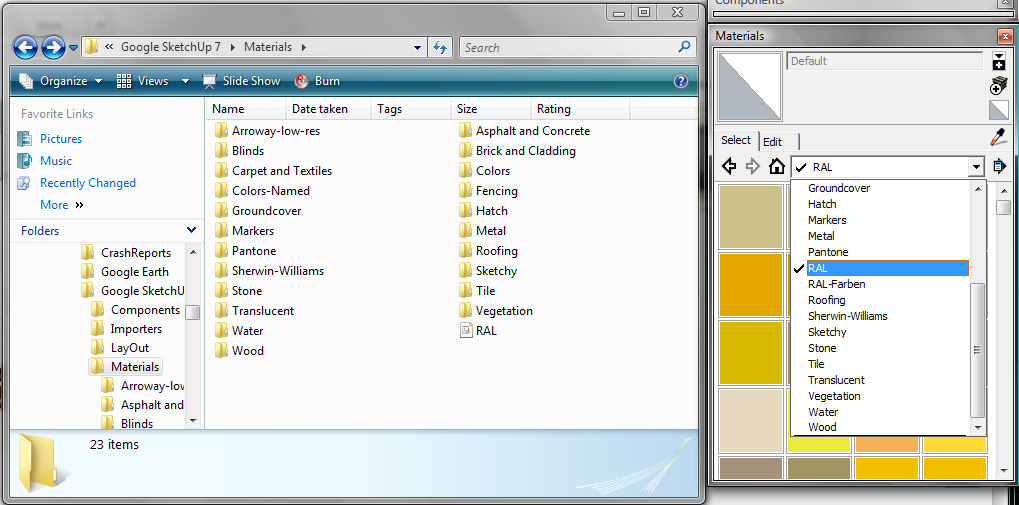

                                Fullscreen capture 2262010 83137 AM.bmp.jpg

                                3D Printing with SketchUp Book
                                http://goo.gl/f7ooYh

                                1 條回覆 最後回覆 回覆 引用 0
                                • H 離線
                                  hebelup
                                  最後由 編輯

                                  Thanks this colors are very good...

                                  1 條回覆 最後回覆 回覆 引用 0
                                  • J 離線
                                    jarrielsucio
                                    最後由 編輯

                                    Thanks Burkhard!! very useful

                                    1 條回覆 最後回覆 回覆 引用 0
                                    • 3 離線
                                      3rdEye
                                      最後由 編輯

                                      Hi there,

                                      can anyone please tell how to add a new RAL Color to the palette?
                                      What do the numbers mean that are put behind the Name of the color in the lines in RAL-Colors.skm?

                                      thx, moon

                                      1 條回覆 最後回覆 回覆 引用 0
                                      • Dave RD 離線
                                        Dave R
                                        最後由 編輯

                                        I expect the numbers are basically a catalog or identifier number used by RAL. See here for the list. Also here.

                                        You could edit an existing one in a model, change its name to the new name and click on Create Material. Then open the secondary materials pane set it to RAL. The top pane should be set to In Model Drag the new color from the In Model to the RAL library.

                                        Etaoin Shrdlu

                                        %

                                        (THERE'S NO PLACE LIKE)

                                        G28 X0.0 Y0.0 Z0.0

                                        M30

                                        %

                                        1 條回覆 最後回覆 回覆 引用 0
                                        • 3 離線
                                          3rdEye
                                          最後由 編輯

                                          Thanks for the fast reply, Dave...

                                          I compared the number inside the "RAL Farben.skm" to the numbers stated on the first link you sent to me (very cool list 😉), but they are different.
                                          I am sure the number describes the colors for sketchup somehow. Would be interesting to know how to get to this number.
                                          For the second part of your post: Thanks, yes i know how to do it this way, the the is a new color skm in the subfolder, but its not inside the list.
                                          If we knew the way to get to the numbers inside the main skm file, we could share on any completions of the list very easy, and after a complete new installation you wil not have to define the colors again.

                                          all the best,
                                          3rdEye

                                          1 條回覆 最後回覆 回覆 引用 0
                                          • TIGT 離線
                                            TIG Moderator
                                            最後由 編輯

                                            A RAL color code [e.g. '1000'] is part of the RAL referencing system and bears no relationship to the SKM material's RGB colors.
                                            So we find that: RAL 1000 RGB=190,189,127 Name= Grünbeige [EN=Green beige]

                                            If the SKM is named 'RAL1000' it doesn't affect the RGB value - you could rename it to say 'Green beige' and it'd still have the same RGB values...

                                            My RAL SKMfiles in http://forums.sketchucation.com/viewtopic.php?p=227982#p227982 is all you need... why the old 'Farben' version?

                                            When you add a new SKM into the ../Materials/../RAL folder [e.g. you make a clone of a RAL material in your model and then save it externally to that RAL folder] then the available SKM files in the Material Browser is updated by the system to include that file. The only way to distribute the SKMs is to zip them up...


                                            TIG

                                            1 條回覆 最後回覆 回覆 引用 0
                                            • 1
                                            • 2
                                            • 3
                                            • 4
                                            • 5
                                            • 3 / 5
                                            • 第一個貼文
                                              最後的貼文
                                            Buy SketchPlus
                                            Buy SUbD
                                            Buy WrapR
                                            Buy eBook
                                            Buy Modelur
                                            Buy Vertex Tools
                                            Buy SketchCuisine
                                            Buy FormFonts

                                            Advertisement

