A Welcome Message to New SketchUcation Members
-
Hi All,
I'm new! My name is Dave, and I'm an old TurboCad user. I'm going to be designing fairly complex accessories for electronic connectors, involving complex curves and threads. Does anyone have any initial tips that might help?
Many thanks
Dave
-
Hi Dave and welcome!
Maybe two initial tip - one because you are coming from a CAD background:
- Unlike in CAD programs generally, layers do not separate geometry in SketchUp.
Always use groups or components to separate raw geometry and only put these groups/components on other layer than the default Layer 0. - SketchUp is rather unwilling to create faces for geometry whose edges are very small (around 1 mm). The general tip is to work in a larger scale and only resize the model at the end. Your field seems to be this "miniature" world so this may help.
Since you are on metric system, you could use a template that uses centimetres or even metres but still "count" in mind in millimetres and scale the whole thing at the end by 10 or 1000 depending on your choice.
- Unlike in CAD programs generally, layers do not separate geometry in SketchUp.
-
Hi Gaieus,
Thanks for the welcome, and a special thanks for the tips. Both are really interesting, especially the scaling issue. I had been wondering how SU was going to handle small items.
Many thanks once again
Dave
-
@unknownuser said:
Hello there,
Welcome to this little SketchUp Community we have set up here!
Welcome to this forum for all your beginners questions. You may also have more advanced questions and may post them in the appropriate forum.
If you're not sure if your question is beginner or advanced, then don't worry too much. The world is full of worrisome people already and we want you to get that cozy - de-worried feeling here. So in that case just post it here anyway.Hi there!
Could you tell me what I am supposed to do for downloading ROUND CORNERS plug-in? -
@coimix said:
Could you tell me what I am supposed to do for downloading ROUND CORNERS plug-in?
In the first post of this topic, there is a download image:
Below that image, there is the plugin attached in a zipped archive.
Note that it requires another plugin library that you can download the same way here:
http://forums.sketchucation.com/viewtopic.php?f=323&t=17947#p144178 -
I'm a new sketchup user and would like to introduce myself here, and humbly ask for some advise.
I have been doing some simple modeling and I've run into a repeated problem with the arch and push pull tool. When I round a corner of a rectangle using the arch and PP tool it leaves a line on the edge plane perpendicular to the faces at the beginning and end of the arch. I've attempted several fixes to no avail.
Is there a way to eliminate these lines?
Thanks,
Richard -
Hi,
Welcome to SCF!
Using the Eraser tool hold Ctrl to soften these hard edges.
There's more to explain but this should fix it. In fact there are lots of ways to fix it!
-
Well, Rich beat me (or rather I was not looking too much lower the posts) but whatever - here is mine, too...
That's a natural thing as while the segments of an extruded arc are softened, the ends are not.
Use the Eraser tool and while holding down the Ctrl key, soften those edges as well.And welcome to SCF!
When you are more familiar with the native SU tools (indeed one has to learn them) and ready for something on steroids, have a look at the Round Corner plugin:
http://forums.sketchucation.com/viewtopic.php?t=20485 -
Thanks guys, the eraser did the trick. I look forward to learning more.
R
-
Hi there, i got a doubt about Match Photo.
I´m working on this model, just playing on SU, and some of the pilars don't fit onto the vertical axis, while the rest of the composition seems to work just fine.
My english is terrible, so here's the pic to see if you understand and/or can help me with this! ^^,
Thanks, greets from the tropics.
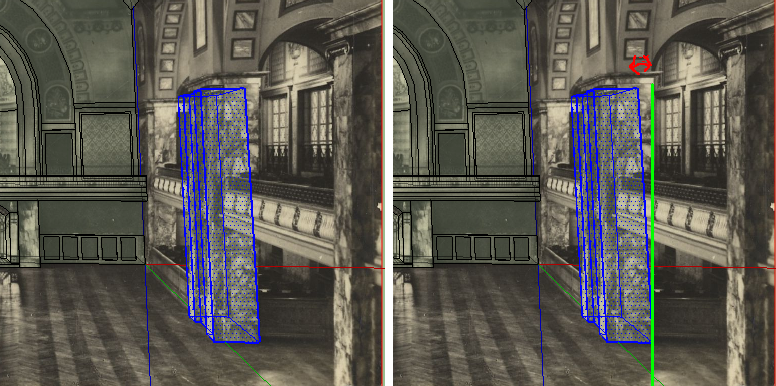
-
Hi JB,
Is the source image not cropped by any chance? Did you take it or got it from somewhere (so you cannot be sure)?
When you crop the source image (unless you crop it in a special way), it will lose some original perspectives that are needed for a perfect camera match in SU.
-
@gaieus said:
When you crop the source image (unless you crop it in a special way), it will lose some original perspectives that are needed for a perfect camera match in SU.
Oh! Hi! Haven´t thought about that!
Thank you, i guess i'll have to do that wall from a different picture o r correct the crop with Ps.
Thank you a lot! ^^, -
Hi, I just joined and am looking forward to
hanging out here, meeting new people and
learning. -
Hello everybody from Zaragoza, Spain.
I have just joined the forum today and I only want to introduce myself and give thanks to all the sketchers who contribute to this page. My experience is very, very poor with this tool, but I enjoy a lot during my free time wit it. My best wishes for you. -
Well, I also started with just "enjoying" it. Then it became more and more serious - and ever since I have been learning something every day.
Welcome you here as well!
-
Hi everyone,
you've got a great site going here. I wanted to start off by thanking you for a) having this place and b) solving so many of my early problems already. So, thanks.
I'm new to the program and I'm basically using it to try and design some toys for myself. toys toys...not adult...things.
anyway, Hi! -
Hi wheeljack,
Welcome to SCF.
-
Hello everyone,
I am currently trying to make an interactive picture of a somewhat weird looking solid. I would like to export it into my Powerpoint so that I can rotate it in 3D to better explain the geometry of the object. That is when I stumbled upon Google sketchup and I am definitely enamored by it. I am a scientist by profession and I do see myself using this software to make illustrative models. Thanks to all the developers.
But I am still new to this software and I am wondering if anyone could tell me if I can make such interactive pictures using sketchup. Basically, I am looking to create a picture like the one shown in this webpage (a table):
If you click on 3D view, the table can be rotated 360 degrees. (The content of the webpage itself is not so relevant, I just wanted to give an example of the kind of picture I am trying to make). Would it be possible to make such an interactive picture and upload that on a .ppt presentation?
Thank you very much for your time and patience.
-
Hi Srikanth and welcome!
I am afraid that particular application could not be embeded into a PP presentation. It uses javascript and I doubt that MS would allow it (although I may be wrong).
There is another way however. What I know for sure, the Hypercosm Player can be embedded into a PP presentation (I have done it already) and it has a nicely functioning, free exporter, too (although as I read, it only works on SU Pro???)
Here is how it would work in a PP presentation:
http://www.hypercosm.com/support/howto7.htmlIf it only works in SU Pro, you could install SU Pro 7 for instance and only use it for exporting. Or if you only need it for a project or two, install SU 8 Pro on your current version - after the trial period it will revert back to the free version.
-
Thanks for the quick response and suggestions. I will explore the Hypercosm Player and will keep the community updated.
Thank you.




Advertisement