sketchucation logo sketchucation
    • Login
    Oops, your profile's looking a bit empty! To help us tailor your experience, please fill in key details like your SketchUp version, skill level, operating system, and more. Update and save your info on your profile page today!
    Mac User? | Join the Rayscaper Beta for Mac Learn More

    Modlumi - Easy 3D modelling
    Scheduled Pinned Locked Moved Corner Bar
    400 Posts 9 Posters 63.5k Views 9 Watching
    Loading More Posts
    • Oldest to Newest
    • Newest to Oldest
    • Most Votes
    Reply
    • Reply as topic
    Log in to reply
    This topic has been deleted. Only users with topic management privileges can see it.
    • pilouP
      pilou
      last edited by pilou

      @ntxdave
      Make any Object : Make a Group
      Select this Group
      Copy Move it (M + CTRL)
      Type / 5 = 6 Objects (Original + 5 between original and second) or Type * 5 = 6 objects( original + behind distance original and second)
      Type 50% then Enter = Your 6 objects a decrease Size from the first Original to last

      Select All : make a Group

      etc... exactely the same with Rotate! (Q)
      It's a sort of Fractal process! πŸ™‚
      All was made with 5 as number of /, and 50% as reduce size generation !
      With training you will make that in seconds!

      For Size you must take an Handle(s) first!
      Size was not use in this Gif : Only Move Copy and Rot!
      Don't forget to make a Group or a Component after a finished command!
      The Last line for example is: Make a group, Make a Big Move with Ctrl then type /5 then type 50% Enter πŸ™‚

      alt text

      Frenchy Pilou
      Is beautiful that please without concept!
      My Little site :)

      1 Reply Last reply
      Reply Quote 1
      • pilouP
        pilou
        last edited by pilou

        Search inside Modlumi a good view then make Snap Shot or save image inside ModLum
        you can hide the axes inside ModLumi or ask the Ai to make it! πŸ™‚

        alt text

        Ask birds in free Vizcom
        alt text

        Variations Vizcom...export image
        alt text

        then Drag & Drop inside Gemin section Image πŸ™‚ Prompt was : make a tapestry from this image
        Truely a game's boy as I said previouly! πŸ™‚
        alt text

        etc...

        Frenchy Pilou
        Is beautiful that please without concept!
        My Little site :)

        1 Reply Last reply
        Reply Quote 2
        • pilouP
          pilou
          last edited by pilou

          @pixelcruncher
          Can you precise the Sweep process (Follow me) and limit of it ?
          Because sometime seems nothing works as expected!

          My personal research πŸ™‚
          Section (profil ) must be // to the ground!
          Section can be or not attached to the path!
          Section must have a surface!
          Section must be ouside the Path surface!

          Path can be a surface or a simple segment(s) perimeter!
          so you can select a surface or some segments!

          Sweep is not Multiple!

          This follow one is a bug!
          Works when i take the entiere path (4 segments) but fails when i take less 4 segments!!!
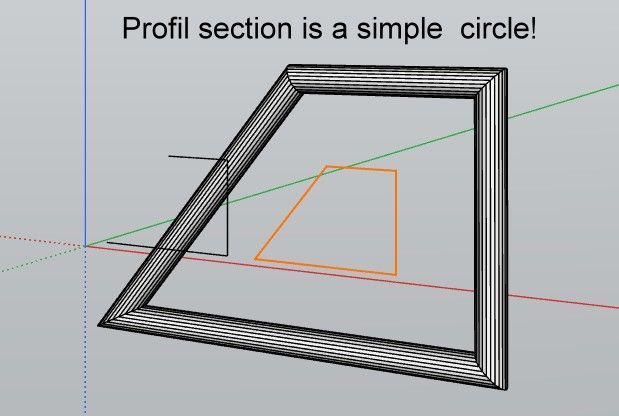
          Bug129.zip

          3segments fail.jpg

          Frenchy Pilou
          Is beautiful that please without concept!
          My Little site :)

          1 Reply Last reply
          Reply Quote 0
          • pilouP
            pilou
            last edited by pilou

            Request : Snap of the Center of a Circle! Or a Polygon... ( I can draw a diameter but... )

            Frenchy Pilou
            Is beautiful that please without concept!
            My Little site :)

            1 Reply Last reply
            Reply Quote 0
            • ntxdaveN
              ntxdave
              last edited by

              As usual, I have a silly question: Does anyone using version 0.28 (either app or browser version) have any problem trying to draw guides?

              I think I must be doing something wrong; I cannot draw guides in either version.

              Press F1...thank me later

              1 Reply Last reply
              Reply Quote 0
              • pilouP
                pilou
                last edited by pilou

                Seems there is a little bug with the Draw Helper Line guides but

                Draw a Rectangle
                Press T
                Don't snap on a middle of a segment!
                That must works as expected! πŸ™‚
                Snap middle (or a corner) gives a Point Guide!
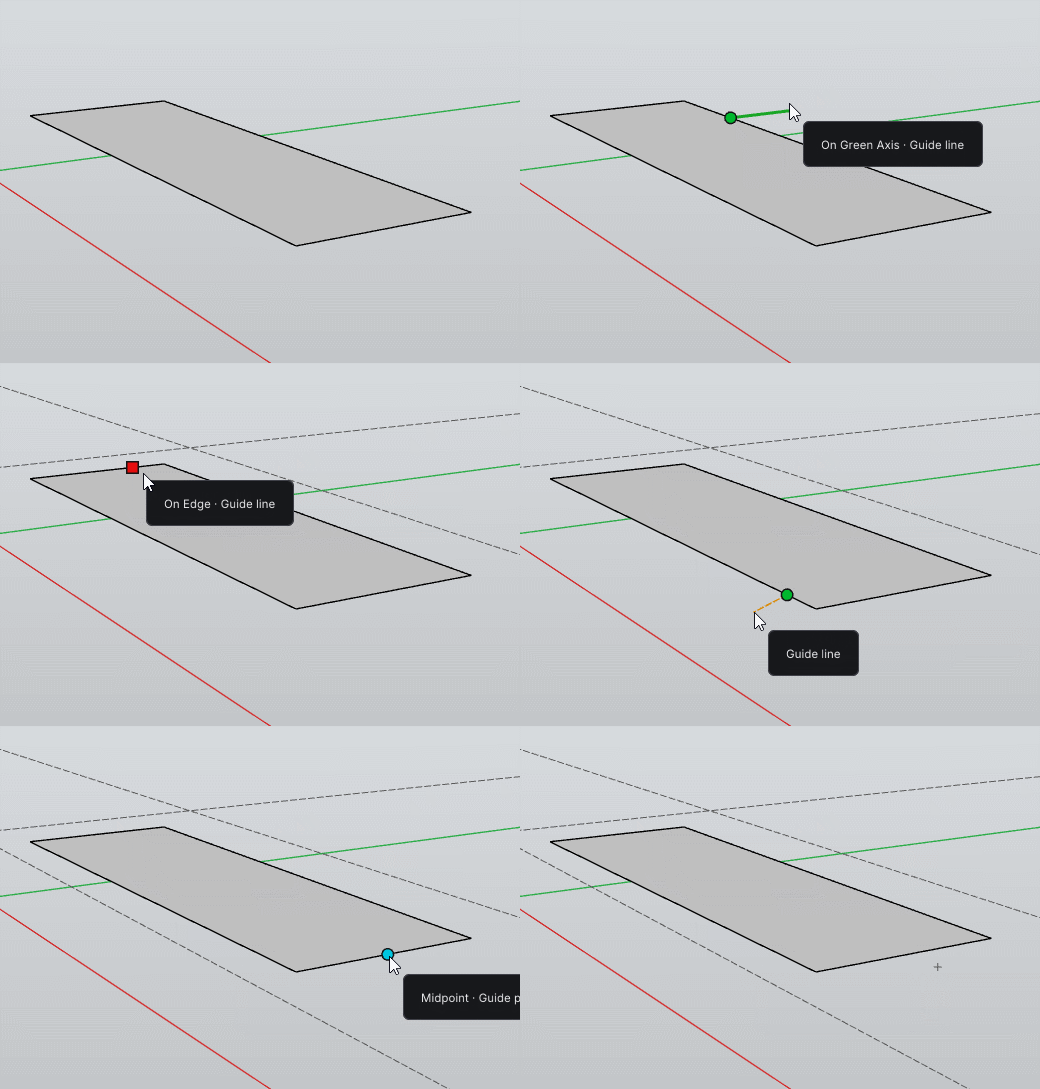
                GIF_guides.gif

                Frenchy Pilou
                Is beautiful that please without concept!
                My Little site :)

                ntxdaveN 1 Reply Last reply
                Reply Quote 0
                • Mike AmosM
                  Mike Amos
                  last edited by

                  That also happens with Sketchup as a random result.

                  Absentia mortis praesentiam vitae probat, vita autem est argumentum constantiae.

                  1 Reply Last reply
                  Reply Quote 0
                  • ntxdaveN
                    ntxdave @pilou
                    last edited by

                    @pilou said:

                    Seems there is a little bug with the Draw Helper Line guides but

                    Draw a Rectangle
                    Press T
                    Don't snap on a middle of a segment!
                    That must works as expected! πŸ™‚
                    Snap middle (or a corner) gives a Point Guide!

                    Thanks @pilou for the most part that worked. Hope this issue gets fixed in a future release.

                    Press F1...thank me later

                    1 Reply Last reply
                    Reply Quote 0
                    • pixelcruncherP
                      pixelcruncher Extension Creator
                      last edited by

                      Folks, I'm still alive; I've just been a bit focused on RAyscaper and other stuff. Will get back to this and address the feedback & bugs.

                      I'm the developer of Rayscaper: https://rayscaper.com/ - Fast and easy rendering for SketchUp.

                      1 Reply Last reply
                      Reply Quote 0
                      • Mike AmosM
                        Mike Amos
                        last edited by

                        One thing at a time mate, spread too thin we achieve zero.

                        Absentia mortis praesentiam vitae probat, vita autem est argumentum constantiae.

                        1 Reply Last reply β™₯
                        Reply Quote 1

                        Hello! It looks like you're interested in this conversation, but you don't have an account yet.

                        Getting fed up of having to scroll through the same posts each visit? When you register for an account, you'll always come back to exactly where you were before, and choose to be notified of new replies (either via email, or push notification). You'll also be able to save bookmarks and upvote posts to show your appreciation to other community members.

                        With your input, this post could be even better πŸ’—

                        Register Login
                        • 1
                        • 2
                        • 10
                        • 11
                        • 12
                        • 13
                        • 14
                        • 19
                        • 20
                        • 12 / 20
                        • First post
                          Last post
                        Buy SketchPlus
                        Buy SUbD
                        Buy WrapR
                        Buy eBook
                        Buy Modelur
                        Buy Vertex Tools
                        Buy SketchCuisine
                        Buy FormFonts

                        Advertisement