Modlumi - Easy 3D modelling



-
@pixelcruncher
You have not Save as or Export SKP ? -
I will add "Save As...".
I'm not adding SKP export. This is the exact feature that got IngeTrazo in trouble with Trimble: https://github.com/ingelibre/ingetrazo/commit/fb3ceab1656e0b3dcd347e05f794157a8cffb66c - I'm steering clear of that.
-
@ntxdave
The How To
Make the module as show on the gif head post above
Select the 3 or 5 segments of the little top roof!
Apply a Fillet (here 3)
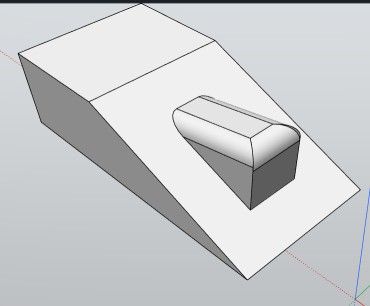
Then Maket it as Group or Component
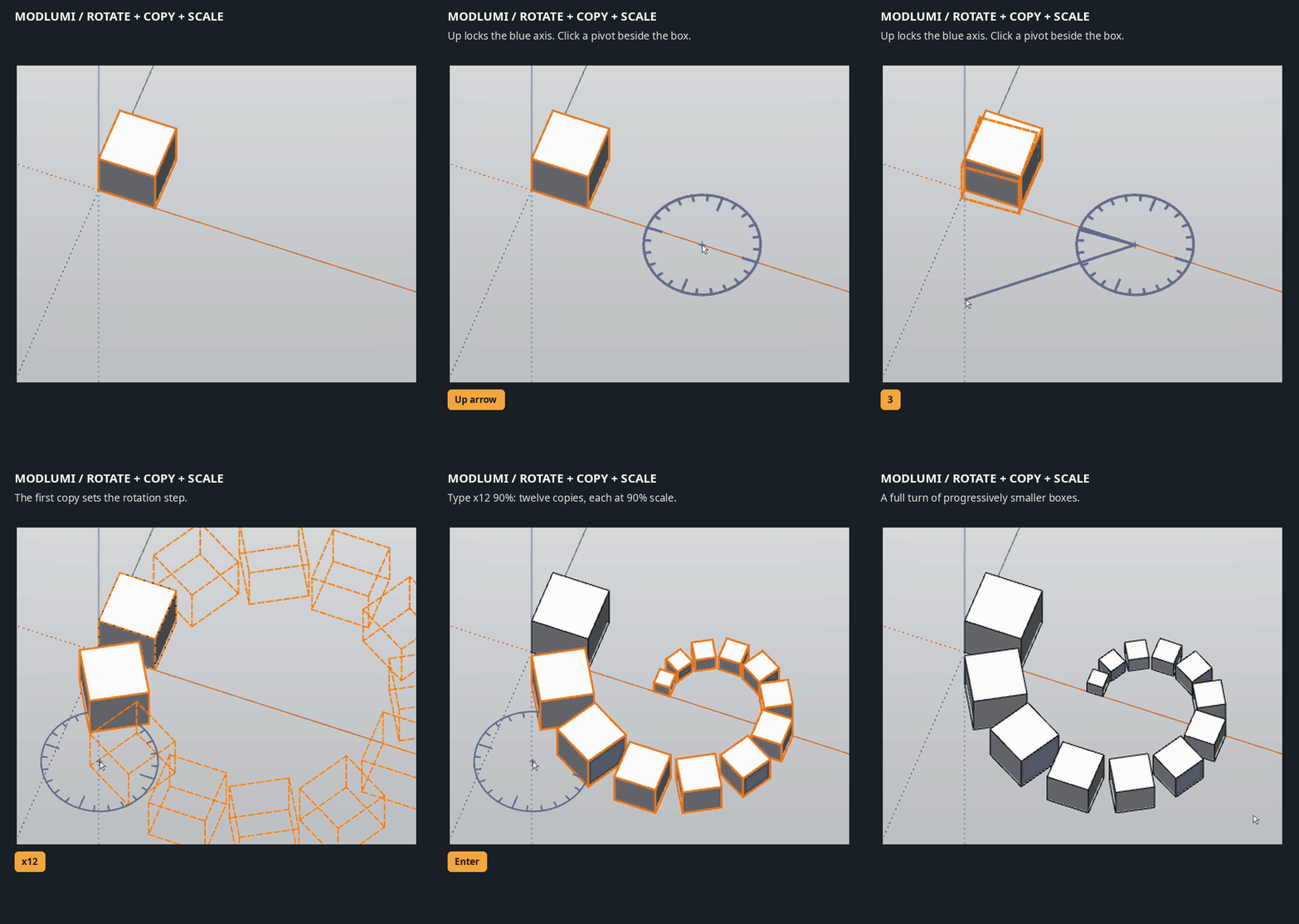
And then use as you want the Move Rotation / Copy
with the %
three or four time
(make group apply copy rotation % etc...)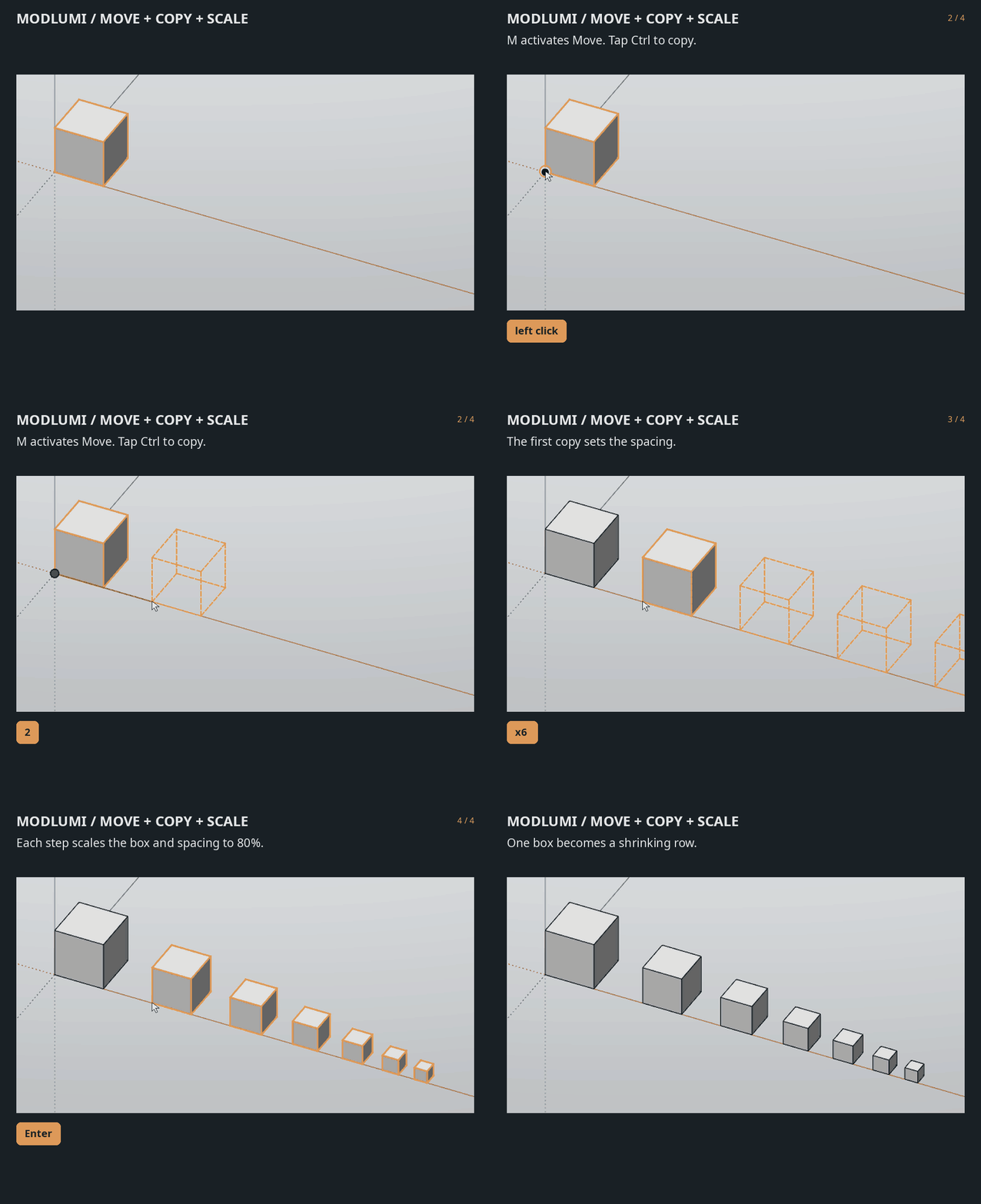
Modlumi - Easy 3D modelling
New in Modlumi: copy arrays with progressive scaling You can now combine Move or Rotate with Copy and scaling to create progressively smaller or larger copie...
sketchucation (community.sketchucation.com)
Here 5 segments of the little top roof was filletered!
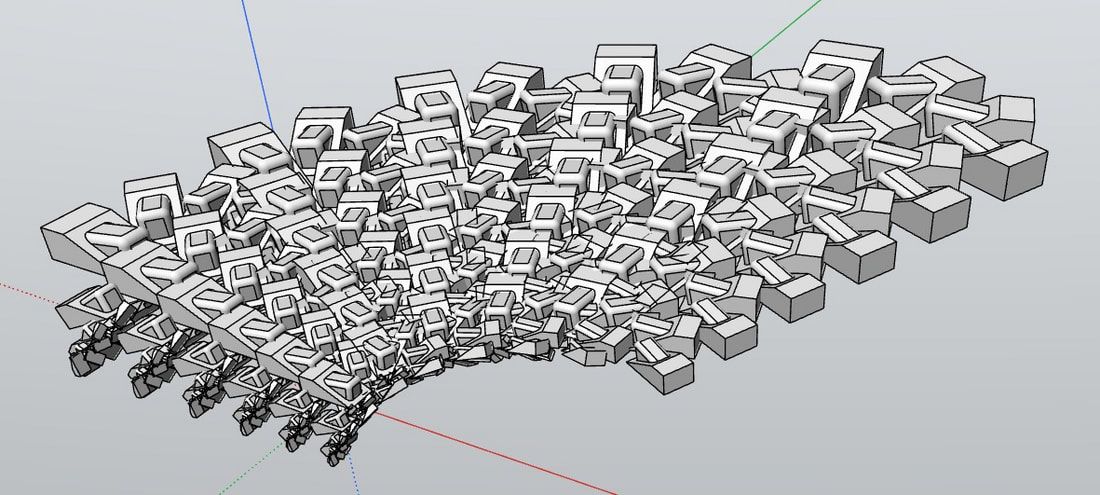
Then take a snaphot or save to image inside Modlumi itself
Send the image to Gemini with any prompt you want!Mine was : Effacer les axes, remplacer chaque volume par une carcasse de voiture, et mettre le résultat dans la nature
"Erase the axes, replace each volume with a car carcass, and place the result in a natural setting."
All take less time than me to write this post!

Frenchy Pilou
Is beautiful that please without concept!
My Little site :) -
@pixelcruncher
About SKP you right! Keep simple!And Dae ?
Or the GlTF is sufficient ? (for SU) without juridic problems) -
@chon Would it help if I would make the app data user configurable, or have the option to start it with
--app-datasuch that you can store the data on USB disk as well?Mayby, i don't know. Sorry, i'm just a poor user

Here are the 4 elements in the C:\Users\User\AppData\Local\modlumi folder after my first use :
analytics.txt
modlumi.log
plugins (folder)
imgui.iniThe installer made also an alias of modlumi in the windows start menu.
Hope it can help
-
@pilou Thanks for testing the armchair again! I'm looking into why it never finishes in millimeters or with Merge coplanar faces; in meters it should still come in within seconds.
It is a heavy one, though: over a million triangles for one chair. A chair modelled by hand is usually a few thousand. You said Krea 3D made it: does Krea have an option to export with less detail, or a lower polygon count? Something around 50,000 triangles would keep the shape and be much easier to work with in Modlumi or in SketchUp.
About quads: no need to subdivide before importing. Modlumi takes triangles or quads, and fewer polygons are always faster.
Cheers,
Thomas
-
Really silly question: How do you draw guides in Modlumi?
-
@pixelcruncher Would it be possible for you so support using the Windows (or Mac) native fonts for the 3D Text and Text labels?
-
Modlumi 0.22 is out
Download it for Windows from https://modlumi.com/download/latest/windows, or open the browser version at https://modlumi.com/app/. If you already run 0.21 on Windows, it will offer you the update. The Mac build of 0.22 will follow later.
New features
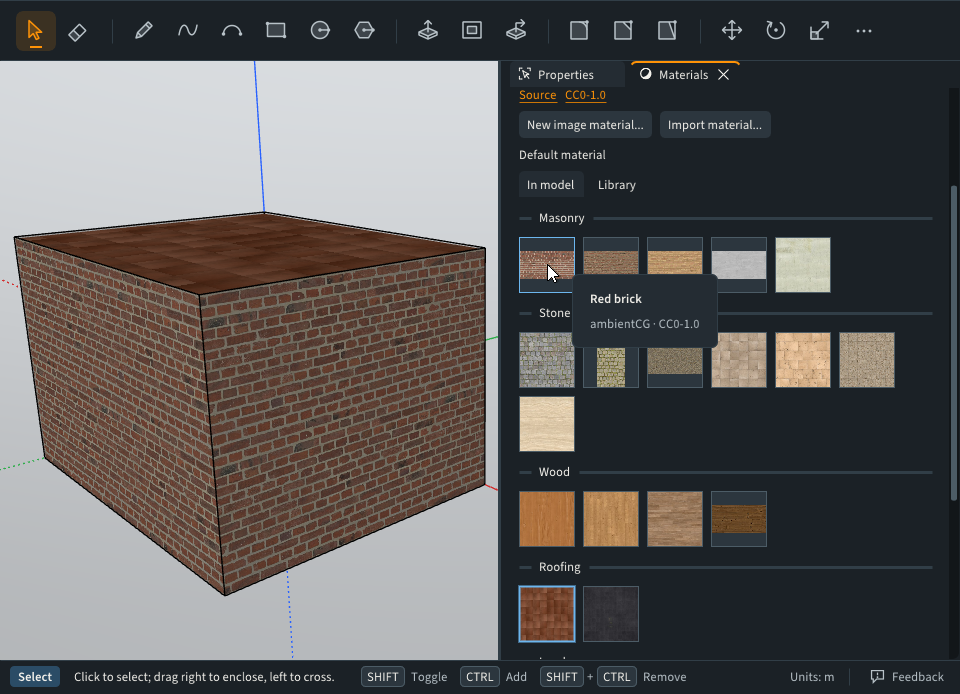
- A library of free materials. The Materials panel has a new Library tab with 27 materials: brick, stone, wood, roof tiles, grass and more. Click one to download it; the desktop app keeps it, so it works offline afterwards. Each material shows where it comes from and its license. https://modlumi.com/docs/user-guide/materials/#library-materials
-
Share materials as files. Right-click a material and choose Export material... to save it as a .mlmat file. Import material... reads .mlmat files and SketchUp .skm materials. https://modlumi.com/docs/user-guide/materials/#share-materials
-
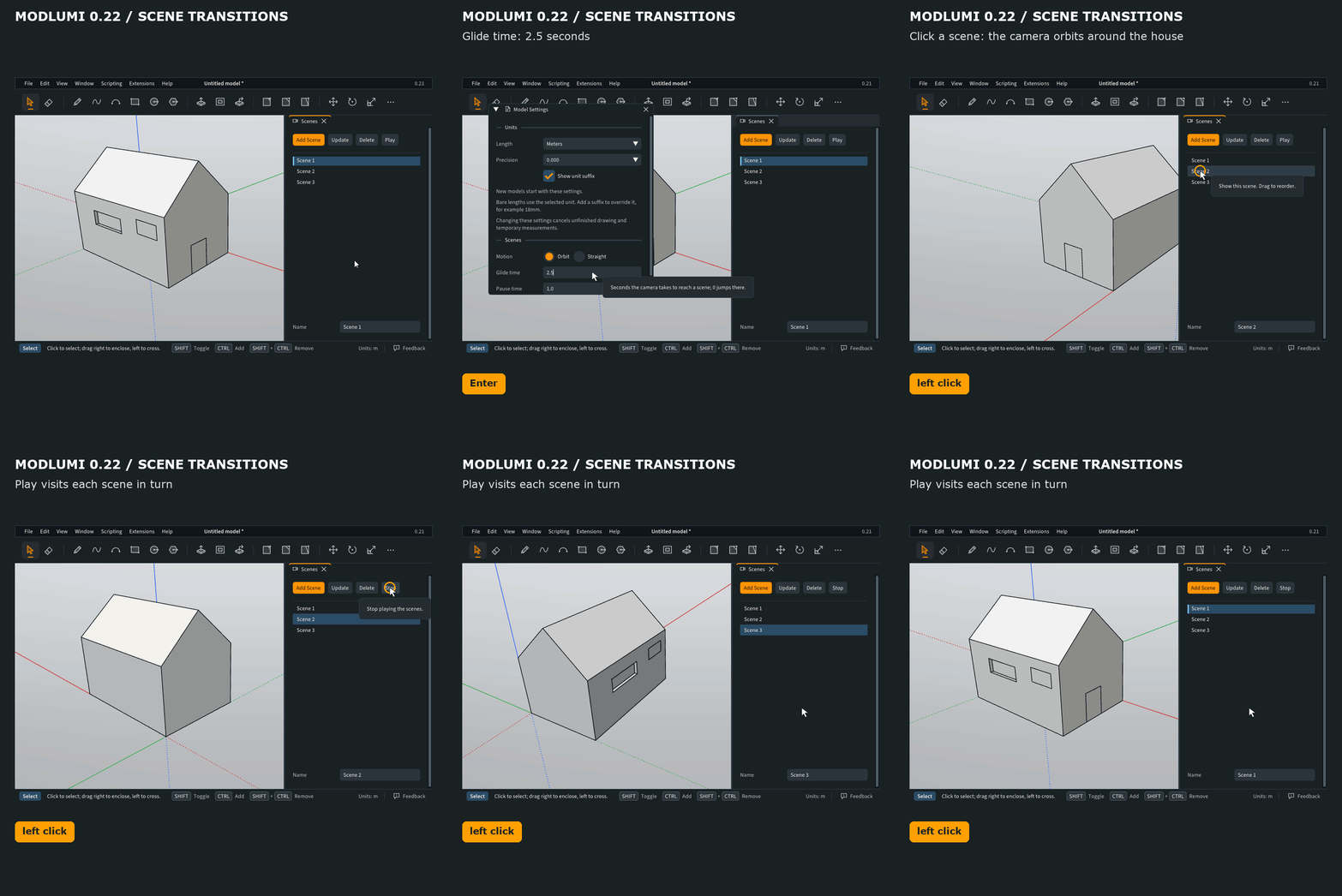
Scenes swing around the model instead of passing through it. Clicking or playing a scene now orbits the camera around the model. In Window → Model Settings you can choose Orbit or Straight, and set the glide and pause times. https://modlumi.com/docs/user-guide/navigating/#how-the-camera-moves-between-scenes
Improvements
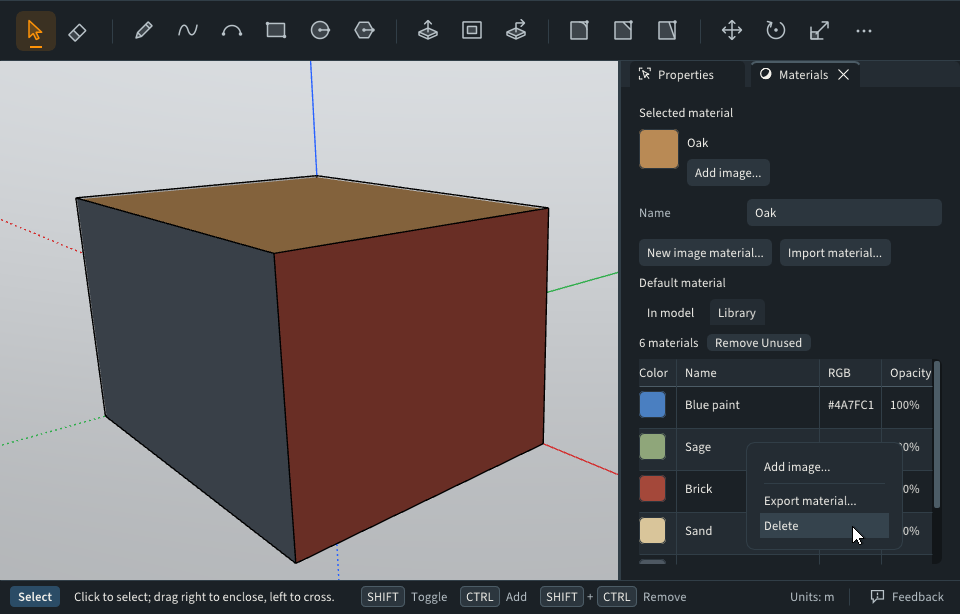
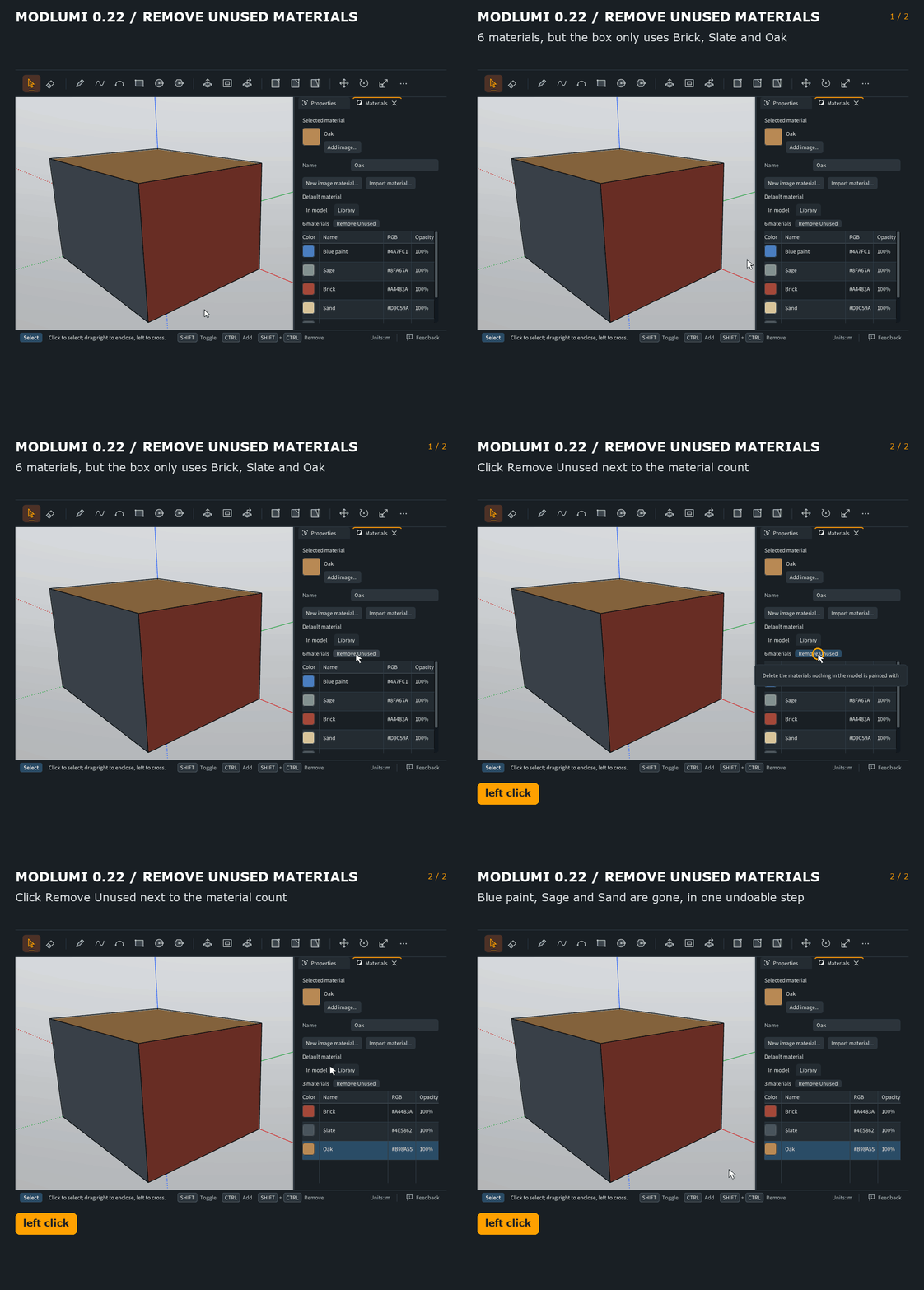
- Delete materials, or remove every material nothing uses. Right-click a material in the Materials panel and choose Delete, or click Remove Unused next to the material count. Both can be undone. Thanks @ntxdave! https://modlumi.com/docs/user-guide/materials/#delete-a-material
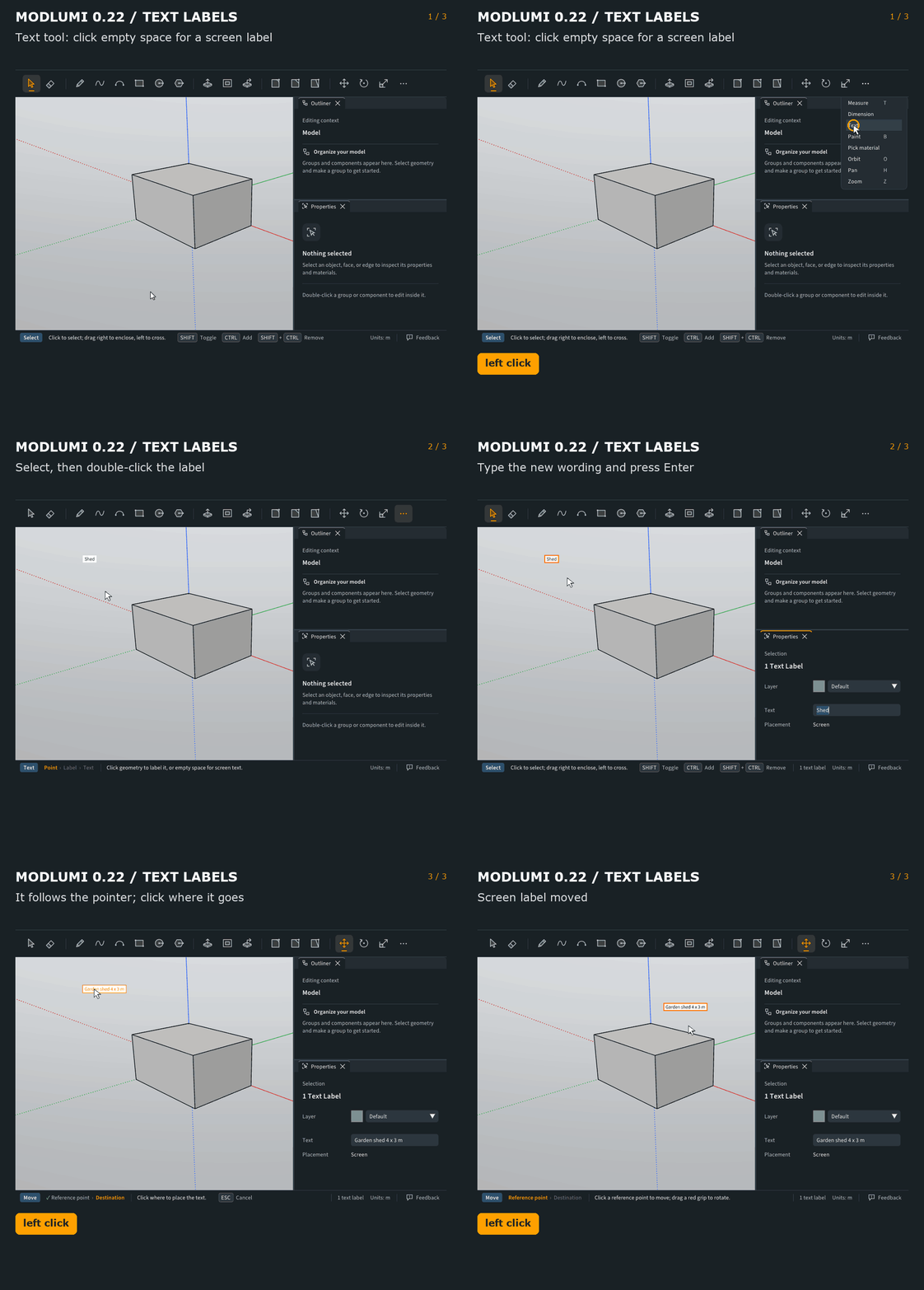
- Move screen text labels with the Move tool, and double-click a label to change its wording. Press M, click the label, then click where it should go. With Select, double-clicking a label or a dimension puts its text in Properties, ready to type over. Thanks again @ntxdave! https://modlumi.com/docs/user-guide/annotating/#text
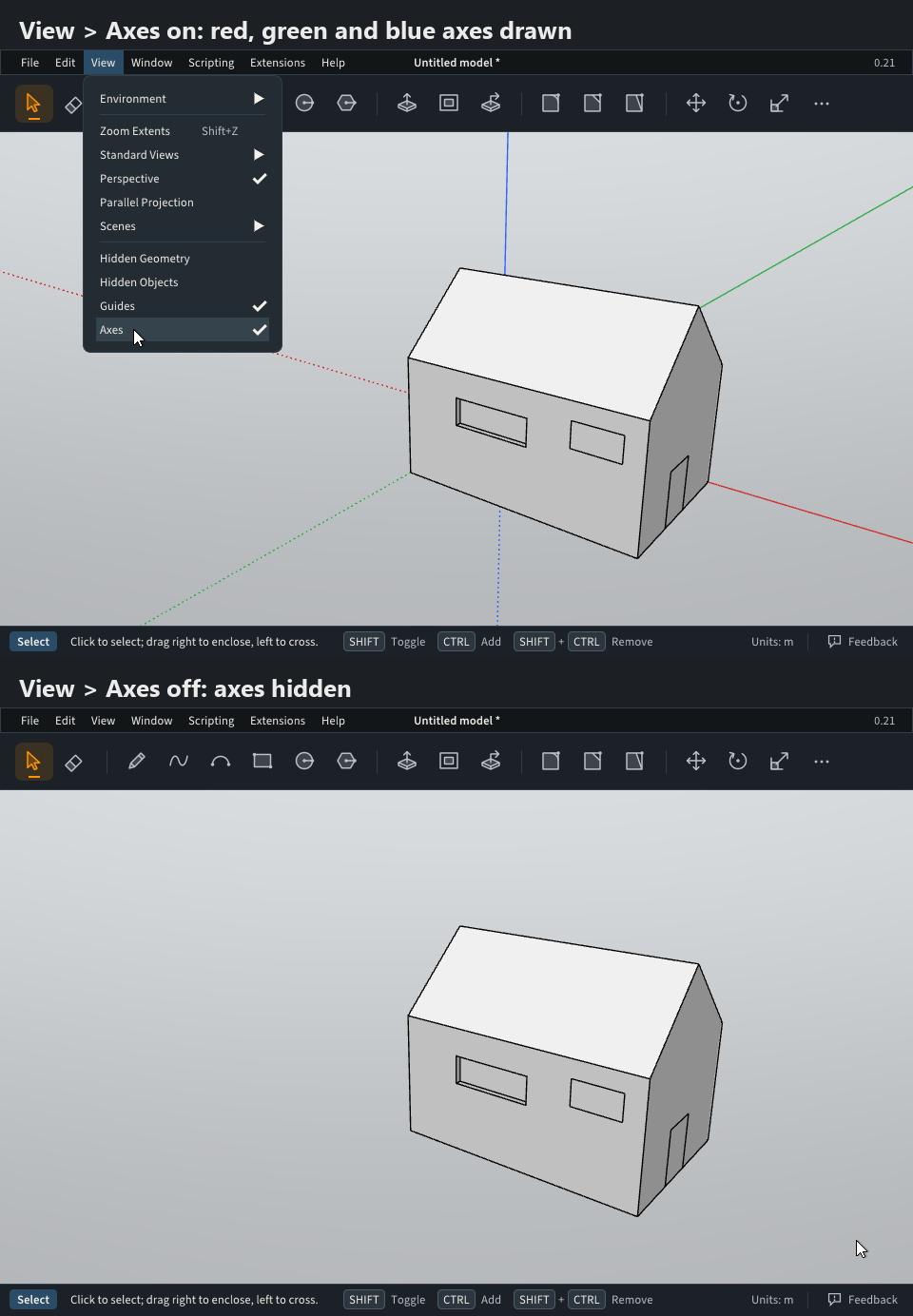
- Show or hide the drawing axes with View → Axes. It only changes the view, not the model. Thanks @pilou for asking!
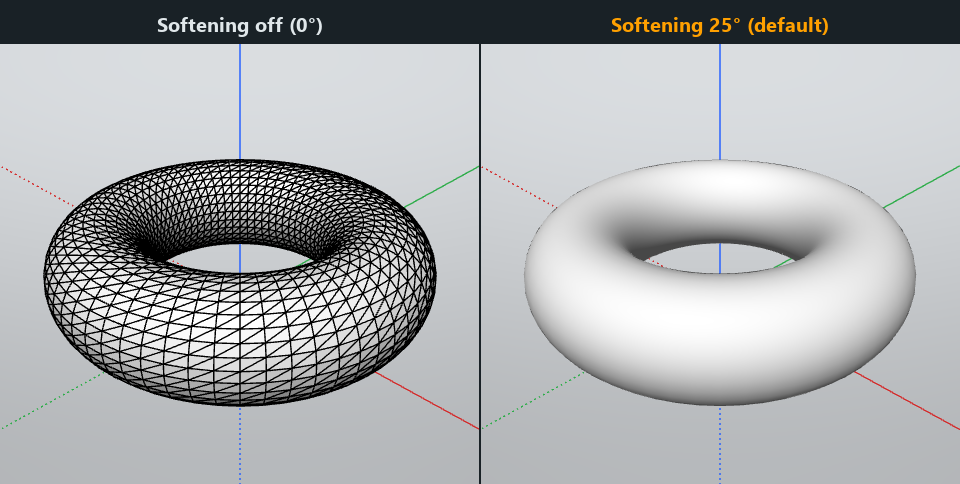
- Imported STL meshes look smooth instead of faceted. STL files, and OBJ or PLY files without shading, now soften the edges between faces that meet at a gentle angle: 25 degrees by default, and you can change it in the import options. https://modlumi.com/docs/user-guide/files/#other-3d-formats
-
Run Modlumi from a USB stick. Start modlumi.exe with --app-data and a folder, and it keeps your settings, layout and plugins in that folder instead of on the computer. The user guide has a small launcher script to put on the stick. Thanks @chon for the idea! https://modlumi.com/docs/user-guide/installing/#run-modlumi-from-a-usb-stick
-
Modlumi reopens the panels that were open when you closed it. Properties, Materials, Outliner, Scenes and Layers come back where they were docked. Thanks to whoever asked through the feedback form!
Fixes
-
Rotate's center lands exactly on the point you snap to, also while you hold Shift to keep the plane. Before, the center could end up off the corner you clicked, sometimes far behind it. @pilou, this is the problem from your sloped face; let me know if it works for you now.
-
Model Settings shows Use for New Models right below the unit fields. In a short window the button was cut off, so it was easy to miss that new models can keep your units. Thanks to the user who reported it from the app!
Full release notes: https://modlumi.com/docs/release-notes/
Thanks for all the reports. Keep them coming!
Cheers,
Thomas
-
@pixelcruncher
About the Slope surface and Copy Rotation who was resolved but use of down Arrow
It 's working also fine now with the use of Shift for block the protractor from a face!
And the Snap points are now well picked!I can't choice numbers of facettes in Krea 3D!

So i will use the https://stephaneginier.com/sculptgl/
who is a cool Zbrushlike but has also COOL TOOLS!How it works: Import your file (Files > Import (obj, sgl, ply, stl)), then go to the Topology menu (on the right) and use the Remesh or adjust resolution option.
Strong points: Runs entirely in your browser (WebGPU/WebGL), very efficient for viewing the mesh live.
Kill some faces during the decimation!
File is too big must < 50 Megas! For these 2 ones!
https://3d-convert.com/
https://www.meshconvert.com/So MeshLab
How it works: Import your file (Files > Import (obj, sgl, ply, stl)), then go to the Topology menu (on the right) and use the Remesh or adjust resolution option.Strong points: Runs entirely in your browser (WebGPU/WebGL), very efficient for viewing the mesh live.
Here the MeshLab file (580 000 faces)
https://moiscript.weebly.com/uploads/3/9/3/8/3938813/output_lab.zip
ModLumi
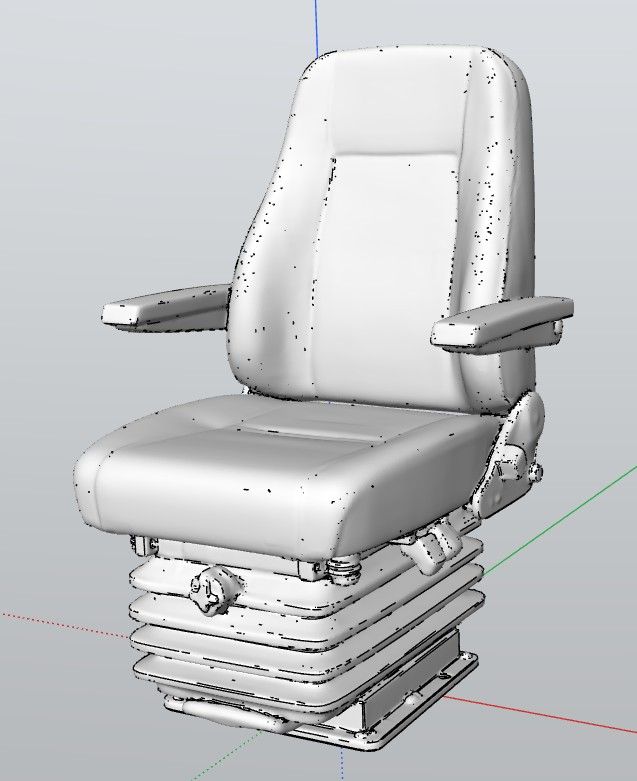
When process of importation is finished (23 seconds) on my very old Latop (more 13 years) click it on the origine!
Millimeters enabled
30 seconds again for finish the process of display!
Very tiny but you can resize it! Use mouse wheel first before Menu Zoom Extend...
-
Just tried something with 0.22 and had a problem. I created 4 scenes and had a Text object for each of the 4 scenes. I then used the Layers feature to control what text object was to be shown with each scene. I went through each of the 4 scenes and selected the text object I wanted to be part of the scene and then clicked the Update button for each of the scenes. However, when view/play each of the scenes it is ignoring the layers, I have turned on for each of the scenes to show which scene is being viewed, the layers control for the scenes is not controlling the text object that should be show in each of the scenes.
Maybe I am doing something wrong or there is a bug in controlling what is visible in each of the scene.
I tried to send the Modlumi file but the forum would not allow me to send/attach it.
The bug reporter should also allow you to attach Modlumi file.
-
@pixelcruncher
Cool for hide axes for snapshot screen : my prompt will be smaller!
For any reason , axes by default are not on the middle of the screen! ???
(even you close the Properties pannel!
Lines are now of the colors axes when parallel of the axes!Request : Extrude Line(s) (very useful) !
@ntxdave You draw Guides with Measure (T) (not Dimension
Draw them from a line (segment) and Enter a measure!Frenchy Pilou
Is beautiful that please without concept!
My Little site :) -
@pilou Thanks for explaining guides to ntxdave! That reminds me of your earlier report that guide lines and guide points didn't work in the Windows desktop app (0.15). I can't reproduce it on Windows with 0.22: guides from an edge and guide points from a corner place, snap and display fine for me. Do they work for you now in 0.22? If something still fails, could you tell me what exactly goes wrong (not created, not shown or cut off, or no snapping)? A short GIF would help, and your graphics card too.






Hello! It looks like you're interested in this conversation, but you don't have an account yet.
Getting fed up of having to scroll through the same posts each visit? When you register for an account, you'll always come back to exactly where you were before, and choose to be notified of new replies (either via email, or push notification). You'll also be able to save bookmarks and upvote posts to show your appreciation to other community members.
With your input, this post could be even better 💗
Register Login


Advertisement