sketchucation logo sketchucation
    • Login
    Oops, your profile's looking a bit empty! To help us tailor your experience, please fill in key details like your SketchUp version, skill level, operating system, and more. Update and save your info on your profile page today!
    Mac User? | Join the Rayscaper Beta for Mac Learn More

    Modlumi - Easy 3D modelling


    Scheduled Pinned Locked Moved Corner Bar
    252 Posts 8 Posters 20.2k Views 6 Watching
    Loading More Posts
    • Oldest to Newest
    • Newest to Oldest
    • Most Votes
    Reply
    • Reply as topic
    Log in to reply
    This topic has been deleted. Only users with topic management privileges can see it.
    • pilouP
      pilou
      last edited by

      It has same function than the last 0.20 windows ? I can't test, i am not a mac fellow! πŸ™‚

      Frenchy Pilou
      Is beautiful that please without concept!
      My Little site :)

      pixelcruncherP 1 Reply Last reply
      Reply Quote 0
      • pixelcruncherP
        pixelcruncher Extension Creator @pilou
        last edited by

        @pilou yes, it has the same features.

        I'm the developer of Rayscaper: https://rayscaper.com/ - Fast and easy rendering for SketchUp.

        ntxdaveN 1 Reply Last reply
        Reply Quote 0
        • ntxdaveN
          ntxdave @pixelcruncher
          last edited by

          @pixelcruncher I am having a problem trying to create an array. I want to copy/move an object and add multiple copies. I thought there was something in this thread before about how to do this but I cannot find il Can someone help me.

          Press F1...thank me later

          1 Reply Last reply
          Reply Quote 0
          • ntxdaveN
            ntxdave
            last edited by

            I am trying to create an array of objects. I thought there was a post in this thread about how to do this but I cannot find it; Can someone give me the instructions about how to do it.

            Press F1...thank me later

            ntxdaveN 1 Reply Last reply
            Reply Quote 0
            • ntxdaveN
              ntxdave @ntxdave
              last edited by

              ntxdave said:

              I am trying to create an array of objects. I thought there was a post in this thread about how to do this but I cannot find it; Can someone give me the instructions about how to do it.

              OK, I looked at the documentation and figured it out.

              Press F1...thank me later

              1 Reply Last reply
              Reply Quote 0
              • pilouP
                pilou
                last edited by pilou

                Maybe it's me but seems there is a bug here ?
                We need a perpendicular snap 3D ! (for pick the external oposite side!
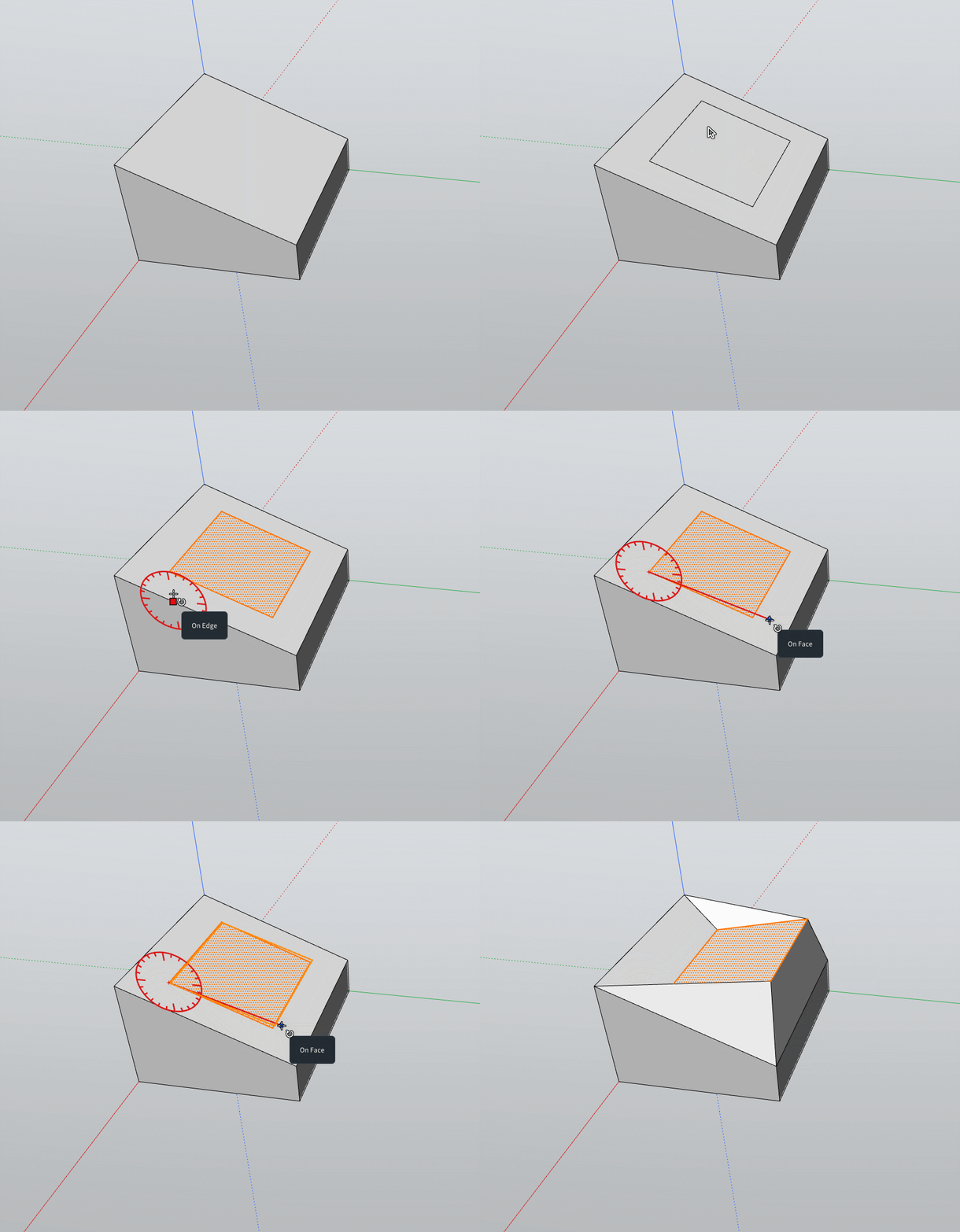
                GIFbugg.gif

                Frenchy Pilou
                Is beautiful that please without concept!
                My Little site :)

                1 Reply Last reply
                Reply Quote 0
                • ntxdaveN
                  ntxdave
                  last edited by

                  I did some testing of applying material images and am reporting some issues I had. However, it would be interesting if there was a way the sender could have a copy of the report. I think the report process is very interesting and that more products should have some type of a feature like it. I just would like to be able to see it/have a copy of it somewhere. Thanks for having this feature in your software. πŸ™‚

                  Press F1...thank me later

                  pixelcruncherP 1 Reply Last reply
                  Reply Quote 0
                  • pixelcruncherP
                    pixelcruncher Extension Creator @ntxdave
                    last edited by

                    @ntxdave I'll see what I can do. Don't forget to leave your email address on the report πŸ˜‰ - There's a bunch I suspect came from you, but I can't really reply on them because there's no sender address.

                    Cheers,
                    Thomas

                    I'm the developer of Rayscaper: https://rayscaper.com/ - Fast and easy rendering for SketchUp.

                    ntxdaveN 1 Reply Last reply
                    Reply Quote 0
                    • ntxdaveN
                      ntxdave @pixelcruncher
                      last edited by ntxdave

                      @pixelcruncher said:

                      @ntxdave I'll see what I can do. Don't forget to leave your email address on the report πŸ˜‰ - There's a bunch I suspect came from you, but I can't really reply on them because there's no sender address.

                      Cheers,
                      Thomas

                      I did not see a place on the report to enter my email address. I will go try again just to see it.

                      Yes, I have submitted several posts. πŸ™‚

                      OK, I just did a really silly test screen and included my email address. Sorry I did not see that before. 😞

                      Press F1...thank me later

                      1 Reply Last reply
                      Reply Quote 0
                      • pilouP
                        pilou
                        last edited by pilou

                        As you can see there is no precise first click Snap 3D of the Gizmo for any reason!
                        I make Shift for Block the Plane then Ctrl for Copy...
                        Same trapeze volume than above!
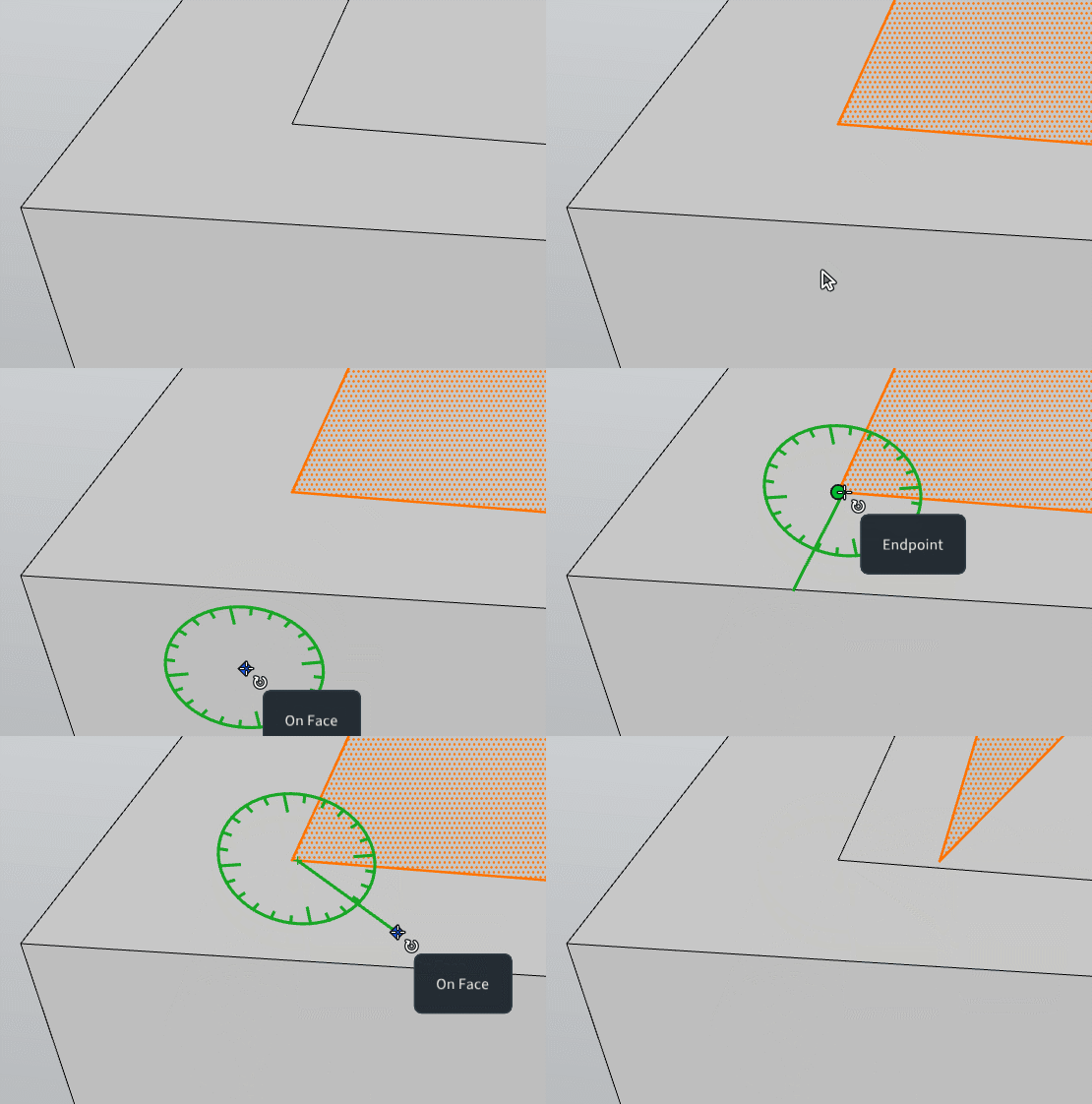
                        GIF_precise_snap.gif

                        Frenchy Pilou
                        Is beautiful that please without concept!
                        My Little site :)

                        1 Reply Last reply
                        Reply Quote 0
                        • ntxdaveN
                          ntxdave
                          last edited by

                          Cana someone give me some instructions about how to do the following things in Modlumi:

                          • Change the name of a color. I was able to change the name of a material image, but I have used several colors in a model but cannot edit the name of the color. It always set the name of the color Paint and will not allow me to set the name I want to use.

                          • Set the size of a text object (not the 3D text, just a plain old text object).

                          Press F1...thank me later

                          1 Reply Last reply
                          Reply Quote 0
                          • pilouP
                            pilou
                            last edited by

                            for the moment seems a text object not 3D is a Label!

                            Frenchy Pilou
                            Is beautiful that please without concept!
                            My Little site :)

                            ntxdaveN 1 Reply Last reply
                            Reply Quote 0
                            • ntxdaveN
                              ntxdave @pilou
                              last edited by

                              @pilou said:

                              for the moment seems a text object not 3D is a Label!

                              Yes, I understand that I just want to have some control of the β€œLabel”. IMO, it is kind of useless as is.

                              Press F1...thank me later

                              1 Reply Last reply
                              Reply Quote 0
                              • majidM
                                majid
                                last edited by

                                Any chance of adding "curevd" guides? Nubrs curves? As a guide for the follow-me or copy-along path tool etc....


                                My inspiring A, B, Sketches book: https://sketchucation.com/shop/books/intermediate/2612-alphabet-inspired-sketches--inspiring-drills-for-architects--3d-artists-and-designers-

                                1 Reply Last reply
                                Reply Quote 0

                                Hello! It looks like you're interested in this conversation, but you don't have an account yet.

                                Getting fed up of having to scroll through the same posts each visit? When you register for an account, you'll always come back to exactly where you were before, and choose to be notified of new replies (either via email, or push notification). You'll also be able to save bookmarks and upvote posts to show your appreciation to other community members.

                                With your input, this post could be even better πŸ’—

                                Register Login
                                • 1
                                • 2
                                • 5
                                • 6
                                • 7
                                • 8
                                • 9
                                • 12
                                • 13
                                • 7 / 13
                                • First post
                                  Last post
                                Buy SketchPlus
                                Buy SUbD
                                Buy WrapR
                                Buy eBook
                                Buy Modelur
                                Buy Vertex Tools
                                Buy SketchCuisine
                                Buy FormFonts

                                Advertisement


