sketchucation logo sketchucation
    • Login
    Oops, your profile's looking a bit empty! To help us tailor your experience, please fill in key details like your SketchUp version, skill level, operating system, and more. Update and save your info on your profile page today!
    ⚠️ Important | Libfredo 15.6b introduces important bugfixes for Fredo's Extensions Update

    TIG Weld Shortcut Setting

    Scheduled Pinned Locked Moved Extensions & Applications Discussions
    10 Posts 3 Posters 45 Views 3 Watching
    Loading More Posts
    • Oldest to Newest
    • Newest to Oldest
    • Most Votes
    Reply
    • Reply as topic
    Log in to reply
    This topic has been deleted. Only users with topic management privileges can see it.
    • ntxdaveN Offline
      ntxdave
      last edited by

      I use TIG Weld fairly often lately. I would like to assign a shortcut setting for it. Is there a way to do that (I have to admit that I have not tried)?

      1 Reply Last reply Reply Quote 0
      • Dave RD Offline
        Dave R
        last edited by

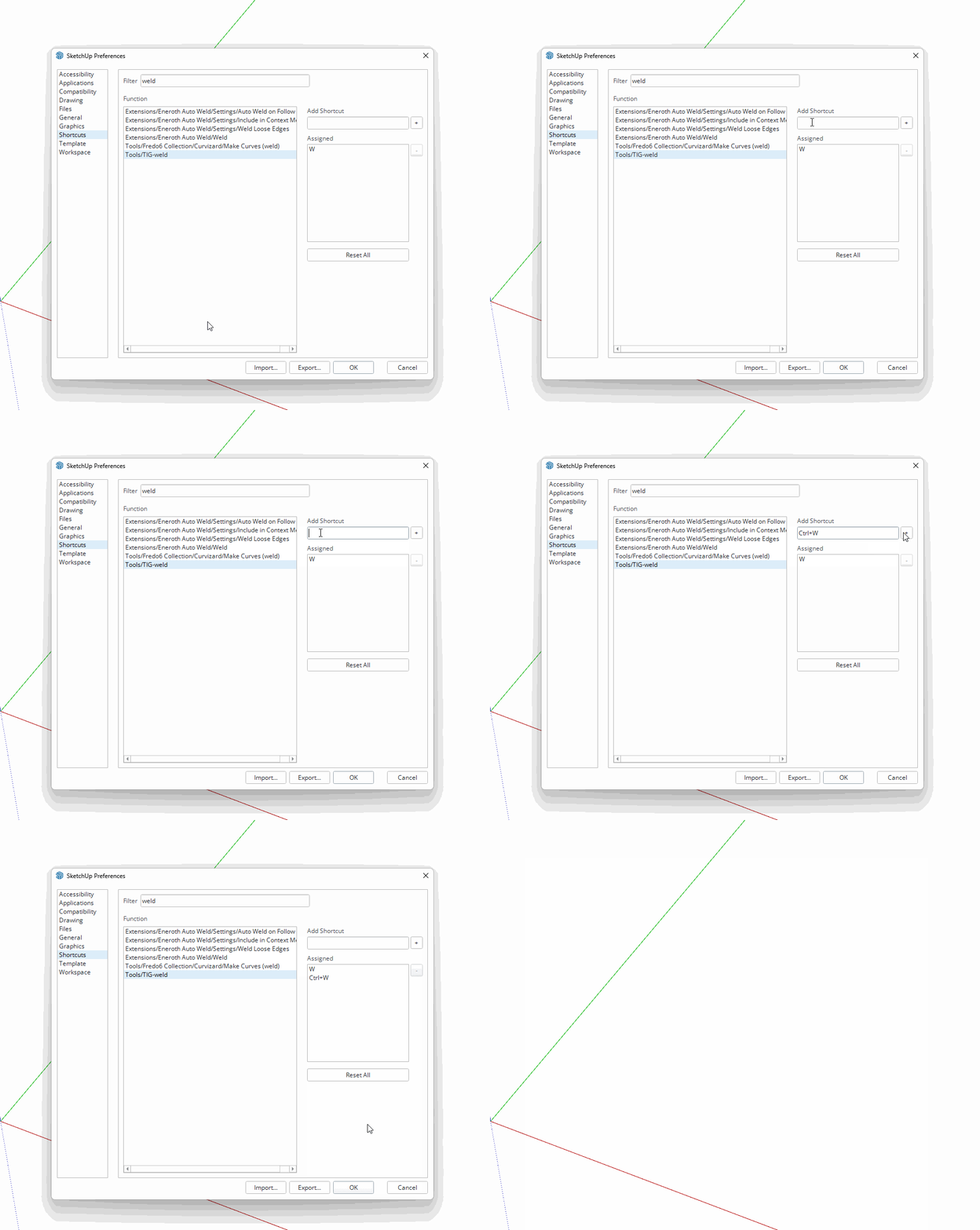
        Sure. I use W for it.

        Screenshot - 12_21_2025 , 7_11_35 PM.png

        Etaoin Shrdlu

        %

        (THERE'S NO PLACE LIKE)

        G28 X0.0 Y0.0 Z0.0

        M30

        %

        1 Reply Last reply Reply Quote 0
        • ntxdaveN Offline
          ntxdave
          last edited by

          I wound up doing the same thing. I wanted to make it Ctrl+W but could not get it to work.

          ntxdaveN 1 Reply Last reply Reply Quote 0
          • ntxdaveN Offline
            ntxdave @ntxdave
            last edited by

            Can someone tell me how to add the Ctrl as part of a shortcut? I have tried several time and cannot get it or the Alt key to work. I thought the Help file said you can these two keys.

            1 Reply Last reply Reply Quote 0
            • Rich O BrienR Online
              Rich O Brien Moderator
              last edited by

              Hold CTRL and with it held press and release W.

              Download the free D'oh Book for SketchUp πŸ“–

              1 Reply Last reply πŸ‘ Reply Quote 0
              • Dave RD Offline
                Dave R
                last edited by Dave R

                short.gif

                @ntxdave said in TIG Weld Shortcut Setting:

                I thought the Help file said you can these two keys.

                You can use Ctrl and Alt for some keyboard shortcuts. Also Shift. But you can't assign keyboard shortcuts that are assigned by the operating system. Ctrl+A, Ctrl+C, Ctrl+V, for example are hard coded so you cannot assign them to other things in SketchUp.

                Etaoin Shrdlu

                %

                (THERE'S NO PLACE LIKE)

                G28 X0.0 Y0.0 Z0.0

                M30

                %

                ntxdaveN 1 Reply Last reply Reply Quote 0
                • ntxdaveN Offline
                  ntxdave @Dave R
                  last edited by

                  @Dave-R This is what I tried but when I click on the Ctrl key nothing shows up. I will try @Rich-O-Brien’s approach as well. At this point I am just trying to get the Ctrl and/or Alt key to work for this/or other shortcuts in the future.

                  With some of my silly post lately, I am feeling really dumb and brand new to SketchUp. 🫠

                  Dave RD 1 Reply Last reply Reply Quote 0
                  • Dave RD Offline
                    Dave R @ntxdave
                    last edited by

                    @ntxdave said in TIG Weld Shortcut Setting:

                    I will try @Rich-O-Brien’s approach as well.

                    It's not a different approach. I just demonstrated what Rich wrote.

                    You're starting to worry me Dave.

                    Etaoin Shrdlu

                    %

                    (THERE'S NO PLACE LIKE)

                    G28 X0.0 Y0.0 Z0.0

                    M30

                    %

                    ntxdaveN 1 Reply Last reply Reply Quote 0
                    • ntxdaveN Offline
                      ntxdave @Dave R
                      last edited by

                      @Dave-R Sorry, I guess I misunderstood what you meant with your post. Yes, it works fine for me now.

                      Again, thanks to the two of you, I have learned something again.

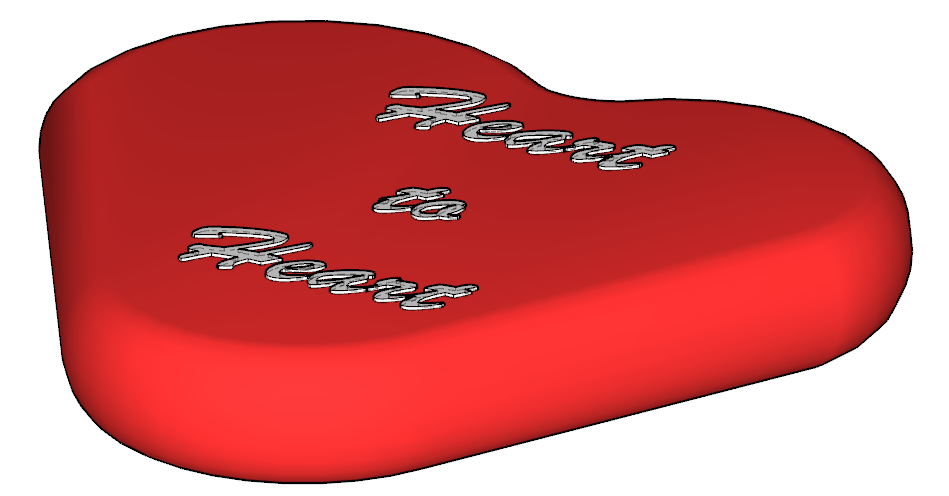
                      One last issue I am having. I am trying to draw a heart that I want to have some "depth" to and have rounded sides. I can draw the hart (and Tig Weld the shape) but some problems with the top dip joint when I try to use the Follow Me tool. I have done it before but just having some trouble getting a "good" shape.

                      Again, I want the two of you guys to know how much I appreciate your assistance and patience. It is greatly appreciated..

                      ntxdaveN 1 Reply Last reply Reply Quote 0
                      • ntxdaveN Offline
                        ntxdave @ntxdave
                        last edited by

                        Making some progress. πŸ‘ πŸ‘ πŸ‘

                        Screenshot 2025-12-22 160302.png Screenshot 2025-12-22 160329.png

                        1 Reply Last reply Reply Quote 1
                        • 1 / 1
                        • First post
                          Last post
                        Buy SketchPlus
                        Buy SUbD
                        Buy WrapR
                        Buy eBook
                        Buy Modelur
                        Buy Vertex Tools
                        Buy SketchCuisine
                        Buy FormFonts

                        Advertisement