sketchucation logo sketchucation
    • Login
    Oops, your profile's looking a bit empty! To help us tailor your experience, please fill in key details like your SketchUp version, skill level, operating system, and more. Update and save your info on your profile page today!
    Mac User? | Join the Rayscaper Beta for Mac Learn More

    Fredo Lord of Toolbars Search issue

    Scheduled Pinned Locked Moved Plugins
    19 Posts 4 Posters 1.3k Views 4 Watching
    Loading More Posts
    • Oldest to Newest
    • Newest to Oldest
    • Most Votes
    Reply
    • Reply as topic
    Log in to reply
    This topic has been deleted. Only users with topic management privileges can see it.
    • K
      kylekin Newcomers @fredo6
      last edited by

      @fredo6 Having the same issues. Search doesn't work. And tools are not registering. When I have the ruby console open -- nothing happens when I click on a tool within LOTT

      S 1 Reply Last reply
      Reply Quote 0
      • S
        Salient @fredo6
        last edited by

        @fredo6

        Thanks for responding. I opened the ruby console by selecting Extensions>Developer>Ruby Console. The console appears however nothing shows in the console when I click the search button on the toolbar. Did I do what you asked me to do correctly?

        1 Reply Last reply
        Reply Quote 1
        • S
          Salient @kylekin
          last edited by

          @kylekin

          it doesn't appear as though it can be fixed.

          1 Reply Last reply
          Reply Quote 0
          • fredo6F
            fredo6
            last edited by fredo6

            I would need a little bit more information.

            • Mac or Windows?
            • What is the 'hourglass'. The Search icon has a magnifier?
            • did you upgrade t the latest version of LibFredo6 (14.2a)?
            K S 2 Replies Last reply
            Reply Quote 0
            • K
              kylekin Newcomers @fredo6
              last edited by

              @fredo6 I upgraded to latest version of libfredo. On a Mac. None of the tool buttons are working from the main menu, search doesn't work, no longer able to add to my favorites with more tools.

              1 Reply Last reply
              Reply Quote 0
              • fredo6F
                fredo6
                last edited by

                Difficult to tell what is the problem.

                Do you get the Master Toolbar Manager dialog (first icon)?
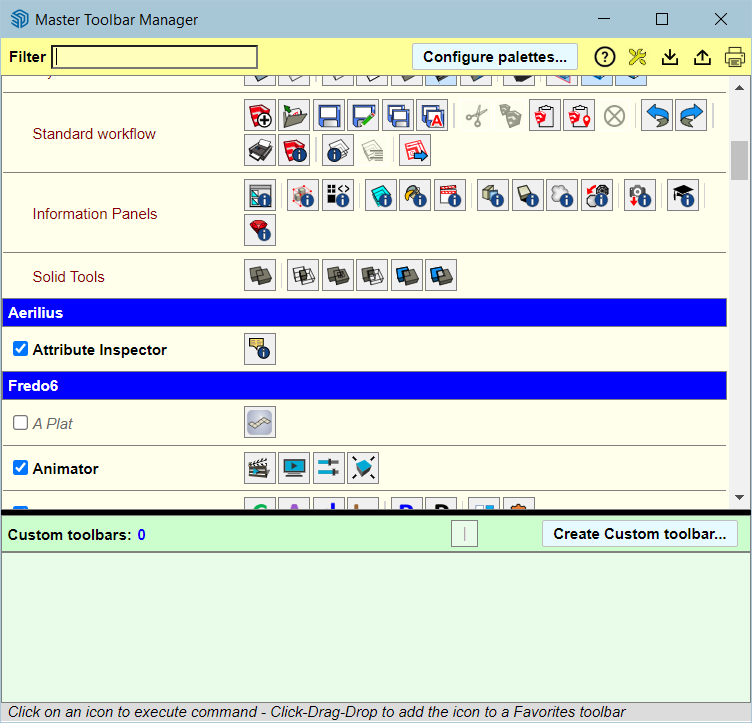
                dbc44de3-e1ff-4462-bdea-40d2ec8f8c0d-image.png

                1 Reply Last reply
                Reply Quote 0
                • S
                  Salient @fredo6
                  last edited by massimo

                  @fredo6

                  Windows
                  and yes, I apologize, I meant the magnifier
                  I did have 14.2a but I just upgraded to your newest.

                  fredo6F 1 Reply Last reply
                  Reply Quote 0
                  • fredo6F
                    fredo6 @Salient
                    last edited by fredo6

                    @Salient
                    Do you have several monitors?

                    If so, it might be that the dialog is out of screen.

                    The best is to open the Ruby Console and copy/ paste the following command and type Enter.

                    Traductor::ChromiumWdlg.dialog_info_reset "LOTT_MiniFindDialog"

                    Then, launch the Serach again. The dialog should be on the main Sketchup screen.

                    S 3 Replies Last reply
                    Reply Quote 0
                    • S
                      Salient @fredo6
                      last edited by

                      @fredo6

                      Yes, I have 4.

                      I disconnected three of them to see if the menu was hiding, but if it is, I still cannot see anything when I click the magnifier.

                      I can see this, but nothing at all when I click the magnifier.

                      Screenshot 2024-04-02 155429.png

                      1 Reply Last reply
                      Reply Quote 0
                      • S
                        Salient @fredo6
                        last edited by

                        @fredo6 said in Fredo Lord of Toolbars Search issue:

                        Traductor::ChromiumWdlg.dialog_info_reset "LOTT_MiniFindDialog"

                        Okay, I will try that and report back.

                        1 Reply Last reply
                        Reply Quote 0
                        • S
                          Salient @fredo6
                          last edited by

                          @fredo6

                          No luck. That didn't work either.

                          I am happy to try anything you suggest.

                          fredo6F 1 Reply Last reply
                          Reply Quote 0
                          • fredo6F
                            fredo6 @Salient
                            last edited by

                            @Salient

                            Can you indicate

                            • which version of Sketchup?
                            • whether you see the other dialogs?
                            S 1 Reply Last reply
                            Reply Quote 0
                            • S
                              Salient @fredo6
                              last edited by

                              @fredo6

                              22.0.354

                              I see all of the other dialogs.

                              The magnifier was working for me perfectly. I do not know what I did to cause it to stop.

                              I have licenses for several of your other plugins and they seem to work perfectly.

                              K 1 Reply Last reply
                              Reply Quote 0
                              • K
                                kylekin Newcomers @Salient
                                last edited by

                                @Salient All appears fixed with the new Sketchup update.

                                1 Reply Last reply
                                Reply Quote 0

                                Hello! It looks like you're interested in this conversation, but you don't have an account yet.

                                Getting fed up of having to scroll through the same posts each visit? When you register for an account, you'll always come back to exactly where you were before, and choose to be notified of new replies (either via email, or push notification). You'll also be able to save bookmarks and upvote posts to show your appreciation to other community members.

                                With your input, this post could be even better đź’—

                                Register Login
                                • 1 / 1
                                • First post
                                  Last post
                                Buy SketchPlus
                                Buy SUbD
                                Buy WrapR
                                Buy eBook
                                Buy Modelur
                                Buy Vertex Tools
                                Buy SketchCuisine
                                Buy FormFonts

                                Advertisement