sketchucation logo sketchucation
    • Login
    Oops, your profile's looking a bit empty! To help us tailor your experience, please fill in key details like your SketchUp version, skill level, operating system, and more. Update and save your info on your profile page today!
    Mac User? | Join the Rayscaper Beta for Mac Learn More

    Rayscaper New Releases

    Scheduled Pinned Locked Moved Extensions & Applications Discussions
    rayscaperrender
    791 Posts 14 Posters 369.2k Views 15 Watching
    Loading More Posts
    • Oldest to Newest
    • Newest to Oldest
    • Most Votes
    Reply
    • Reply as topic
    Log in to reply
    This topic has been deleted. Only users with topic management privileges can see it.
    • KrassK
      Krass
      last edited by

      Rayscaper
      This is truly excellent—thanks for adding this option so quickly!
      I’ve just posted a new message in the Rayscaper section of the French forum Biblio 3D to mark the release of version 1.0.0, including a summary of all the available features:

      Link Preview Image
      [ RAYSCAPER ] Rayscaper 1.0.0

      Rayscaper pour Sketchup version finale vient de sortir, fini les beta. Disponible aussi pour Mac https://sketchucation.com/plugin/2677-rayscaper Le programme es

      favicon

      www.biblio3d.com (www.biblio3d.com)

      I’ve created this initial render; please forgive me for not being able to resist the kitschiness of this sofa...

      Krass

      1 Reply Last reply
      Reply Quote 1
      • KrassK
        Krass
        last edited by

        However, this first render is slightly blurry; I hadn’t touched any of the settings... Could it be related to the heavy demands that the "Fur" places on my graphics card? I’m not sure—perhaps I accidentally moved a slider somewhere...

        Krass

        1 Reply Last reply
        Reply Quote 0
        • pixelcruncherP
          pixelcruncher Extension Creator
          last edited by

          @krass Very cool render, I forgive you for the kitsch 🙂

          I changed the denoising; it kicks in a bit earlier, so maybe that's why the render looks blurry? Do you prefer a noisy first render over a blurry one?

          Cheers,
          Thomas

          I'm the developer of Rayscaper: https://rayscaper.com/ - Fast and easy rendering for SketchUp.

          1 Reply Last reply
          Reply Quote 0
          • KrassK
            Krass
            last edited by

            tu avais déjà fait cette modification du débruiteur auparavant je crois.
            je ne sais pas, mais je me rappelle aussi qu'il y a des paramètres de filtres de pixels..
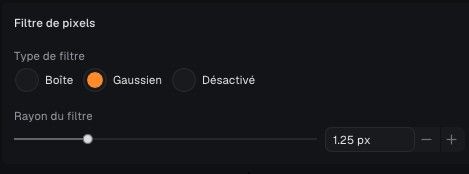
            image.jpeg

            mais je vais continuer les tests voir si c'est pas plutôt du ressort de l'opticien...

            Krass

            1 Reply Last reply
            Reply Quote 0
            • pixelcruncherP
              pixelcruncher Extension Creator
              last edited by

              @krass

              The pixel filter and the denoiser are two different things. The pixel filter sets how much each sample spreads over the pixels around it, so it decides how sharp the image is, whether or not it's denoised. The denoiser only cleans up the noise, and it's the part I changed, not the pixel filter.

              Cheers,
              Thomas

              I'm the developer of Rayscaper: https://rayscaper.com/ - Fast and easy rendering for SketchUp.

              1 Reply Last reply
              Reply Quote 0
              • KrassK
                Krass
                last edited by

                here is a render 1024 Spp in 1080 p.
                If other users could take a look—I find it a bit sluggish.

                Krass

                1 Reply Last reply
                Reply Quote 0
                • KrassK
                  Krass
                  last edited by

                  If other users could take a look—I find it a bit sluggish. :
                  https://jskup.fr/wp-content/uploads/2026/11/testnet.png

                  Krass

                  pixelcruncherP 1 Reply Last reply
                  Reply Quote 0
                  • pixelcruncherP
                    pixelcruncher Extension Creator @Krass
                    last edited by

                    @Krass I like the render! What do you mean by sluggish? The performance of Rayscaper or something about the render?

                    I'm the developer of Rayscaper: https://rayscaper.com/ - Fast and easy rendering for SketchUp.

                    1 Reply Last reply
                    Reply Quote 0
                    • KrassK
                      Krass
                      last edited by

                      I mean not sharp enough.
                      But I offen render in 2 or 4k... may be that's the point?

                      Krass

                      1 Reply Last reply
                      Reply Quote 0
                      • KrassK
                        Krass
                        last edited by

                        Yes, 4K is much better—it’s truly the ideal solution when combined with the denoiser, as even after just 2 minutes, you get a much sharper image that’s close to the final result. It does take longer, of course, but you can also choose to stop the render after 5 minutes, by which point you already have an excellent preview image.

                        Krass

                        1 Reply Last reply
                        Reply Quote 1
                        • KrassK
                          Krass
                          last edited by Krass

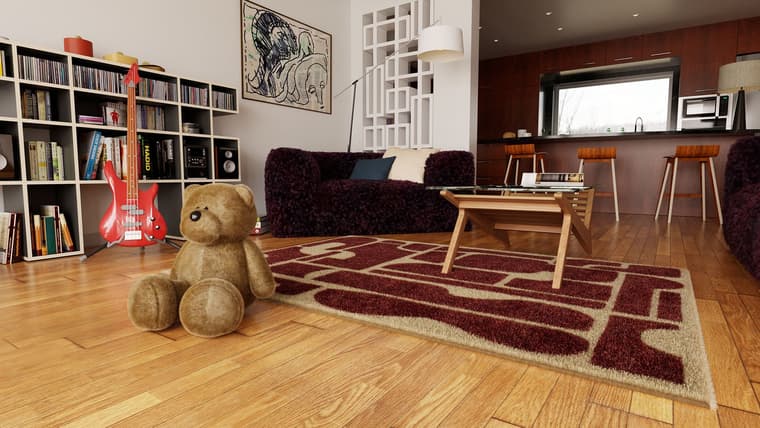
                          4k render reduced to 1080 p. Suits me
                          ours_brun.jpg

                          Krass

                          1 Reply Last reply
                          Reply Quote 3
                          • A
                            Alattab
                            last edited by

                            any thing new

                            1 Reply Last reply
                            Reply Quote 0
                            • KrassK
                              Krass
                              last edited by

                              Thanks! This extension looks quite comprehensive. But I still think you should have created a new thread for this extension rather than in this post dedicated to Rayscaper. From the beginning of your posts, I haven't found you very encouraging regarding the enormous amount of work done by Pixel Cruncher. What do you think?

                              Krass

                              A 1 Reply Last reply
                              Reply Quote 2
                              • A
                                Alattab @Krass
                                last edited by

                                @Krass Okay, I’m sorry; I didn’t mean that. All I meant was to clarify the automatic material recognition feature.

                                1 Reply Last reply
                                Reply Quote 2
                                • pixelcruncherP
                                  pixelcruncher Extension Creator
                                  last edited by

                                  No worries, folks, I appreciate suggestions and the love for Rayscaper! I've been working on a feature like this for a while, but I never finished it. I will launch it soon. But yes, Rayscaper will try to be smart about material names and will have user-configurable rules for matching them. I'm trying to make it so it doesn't get in your way; if you don't like it, you don't have to use it.

                                  I'm the developer of Rayscaper: https://rayscaper.com/ - Fast and easy rendering for SketchUp.

                                  1 Reply Last reply 👍
                                  Reply Quote 1
                                  • A
                                    Alattab
                                    last edited by

                                    Please don’t be upset; all I want is to support RayScaper so that it stays at the forefront and meets every need.

                                    1 Reply Last reply
                                    Reply Quote 0
                                    • A
                                      Alattab
                                      last edited by

                                      Is it possible to turn a line or a series of connected lines into something that glows like a strip light?

                                      1 Reply Last reply
                                      Reply Quote 0
                                      • KrassK
                                        Krass
                                        last edited by

                                        The only way is to use an emissive material. Any small, thin face will work or line converted to tube. But you need a face to apply the material on. You can convert your lines instantly into tubes with Lines to tube function from JHS power bar extensions bundle

                                        Krass

                                        1 Reply Last reply 👍
                                        Reply Quote 1
                                        • pixelcruncherP
                                          pixelcruncher Extension Creator
                                          last edited by

                                          Hey, Rayscaper users!

                                          Rayscaper 1.0.1 is available. You can get it via:

                                          • The SketchUcation store.
                                          • Direct download: Rayscaper_Win_1.0.1.rbz.

                                          I recommend upgrading to the latest version.

                                          Auto Setup: Your First Render Looks Right

                                          A SketchUp material is a color and maybe a texture: it doesn't say that a surface is glass, polished brass or a mirror. The name often does. When you render a model for the first time, Rayscaper now reads the names of its materials and sets them up: "Window Glass" becomes Glass, "Brass" becomes polished Metal and "Antique Mirror" a mirror. It reads names in several languages.

                                          A banner tells you what it changed. Tools > Auto Setup Materials... shows every guess: point at a material to see where it is in the render, and correct or revert what doesn't look right. Guesses it isn't sure of stay suggestions for you to apply.
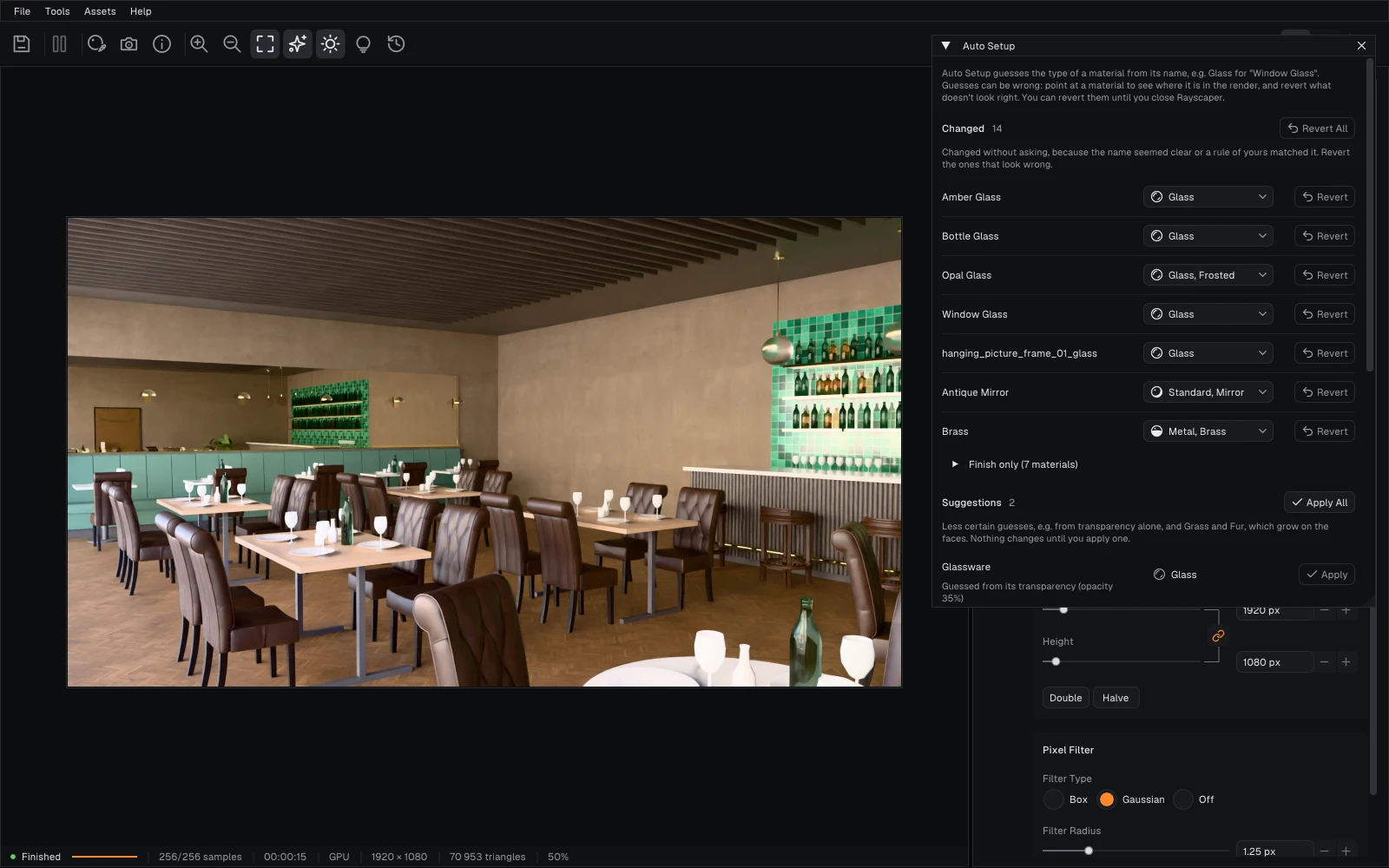
                                          auto_setup_review.png

                                          Lighting for an Interior or an Exterior

                                          Auto Setup also asks whether your model is an interior or an exterior, and sets the exposure, light bounces, bloom and sky for it. An interior without lights gets an offer to add one.
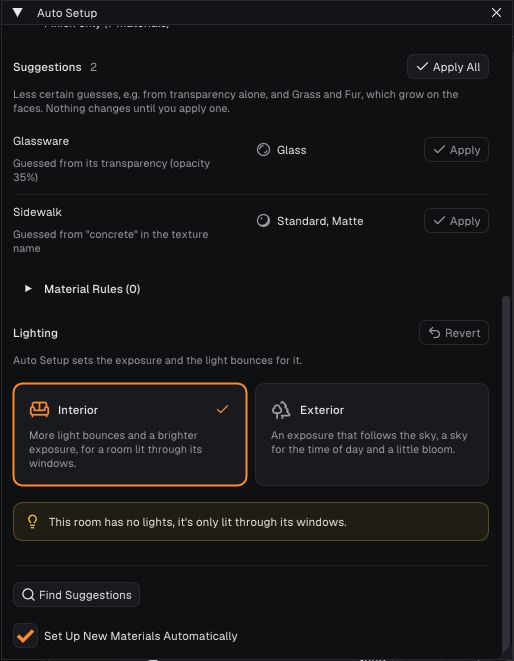
                                          auto_setup_lighting.png

                                          Material Rules

                                          Do you name your materials your own way, like M_GL_* for glass or "Verre"? Tell Auto Setup what your names mean with material rules. Your rules come before its own guesses and apply to every model.
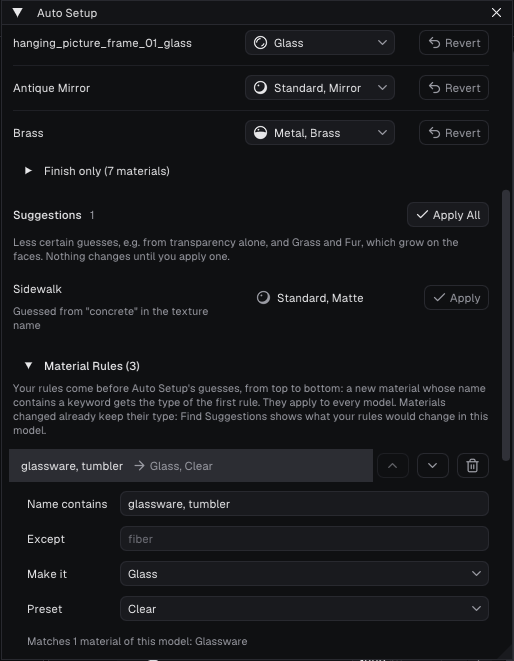
                                          auto_setup_rules.png

                                          See Auto Setup in the manual. If you set up your own materials, you can turn it off there in one click.

                                          Auto Setup is still a bit experimental: it can guess wrong, and it doesn't know every way people name their materials yet. Your feedback is much appreciated! If it set up a material wrong or missed one, or the lighting doesn't suit your scene, please reply here with the material names (or the model, if you can share it).

                                          What Changed?

                                          • Add Auto Setup: when you open a model without Rayscaper settings, Rayscaper sets up its materials from their names. A banner says what it changed, and Tools > Auto Setup Materials... lets you review, correct or revert every guess.
                                          • Add the lighting of Auto Setup: choose interior or exterior, and it sets the exposure, bounces, bloom and sky for that kind of scene.
                                          • Add material rules to Auto Setup: tell it what your own material names mean. Your rules come before its own guesses.
                                          • Animate the field of view between SketchUp scenes in Render Animation, so a zoom between scenes and Two-Point Perspective scenes render as SketchUp shows them. Animations whose scenes have different fields of view now render differently than before.
                                          • Fix auto exposure blowing out renders with a transparent background.

                                          Full release notes: rayscaper.com/manual/release-notes

                                          Help Me Build the Community 👍

                                          If you like Rayscaper, please share your renders (final or work-in-progress, it doesn't matter)! This is motivating and helps me showcase its capabilities to new users.

                                          Follow me on X.

                                          Happy Rendering!
                                          Thomas

                                          I'm the developer of Rayscaper: https://rayscaper.com/ - Fast and easy rendering for SketchUp.

                                          A 2 Replies Last reply
                                          Reply Quote 0
                                          • KrassK
                                            Krass
                                            last edited by

                                            Hello Thomas,
                                            Thank you. I’d like to know if the "round corner" feature is difficult to develop for your program. I’m referring to that "fake" round corner effect, which generates rounded edges where there weren't any before?

                                            Krass

                                            A 2 Replies Last reply
                                            Reply Quote 0

                                            Hello! It looks like you're interested in this conversation, but you don't have an account yet.

                                            Getting fed up of having to scroll through the same posts each visit? When you register for an account, you'll always come back to exactly where you were before, and choose to be notified of new replies (either via email, or push notification). You'll also be able to save bookmarks and upvote posts to show your appreciation to other community members.

                                            With your input, this post could be even better 💗

                                            Register Login
                                            • 1
                                            • 2
                                            • 36
                                            • 37
                                            • 38
                                            • 39
                                            • 40
                                            • 38 / 40
                                            • First post
                                              Last post
                                            Buy SketchPlus
                                            Buy SUbD
                                            Buy WrapR
                                            Buy eBook
                                            Buy Modelur
                                            Buy Vertex Tools
                                            Buy SketchCuisine
                                            Buy FormFonts

                                            Advertisement