Rayscaper New Releases
-
On this page I show a comparison slider between the original rendering and the changes that Magnific Upscale adds
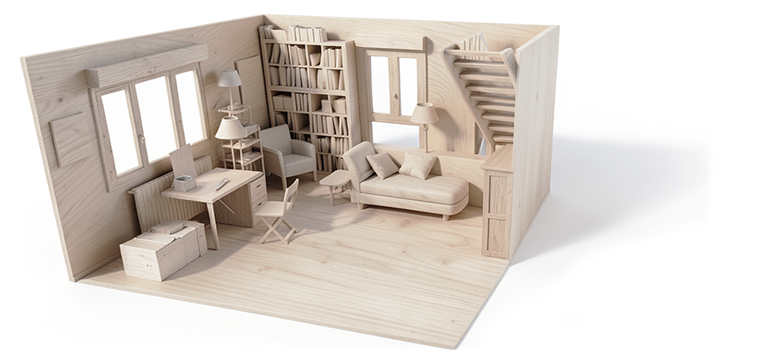
Comparatif rayscaper/magnific upscale – jskup
https://jskup.fr/wp-content/uploads/2025/12/animationsuite_0000_1.mp4 Avant Après

jskup (jskup.fr)
Of course, we then have to go back through Photoshop to correct the errors that the upscaling process generates.
-
Just to confirm, your GPU is working again and your icons are back?
As for objects on hidden tags, it's still the same; objects on hidden tags in the SU viewport are displayed in the Rayscaper render.
Thanks for reporting. I could find a scene to reproduce it. Seems to happen only for components/groups nested within other groups. I will have a look at this bug.
I finally understand how to use the denoiser. You might initially think that a low-resolution render will be calculated faster... But actually, when the denoiser is applied during rendering, especially when the render resolution is high, the denoising is very clean.
It might seem obvious to you, but it took me a while to figure it out. So I leave the denoiser at full power and immediately set the render size to 2k or higher.
I should document that better. The denoiser works on the full resolution image. And it works now as a post-processing step, so enable/disable won't impact the rendering.
Thomas, you asked me why I apply an upscale layer after a ray-scaping render. For scenes with windows, I have to do two renders, like a photographer: a light one for the room's exposure and a dark one to replace the "blown-out," overexposed parts of the window. D5 Render doesn't have this problem because its renders aren't truly photographic; they're a kind of pseudo-pathtracing.
That's a clever trick, thanks for sharing. Does this mean the tone-mapping operations you are getting in the post-processing step aren't sufficient for you? Should there be more options to provide a better image from the get-go?
Regards,
Thomas -
And there's still this problem with certain groups containing other groups and components that don't display unless everything inside is exploded. And I can't always explode everything, as I have variations to make in subsequent steps.
@Krass - Do you mind sending me a scene where this happens? I would like to investigate.
-
ok, I will send you the scene. Regarding the issue of geometry not displaying when enclosed in groups and subgroups, if I find an earlier version where I haven't broken everything down inside. As for exposure, there may be aspects I don't fully understand, but generally I have this problem: like in photography, if you take an interior shot focused on objects, your window will be white, with saturated light. If you focus on the window, the outside landscape, a digital camera will make the interior extremely dark so you can see the trees and the garden. Just like the human eye. Except our eyes are very fast and correct in microseconds, which allows us to see both the exterior and the interior so clearly. That's light sensitivity. If there's a way...
-
Hey, Rayscaper users!
Happy holidays, and all the best for 2026!
Rayscaper 0.9.82 Beta is available. You can get it via:
- The SketchUcation store.
- Direct download: link.
I recommend upgrading to the latest version.
What Changed?
Lighting Enhancements
- Area Light Support: Create realistic soft lighting effects with area lights, perfect for architectural and product visualization
- Multi-Selection for Lights: Select multiple lights at once using SHIFT or CTRL from SketchUp, the lights overlay, or the lights tab for easier management in complex scenes
- Light Component Preview: See a preview of light components in the light tool for easier and more accurate placement
- Light Grouping: Group Rayscaper light components within SketchUp groups and component definitions for better organization
- Enhanced Light Icons: Improved visual feedback with new light icons throughout the interface
Material & Texture Improvements
- Material Selection Context Menu: Right-click on materials in the asset manager for quick access to common operations
- Export Selected Materials: Export materials from your current scene for reuse in other projects
- Auto-Wire Alpha Textures: Textures with alpha channels in SketchUp automatically connect to the opacity channel in Rayscaper materials
- Float Texture Multipliers: Adjust the strength of roughness and metallic textures with new multiplier controls
- SketchUp 2025 PBR Support: Metallic and roughness factors from SketchUp 2025's PBR materials now properly apply as texture multipliers
Animation
- SketchUp Scene Animation: Render animations based on SketchUp scenes, including sun and shadow positions - perfect for creating time-lapse renders showing how lighting changes throughout the day
Interface Improvements
- Updated Color Scheme: Refreshed Rayscaper color scheme for better visual clarity
- Improved Render Status Bar: Clearer visual indicators make it easier to monitor rendering progress
- Better Tooltips: Rewritten tooltips throughout the interface for improved clarity and user-friendliness
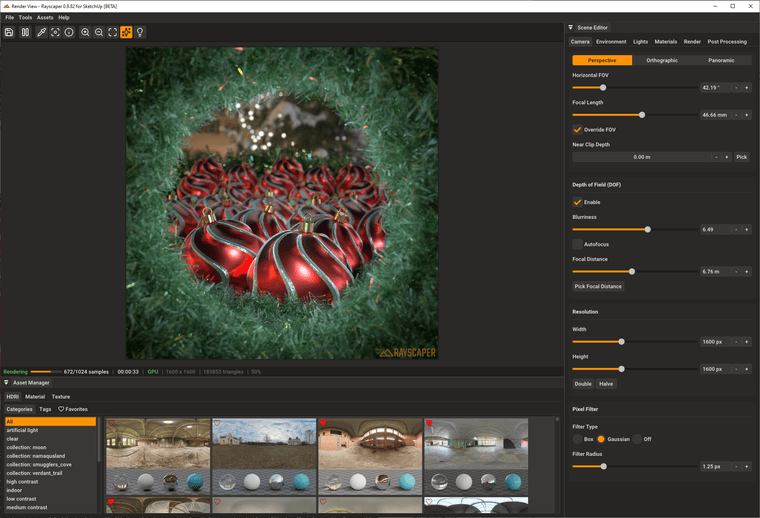
Here's a nice XMas render by @rich-o-brien
Help Me Build the Community

If you like Rayscaper, please share your renders (final or work-in-progress, it doesn't matter)! This is motivating and helps me showcase its capabilities
to new users.Follow me on https://x.com/rayscaper3d.
Happy Rendering!
Thomas -
Thanks for the update, though I have issues with it. Here is what I get:
Error: #<LoadError: 126: The specified module could not be found. - c:/users/magic/appdata/roaming/sketchup/sketchup 2023/sketchup/plugins/rayscaper/installed/Windows/2023/0.9.82 Beta/resources/SUEX_Rayscaper_LoadLibs.so>
E:/Program Files/SketchUp/Sketchup 2023/Tools/RubyStdLib/rubygems/core_ext/kernel_require.rb:83:inrequire' E:/Program Files/SketchUp/Sketchup 2023/Tools/RubyStdLib/rubygems/core_ext/kernel_require.rb:83:inrequire'
c:/users/magic/appdata/roaming/sketchup/sketchup 2023/sketchup/plugins/rayscaper/main.rbe:174:in<module:Rayscaper>' c:/users/magic/appdata/roaming/sketchup/sketchup 2023/sketchup/plugins/rayscaper/main.rbe:8:in<main>'
E:/Program Files/SketchUp/Sketchup 2023/Tools/extensions.rb:197:ineval' E:/Program Files/SketchUp/Sketchup 2023/Tools/extensions.rb:197:inrequire'
E:/Program Files/SketchUp/Sketchup 2023/Tools/extensions.rb:197:inload' C:/Users/Magic/AppData/Roaming/SketchUp/SketchUp 2023/SketchUp/Plugins/rayscaper.rb:18:inregister_extension'
C:/Users/Magic/AppData/Roaming/SketchUp/SketchUp 2023/SketchUp/Plugins/rayscaper.rb:18:in<module:Rayscaper>' C:/Users/Magic/AppData/Roaming/SketchUp/SketchUp 2023/SketchUp/Plugins/rayscaper.rb:6:in<top (required)>'I uninstalled the previous version, then removed the entire plugin and its loader and reinstalled it, yet the issue persists.
-
@majid Sorry about that! Can you send me the log files as described here: https://rayscaper.com/getting-help/report-a-bug/#1-export-the-log-files
-
Hi Thomas, I can't believe I read that you can now do animation? I just installed it and it works perfectly on my computer. It's a Christmas present! But I'm eager to understand how to create an animation. A tutorial would be great...
-
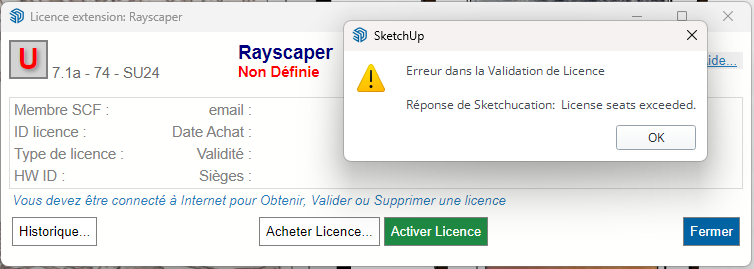
I reinstalled Windows; I suppose that explains the license issue I'm having? Rayscaper is installed on two machines.
-
Sketchup crashes as soon as I click on "double" in the rendering resolution settings.
and it's systematic -
Regarding the animation, is it in the form of a sequence of images?
-
I guess it is bkz I use SU 2023... and RS does not support it
-
you can't use Rayscaper on your 2023 SU ? If yes do you get the same issue when increasing camera resolution?
-
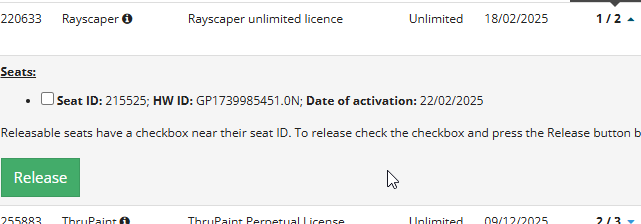
ok, i found it
-
To get back to my point about the crash when I change the camera resolution: it doesn't crash on smaller SketchUp files, I've run tests. But it's true that this particular file is quite large, 279 MB.
-
Have a look at this guide on how to release seats: https://rayscaper.com/faq/licensing/#how-do-i-release-a-license-seat
-
@Krass, I'm updating my documentation, stay tuned. If I have time this week, I will also try a video.
-
@Krass Yikes, can you get me the logs after a crash happened?
-
@majid I'm supporting 2026, 2025, 2024. I changed that a couple of releases back.
-
Done, I send the bug report




Hello! It looks like you're interested in this conversation, but you don't have an account yet.
Getting fed up of having to scroll through the same posts each visit? When you register for an account, you'll always come back to exactly where you were before, and choose to be notified of new replies (either via email, or push notification). You'll also be able to save bookmarks and upvote posts to show your appreciation to other community members.
With your input, this post could be even better 💗
Register Login


Advertisement