Rayscaper New Releases
-
@pixelcruncher said in Rayscaper New Releases:
Migrated Rayscaper to a new graphical user interface (GUI) framework. This changes the look and feel of the GUI but
was done mainly to simplify Rayscaper's code base to enable faster future development. This was a significant change and why it took +1 Month since the previous release.Help me build the community

I'm on Twitter (X) now: https://twitter.com/Rayscaper3d/ - Please follow the @Rayscaper3d that will help me grow the community and spread the word about Rayscaper!

I like the updated UI. To me it is easier to read and some of the tools are definitely improved (IMO)
I do not have a Twitter account and not sure I want one. You should explore the idea of having your own forum.

Press F1...thank me later
-
Great to hear that you like the new GUI better! It took some effort to migrate the code.
I have been dragging my feet on having a Rayscaper forum. I got by with the SketchUcation forum and the official SketchUp forum. I also haven’t done any real effort spread the word about Rayscaper, always have been focused on programming the software. Definitely something to think about for me.
-
Hey, Rayscaper friends!
Rayscaper 0.9.25 Beta is available in the SketchUcation store. Some fixes and improvements. As always, I recommend upgrading to the latest version.
What Changed?
Improvements
Support SketchUp Shadows
You can now create a directional light in Rayscaper that is directly coupled to the SketchUp shadows feature. You can enable this feature from the Rayscaper menu:
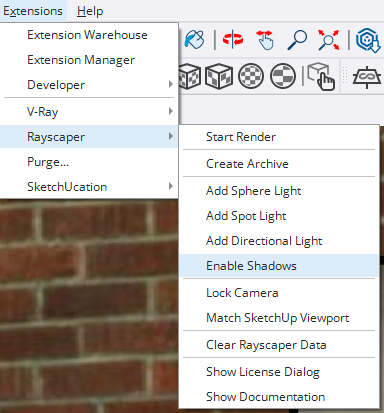
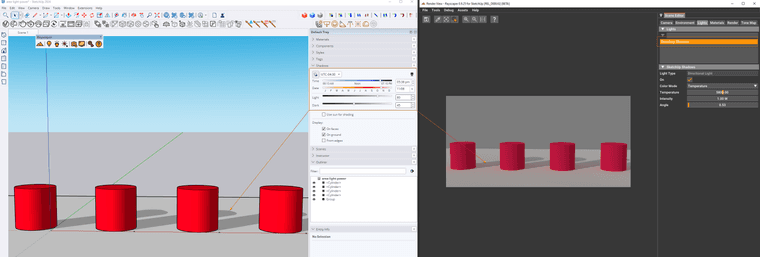
Enabling this creates a new directional light that syncs with the SketchUp shadows controls.
Filter material & light lists
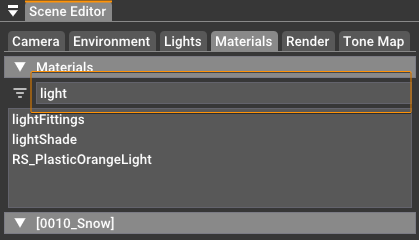
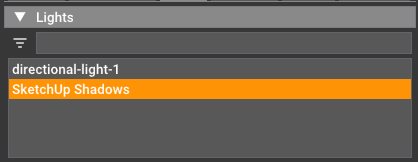
Type some text in the filter box to filter in your lights and materials lists:
Bug Fixes
- Fix "ghost" lights in Rayscaper. Sometimes, lights that you deleted before would re-appear again when loading the scene at a later time.
- Disable the light tools when the user is editing inside a component. Adding Rayscaper lights to SketchUp components is not supported (it's on our roadmap). To avoid this, we now disable the light-creation tools when a component is edited.
- Show light and material names alphabetically.
Help me build the community
I'm on Twitter (X) now: https://twitter.com/Rayscaper3d/ - Please follow the @Rayscaper3d that will help me grow the community and spread the word about Rayscaper!
If you like Rayscaper, please share your renders! This will help me showcase its capabilities to other potential users.
Happy Rendering!
I'm the developer of Rayscaper: https://rayscaper.com/ - Fast and easy rendering for SketchUp.
-
Hey folks,
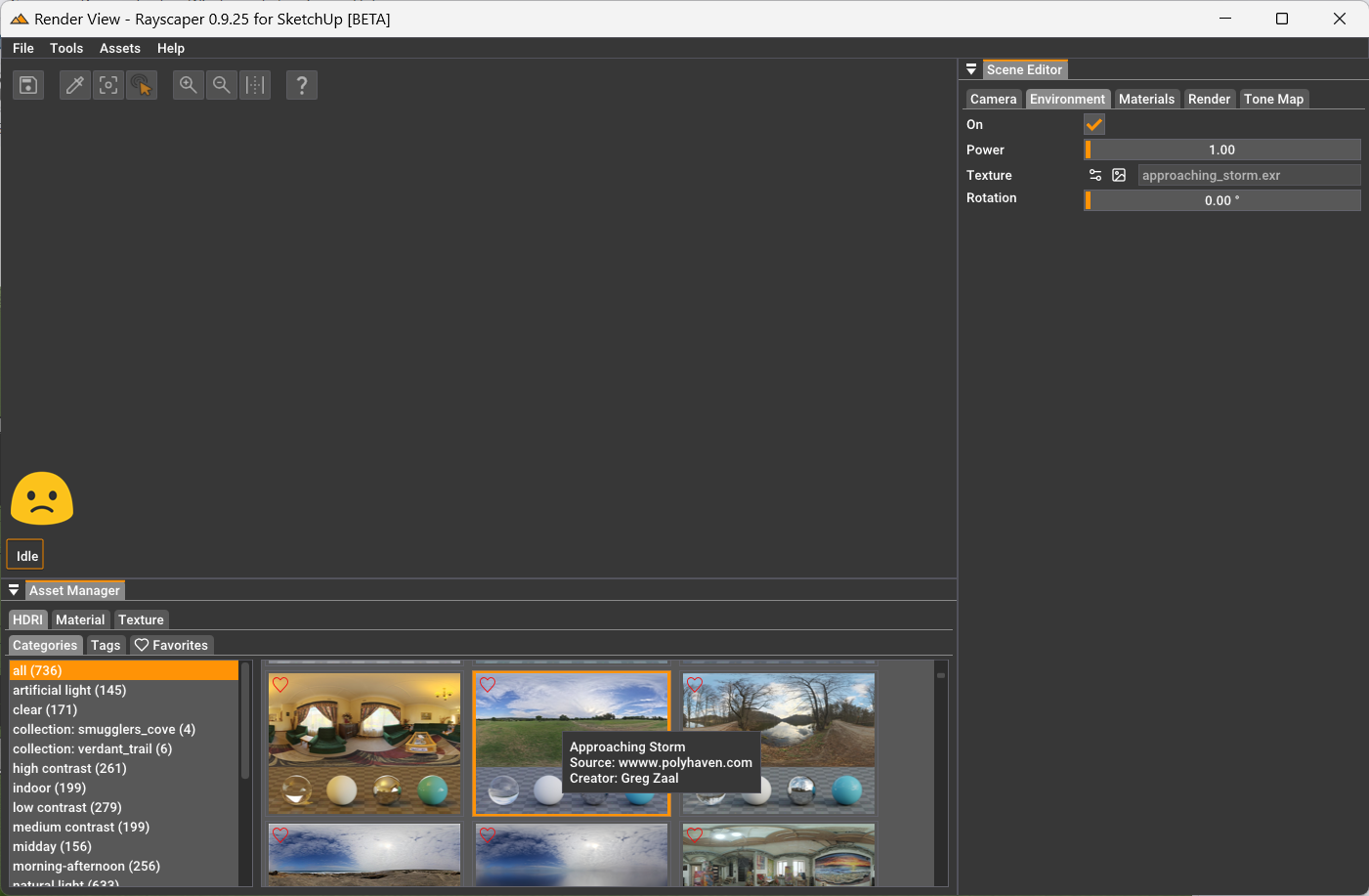
There was an issue with the previous release (0.9.25 Beta). Rayscaper would refuse to render and stay idle. This is fixed in version 0.9.26 Beta. You can get it from the plugin store.
I'm the developer of Rayscaper: https://rayscaper.com/ - Fast and easy rendering for SketchUp.
-
@pixelcruncher Thanks for the update. Everything seems to be working correctly now.
-
@pixelcruncher said in Rayscaper New Releases:
Hey, Rayscaper friends!
Help me build the community
I'm on Twitter (X) now: https://twitter.com/Rayscaper3d/ - Please follow the @Rayscaper3d that will help me grow the community and spread the word about Rayscaper!
If you like Rayscaper, please share your renders! This will help me showcase its capabilities to other potential users.
Happy Rendering!
OK, I set up an account on Twitter, but I have to say that so far what I see is not something I like. I think there has to be a better way to promote your product and get positive feedback.I have shared several renders on the Rayscaper Learning-Practice thread. If you think any of them are worth posting somewhere, feel free. The ones I have shared so far are inspired by @majid and his book.
Again, I think it would be good (better IMO) if you started your own forum. Another idea might be to get Rich to set up a category on SketchUcation for Rendering and then a subcategory for Rayscaper (but that might bypass some SketchUp users).
-
I have shared several renders on the Rayscaper Learning-Practice thread. If you think any of them are worth posting somewhere, feel free. The ones I have shared so far are inspired by @majid and his book.
Thanks @ntxdave - which book by @majid are you referring to?
Again, I think it would be good (better IMO) if you started your own forum. Another idea might be to get Rich to set up a category on SketchUcation for Rendering and then a subcategory for Rayscaper (but that might bypass some SketchUp users).
At some point, that decision will be made. But right now, there's not that much interest in Rayscaper yet. However, having a Rayscaper forum might help attract users. I'm a programmer, so I always feel like improving the software, but at some point, I will have to step out of my comfort zone and start marketing it

I'm the developer of Rayscaper: https://rayscaper.com/ - Fast and easy rendering for SketchUp.
-
-
I have updated Rayscaper via the Extension Store tools but, only to .23. Is the .26 update waiting for release or is there an issue?
Absentia mortis praesentiam vitae probat, vita autem est argumentum constantiae.
-
@Mike-Amos it should be available, I will have a look in the morning it’s likely a mistake on my end.
I'm the developer of Rayscaper: https://rayscaper.com/ - Fast and easy rendering for SketchUp.
-
Not so sure I agree with the concept of having a purpose built forum. There is a captive audience here of Sketchup users.
Investing in a sole purpose forum will distrract energy and as a one man band, leading to additional fatigue you do not need right now and possibly not ever..
Absentia mortis praesentiam vitae probat, vita autem est argumentum constantiae.
-
Hey, Rayscaper friends!
Rayscaper 0.9.27 Beta is available in the SketchUcation store. Some fixes and improvements. As always, I recommend upgrading to the latest version.
What Changed?
Bug Fixes
- Fix the sheen tint control in the Disney material user interface.
- Fix a bug where Rayscaper fails to load material and light settings stored in *.skp files.
Help me build the community
I'm on Twitter (X) now: https://twitter.com/Rayscaper3d/ - Please follow the @Rayscaper3d that will help me grow the community and spread the word about Rayscaper!
If you like Rayscaper, please share your renders! This will help me showcase its capabilities to other potential users.
Happy Rendering!
-
@Mike-Amos I don't know what happened, but it should be fixed now. I uploaded version 0.9.27 beta to the extension store:
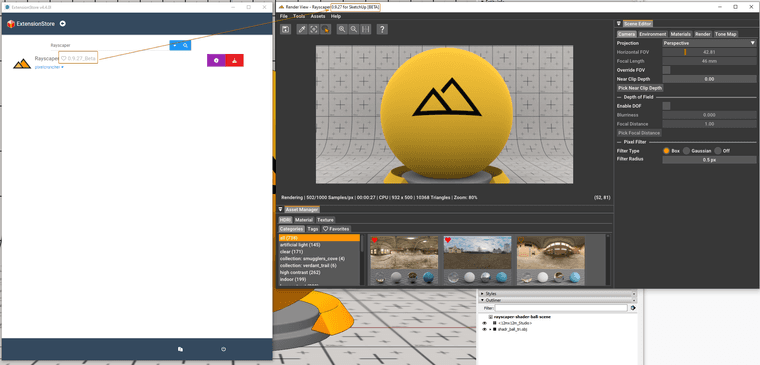
Can you check if you can upgrade to 0.9.27 beta?
Cheers,
Thomas -
@Mike-Amos said in Rayscaper New Releases:
Not so sure I agree with the concept of having a purpose built forum. There is a captive audience here of Sketchup users.
Investing in a sole purpose forum will distrract energy and as a one man band, leading to additional fatigue you do not need right now and possibly not ever..
I do think a forum will benefit Rayscaper users in the long term and the product's growth, but that's only once it reaches a critical mass of users. Right now, I'm not doing anything actively to grow the user base; I'm focused on improving the software.
@Mike-Amos, I am very aware that a forum can be a distraction. When I would have my own forum. On top of helping users (which is always my priority), I'm also maintaining forum software and dealing with moderation. Rayscaper is my side gig, and although I have an awesome employer who supports my side project, I still have to be cognizant of where I spend my time and energy. I want to get Rayscaper out of the beta stage and make it rock solid so that it can be showcased to more users.
Cheers,
ThomasI'm the developer of Rayscaper: https://rayscaper.com/ - Fast and easy rendering for SketchUp.
-
-
@Mike-Amos said in Rayscaper New Releases:
I can confirm that the 0.9.27 update has successfully completed.
Thanks.
I tried it but every time I launched Rayscaper it crashed SketchUp. So I have gone back to 0.9.23.
In order to get it working, I had to uninstall 0.9.27 and then reinstall 0.9.23 (which was the only other download I had).
I have to admit that I am still working with the "free" version. I do like it and anticipate purchasing but I am still trying to lean and improve my skills. One of the things I still have a little problem with is matching stuff I create (in particular vegetation) with HDRI files but I am exploring ways to handle this situation.

-
@pixelcruncher I just noticed an improvement I was hoping for: When you open rayscaper and you have the loading screen, it used to be on top of all the windows, so I had to pause whatever I was doing and wait for it to load, but now it functions as a regular window, that I can open another window on top of it. This works a lot better, so I am just saying thanks for this.
-
@sashapepperspray It's Great to hear you like it. This was not a deliberate change but a side effect of how the new GUI framework used in Rayscaper handles splash screens.
Cheers,
Thomas -
Hey, Rayscaper users!
Rayscaper 0.9.30 Beta is available in the SketchUcation store. More fixes and improvements. As always, I recommend upgrading to the latest version.
Thirty-nine more bugs and items are on my TODO list before I remove the beta tag. Initially, I started with 100+ items
What Changed?
Improvements
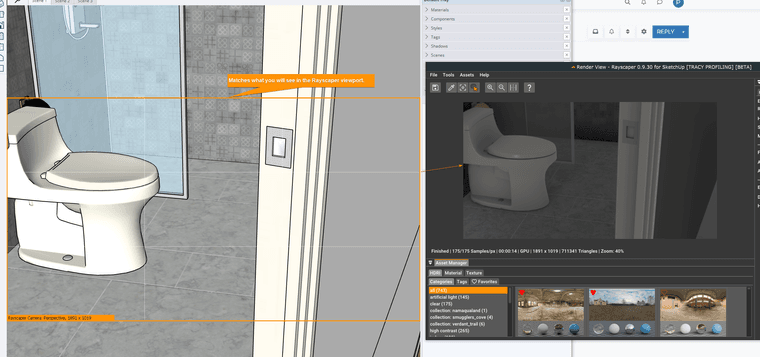
Camera overlay in the SketchUp viewport
This new feature will help you frame your Rayscaper shots. It overlays the SketchUp viewport with what is visible in your final render:
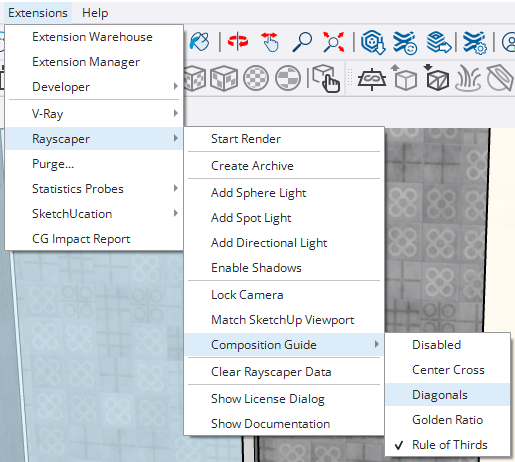
You can also display visual guides to help you composition your shot:
To disable the overlay, uncheck it in the overlays tray:
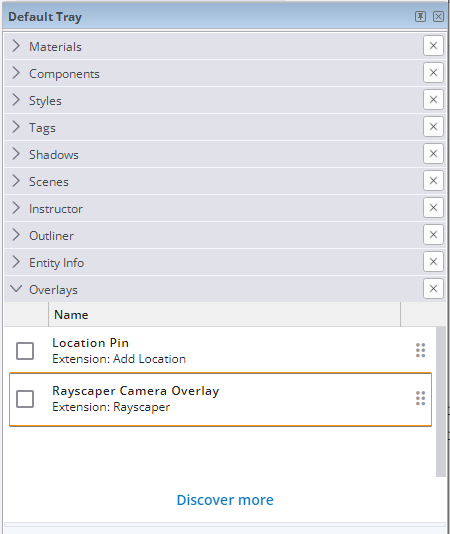
The overlay uses a new SketchUp API introduced in SketchUp version 2023, so the overlay is not enabled when using Rayscaper with SketchUp version 2022.
Bug Fixes
- Move the render resolution configuration to the camera tab. I think that's where it belongs logically.
- Fix thumbnail display for images. Some images would not show correctly as thumbnails.
- Add the missing normal map color space control.
- Fix the overexposed material preview when saving materials.
- Fix a performance regression in the UI.
- Fix render settings loss between Rayscaper rendering sessions. (cc: @Mike-Amos ).
- Fix a crash when loading Rayscaper data from some *.skp files.
- Fix a rendering difference between CPU & GPU rendering.
Help me build the community
I'm on Twitter (X) now: https://twitter.com/Rayscaper3d/ - Please follow the @Rayscaper3d that will help me grow the community and spread the word about Rayscaper!
If you like Rayscaper, please share your renders! This will help me showcase its capabilities to other potential users.
Happy Rendering!
-
Hey, Rayscaper users!
It's almost the weekend; hang in there!
Rayscaper 0.9.31 Beta is available in the SketchUcation store. More fixes and improvements. As always, I recommend upgrading to the latest version.
What Changed?
Improvements
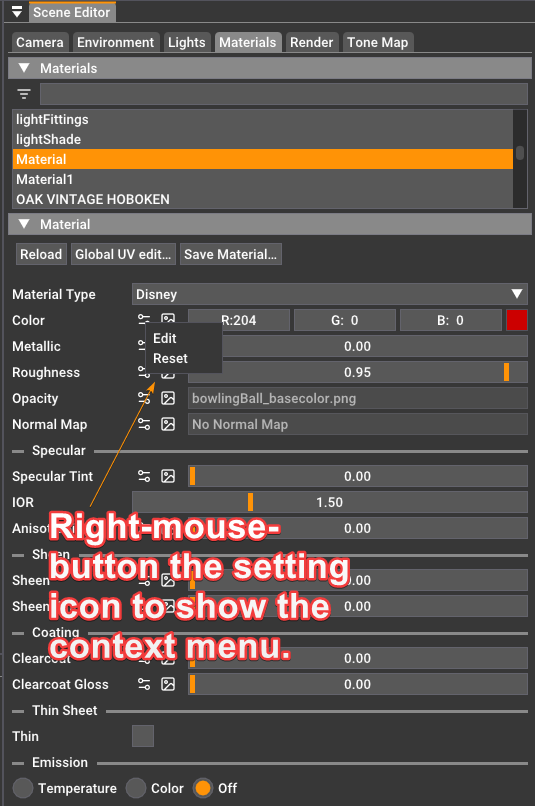
Texture Slot Context Menu
Right-mouse button click on the settings icon of a texture input to show a context menu. This context menu has two items:
- Edit: Opens the texture details editor.
- Reset: Nukes the texture settings and restores the default.
 O
OBug Fixes
- Fix freezing of the file browser when opening an image.
Help me build the community
I'm on Twitter (X) now: https://twitter.com/Rayscaper3d/ - Please follow the @Rayscaper3d that will help me grow the community and spread the word about Rayscaper!
If you like Rayscaper, please share your renders! This will help me showcase its capabilities to other potential users.
Happy Rendering!
I'm the developer of Rayscaper: https://rayscaper.com/ - Fast and easy rendering for SketchUp.




Hello! It looks like you're interested in this conversation, but you don't have an account yet.
Getting fed up of having to scroll through the same posts each visit? When you register for an account, you'll always come back to exactly where you were before, and choose to be notified of new replies (either via email, or push notification). You'll also be able to save bookmarks and upvote posts to show your appreciation to other community members.
With your input, this post could be even better 💗
Register Login


Advertisement