sketchucation logo sketchucation
    • Login
    Oops, your profile's looking a bit empty! To help us tailor your experience, please fill in key details like your SketchUp version, skill level, operating system, and more. Update and save your info on your profile page today!
    Mac User? | Join the Rayscaper Beta for Mac Learn More

    Grooves running upwards

    Scheduled Pinned Locked Moved Newbie Forum
    6 Posts 4 Posters 310 Views 4 Watching
    Loading More Posts
    • Oldest to Newest
    • Newest to Oldest
    • Most Votes
    Reply
    • Reply as topic
    Log in to reply
    This topic has been deleted. Only users with topic management privileges can see it.
    • A
      Alohaa
      last edited by

      Hello,

      is it possible to have the grooves in the object in the attached file taper upwards onto the surface 2cm before the top and end edges?
      I have no idea how to do this.

      Sincerely
      ProApe


      Grooves.skp

      1 Reply Last reply
      Reply Quote 0
      • Rich O BrienR
        Rich O Brien Moderator
        last edited by

        Not sure if I fully understand your query. But from what you typed I arrived here...

        https://i.imgur.com/CMsX5k0.png

        Download the free D'oh Book for SketchUp πŸ“–

        1 Reply Last reply
        Reply Quote 0
        • BoxB
          Box
          last edited by

          Like Rich I'm not sure what you want as such, this is another guess.
          The taper is 2cm long and it is 2cm from the end.
          This requires you to understand how to use the cardinal points, something well worth learning about.
          Note.The centre line I put in before flattening the curve is like a safety valve, without it the geometry can go a bit nuts, but can be removed when done. And drawing the edge over the end of the taper is just a lazy way to unsoften the edge at that point.

          https://i.imgur.com/YRgbWE4.gif

          1 Reply Last reply
          Reply Quote 0
          • A
            Alohaa
            last edited by

            Hi,
            very nice and complicated! thank you

            1 Reply Last reply
            Reply Quote 0
            • Dave RD
              Dave R
              last edited by

              Another option for doing this sort of thing. Gives you a different look and maybe not what you want.
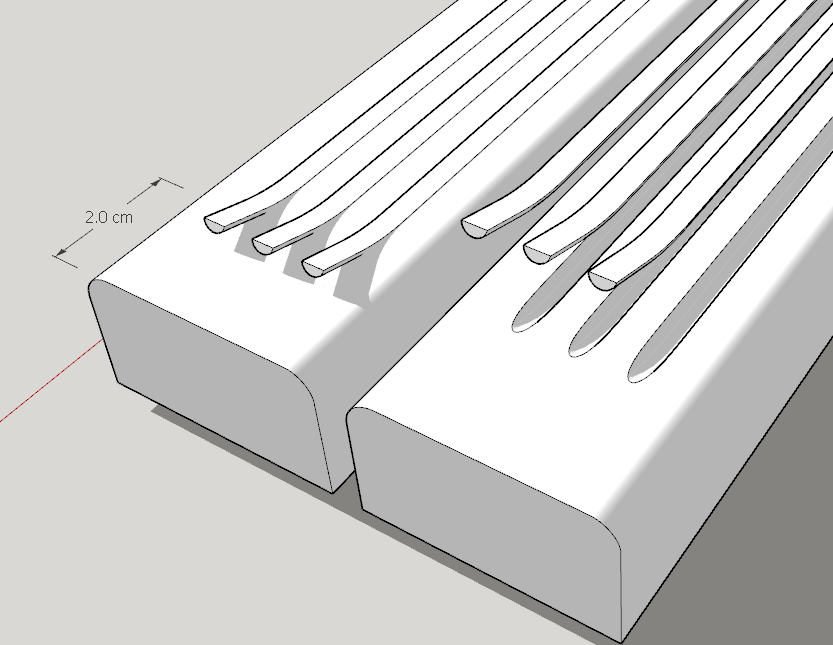
              Screenshot - 12_2_2022 , 8_41_51 PM.png

              Etaoin Shrdlu

              %

              (THERE'S NO PLACE LIKE)

              G28 X0.0 Y0.0 Z0.0

              M30

              %

              1 Reply Last reply
              Reply Quote 0
              • A
                Alohaa
                last edited by

                No, that's not really what I want.
                I was able to reproduce the first solution (but it is not easy to see if it worked or not), but the second one didn't work.


                1 Reply Last reply
                Reply Quote 0

                Hello! It looks like you're interested in this conversation, but you don't have an account yet.

                Getting fed up of having to scroll through the same posts each visit? When you register for an account, you'll always come back to exactly where you were before, and choose to be notified of new replies (either via email, or push notification). You'll also be able to save bookmarks and upvote posts to show your appreciation to other community members.

                With your input, this post could be even better πŸ’—

                Register Login
                • 1 / 1
                • First post
                  Last post
                Buy SketchPlus
                Buy SUbD
                Buy WrapR
                Buy eBook
                Buy Modelur
                Buy Vertex Tools
                Buy SketchCuisine
                Buy FormFonts

                Advertisement
