Locating extensionstore Search (icon)
-
I have the extensionStore toolbar installed showing the three colored toolbar.
After choosing the "red icon on the left of the toolbar it opens extensionStore window and I am expecting to find a search icon at the bottom and there is none. I'm following a text book printed in 2017 and it showes the search icon that is expected to be at the bottom of the list. What am I doing wrong? -
Can you share a screen shot of what you are seeing? When I open the panel I get the search magnifying glass at the bottom.
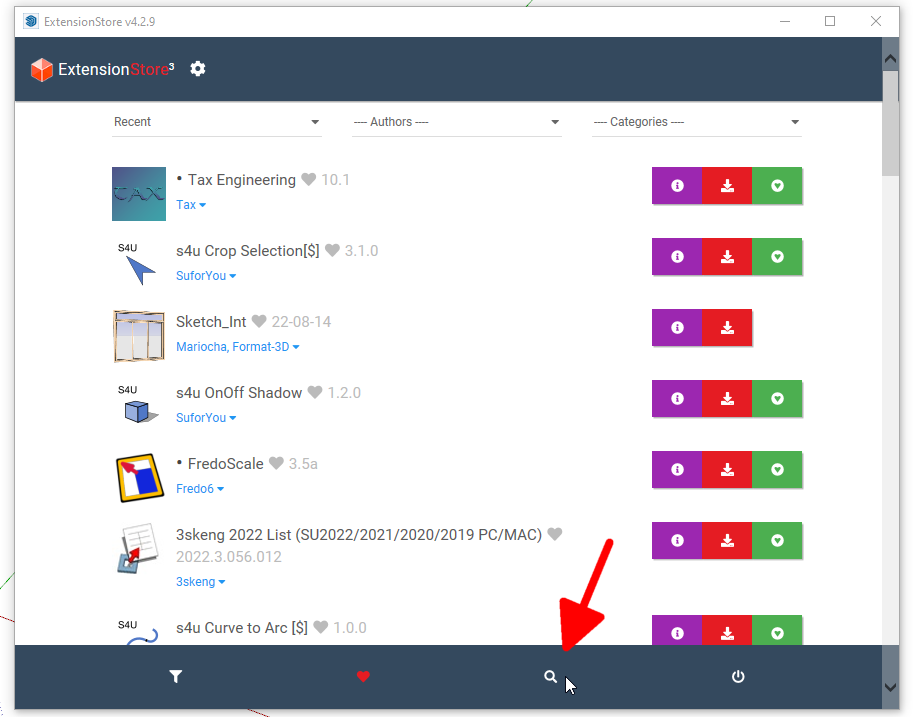
-
In v4.2.9, the latest...

Sketchucation Tools | SketchUcation
3D SketchUp Community for Design and Engineering Professionals.
(sketchucation.com)
Clicking the 1st icon shows and hides the filtering...

...whereas clicking the little search icon will switch to dedicated searching...

...and the advanced filters are available underneath if you click the chevron


Hello! It looks like you're interested in this conversation, but you don't have an account yet.
Getting fed up of having to scroll through the same posts each visit? When you register for an account, you'll always come back to exactly where you were before, and choose to be notified of new replies (either via email, or push notification). You'll also be able to save bookmarks and upvote posts to show your appreciation to other community members.
With your input, this post could be even better 💗
Register Login


Advertisement