sketchucation logo sketchucation
    • Login
    Oops, your profile's looking a bit empty! To help us tailor your experience, please fill in key details like your SketchUp version, skill level, operating system, and more. Update and save your info on your profile page today!
    ⚠️ Update | Sketchucation Tools 5.0.8 released with licensing improvements and bugfixes Download

    [Plugin] MoveAlignMe (MAM) - v1.4a - 02 Apr 24


    Scheduled Pinned Locked Moved Plugins
    19 Posts 9 Posters 18.1k Views 9 Watching
    Loading More Posts
    • Oldest to Newest
    • Newest to Oldest
    • Most Votes
    Reply
    • Reply as topic
    Log in to reply
    This topic has been deleted. Only users with topic management privileges can see it.
    • Rich O BrienR
      Rich O Brien Moderator
      last edited by

      That looks very impressive Fredo. Can't wait to try it out.

      Download the free D'oh Book for SketchUp πŸ“–

      1 Reply Last reply
      Reply Quote 0
      • R
        RLGL
        last edited by

        Oct 24, 2021 1_45_35 PM.pdfOct 24, 2021 12_58_35 PM.pdfThe plug in ghosted me. I have tried multiple times to install, it shows in the Extension Manager but it is not listed in the Fredo6 Collection. The Ruby console is blank. I did get the message that is with this post. There have been multiple trys to get it to show, restarting Sketchup and the computer. The files that are in the AppData folder are also attached.

        1 Reply Last reply
        Reply Quote 0
        • fredo6F
          fredo6
          last edited by

          @rlgl said:

          [attachment=0:1k9wtyle]<!-- ia0 -->Oct 24, 2021 1_45_35 PM.pdf<!-- ia0 -->[/attachment:1k9wtyle][attachment=1:1k9wtyle]<!-- ia1 -->Oct 24, 2021 12_58_35 PM.pdf<!-- ia1 -->[/attachment:1k9wtyle]The plug in ghosted me. I have tried multiple times to install, it shows in the Extension Manager but it is not listed in the Fredo6 Collection. The Ruby console is blank. I did get the message that is with this post. There have been multiple trys to get it to show, restarting Sketchup and the computer. The files that are in the AppData folder are also attached.

          As indicated in the message, you need to install the latest version of LibFredo6, v12.1.

          1 Reply Last reply
          Reply Quote 0
          • R
            RLGL
            last edited by

            My bad, the update checker did not indicate there was an update to Libfredo 6.

            1 Reply Last reply
            Reply Quote 0
            • boofredlayB
              boofredlay
              last edited by

              Bravo! Another tool I did not know I needed.
              Thank you.

              http://www.coroflot.com/boofredlay

              1 Reply Last reply
              Reply Quote 0
              • fredo6F
                fredo6
                last edited by

                NEW RELEASE: MoveAlignMe v1.1c - 31 Oct 21

                Requirements

                • LibFredo6: v12.1a
                • Sketchup version: SU2017 and above

                MoveAlignMe 1.1c includes Deep Gluing, which is the possibility to move a group or instance inside the group or component containing the target face, with gluing and cut-opening.


                Home Page of MoveAlignMe for information and Download.

                Main post of this MoveAlignMe thread.

                1 Reply Last reply
                Reply Quote 0
                • R
                  rv1974
                  last edited by

                  Fredo, thanks for the new tool! I really loved ability to put faces perpendicularly to the edges. However the new 'move inside the group with gluing and cut-opening' doesn't work for me - the cutting component does indeed get glued but stays out of hosting group. no cutting happens.

                  1 Reply Last reply
                  Reply Quote 0
                  • fredo6F
                    fredo6
                    last edited by

                    @rv1974 said:

                    However the new 'move inside the group with gluing and cut-opening' doesn't work for me - the cutting component does indeed get glued but stays out of hosting group. no cutting happens.

                    I forgot a few explanations:

                    Deep Gluing has to be explictely activated by Toogle SHIFT. When activated, the target faces embedded in groups or components will be highlighted in lightgreen, indicating that the object will be moved inside the target group or component and gluing / cut-opening will apply on the target face.

                    This is illustrated in the video below

                    1 Reply Last reply
                    Reply Quote 0
                    • R
                      rv1974
                      last edited by

                      Oh now it makes sense, thank you.
                      Suggestion: Could you implement (via Control key) multiple copying (one click = one copy), similarly to TT's one?
                      https://sketchucation.com/pluginstore?pln=tt_place_component

                      1 Reply Last reply
                      Reply Quote 0
                      • alvisA
                        alvis
                        last edited by

                        Thanks πŸ‘

                        1 Reply Last reply
                        Reply Quote 0
                        • A
                          attar82
                          last edited by

                          I have tried it from a Window model from the 3D Warehouse but it is not working

                          1 Reply Last reply
                          Reply Quote 0
                          • Dave RD
                            Dave R
                            last edited by

                            @attar82 said:

                            I have tried it...

                            What window from the 3D Warehouse?

                            You're using SketchUp 8 as indicated in your profile?

                            Etaoin Shrdlu

                            %

                            (THERE'S NO PLACE LIKE)

                            G28 X0.0 Y0.0 Z0.0

                            M30

                            %

                            1 Reply Last reply
                            Reply Quote 0
                            • A
                              attar82
                              last edited by

                              @dave r said:

                              @attar82 said:

                              I have tried it...

                              What window from the 3D Warehouse?

                              You're using SketchUp 8 as indicated in your profile?

                              Apologies, this is the first time i am using this platform for quiieres
                              I updated my profile, I am using Sketchup 2021, I've sent you an email a couple of days before using Extension Warehouse.com. May i contact you via email, it is much easier.
                              I ve attached a video for my Query did you see it?

                              1 Reply Last reply
                              Reply Quote 0
                              • fredo6F
                                fredo6
                                last edited by

                                NEW RELEASE: MoveAlignMe v1.2a - 14 Nov 21

                                Requirements

                                • LibFredo6: v12.2a
                                • Sketchup version: SU2017 and above

                                MoveAlignMe 1.2a fixes a major bug when processing multiple elements in copy mode. The result was not exploded.


                                Home Page of MoveAlignMe for information and Download.

                                Main post of this MoveAlignMe thread.

                                1 Reply Last reply
                                Reply Quote 0
                                • B
                                  Bells88
                                  last edited by

                                  does not work on sketchup 2020! I have installed everything correctly but no icons are popping up anywhere. I have many other Fredo6 plugins but this is the only one that doesn't work. suggestions?

                                  1 Reply Last reply
                                  Reply Quote 0
                                  • Dave RD
                                    Dave R
                                    last edited by

                                    @bells88 said:

                                    does not work on sketchup 2020!

                                    Actually, it does work in SketchUp 2020.
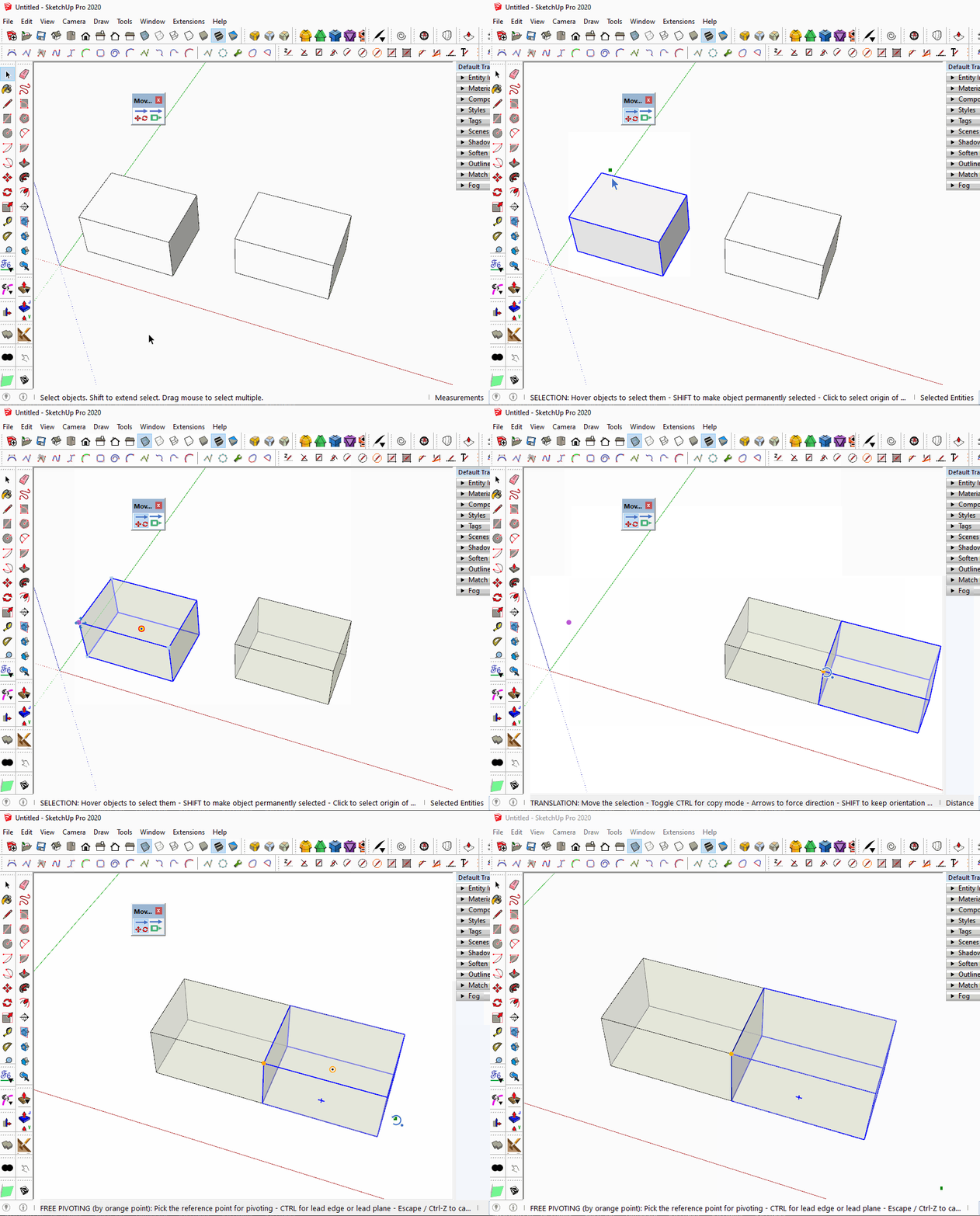
                                    Click on the picture.

                                    Did you restart SketchUp as directed when the extension was installed? The current version of LibFredo6 installed?

                                    Please update your profile. It says you are using a pre-2013 version.

                                    Etaoin Shrdlu

                                    %

                                    (THERE'S NO PLACE LIKE)

                                    G28 X0.0 Y0.0 Z0.0

                                    M30

                                    %

                                    1 Reply Last reply
                                    Reply Quote 0
                                    • fredo6F
                                      fredo6
                                      last edited by

                                      NEW RELEASE: MoveAlignMe v1.3a - 24 Feb 24

                                      Requirements

                                      • LibFredo6: v12.2a
                                      • Sketchup version: SU2017 and above

                                      MoveAlignMe 1.3a is for bug fixing and future compatibility.


                                      Home Page of MoveAlignMe for information and Download.

                                      Main post of this MoveAlignMe thread.

                                      1 Reply Last reply
                                      Reply Quote 0
                                      • fredo6F
                                        fredo6
                                        last edited by fredo6

                                        NEW RELEASE: MoveAlignMe v1.4a - 01 Apr 24

                                        Requirements:

                                        • LibFredo6: v14.3b
                                        • Sketchup version: SU2017 and above

                                        MoveAlignMe 1.4a is a maintenance release for:

                                        • future compatibility.

                                        Home Page of MoveAlignMe for information and Download.

                                        Main post of this MoveAlignMe thread.

                                        1 Reply Last reply
                                        Reply Quote 0

                                        Hello! It looks like you're interested in this conversation, but you don't have an account yet.

                                        Getting fed up of having to scroll through the same posts each visit? When you register for an account, you'll always come back to exactly where you were before, and choose to be notified of new replies (either via email, or push notification). You'll also be able to save bookmarks and upvote posts to show your appreciation to other community members.

                                        With your input, this post could be even better πŸ’—

                                        Register Login
                                        • 1 / 1
                                        • First post
                                          Last post
                                        Buy SketchPlus
                                        Buy SUbD
                                        Buy WrapR
                                        Buy eBook
                                        Buy Modelur
                                        Buy Vertex Tools
                                        Buy SketchCuisine
                                        Buy FormFonts

                                        Advertisement